METER / GAUGE SYSTEM
-
FUNCTION
-
Multi Buzzer
-
The table below shows the warning and reminder functions of the buzzer in the combination meter assembly.
Priority Item 1 Unexpected Vehicle Motion Warning (Intermittent)*1 2 Unexpected Vehicle Motion Warning (Continuous)*1 3 Front Seat Belt Warning (Level 2) 4 Front Seat Belt Warning (Level 1) 5 Key Reminder*2 6 Front Differential Oil High Temperature Warning 7 Brake Fluid Low Warning 8 Engine Switch Operation while Driving Warning*1 9 Parking Brake Engaged Warning 10 Active Test (for Brake System) 11 Engine Oil Pressure Warning 12 Speed Warning 13 Door Open while Driving Warning 14 Entry and Start System Warning 2 (Intermittent: Maximum 9 Times)*1 15 Reverse Warning (for 6-speed Manual Transmission)*3 16 Engine Start while Driving Notice*1 17 Shift Reject*4 18 Multi-information Display Warning 19 Fuel Sedimenter Warning*5 20 Check Engine Warning 21 Slip Warning 22 4WD Warning (Intermittent)*6 23 4WD Warning (3 Times)*6 24 Light Reminder 25 Entry and Start System Warning (Once)*1 26 Immobiliser Certification Reminder*1 26 DPF Warning*5 28 Turn Signal/Hazard Warning Operation *1: Models with entry and start system
*2: Models without entry and start system
*3: Models with manual transmission
*4: Models with automatic transmission
*5: Models with diesel engine
*6: 4WD models
-
-
Multi-information Display (Models with Optitron Type Combination Meter Assembly)
-
Display Function Flow
-
The multi-information display can be switched as shown in the flowchart below:
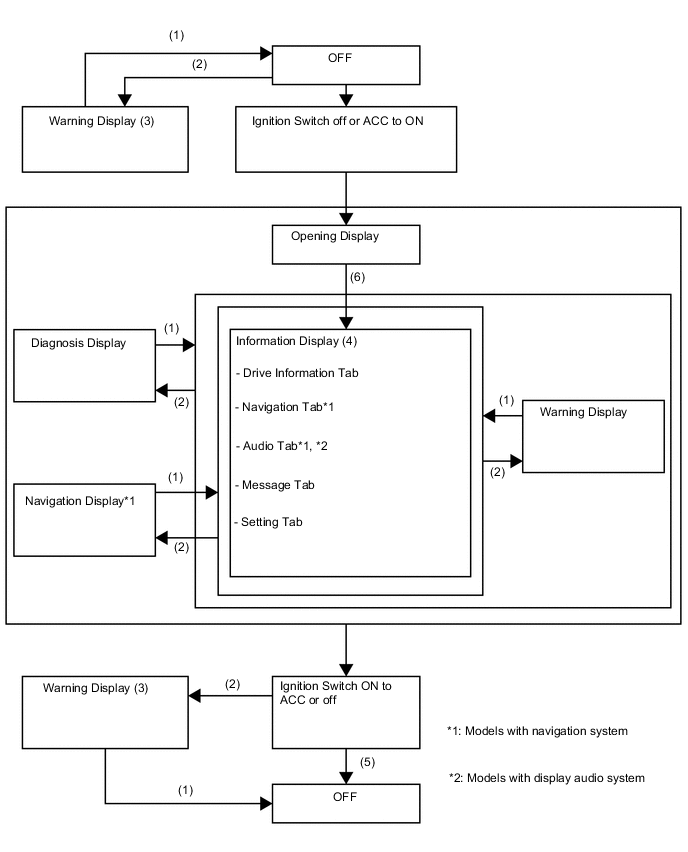
(1) Conditions are not met. (2) Conditions are met. (3) If there are multiple display requests, items will be displayed in sequence. (4) Item or display is selected by operating the steering pad switch assembly switch. (5) ODO display is displayed for a certain period of time after the engine switch is turned off. (6) After ignition switch is turned to ON. -
-
Display Tab Operation
-
The information currently displayed can be switched using the RIGHT/LEFT switch on the steering pad switch assembly.
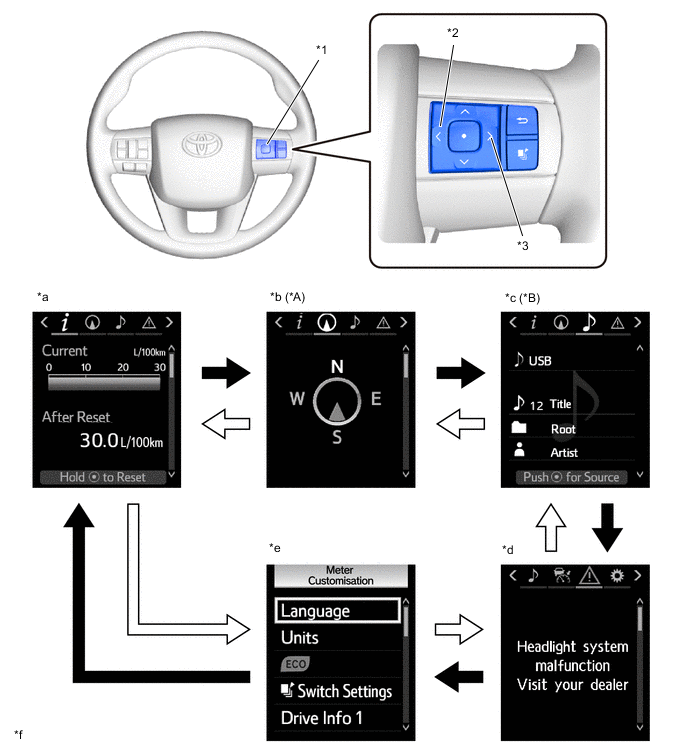
*A Models with Navigation System *B Models with Navigation System or Display Audio System *1 Steering Pad Switch Assembly *2 LEFT Switch *3 RIGHT Switch - - *a Drive Information *b Navigation Information *c Audio Information *d Warning Message *e Settings *f The illustrations shown are examples only. The illustrations may differ from the actual vehicle screen. 
RIGHT Switch Operation 
LEFT Switch Operation
-
-
Drive Information
-
Drive information shows vehicle information such as drivable range and fuel consumption.
-
The drive information can be switched using the UP/DOWN switch on the steering pad switch assembly.
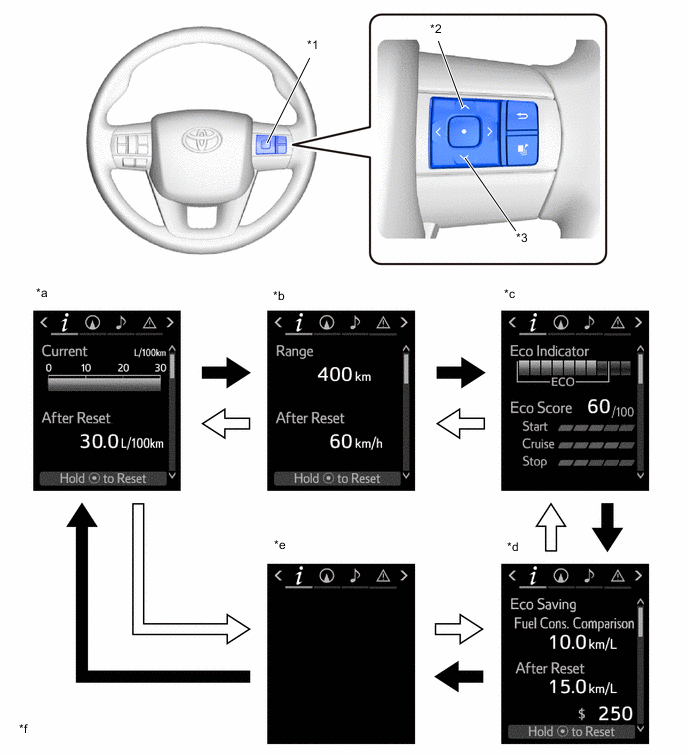
*1 Steering Pad Switch Assembly *2 UP Switch *3 DOWN Switch - - *a Drive Information 1 *b Drive Information 2 *c Eco Drive Indicator and Eco Judge *d Eco Wallet *e Blank *f The illustrations shown are examples only. The illustrations may differ from the actual vehicle screen. DOWN Switch Operation UP Switch Operation
-
-
Setting Function
-
The items displayed on the multi-information display can be customized.
-
The items can be selected on the information setting screen.
Item Available Setting Language The language displayed on the multi-information display can be selected.
-
English
-
French*1
-
Spanish*1
-
Thai*1
-
Portuguese*1
-
Indonesian*1
-
Arabic*2
Unit The unit displayed on the multi-information display, display audio system or navigation system can be selected.
-
km (km/L)
-
km (L/100 km)
ECO Indicator Light The ECO indicator light can be switched on or off.
-
On
-
Off
TOP Switch Settings The item that is displayed when the TOP switch is pressed can be selected. Drive Information 1 2 items can be selected among the following:
-
Current Fuel Consumption (Bar Display)
-
Current Fuel Consumption (Value Display)
-
Average Fuel Consumption Between Reset Operations
-
Average Fuel Consumption After Engine Start-up
-
Average Fuel Consumption After Refueling
-
Average Vehicle Speed Between Reset Operations
-
Average Vehicle Speed After Engine Start-up
-
Elapsed Time Between Reset Operations
-
Elapsed Time After Engine Start-up
-
Cruising Range
-
Cruising Range After Engine Start-up
-
Blank
Drive Information 2 2 items can be selected among the following:
-
Current Fuel Consumption (Bar Display)
-
Current Fuel Consumption (Value Display)
-
Average Fuel Consumption Between Reset Operations
-
Average Fuel Consumption After Engine Start-up
-
Average Fuel Consumption After Refueling
-
Average Vehicle Speed Between Reset Operations
-
Average Vehicle Speed After Engine Start-up
-
Elapsed Time Between Reset Operations
-
Elapsed Time After Engine Start-up
-
Cruising Range
-
Cruising Range After Engine Start-up
-
Blank
Interruption Display The following displays that appear as soon as the set condition is met can be switched on or off.
-
Turn-by-turn Navigation Display*3
Accent Color The accent color can be changed:
-
Clear Blue
-
Clear Turquoise
-
Deep Orange
-
Radiant Orange
Initialization The setting items can be initialized. *1: Except models for Australia and G.C.C. Countries
*2: Models for G.C.C. Countries
*3: Models with navigation system
-
-
-
Warning Mode Function
-
When a warning is necessary, the warning display interrupts the display in the multi-information display.
-
The master warning light may illuminate or blink and the buzzer in the combination meter assembly may sound depending on the item displayed on the multi-information display.
System Display Message* Entry and Start System Shift to P before exiting vehicle Power turned off to save battery Key not detected Check key location Smart Entry & Start System malfunction See owner's manual Turn off vehicle Key left inside vehicle Depress brake and then touch key to engine switch Depress clutch and then touch key to engine switch Steering wheel lock Press engine switch while turning wheel Key battery low Depress brake and then start engine Depress clutch and then start engine Push and hold engine switch for emergency stop Shift to N and press engine switch to restart Depress clutch and press engine switch to restart Cruise Control System Cruise control malfunction Visit your dealer Engine Control System Low oil pressure Stop in a safe place See owner's manual Water accumulation in fuel filter See owner's manual Engine oil level low Add or replace Check Engine Reduced engine power Visit your dealer Check Engine Visit your dealer Reduced engine power Visit your dealer Engine maintenance required Visit your dealer Replace fuel filter Symbol Mark Graphic Display (Charge Warning) DPF full See owner's manual DPF full Visit your dealer Manual regeneration in process Keep flammables away from vehicle DPF regeneration in process DPF manual regeneration available DPF full Manual regeneration required See owner's manual T-BELT maintenance required Resetting T-BELT maintenance date Transmission Control System Transmission fluid temp high See owner's manual Transmission system malfunction Visit your dealer Brake Override System Brake override malfunction Visit your dealer Accelerator and brake pedals depressed simultaneously Traction Control System TRC turned off 4WD Control System 2WD-4WD mode change malfunction visit your dealer Differential oil temp high Cooling time required Differential oil temp high Shift to 2WD mode Cooling time required Automatic Headlight Level Control System Headlight system malfunction Visit your dealer *: The warning message differs by vehicle specification.
-
-
-
Multi-information Display (Models with Analog Type Combination Meter Assembly with Dot Display Type Multi-information Display)
-
Display Function Flow
-
The multi-information display can be switched as shown in the flowchart below:
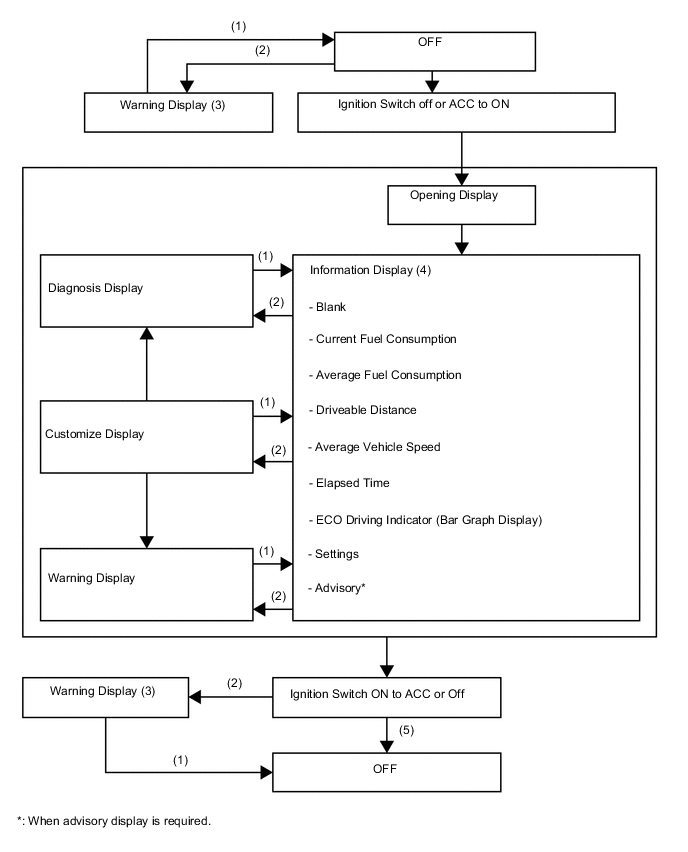
(1) Conditions are not met. (2) Conditions are met. (3) If there are multiple display requests, items will be displayed in sequence. (4) Item or display is selected by operating the steering pad switch assembly switch. (5) ODO display is displayed for a certain period of time after the ignition switch is turned off.
-
-
Cruise Information Display and ODO/TRIP Display
-
The cruise information display can be switched by operating the DISP switch. The counter can be reset by pressing and holding the DISP switch for 0.8 seconds or more.
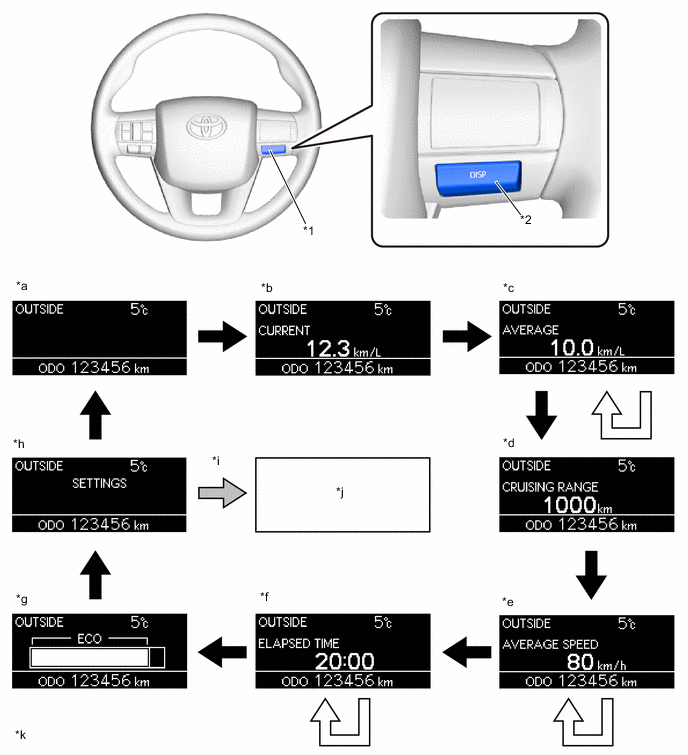
*1 Steering Pad Switch Assembly *2 DISP Switch *a Blank *b Current Fuel Consumption *c Average Fuel Consumption *d Cruising Range *e Average Vehicle Speed *f Elapsed Time *g Eco Driving Indicator Zone Display *h Settings Display *i The DISP switch is operated for 0.8 seconds or more to customize mode display. *j
-
Language Setting
-
Unit Setting
-
ECO Indicator Light Setting
*k The illustrations shown are examples only. The illustrations may differ from the actual vehicle screen. - - The DISP switch is operated for less than 0.8 seconds. The DISP switch is operated for 0.8 seconds or more to reset. -
-
-
Setting Function
-
The customization display can be switched by pressing and holding the DISP switch for 0.8 seconds or more while the setting display is shown on the cruise information display.
-
The customization item can be switched to by pressing the DISP switch for less than 0.8 seconds.
Item Available Setting Language The language displayed on the multi-information display can be selected.
-
English
-
French*
-
Spanish*
-
Thai*
-
Portuguese*
-
Indonesian*
Unit The unit displayed on the multi-information display, display audio system or navigation system can be selected.
-
km (km/L)
-
km (L/100 km)
ECO Indicator Light The ECO indicator light can be switched to on or off.
-
On
-
Off
*: Except models for Australia and G.C.C. Countries
-
-
-
Warning Mode Function
-
When a warning is necessary, the warning display interrupts the display in the multi-information display.
-
The master warning light may illuminate or blink and the buzzer in the combination meter assembly may sound depending on the item displayed on the multi-information display.
System Display Message* Engine Control System Symbol Mark Graphic Display (Low Oil Pressure Warning) WATER ACCUMULATION IN FUEL FILTER SEE OWNER'S MANUAL ENGINE OIL LEVEL LOW ADD OR REPLACE CHECK ENGINE REDUCED ENGINE POWER VISIT YOUR DEALER CHECK ENGINE VISIT YOUR DEALER REDUCED ENGINE POWER VISIT YOUR DEALER ENGINE MAINTENANCE REQUIRED VISIT YOUR DEALER REPLACE FUEL FILTER Symbol Mark Graphic Display (Charge Warning) DPF full See owner's manual DPF full Visit your dealer Manual regeneration in process Keep flammables away from vehicle DPF regeneration in process DPF manual regeneration available DPF full Manual regeneration required See owner's manual T-BELT MAINTENANCE REQIRED RESETTING T-BELT MAINTENANCE DATE Transmission Control System TRANSMISSION FLUID TEMP HIGH SEE OWNER'S MANUAL TRANSMISSION SYSTEM MALFUNCTION VISIT YOUR DEALER Brake Override System BRAKE OVERRIDE MALFUNCTION VISIT YOUR DEALER ACCELERATOR AND BRAKE PEDALS DEPRESSED SIMULTANEOUSLY Traction Control System TRC TURNED OFF 4WD Control System 2WD-4WD MODE CHANGE MALFUNCTION VISIT YOUR DEALER DIFFERENTIAL OIL TEMP HIGH COOLING TIME REQUIRED DIFFERENTIAL OIL TEMP HIGH SHIFT TO 2WD MODE COOLING TIME REQUIRED Automatic Headlight Level Control System HEADLIGHT SYSTEM MALFUNCTION VISIT YOUR DEALER *: The warning message differs by vehicle specification.
-
-
-
Rear Seat Belt Warning
-
The rear seat belt warning function indicates the state of the rear seat belts using the telltale light assembly.
-
The combination meter assembly sends a rear seat belt warning signal to the telltale light assembly based on the rear seat belt buckle switches and courtesy switches for the rear doors. When the signal is received, the telltale light assembly operates the lights.
-
The flow of operations that results in a rear seat belt warning is as follows:
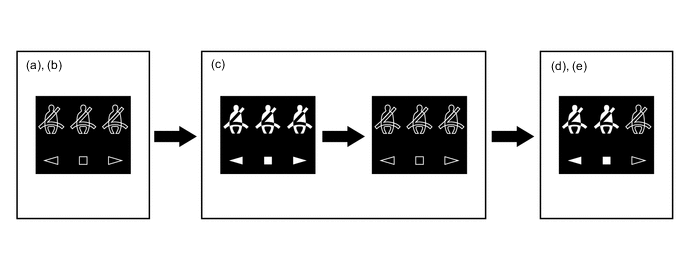
Step Condition Transition Telltale Light Assembly (a) Ignition switch is off. Warning is not displayed. (b) A rear door is opened then closed. (c)
-
Ignition switch is turned to ON.
-
A seat belt is fastened.
-
In this case, all seats will be displayed as being unfastened regardless of the number of occupants. If seat belts are then fastened, the display for the relevant seat will go off.
-
The warning will be displayed for approximately 34 seconds and then go off.
(d) Any of the rear seat belts are unfastened. Seats with an unfastened seat belt will be displayed regardless of the number of occupants. (e) When one of the following conditions is met, the multi-buzzer will stop sounding.
-
The seat belt is refastened.
-
Vehicle speed is lower than approximately 2 km/h (1.2 mph) and the parking brake is applied.
-
Seats with an unfastened seat belt will be displayed regardless of the number of occupants.
-
The warning message will be displayed for approximately 34 seconds and then go off.
-
-
-