WIRELESS CHARGING SYSTEM
-
FUNCTION OF MAIN COMPONENTS
Component Function Mobile Wireless Charger Cradle Assembly Mobile Wireless Charger Switch Turns on/off the wireless charging system. Charging Indicator Indicates the status of the wireless charging system. Charging Area Charges a Qi-compatible device when it is placed on the charging area with the wireless charging system on. Certification ECU (Smart Key ECU Assembly) Sends the charging suspension signal to the mobile wireless charger cradle assembly. -
SYSTEM CONTROL
-
The wireless charging system operates when both of the following conditions are met:
-
Power switch on (ACC) or on (IG)
-
Mobile wireless charger switch on (charging indicator illuminated (green))
-
-
If any of the following operations are performed with an electrical key transmitter sub-assembly present, charging may stop temporarily:
-
Opening/closing the doors
-
Pressing the back door opener switch assembly
-
Closing the back door
-
Starting the hybrid system
-
Moving the electrical key transmitter sub-assembly out of the detection area
-
-
Charging will resume if 30 minutes have elapsed since charging has completed and the Qi-compatible device has not been moved.
-
Charging will resume if the Qi-compatible device is moved or repositioned within the charging area, or replaced with another Qi-compatible device within 30 minutes after charging has completed.
-
If the Qi-compatible device is moved during charging, charging will resume immediately after the Qi-compatible device placed within the charging area.
-
If charging is stopped and resumed repeatedly due to the Qi-compatible device being moved or a communication error between the Qi-compatible device and wireless charging system, charging will be stopped to protect the Qi-compatible device.
-
-
FUNCTION
-
Charging frequency switching function
-
If noise is generated in the AM radio during charging, turn the wireless charging system off and check if the noise is reduced. If the noise is reduced, press the mobile wireless charging switch for approximately 2 seconds to change the charging frequency and reduce the noise.
-
-
Charging indicator status
-
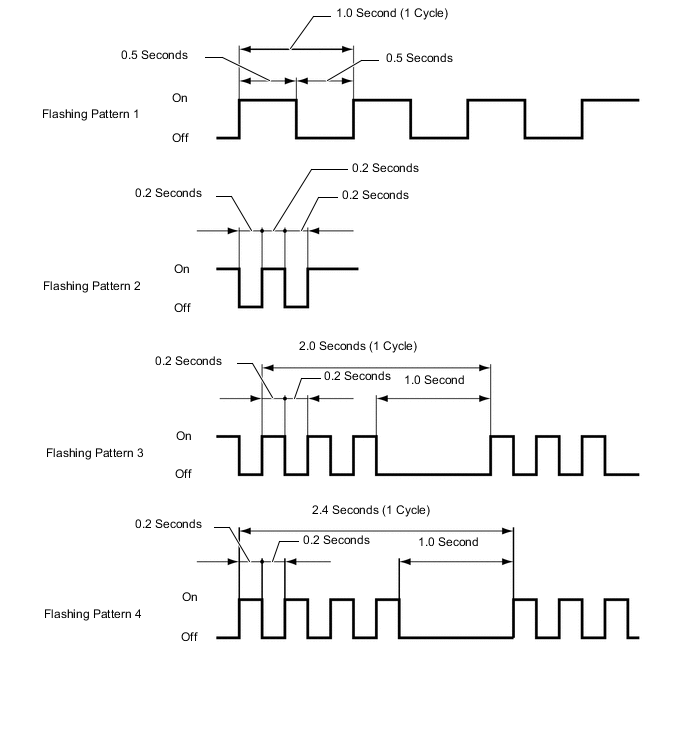
Operation of the wireless charging system is indicated by the status of the charging indicator as follows:
Charging Indicator Operation Status Color Not illuminated - Wireless charging system not operating. Illuminated Green Wireless charging system suspended, or charging is complete* or temporarily stopped. Illuminated Amber A Qi-compatible device is detected in the charging area and is being charged. Flashing
(Pattern 1)
Amber The wireless charging system cannot receive signals from the certification ECU (smart key ECU assembly). Flashing
(Pattern 2)
Amber The charging frequency has been changed by the wireless charging system during charging. Flashing
(Pattern 3)
Amber
-
An object is detected between the Qi-compatible device and charging area.
-
A gap is detected between the Qi-compatible device and charging area.
-
The Qi-compatible device is not positioned appropriately.
-
The Qi-compatible device has been moved from its initial position.
Flashing
(Pattern 4)
Amber The internal temperature of the mobile wireless charger cradle assembly or cellular phone is too high. *: The charging indicator may not illuminate (green) after charging is completed using a Qi-compatible device, case or accessory. In this case, it is necessary to confirm the charging status on the Qi-compatible device.
Figure 1. Charging Indicator Flashing Pattern
-
-
-