METER / GAUGE SYSTEM
-
FUNCTION
-
Buzzer
-
The table below shows the warning and reminder functions of the buzzer in the combination meter assembly.
Priority Item 1 READY 2 Simple Advanced Parking Guidance System (2 times: Pattern 1)*1 3 Simple Advanced Parking Guidance System (Once: Pattern 1)*1 4 Simple Advanced Parking Guidance System (2 times: Pattern 2)*1 5 Simple Advanced Parking Guidance System (Once: Pattern 2)*1 6 Simple Advanced Parking Guidance System (Once: Pattern 3)*1 7 Reverse Warning (Intermittent) 8 Reverse Warning (Once) 9 Accelerator Depression with P Position 10 Entry and Start System Warning 1 (Intermittent) 11 P Position Select Advice 12 Door Open when Shift not in P Warning 13 Front Seat Belt Warning (Level 2) 14 Rear Seat Belt Warning 15 Front Seat Belt Warning (Level 1) 16 Brake Force Reduction Warning 17 Brake Fluid Low Warning 18 EPS Warning 19 Emergency Stop Warning 20 Unexpected Vehicle Motion Warning*2 21 Accelerator Depression with N Position 22 Accelerator Depression Hold Warning 23 Towing Prohibition Notification 24 Parking Brake Engaged Warning 25 HV Battery Low Warning (SOC: 18 %) 26 Sway Warning*2 27 Brake System Temperature Warning/Active Test 28 Speed Limit Exceed Warning*3 29 Speed Limit Exceed Warning (Full-speed Range Following Function)*4 30 Hybrid System Warning (Continuous) 31 Hybrid System Warning (Intermittent: 0.2 seconds cycle) 32 Hybrid System Warning (Intermittent: 0.4 seconds cycle) 33 Hybrid System Warning (Intermittent: 0.7 seconds cycle) 34 Hybrid System Warning (Intermittent: 1.2 seconds cycle) 35 Hybrid System Warning (Once) 36 Engine Oil Pressure Warning 37 Entry and Start System Warning 2 (Intermittent) 38 HV Battery Low Warning (SOC: 25 %) 39 Lane Departure Alert System Warning*2 40 Hybrid System Start while Driving Notice 41 Shift Reject Warning 42 EV Driving Mode Reject Warning 43 Low Speed Zone Leading Vehicle Lost Warning*4 44 P Position Select Advice When Dynamic Radar Cruise Control Operating*4 45 Low Speed Zone Leading Vehicle Lost Warning*4 46 Lane Departure Alert System Cancel Warning*2 47 EPS Warning (Once) 48 Hybrid Unit Overheat Warning 49 Hands off Steering Wheel Warning*2 50 Multi-information Display Warning 51 HV Battery Diagnosis Request Notification 52 Brake System Temperature Warning/Active Test 53 N Position Select Notice 54 Entry and Start System Warning (Once) 55 Immobiliser Certification Reminder 56 Turn Signal/Hazard Warning Operation *1: Models with simple intelligent parking assist system
*2: Models with lane departure alert system
*3: Models for G. C. C. countries
*4: Models with dynamic radar cruise control system
-
-
Multi-information Display
-
Display Function Flow
-
The multi-information display can be switched as shown in the flow chart below:
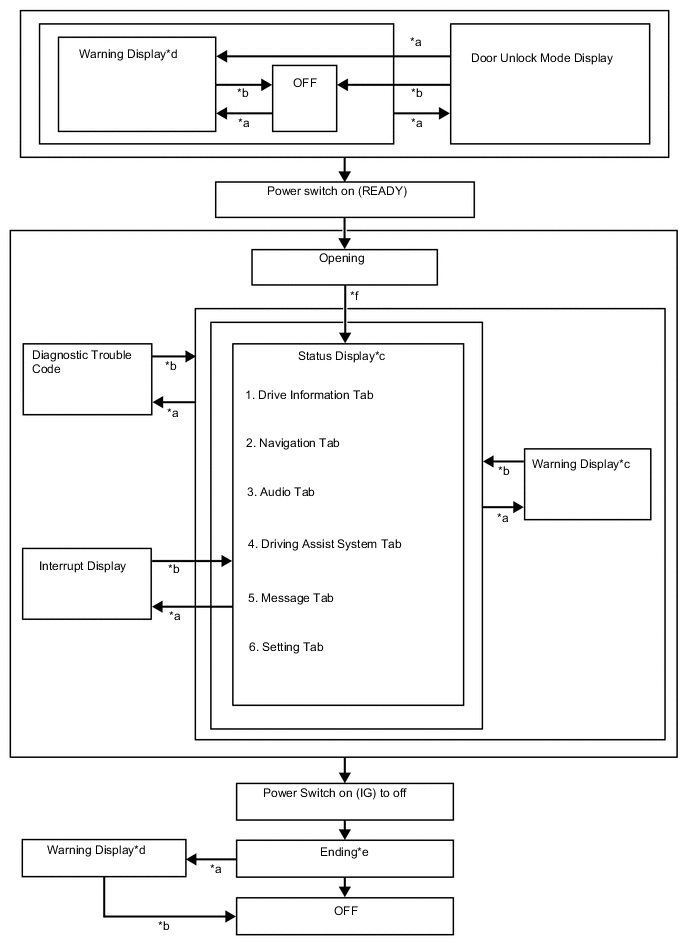
Item Display Change Condition *a Conditions are met. *b Conditions are not met. *c Item or display is selected by operating the steering pad switch. *d If there are multiple display requests, items will be displayed in sequence. *e Odometer, elapsed time (After start), distance (after start), average fuel consumption (after start) and eco score result are displayed. *f After power switch is turned on (IG)
-
-
Display Tab Operation
-
The information currently displayed can be switched using the RIGHT/LEFT switch of the steering pad switch assembly.
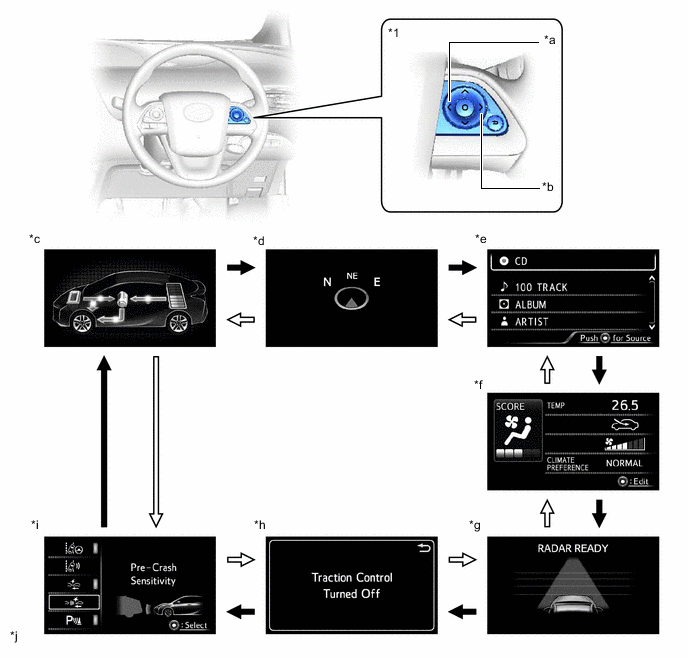
*1 Steering Pad Switch Assembly - - *a LEFT Switch *b RIGHT Switch *c Drive Information *d Navigation Information *e Audio Information *f Air Conditioning System Information *g Driving Assist System Information *h Message *i Settings *j The illustrations shown are examples only. 
LEFT switch operation 
RIGHT switch operation
-
-
Drive Information
-
The drive information tab shows vehicle information such as drivable range and fuel consumption.
-
The drive information display can be changed using the UP/DOWN switch of the steering pad switch assembly.
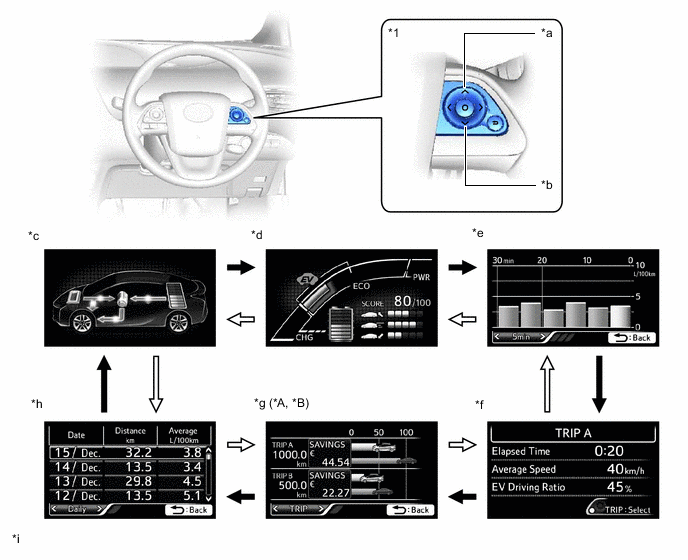
*A Except Models for G.C.C. Countries *B Except Destination Package for South Korea *1 Steering Pad Switch Assembly - - *a UP Switch *b DOWN Switch *c Energy Monitor *d Hybrid System Indicator/State Of Charge/Eco Score *e Fuel Consumption Record *f Drive Monitor *g Eco Savings *h Eco Diary *i The illustrations shown are examples only. - - UP switch operation DOWN switch operation
Drive Information Details Item Outline Energy Monitor
-
Displays the energy flow in the form of an arrow.
-
Engine to Tire
-
Engine to Motor
-
Motor to Tire
-
Tire to Motor
-
Motor to Battery
-
Battery to Motor
-
Displays the State Of Charge (SOC) of the HV battery in 8 levels.
Hybrid System Indicator/State Of Charge/Eco Score Hybrid System Indicator
-
Displays the total of the HV battery and engine output as the hybrid system output.
State Of Charge
-
Displays the State Of Charge (SOC) of the HV battery in 8 levels.
Eco Score
-
Displays the driving score in each category (Eco-Start, Eco-Cruise or Eco Stop) to support eco driving.
-
SCORE: Displays an overall score out of 100 which is calculated based on the result of Eco-Start, Eco-Cruise and Eco Stop.
-
Eco-Start: Evaluates acceleration from when the vehicle starts off to when it reaches a constant speed, and shows the result in the bar graph.
-
Eco-Cruise: Evaluates constant speed driving and shows the result in the bar graph.
-
Eco Stop: Evaluates deceleration from constant speed driving to vehicle stop and shows the result in the bar graph.
-
Starting the vehicle off resets the eco score result.
-
When the power switch is turned off, displays the total eco score results.
Fuel Consumption Record
-
Displays a value that has been calculated by the combination meter based on the distance driven and the volume of fuel consumed.
-
The following items can be displayed.
-
Fuel consumption per 5 minutes
-
Fuel consumption per 1 km
-
Fuel consumption per 5 km
-
Fuel consumption per month
-
The item shown can be changed using the steering pad switch.
Drive Monitor
-
The following information can be displayed for TRIP A, TRIP B, after start or after reset:
-
Elapsed Time
-
Average Speed
-
EV Driving Ratio
-
The information shown (TRIP A, TRIP B, after start or after reset) can be changed using the TRIP switch.
Eco Saving
-
Displays the consumed fuel cost and reduced fuel cost compared to the target vehicle information set by the user.
-
The fuel price and target vehicle fuel efficiency value for eco saving calculation, can be changed via the settings.
-
Displays monthly eco saving or TRIP A and TRIP B eco saving.
-
The eco saving for TRIP A and TRIP B and monthly can be changed using the steering pad switch.
Eco Diary
-
Displays daily or monthly travel distance and fuel consumption.
-
Daily or monthly can be selected using the steering pad switch.
-
-
Setting Function
-
The items displayed on the multi-information display can be customized.
-
The following items can be selected on the information setting screen.
Lane Departure Alert System (Models with Lane Departure Alert System) Item Available Setting Steering Assist
-
Setting for lane center can be set to on/off:
-
On
-
Off
Warning Sensitivity
-
Alert sensitivity of alert system can be changed:
-
High
-
Normal
Pre-crash Safety system (Models with Pre-crash Safety System) Item Available Setting PCS
-
The pre-crash safety system can be set to on/off:
-
On
-
Off
Pre-crash warning timing
-
The pre-crash warning timing can be selected:
-
Far (Icon is displayed)
-
Middle (Icon is displayed)
-
Near (Icon is displayed)
TOYOTA Parking Assist-sensor System (Models with TOYOTA Parking Assist-sensor System) Item Available Setting TOYOTA Parking Assist-sensor System
-
The TOYOTA parking assist-sensor system can be set to on/off:
-
ON
-
OFF
Intelligent Clearance Sonar System (Models with Intelligent Clearance Sonar System) Item Available Setting Intelligent Clearance Sonar System
-
The intelligent clearance sonar system can be set to on/off:
-
ON
-
OFF
Blind Spot Monitor System (Models with Blind Spot Monitor System) Item Available Setting BSM
-
The blind spot monitor system can be set to on/off:
-
ON
-
OFF
Sway Warning (Models with Lane Departure Alert System) Item Available Setting Unsteady Driving Detection
-
Unsteady driving detection sensitivity can be selected:
-
On
-
Off
Unsteady Driving Detection Sensitivity
-
Unsteady driving detection sensitivity can be selected:
-
High
-
Medium
-
Low
Headup display (Models with Headup Display) Item Available Setting Display Brightness/Position
-
The brightness and position of the headup display image can be changed:
-
When changing the brightness of the headup display image, press the RIGHT or LEFT switch of the steering pad switch assembly.
-
When changing the position of the headup display image, press the UP or DOWN switch of the steering pad switch assembly.
Road Sign Assist Item Available Setting Road Sign Assist
-
The road sign assist can be set to on/off:
-
ON
-
OFF
Combination Meter Item Available Setting Unit
-
The unit displayed on the multi-information display can be selected:
-
MPH
-
km/h
Brightness
-
The brightness and position of the combination meter can be changed.
-
When changing the brightness of combination meter, press the RIGHT or LEFT switch of the steering pad switch assembly.
Clock Select to adjust clock of the combination meter. On the hour setting
-
Sets the minute display to "00" via the enter switch on the steering pad switch.
Tech Tips
-
When the current minute counter is between 01 and 29, the hour counter does not change.
-
When the current minute counter is between 30 and 59, 1 hour is added to the hour counter.
Meter Customize Item Available Setting Simple/Split Screen
-
The type of main display can be selected:
-
Simple
-
Split
Screen OFF
-
The multi-information display can be turned off:
-
Yes
-
No
HV System Indicator
-
The ECO accelerator guidance can be turned on or off:
-
Yes
-
No
-
The EV indicator light can be turned on or off:
-
On
-
Off
Pop-up Display On/Off
-
The following pop-up display can be turned on or off:
-
Navigation
-
Instrument Panel Light
-
Gasoline Price
-
Climate Settings
-
Cruise Control Operation Display
-
HUD Settings
-
Driving Mode Select
Speed Limit
-
The type of speed limit alert can be selected.
-
OFF
-
Only Display
-
With Caution
Language
-
The language used on the multi-information display can be selected:
-
English
-
French
-
Spanish
-
Germany
-
Italian
-
Russian
-
Turkish
Calendar Date, month and year can be set. Eco Savings Gasoline Price
-
The Gasoline Price can be set.
COMP. Consumption
-
The COMP. Consumption can be set.
History Reset
-
The following history can be reset:
-
Monthly Fuel Consumption
-
Eco Savings (Monthly)
-
Eco-Diary (Daily)
-
Eco-Diary (Monthly)
Initialization The set items can be initialized. Vehicle Settings Item Available Setting TPMS The tire pressure warning system can be reset Route Guidance
-
The route guidance of headup display can be set to on/off:
-
ON
-
OFF
Method Notification Excess Speed Notification
-
The excess speed notification of road sign assist settings can be changed:
-
No Notification
-
Only Visual
-
Visual & Audible
Other Notification
-
The notification of road sign assist (except excess speed notification) settings can be set:
-
No Notification
-
Only Visual
-
Visual & Audible
Unlock on Second Key Turn
-
The unlock on second key turn setting can be changed:
-
On
-
Off
Remote 2-Press Unlock
-
The Remote 2-Press unlock setting can be changed:
-
On
-
Off
Wireless Lock When Door Opened
-
The Wireless lock when door opened can be turned on or off:
-
On
-
Off
Select Doors to Unlock
-
The target of the select doors to unlock can be changed:
-
All Doors
-
Each Door
-
Driver's Door
-
Side Doors
Key System with Elec. Key
-
The entry and start system can be turned on or off:
-
On
-
Off
Auto Relock Timer
-
The auto relock timer setting can be changed:
-
Off
-
30 sec.
-
60 sec.
-
120 sec.
Lock/Unlock Feedback-Lights
-
The lock/unlock feedback-lights can be turned on or off:
-
On
-
Off
Lock/Unlock Feedback-Tone
-
The lock/unlock feedback-tone volume can be changed:
-
7
-
6
-
5
-
4
-
3
-
2
-
1
-
Off
Auto A/C Mode
-
The auto A/C mode can be turned on or off:
-
On
-
Off
Efficient Ventilation Mode
-
The efficient ventilation mode can be turned on or off:
-
On
-
Off
Headlamps-On Sensitivity
-
The automatic light control sensor sensitivity can be changed:
-
-2
-
-1
-
0
-
+1
-
+2
Headlamps Auto-Off Timer
-
The light auto turn-off control setting can be changed:
-
Off
-
30 sec.
-
60 sec.
-
90 sec.
Daytime Running Lights
-
The daytime running light system can be turned on or off:
-
On
-
Off
Interior Lights Off Timer
-
The interior lights off timer setting can be changed:
-
30 sec.
-
15 sec.
-
7.5 sec.
-
Off
Light Sensor Sensitivity for Dimming
-
The light sensor sensitivity for dimming interior illumination can be changed:
-
-2
-
-1
-
0
-
+1
-
+2
Light Sensor Sensitivity for Brightening
-
The light sensor sensitivity for brightening interior illumination can be changed:
-
-2
-
-1
-
0
-
+1
-
+2
-
-
-
Warning Mode Function
-
When a warning is necessary, the warning display interrupts the current display on the multi-information display.
-
The master warning light may illuminate or blink and the buzzer in the combination meter assembly may sound depending on the item displayed on the multi-information display.
Priority Display Master Warning Light Buzzer 1 2WD MAINTENANCE MODE - - 2WD CERTIFICATION MODE - - RES-1 - - RES-2 - - RESOLVER-1 NOT ADJUSTED - - RESOLVER-2 NOT ADJUSTED - - ADJUSTING LDA CAMERA*1 - - ADJUSTING FRONT RADAR BEAM*2 - - ADJUSTING FRONT RADAR BEAM ERROR*2 - - ADJUSTING FRONT RADAR BEAM ALONG VERTICAL AXIS*2 - - ADJUSTING FRONT RADAR BEAM ALONG HORIZONTAL AXIS*2 - - ADJUSTING FRONT RADAR BEAM*2 - - CHECKING PRE-CRASH BRAKE*3 - - CHECKING CRUISE CONTROL BRAKE*2 - - Write Zero-Point of Steering Angle - - End of Adjustment - - Memory Error - - BRAKE!*3 - - Push and Hold Power Switch for Emergency Stop Blinks Sounds Shift to N Position and Push Power Switch to Restart Blinks Sounds Hybrid System Stopped Shift to P Blinks Sounds Hybrid System Stopped Stop in a Safe Place Blinks Sounds 2 Dynamic radar cruise control warning reminder indicator (image display)*2 - - Lane departure alert warning reminder indicator (image display)*1 - - Braking Power Low Stop in a Safe Place See Owner's Manual Blinks Sounds Antilock Brake System Malfunction Visit Your Dealer - Sounds Braking Power Low Stop in a Safe Place See Owner's Manual Blinks Sounds Brake!*4 Blinks Sounds Object Detected Acceleration Reduced*4 Blinks Sounds Switch to Brake*4 Blinks Sounds Accelerator Stuck Depress Brake to Stop Blinks Sounds Shift to P Position When Parked Blinks Sounds Hybrid System Failure. Please Refrain From Being Towed Illuminates Sounds Shift to P Position When Parked Illuminates Sounds Moon Roof Opened*5 Blinks Sounds Window opened Blinks - Window / Moon Roof Opened*5 Blinks Sounds 3 Door open (while driving) (image display) Blinks Sounds Door open (image display) - - Parking Assist Malfunction Visit Your Dealer*6 Illuminates - Clearance sonar detection (image display)*4 - - Parking Assist Malfunction*6 Illuminates - Clean Parking Assist Sensor*6 Illuminates - Rear Crossing Traffic*7 - - Simple Intelligent Parking Assist System Display*6
-
Assist Mode Selection
-
Detection of an Empty Parking Space
-
Operation Disabled, Cancellation or Suspension
- - Simple Intelligent Parking Assist System Display*6
-
Parking Assist in Progress
-
Guidance Ends
- - IPA System Check Visit Your Dealer*6 Illuminates - 4 Auto Power OFF to Conserve Battery - - 5 Shift is in N Release Accelerator Before Shifting Blinks Sounds Press Brake When Vehicle is Stopped. Hybrid System may Overheat Blinks Sounds Hybrid Battery Low. Hybrid System Stopped. Shift to P and Restart. Blinks Sounds 6 Shifted to N Stop Vehicle to Shift to P Blinks Sounds Low 12-Volt Battery Apply Parking Brake Securely While Parking See Owner's Manual Illuminates Sounds Shift System Malfunction Apply Parking Brake Securely While Parking See Owner's Manual Illuminates Sounds Shift System Malfunction Shifting Unavailable See Owner's Manual Illuminates Sounds Shift System Malfunction Stop in a Safe Place See Owner's Manual Illuminates Sounds P Switch Malfunction Apply Parking Brake Securely While Parking See Owner's Manual Illuminates Sounds Shift System Malfunction Apply Parking Brake Securely While Parking See Owner's Manual Illuminates Sounds Shift System Malfunction See Owner's Manual Illuminates Sounds Shifting Unavailable Release Accelerator and Press Brake to Shift Blinks Sounds Shift to N by Holding Shift Lever in N Position Blinks Sounds Shifting Unavailable Low 12-Volt Battery See Owner's Manual Blinks Sounds Shifting Unavailable While READY Indicator is Flashing Try Again Blinks Sounds Shifting Unavailable Wait a Moment and Try Again Blinks Sounds Shifted to N Vehicle Must Be in D to Shift to B Blinks Sounds Unable to Shift to D, B and R Shift after Hybrid System READY Blinks Sounds Shifting Unavailable Press Brake to Shift Blinks Sounds Unable to Shift to B Vehicle Must be in D to Shift to B Blinks Sounds Shifted to N Stop Vehicle to Shift to D Blinks Sounds Shifted to N Stop Vehicle to Shift to R Blinks Sounds Quick Shifting to N Accepted Blinks Sounds Shift to P Position to Start Blinks Sounds 7 Accelerator System Malfunction Inspect at dealer. Illuminates Sounds Accelerator System Malfunction Greatly Reduced Output Power Inspect at dealer. Illuminates Sounds Accelerator System Malfunction Reduced Output Power Inspect at dealer. Illuminates Sounds Accelerator System Malfunction Stop in a Safe Place See Owner's Manual Illuminates Sounds Accelerator System Malfunction Stop in a Safe Place within 0.5 km Illuminates Sounds Accelerator System Malfunction Stop in a Safe Place within 0.3 miles Illuminates Sounds Accelerator System Malfunction Stop in a Safe Place within 1.0 km Illuminates Sounds Accelerator System Malfunction Stop in a Safe Place within 0.6 miles Illuminates Sounds Accelerator System Malfunction Stop in a Safe Place within 1.5 km Illuminates Sounds Accelerator System Malfunction Stop in a Safe Place within 0.9 miles Illuminates Sounds Accelerator System Malfunction Stop in a Safe Place within 2.0 km Illuminates Sounds Accelerator System Malfunction Stop in a Safe Place within 1.2 miles Illuminates Sounds Accelerator System Malfunction Stop in a Safe Place within 5.0 km Illuminates Sounds Accelerator System Malfunction Stop in a Safe Place within 3.1 miles Illuminates Sounds Accelerator System Malfunction Stop in a Safe Place within 10 km Illuminates Sounds Accelerator System Malfunction Stop in a Safe Place within 6.2 miles Illuminates Sounds Accelerator System Malfunction Reduced Output Power Avoid Shifting to N Illuminates Sounds Accelerator System Malfunction Avoid Shifting to N Visit Your Dealer Illuminates Sounds Accelerator System Malfunction Hybrid System Stopped Stop in a Safe Place Illuminates Sounds Accelerator System Malfunction Shift to P See Owner's Manual Illuminates Sounds Hybrid Battery Low. Shift Out of N to Recharge. Blinks Sounds Power Steering Malfunction Steering Power Low Visit Your Dealer Blinks Sounds Power Steering Malfunction Steering Power Low Visit Your Dealer Illuminates Sounds Voltage Abnormality Steering Power Low Visit Your Dealer Blinks Sounds Steering Power Low Visit Your Dealer Illuminates Sounds Power Steering Malfunction Visit Your Dealer Illuminates Sounds Release Parking Brake Blinks Sounds Key Not Detected Check Key Location - Sounds Speed Limit Exceeded*8 Blinks Sounds Release Accelerator Blinks Sounds 8 Hold Steering Wheel*1 -/Illuminates - LDA Steering Assist Unavailable Hold Steering Wheel*1 Illuminates Sounds Please Control Steering Wheel*1 Illuminates Sounds 9 Clean Radar Sensor*2 Illuminates Sounds Cruise Control not Available*2 Illuminates Sounds Cruise Control not Available Depress the Brake Pedal*2 - Sounds Grille Shutter Inoperative Visit Your Dealer Illuminates Sounds Check Access System with Elec. Key Illuminates Sounds Blind Spot Monitor Unavailable*9 Illuminates Sounds Check Cruise Control System Have your vehicle Checked by a Dealer*2 Illuminates Sounds Cruise Control Off. Shifted to P Position. Depress the Brake Pedal and Shift to D to Restart*2 - Sounds Cruise Control not Available Depress the Brake Pedal*2 - Sounds Lane Departure Alert Malfunction Visit Your Dealer*1 Illuminates Sounds Lane Departure Alert Unavailable*1 Illuminates Sounds Lane Departure Alert Turned ON Steering Assist Active*1 - - Lane Departure Alert Turned ON Steering Assist Inactive*1 - - "Use on expressway only Beware of stopping or merging vehicles !" - - 10 Headup Display Position Adjustment (image display)*10 - - 11 Dynamic Radar Cruise Control System Operation Guidance (image display)*2 - - 12 Drive Mode Change Display (image display) - - 13 Air Conditioning System Operation Guidance (image display) - - 14 Pre-Crash System Malfunction Visit Your Dealer*3 Illuminates Sounds Blind Spot Monitor System Malfunction Visit Your Dealer*9 Illuminates Sounds Engine Oil Pressure Low Illuminates Sounds Braking Power Low Visit Your Dealer - Sounds Lane Departure Alert System is Unavailable Below Approx. 50km/h*1 - - Lane Departure Alert System is Unavailable Below Approx. 32MPH*1 - - Lane Departure Alert System is Unavailable at this Speed.*1 - - Check Speed Limiter System*11 Illuminates Sounds 15 Dynamic radar cruise control*2/Lane departure alert*1 (image display) - - Hybrid System Stopped Steering Power Low Illuminates Sounds Engine Stopped Steering Power Low Illuminates Sounds Turn power off Blinks Sounds Key detected in vehicle - Sounds Would you like to Take Rest?*1 - - Please Take Rest*1 - - Depress Brake Pedal and Touch Power Switch with Key - Sounds Not Ready to Drive Depress brake pedal and push power switch to start - Sounds 16 Depress Brake Pedal and Push Power Switch to Start - Sounds Push Power Switch while Turning the Steering Wheel in Either Direction Blinks Sounds Drive-start Control Malfunction Visit Your Dealer Illuminates Sounds ICS Malfunction Visit Your Dealer*4 Illuminates Sounds Brake Override Malfunction Visit Your Dealer Illuminates Sounds 17 Key Battery Low Replace Key Battery - Sounds Engine Oil Level Low Add or Replace - - Hybrid System Overheated. Reduced Output Power. Illuminates Sounds Headlight System Malfunction Visit Your Dealer Illuminates Sounds Check RSA System*12 Illuminates Sounds Accelerator and Brake Pedals Pressed Simultaneously Blinks - 18 Maintenance Required for Traction Battery Cooling Parts See Owner's Manual - - Windshield Washer Fluid Low*13 - - Traction Control Turned Off - - To Activate Auto High Beam, Switch Headlights to High Beam - - A New Key has been Registered Contact Your Dealer for Details - - Depress Brake Pedal and Push Power Switch to Start - - VSC Turned Off Pre-crash Brake System Unavailable*3 - - Pre-Crash System Unavailable*3 - - ICS Unavailable*4 Blinks - EV MODE Currently Not Available - Sounds EV MODE Not Available Warming Up - Sounds EV MODE Not Available Low Battery - Sounds EV MODE Not Available Excessive Speed - Sounds EV MODE Not Available Excessive Acceleration - Sounds EV MODE Deactivated - Sounds EV MODE Deactivated Low Battery - Sounds EV MODE Deactivated Excessive Speed - Sounds EV MODE Deactivated Excessive Accelerator - Sounds Forward Camera System Unavailable*1 - - Forward Camera System Unavailable Clean Windshield*1 - - Pre-Crash Safety Unavailable Clean Radar Sensor*3 - - Pre-Crash Safety Unavailable*3 - - Have Traction Battery Inspected - - Vehicle Start will Soon be Disabled Have Traction Battery Inspected - Sounds Vehicle Start Disabled Until Traction Battery Inspected - - Diagnosing Hybrid Battery - - Grille Shutter not Initialized. Cancel Maintenance Mode. Illuminates - *1: Models with lane departure alert system
*2: Models with dynamic radar cruise control system
*3: Models with pre-crash safety system
*4: Models with intelligent clearance sonar system
*5: Models with sliding roof system
*6: Models with simple intelligent parking assist system
*7: Models with rear crossing traffic alert function
*8: Models for G.C.C. countries
*9: Models with blind spot monitor system
*10: Models with headup display
*11: Models with speed limiter system
*12: Models with road sign assist system
*13: Models with washer fluid warning system
-
-
-