DIGITAL REAR-VIEW MIRROR SYSTEM
-
FUNCTION OF MAIN COMPONENTS
Component Outline Inner Rear View Mirror Assembly Displays and adjusts images captured by the inner mirror camera assembly. Inner Mirror Camera Assembly Captures images of areas to the rear of the vehicle and outputs them as video signals. -
SYSTEM CONTROL
-
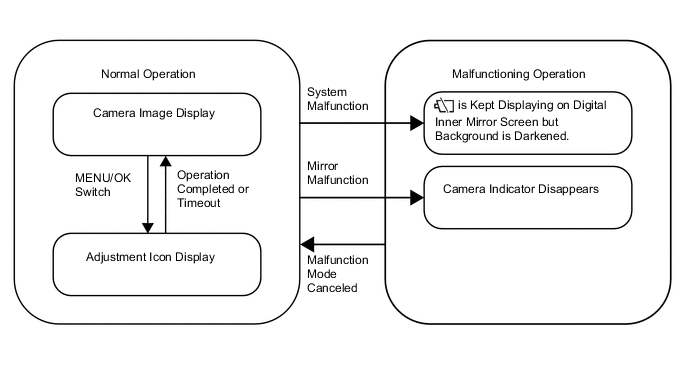
Digital Inner Mirror Mode State Changes when Engine Switch On (IG)
-
Operations when Digital Inner Mirror System is Malfunctioning
-
System Malfunction
-
If a system malfunction occurs, the camera indicator (malfunctioning) is displayed in the top right of the digital inner mirror screen and the inner mirror screen becomes darker.
-
-
Mirror Malfunction
-
If a malfunction occurs in the mirror, the camera indicator disappears.
-
-
-
-
OPERATING CONDITION
-
Digital Inner Mirror System Operation and Cancel Conditions
-
The digital inner mirror system operates when the following all conditions are met
-
IG ON
-
The switching lever is set to mirror surface mode.
-
-
The digital inner mirror system stops operating when either of the following conditions is met.
-
The engine switch is turned from on (IG) or on (ACC), or turned off.
-
The switching lever is set to mirror surface mode.
-
-
-
-
FUNCTION
Digital Inner Mirror System Outline Mode Condition User Operation Operation Surface Mirror Mode
-
IG OFF
-
The switching lever is set to mirror surface mode.
- The image disappears and the user can use surface mirror mode.
-
IG ON
-
The switching lever is set to mirror surface mode.
- The image disappears and the user can use surface mirror mode. Press the MENU/OK switch and also press the adjustment icon anti-glare on/off switch. The outer and inner mirror anti-glare function can be turned on and off. Digital Mirror Mode
-
IG ON
-
The switching lever is set to digital mirror mode.
Turn the engine switch off. After the engine switch is turned off, the mirror image is continuously displayed for a few seconds (fadeout control). -
-
The image of the area to the rear of the vehicle is displayed.
-
The camera indicator is displayed.
Press the MENU/OK switch. The adjustment icons can be displayed and a desired item can be selected. Press and hold the MENU/OK switch for 10 seconds. Mirror surface mode can be changed to mirror surface mode*
*: Turning the engine switch on (IG) again is necessary to return to digital mirror mode.
-
-
DIAGNOSIS
-
Digital Inner Mirror Fail-safe Function
-
Inner Mirror High Internal Temperature
-
When the temperature of the digital inner mirror is very high, the high mirror temperature indicator is displayed on the digital inner mirror screen. (The digital inner mirror screen gradually becomes darker and the image disappears if the mirror temperature keeps increasing.)
-
-
-