DIGITAL REAR-VIEW MIRROR SYSTEM
-
OUTLINE
-
The digital inner rear view mirror system is a driving assist device that displays video from the inner mirror camera assembly on the display in the inner mirror.
-
By operating the switching lever, surface mirror mode is changed to digital mirror mode.
-
The digital inner rear view mirror system enables the driver to check the rear without the headrest, luggage, rear sunshade, etc. obstructing the view. In addition, the privacy of rear seats passengers is protected by not displaying a view of the rear seats.
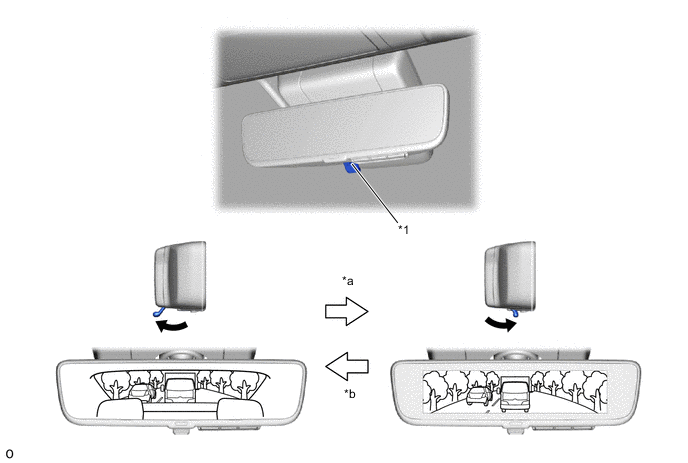
*1 Switching Lever - - *a Digital Mirror Mode *b Surface Mirror Mode
-
-
PRECAUTION
-
Knowledge
-
The digital inner mirror may generate heat, but this is not a malfunction.
-
If a passenger stares at the digital inner mirror screen, he/she may feel the effects of car sickness (dizziness).
-
Do not touch or cover the sensors as it may cause the sensors to operate incorrectly.
-
The image color may differ from the actual color in dark locations (at night, etc.), but this is not a malfunction.
-
Depending on the age and health condition of the user, it may take a while until he/she can focus on the digital inner mirror screen. If it is difficult to focus on the screen, change to mirror surface mode or stop the vehicle in a safe location to adjust the inner mirror.
-
If the digital inner mirror screen is too bright, your eyes may get tired. Adjust the brightness to a moderate level.
-
If you experience discomfort due to flickering lights from vehicles to the rear, change to mirror surface mode.
-
-
Cautions
-
Check around the vehicle with your own eyes while driving.
-
Before driving for the first time or when changing driver, always park the vehicle in a safe place to adjust the inner mirror and do not adjust it while driving. If the vehicle is driven without first adjusting the mirror, double images may occur. In addition, if the display is difficult to see due to external light reflections caused by a vehicle with a sunroof, etc., close the shade.
-
The actual size of vehicles and obstacles displayed on the digital inner mirror screen may differ from the actual size. When driving in reverse, always directly confirm the surroundings of the vehicle (particularly the area to the rear).
-
If a vehicle to the rear approaches the vehicle while in a dark location (at night, etc.), the image of the surrounding area may be displayed darker than it actually is. Check around the vehicle with your own eyes.
-
The image range displayed on the digital inner mirror screen and the one displayed on the inner mirror on mirror surface mode differs, so confirm the difference beforehand.
-
-
Troubleshooting
-
If it is difficult to see the digital inner mirror screen due to the exhaust gas interfering with the image, change to surface mirror mode.
-
If the images on the digital inner mirror screen are misaligned because the back door is not completely closed, close it.
-
If it is difficult to see the digital inner mirror screen due to interference by a strong light source (such as the sun, the light from the headlights, etc.) reflected on the screen, change to surface mirror mode. (If light from the moon roof is reflected, close the sun shade.)
-
If it is difficult to see the digital inner mirror screen because water, snow, mud, etc. is stuck to the back door glass, change to surface mirror mode.
-
If it is difficult to see the digital inner mirror screen because the screen is used under lighting conditions such as halogen, sodium and mercury light sources, etc., change to surface mirror mode.
-
-
Handling Guide
-
When wiping the camera lens, wipe dirt on the lens with a wet soft cloth.
-
-
Notice
-
Do not subject the camera to strong impacts by hitting it, throwing objects at it, etc. The installation position and angle of the camera may become misaligned.
-
Do not remove, disassemble or modify the camera.
-
Do not strongly rub the camera lens. Otherwise, the lens may get damaged and the camera may not be able to capture clear images.
-
Do not remove, disassemble or modify the mirror.
-
When applying colored film (including transparent film) to the rear windowglass, do not apply it to the area in front of the camera.If film is applied to the area in front of the camera, the image from the cameramay not display properly.
-
-