LIGHTING SYSTEM
-
FUNCTION OF MAIN COMPONENT
Item Function Ceiling Illumination Light Switches between 16 colors of light and illuminates. Room Light Control Relay Receives signals from the main body ECU (multiplex network body ECU), integration control and panel assembly, etc., and controls the ceiling color illumination. Integration Control and Panel Assembly Dimmer Switch
-
Illuminates and turns off the ceiling illumination light, and switches the dimmer level.
-
Light adjustment can be set to one of 4 levels of brightness.
Color Select Switch (UP/DOWN) The color of the ceiling illumination light changes according to the operation of this switch. Combination Meter Assembly Multi-information Display Switches the brightness and color of the ceiling illumination lights based upon operation of the steering pad switch. Main Body ECU (Multiplex Network Body ECU) Sends illumination/turn off request signals for the ceiling illumination lights to the room light control relay based on information regarding whether the doors are locked or unlocked, open or closed, and whether the engine is started. -
-
FUNCTION
-
Dimmer Switch Function
-
The dimmer level*1 can be set to one of 4 levels excluding 0 % (turned off)*2 by operating the dimmer switch installed in the integration control and panel assembly.
Tech Tips
*1: The initial setting for the dimmer level is 100%. Also, when the auxiliary battery is removed, the dimmer level will return to the initial setting.
*2: The dimmer level can be changed to 100%, 75%, 50%, 25% and 0% (turned off).
-
-
Color Select Switch Function
-
16 colors* can be chosen from by operating the color select switch installed in the integration control and panel assembly.
Tech Tips
*: The initial setting is white. Also, when the auxiliary battery is removed, the color setting will return to the initial setting.
Color Settings No. Color No. Color 1 White 2 Sky Blue 3 Aqua 4 Pale Blue 5 Blue 6 Purple 7 Pale Purple 8 Pink 9 Rose 10 Yaezakura (Cherry 1) 11 Somei-yoshino (Cherry 2) 12 Yellow 13 Pale Yellow 14 Light Green 15 Yellow-green 16 Green
-
-
Combination Meter Assembly Operation Switching Function
-
The dimmer level*1 and color*2 can be selected using the combination meter assembly.
Tech Tips
*1: The dimmer level can be changed to 100%, 75%, 50%, 25% and 0% (turned off).
*2: The color can be selected from the color settings chart above.
-
-
Vehicle-linked Function
-
Lights illuminate and turn off at the brightness and color previously set by the user when the doors are locked and unlocked, open and closed, and when the engine is started.
-
-
Engine Switch On (IG) Automatic Light Turn-off Function
-
The illuminated lights turn off when the engine switch is turned from off to on (IG).*
Tech Tips
*: Lights do not turn off when a door is open. Also, lights can be illuminated by operating the dimmer switch.
-
-
Ceiling Color Illumination Control
Figure 1. Ceiling Illumination Light (IG OFF)
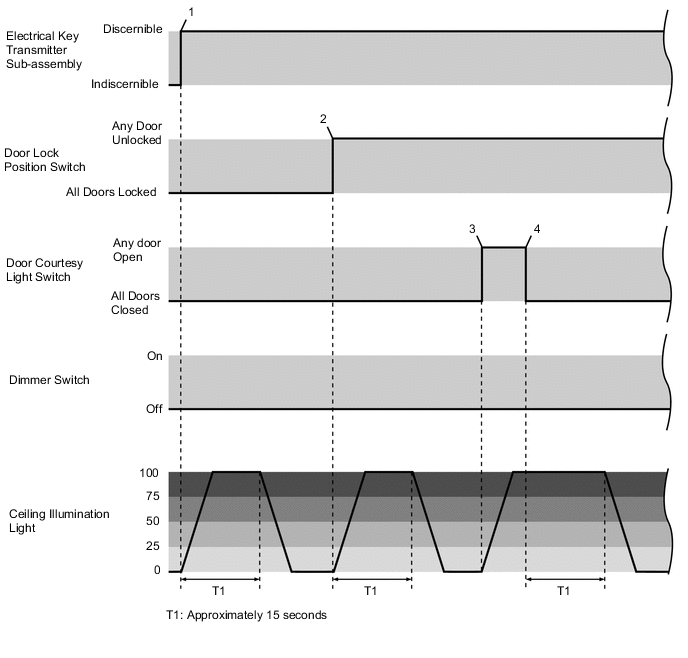
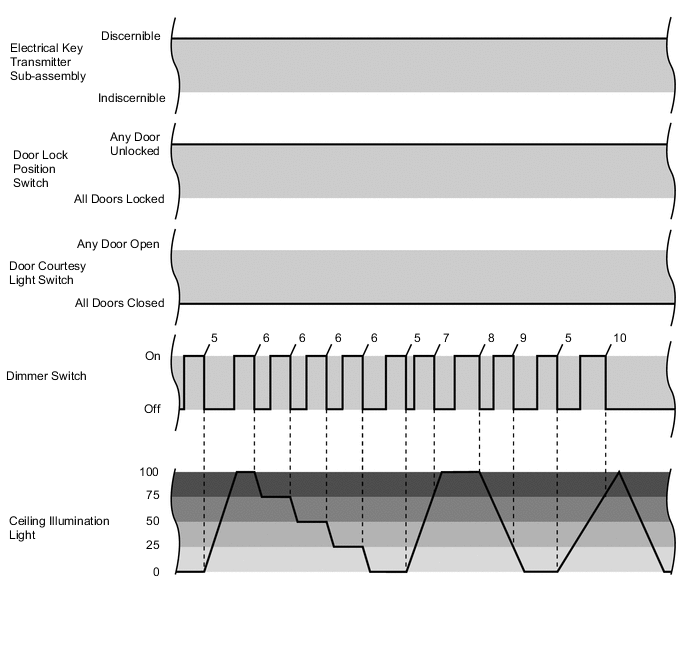
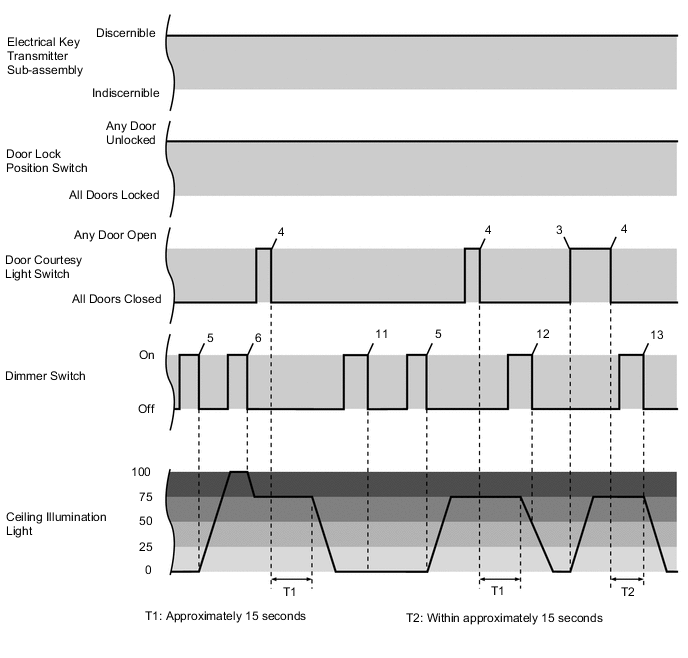
No. Vehicle Status*1 Ceiling Illumination Light Status 1 The electrical key transmitter sub-assembly is determined to be outside of the vehicle. Illuminates (fades in)*2 → Turns off after approximately 15 seconds (fades out) 2 After all the doors are closed and locked, any door is unlocked. Illuminates (fades in)*2 → Turns off after approximately 15 seconds (fades out) 3 Any door is opened. Illuminates (fades in)*2 4 All of the doors are closed. Turns off after approximately 15 seconds (fades out) 5 With all of the doors closed and the ceiling illumination light off, the dimmer switch is briefly pressed. Illuminates (fades in)*3 6 With the ceiling illumination light illuminated, the dimmer switch is briefly pressed. Illuminates → Dims*4 7 After the operation described above in No. 5, the dimmer switch is briefly pressed while the light is fading in.*5 Continues illuminating (fading in) 8 With the ceiling illumination light illuminated, the dimmer switch is pressed and held. Turns off (fades out)*6 9 After the operation described above in No. 8, the dimmer switch is briefly pressed while the light is fading out.*5 Continues turning off (fading out) 10 After the operation described above in No. 5, the dimmer switch is pressed and held while the light is fading in. After illuminating (fading in)*3 → Turns off (fades out)*6 11 With the ceiling illumination light off, the dimmer switch is pressed and held. Remains off (previously stored dimmer level retained) 12 After the operation described above in No. 4, the dimmer switch is pressed and held while the light is fading out. Continues turning off (fading out) and the dimmer level is stored at 0% for the next time the light is turned on. 13 After the operation described above in No. 4, the dimmer switch is pressed and held within approximately 15 seconds. Illuminates (fades in) → Turns off (fades out)*6 Tech Tips
*1: Briefly pressing the dimmer switch means pressing and releasing within less than 0.8 seconds, while pressing and holding the switch means continuing to press for 0.8 seconds or more.
*2: Illuminates at the previously stored dimmer level. Also, when the previously stored dimmer level is 0%, the light does not illuminate.
*3: Illuminates at the previously stored dimmer level. Also, when the previously stored dimmer level is 0%, the light illuminates at 100%.
*4: The following cycle repeats: Illuminates (100%) → Illuminates (75%) → Illuminates (50%) → Illuminates (25%) → Turns off (0%) → Illuminates (100%).
*5: The dimmer switch does not operate when briefly pressed while the light is fading in or out.
*6: A dimmer level of 0% is stored when the light is turned off by pressing and holding the dimmer switch.
Figure 2. Ceiling Illumination Light (Engine Switch On (IG))
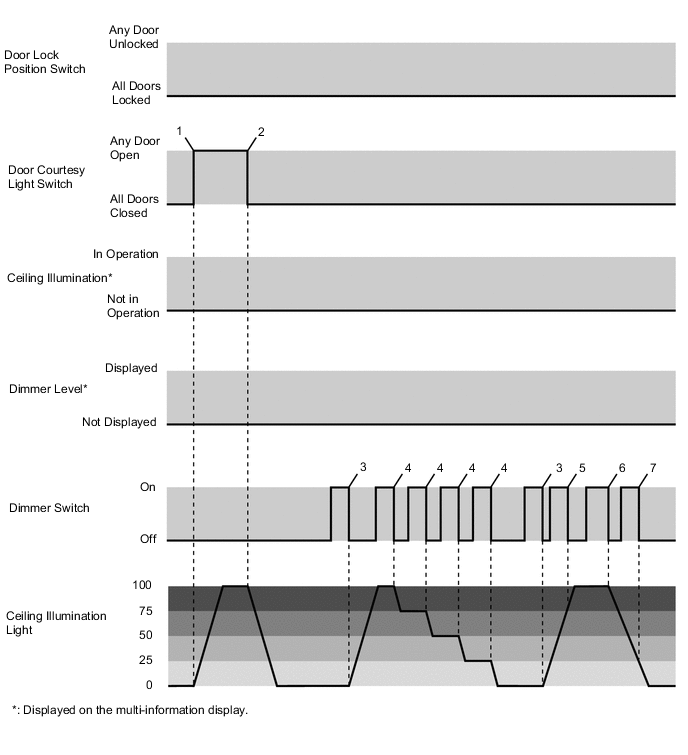
No. Vehicle Status*1 Ceiling Illumination Light Status 1 Any door is opened. Illuminates (fades in)*2 2 All of the doors are closed. Turns off (fades out) 3 With all of the doors closed and the ceiling illumination light off, the dimmer switch is briefly pressed. Illuminates (fades in)*3 4 With the ceiling illumination light illuminated, the dimmer switch is briefly pressed. Illuminates → Dims*4 5 After the operation described above in No. 3, the dimmer switch is briefly pressed while the light is fading in.*5 Continues illuminating (fading in) 6 With the ceiling illumination light illuminated, the dimmer switch is pressed and held. Turns off (fades out)*6 7 After the operation described above in No. 6, the dimmer switch is briefly pressed while the light is fading out.*5 Continues turning off (fading out) Tech Tips
*1: Briefly pressing the dimmer switch means pressing and releasing within less than 0.8 seconds, while pressing and holding the switch means continuing to press for 0.8 seconds or more.
*2: Illuminates at the previously stored dimmer level. Also, when the previously stored dimmer level is 0%, the light does not illuminate.
*3: Illuminates at the previously stored dimmer level. Also, when the previously stored dimmer level is 0%, the light illuminates at 100%.
*4: The following cycle repeats: Illuminates (100%) → Illuminates (75%) → Illuminates (50%) → Illuminates (25%) → Turns off (0%) → Illuminates (100%).
*5: The dimmer switch does not operate when briefly pressed while the light is fading in or out.
*6: A dimmer level of 0% is stored when the light is turned off by pressing and holding the dimmer switch.
Figure 3. Ceiling Illumination Light (Engine Switch On (IG) → Off) 1
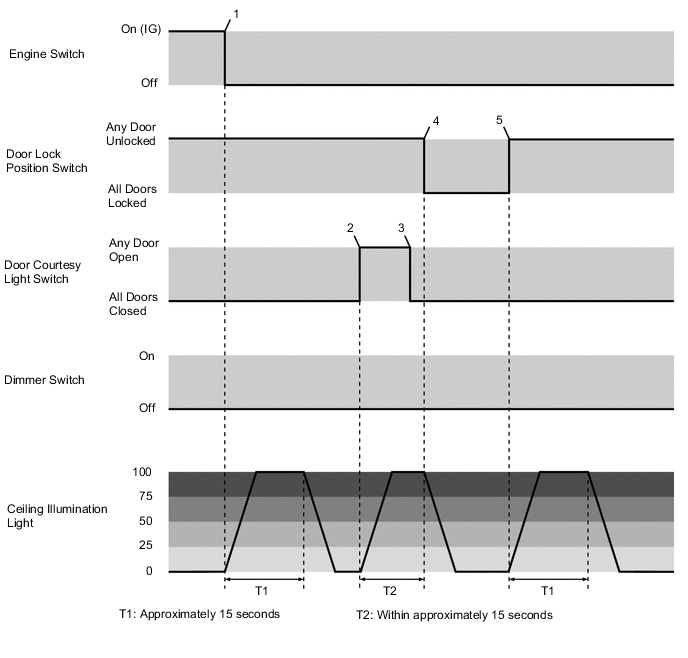
No. Vehicle Status Ceiling Illumination Light Status 1 The engine switch is turned from on (IG) to off. Illuminates (fades in)* → Turns off after approximately 15 seconds (fades out) 2 With the engine switch off, any door is opened. Illuminates (fades in)* 3 All of the doors are closed. Turns off after approximately 15 seconds (fades out) 4 After the operation described above in No. 3, all the doors are locked within approximately 15 seconds. Turns off (fades out) 5 With the ceiling illumination light off, any door is unlocked. Illuminates (fades in)* → Turns off after approximately 15 seconds (fades out) Tech Tips
*: Illuminates at the previously stored dimmer level. Also, when the previously stored dimmer level is 0%, the light does not illuminate.
Figure 4. Ceiling Illumination Light (Engine Switch On (IG) → Off) 2
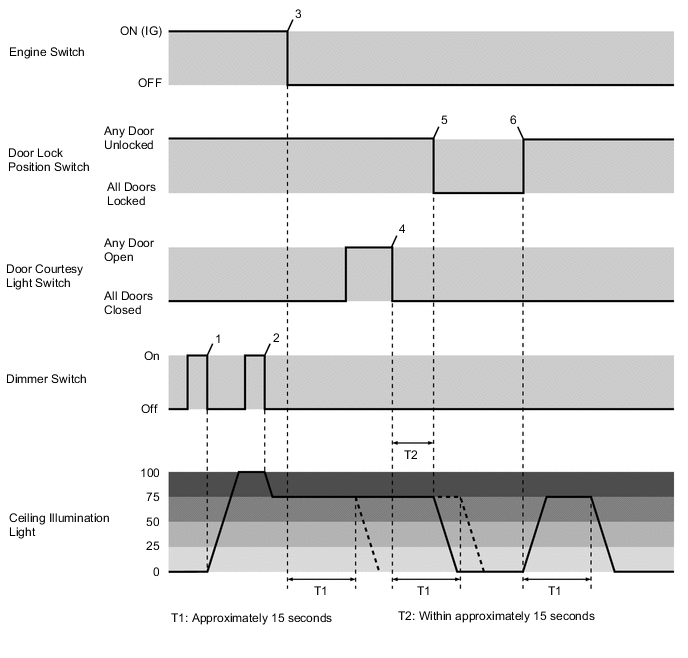
No. Vehicle Status*1 Ceiling Illumination Light Status 1 With the engine switch on (IG), all the doors closed and the ceiling illumination light off, the dimmer switch is briefly pressed. Illuminates (fades in)*2 2 In the condition described above in No. 1, the dimmer switch is briefly pressed. Illuminates →Dims*3 3 In the condition described above in No. 2, the engine switch is turned from on (IG) to off. Turns off after approximately 15 seconds (fades out) 4 Within approximately 15 seconds after the engine switch is turned off with the ceiling illumination light illuminated, any door is opened and then all the doors are closed. Turns off after approximately 15 seconds (fades out) 5 After the operation described above in No. 4, all the doors are locked within approximately 15 seconds. Turns off (fades out) 6 After all the doors are locked with the engine switch off, any door is unlocked. Illuminates (fades in)*4 → Turns off after approximately 15 seconds (fades out) Tech Tips
*1: Briefly pressing the dimmer switch means pressing and releasing within less than 0.8 seconds.
*2: Illuminates at the previously stored dimmer level. Also, when the previously stored dimmer level is 0%, the light illuminates at 100%.
*3: The following cycle repeats: Illuminates (100%) → Illuminates (75%) → Illuminates (50%) → Illuminates (25%) → Turns off (0%) → Illuminates (100%).
*4: Illuminates at the previously stored dimmer level. Also, when the previously stored dimmer level is 0%, the light does not illuminate.
Figure 5. Ceiling Illumination Light (Engine Switch On (IG) → OFF) 3
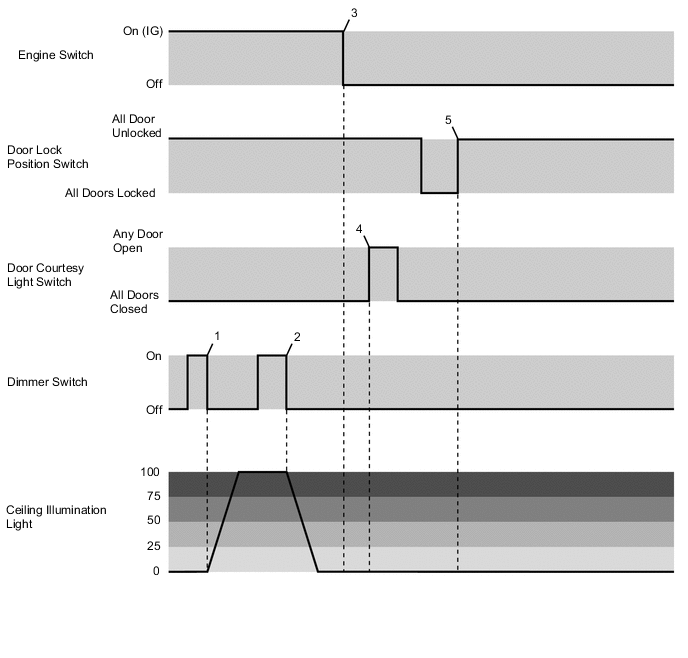
No. Vehicle Status*1 Ceiling Illumination Light Status 1 With the engine switch on (IG) and the ceiling illumination light off, the dimmer switch is briefly pressed. Illuminates (fades in)*2 2 With the ceiling illumination light illuminated, the dimmer switch is pressed and held. Turns off (fades out)*3 3 After the operation described above in No. 2, the engine switch is turned from on (IG) to off. Remains off 4 After the operation described above in No. 2 and all the doors are closed, any door is opened. Remains off 5 After the operation described above in No. 2 and all the doors are locked, any door is unlocked. Remains off Tech Tips
*1: Briefly pressing the dimmer switch means pressing and releasing within less than 0.8 seconds, while pressing and holding the switch means continuing to press for 0.8 seconds or more.
*2: Illuminates at the previously stored dimmer level. Also, when the previously stored dimmer level is 0%, the light illuminates at 100%.
*3: When the light is turned off by pressing and holding the dimmer switch or operation of the combination meter assembly, the stored value becomes 0% (off). Therefore, the illuminated entry system does not operate afterward.
Figure 6. Ceiling Illumination Light (Engine Switch Off → ON (IG)) 1
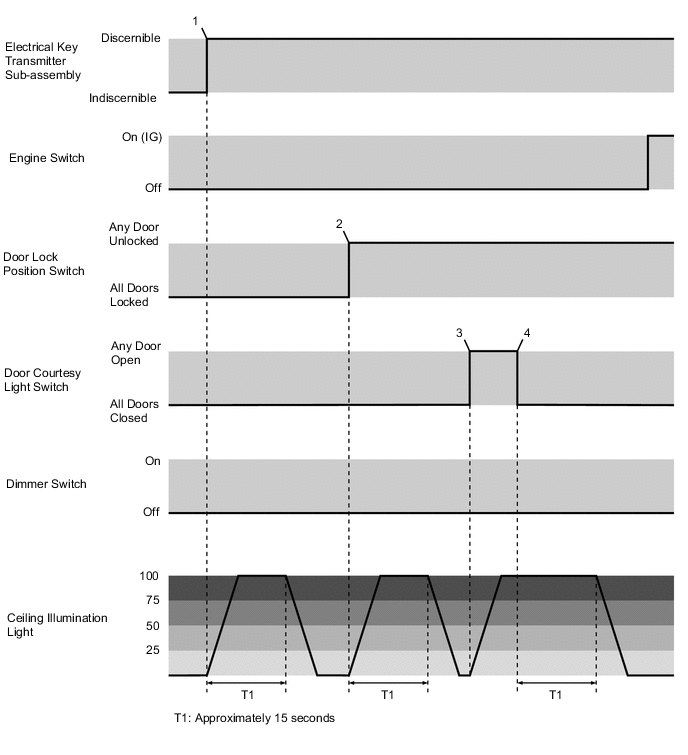
No. Vehicle Status Ceiling Illumination Light Status 1 The electrical key transmitter sub-assembly is determined to be outside of the vehicle. Illuminates (fades in)* → Turns off after approximately 15 seconds (fades out) 2 After all the doors are closed and locked, any door is unlocked. Illuminates (fades in)* → Turns off after approximately 15 seconds (fades out) 3 Any door is opened. Illuminates (fades in)* 4 All of the doors are closed. Turns off after approximately 15 seconds (fades out) Tech Tips
*: Illuminates at the previously stored dimmer level. Also, when the previously stored dimmer level is 0%, the light does not illuminate.
Figure 7. Ceiling Illumination Light (Engine Switch Off → ON (IG)) 2
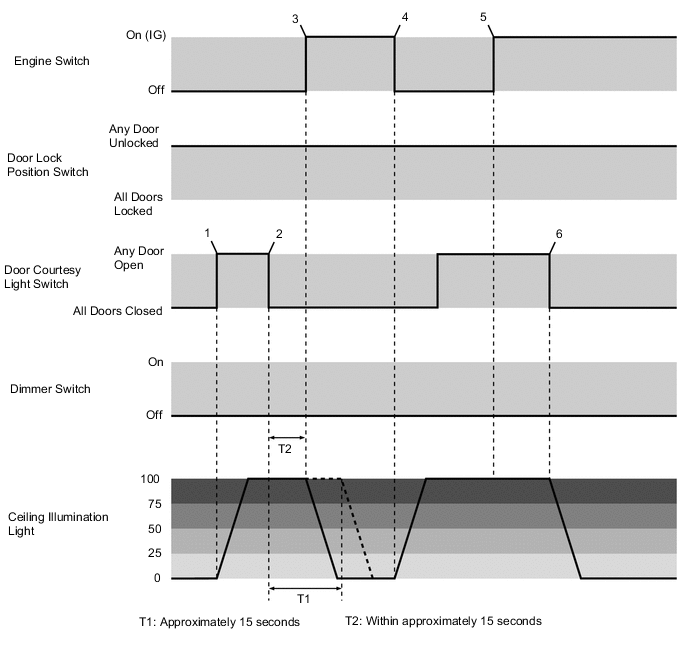
No. Vehicle Status Ceiling Illumination Light Status 1 Any door is opened. Illuminates (fades in)* 2 All of the doors are closed. Turns off after approximately 15 seconds (fades out) 3 After the operation described above in No. 2, the engine switch is turned from off to on (IG) within approximately 15 seconds. Turns off (fades out) 4 With the ceiling illumination light off, the engine switch is turned from on (IG) to off. Illuminates (fades in)* 5 With any door open, the engine switch is turned from off to on (IG). Remains illuminated 6 With the engine switch on (IG) and the ceiling illumination light illuminated, all the doors are closed. Turns off (fades out) Tech Tips
*: Illuminates at the previously stored dimmer level. Also, when the previously stored dimmer level is 0%, the light does not illuminate.
Figure 8. Ceiling Illumination Light Color Selection
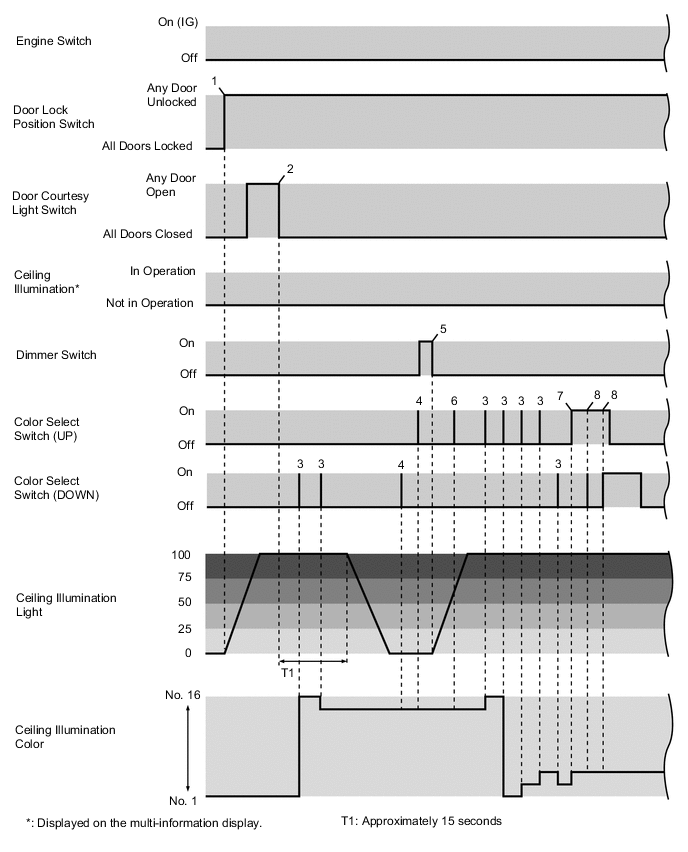
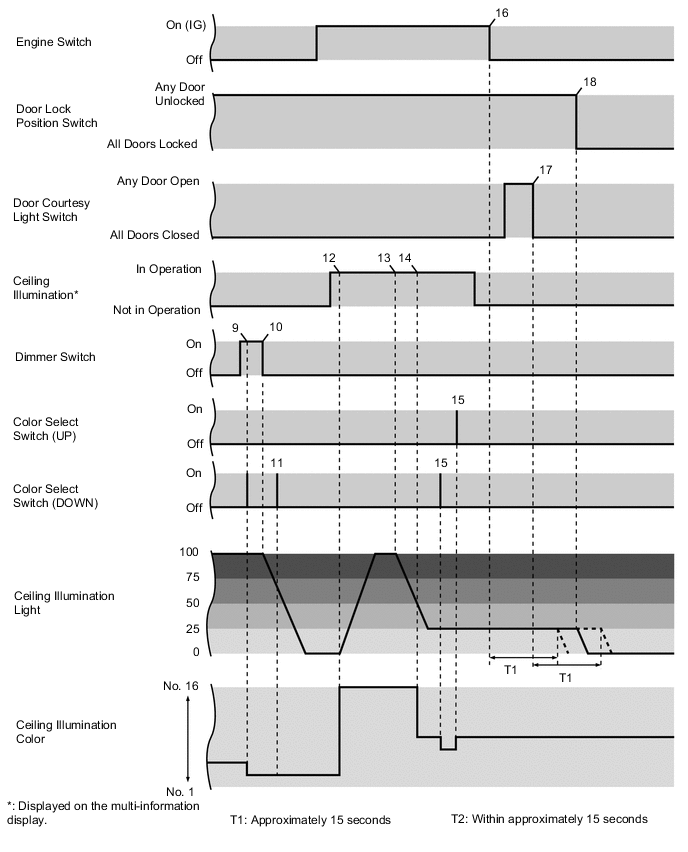
No. Vehicle Status Ceiling Illumination Light Status 1 With the engine switch off and all the doors closed, any door is unlocked. Illuminates (fades in)*1 2 After any door is opened, all the doors are closed. Turns off after approximately 15 seconds (fades out) 3 With the ceiling illumination light illuminated, up or down is pressed on the color select switch. Changes color*2 4 With the ceiling illumination light off, up or down is pressed on the color select switch. Does not change*3 5 With the ceiling illumination light off, the dimmer switch is briefly pressed. Illuminates (fades in)*4 6 After the operation described above in No. 5, up or down is pressed on the color select switch while the light is fading in. Continues illuminating (fading in) and color does not change*5 7 With the ceiling illumination light illuminated, up or down is pressed and continuously held on the color select switch. Changes color*2 8 With the color select switch stuck in the up or down position due to a malfunction, up or down is pressed.*6 Does not change 9 With the ceiling illumination light illuminated and the dimmer switch pressed, up or down is pressed on the color select switch. Changes color*2 10 With the ceiling illumination light illuminated, the dimmer switch is pressed and held. Turns off (fades out) 11 After the operation described above in No. 10, up or down is pressed on the color select switch while the light is fading out. Does not change*7 12 With the engine switch on (IG) and the ceiling illumination light off, color selection is performed by operating the combination meter assembly (in this example, color No. 16 is selected). Changes to the selected color or illuminates (fades in).*1, *8 13 With the ceiling illumination light illuminated, the dimmer level is changed using the combination meter assembly. Dims*9 14 After the operation described above in No. 13, color selection is performed using the combination meter assembly while the light is fading out (in this example, color No. 8 is selected). Changes color*10 15 With the combination meter assembly being operated, up or down is pressed on the color select switch. Changes color*2 16 With the ceiling illumination light illuminated, the engine switch is turned off. Turns off after approximately 15 seconds (fades out) 17 Within approximately 15 seconds after the operation described above in No. 16, any door is opened and then all the doors are closed. Turns off after approximately 15 seconds (fades out) 18 After the operation described above in No. 17, all the doors are locked within approximately 15 seconds. Turns off (fades out)*11 Tech Tips
*1: Illuminates at the previously stored dimmer level. Also, when the previously stored dimmer level is 0%, the light does not illuminate.
*2: When up is pressed on the color select switch, the color cycles from No. 1 → No. 2 ... No. 16 → No. 1. When down is pressed on the color select switch, the color cycles from No. 1 → No. 16 ... No. 2 → No. 1.
*3: When the ceiling illumination light is off, the color select switch does not operate.
*4: Illuminates at the previously stored dimmer level. Also, when the previously stored dimmer level is 0%, the light illuminates at 100%.
*5: While the ceiling illumination light is fading in, the color select switch does not operate.
*6: The color select switch does not operate when up and down is pressed simultaneously.
*7: While the ceiling illumination light is fading out, the color select switch does not operate.
*8: Color selection can be performed using the combination meter assembly to select the preferred color from No. 1 to No. 16. Furthermore, when color selection is performed from the combination meter assembly with the ceiling illumination light off, the ceiling illumination light illuminates (fades in) at the previously stored dimmer level.
*9: The dimmer level can be changed using the combination meter assembly to select a dimmer level of 100%, 75%, 50%, 25% or 0%.
*10: Color selection using the combination meter assembly can even be performed while the light is fading in or out.
*11: After the light turns off, the selected color of the ceiling illumination light will be stored.
-
Battery Saving Control
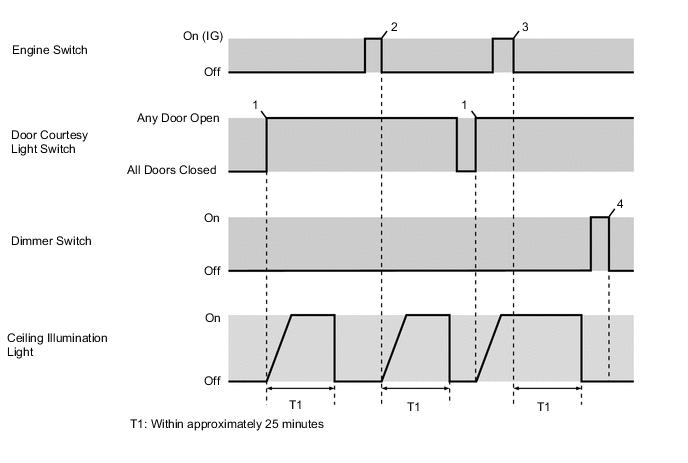
Battery Saving Control Chart No. Vehicle Status*1 Ceiling Illumination Light Status 1 After all the doors are closed with the engine switch off, any door is opened. Illuminates (fades in) → Turns off after approximately 25 minutes*2 (fades out) 2 After any door is opened with the engine switch on (IG), the engine switch is turned off. Illuminates (fades in) → Turns off after approximately 25 minutes*2 (fades out) 3 After the operation described above in No. 1, the engine switch is turned from on (IG) to off within approximately 25 minutes. Illuminates → Turns off after approximately 25 minutes*2 (fades out) 4 With the ceiling illumination light turned off due to battery saving control, the dimmer switch is briefly pressed. Remains off*3 Tech Tips
*1: Briefly pressing the dimmer switch means pressing and releasing within less than 0.8 seconds.
*2: The room light control relay cumulatively counts approximately 25 minutes depending on the vehicle condition. Therefore, battery saving control may not operate even after approximately 25 minutes have elapsed. Also, the lights may turn off before approximately 25 minutes have elapsed due to battery saving control performed by the main body ECU (multiplex network body ECU).
*3: While the ceiling illumination lights are turned off due to battery saving control, the ceiling illumination lights cannot be illuminated by operating the dimmer switch.
-
-
DIAGNOSIS
-
Each ECU can be accessed through multiplex communication lines by connecting the Global TechStream (GTS) to DLC3. As a result, items such as DTC output, Data Lists and Active Tests can be accessed. For details, refer to the Repair Manual.
-