METER / GAUGE SYSTEM
-
OUTLINE
-
An Optitron type combination meter assembly or Thin Film Transistor Liquid Crystal Display (TFT LCD) type combination meter assembly is provided depending on the model.
-
A multi-information display on which various kinds of information is displayed integrated into the combination meter assembly.
-
The combination meter assembly has a built-in meter ECU and buzzer.
-
On the Thin Film Transistor Liquid Crystal Display (TFT LCD) type combination meter assembly, an aluminum ring that is moved by a motor is provided, enabling 2 types of display.
Figure 1. Models with Optitron Meter
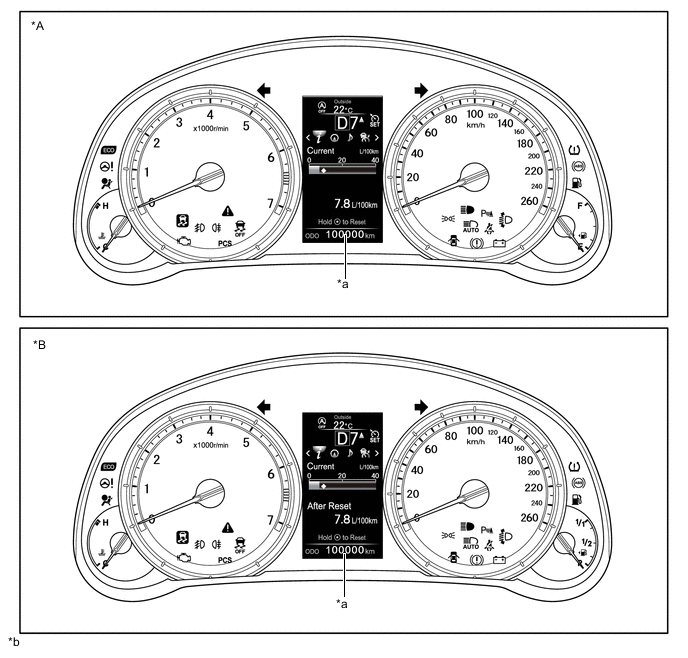
*A Except Models for Europe *B Models for Europe *a Multi-information Display *b The illustrations shown are examples only. Figure 2. Models with TFT LCD Meter
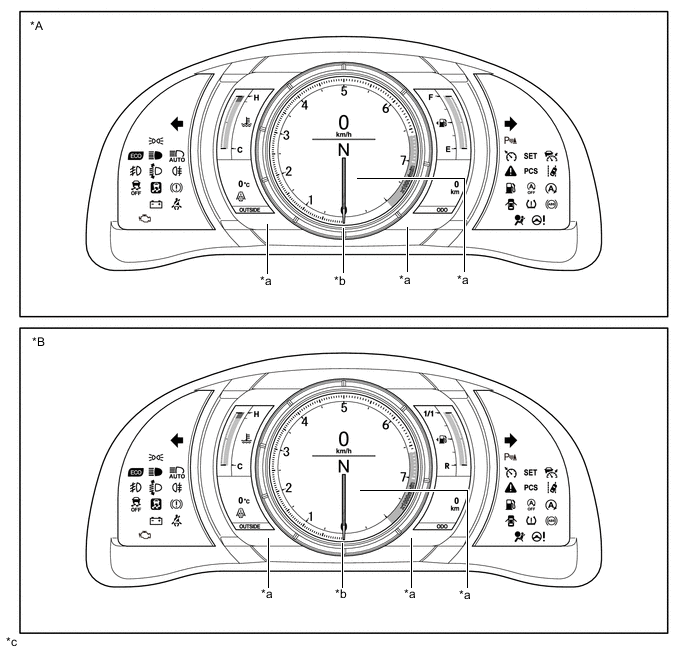
*A Except Models for Europe *B Models for Europe *a TFT LCD *b Movable Meter Ring *c The illustrations shown are examples only. - -
-
-
MAIN FEATURES
-
Combination Meter Assembly (Models with Optitron Meter)
-
Opening/Ending Ceremony
-
An opening/ending ceremony which allows for anticipation of a pleasant drive is used. The ceremony operates as follows:
-
When the engine switch is turned on (IG), the needles of the speedometer, tachometer, engine coolant temperature gauge and fuel gauge illuminate.
-
Then, the gauges and panels of the speedometer, tachometer, engine coolant temperature gauge, fuel gauge and the multi-information display illuminate.
-
When the engine switch is turned off, the panels of the speedometer, tachometer, engine coolant temperature gauge, fuel gauge and the multi-information display fade out.
-
Then, the needles of the speedometer, tachometer, engine coolant temperature gauge and fuel gauge fade out.
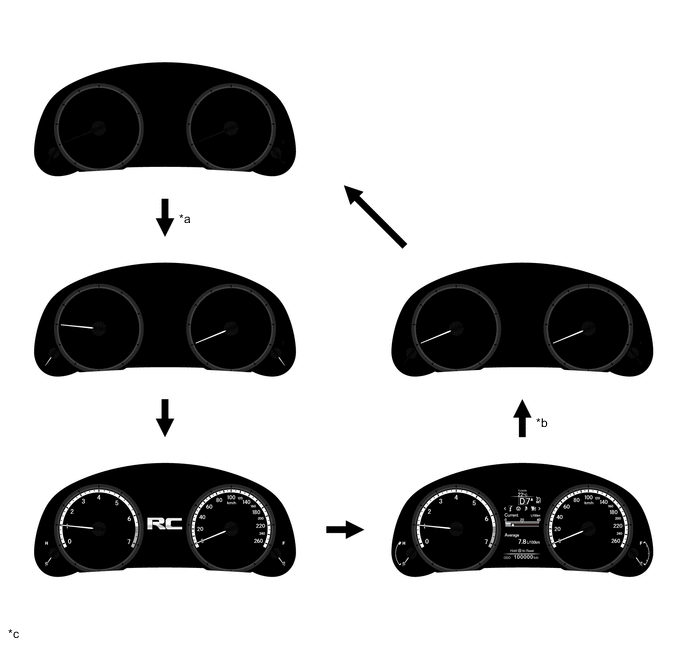
*a IG ON *b IG OFF *c The illustrations shown are examples only. - -
-
-
Multi-information Display
-
The multi-information display is located at the center of the combination meter assembly.
-
The multi-information display shows the following information.
Item Outline Shift Position Indicator The current shift position is displayed. Outside Temperature
-
The outside temperature is displayed.
-
When the outside temperature drops below 3°C (37°F), an ice warning light illuminates to warn the driver to drive with caution due to possibly icy road conditions. After the ice warning light flashes 10 times, the light stays on. When the temperature reaches 5°C (41°F), the light goes off.
Drive Mode
-
The currently selected drive mode is displayed:
-
ECO Mode
-
SPORT Mode
-
SNOW Mode*1
-
The panel color changes in accordance with driving mode:
-
ECO Mode: Blue
-
SPORT Mode: Red
Indicator
-
When the display conditions are met, the following indicators illuminate.
-
Cruise Control Indicator
-
Cruise Control Indicator (Vehicle-to-Vehicle Distance Control Mode)*2
-
Cruise SET Indicator
-
Lane Departure Alert Indicator*3
Information
-
The following information can be displayed on the multi-information display by switching between tabs.
-
Drive Information
-
Navigation Information*4
-
Audio Information
-
Dynamic Radar Cruise Control System Information*2
-
Lane Departure Alert System Information*3, *5
-
Stop and Start System Information*6
-
Message
-
Settings
-
The tab can be switched using the RIGHT/LEFT switch of the steering pad switch assembly.
Operation Guide
-
When the following systems are operated, the operation result is displayed.
-
Dynamic Radar Cruise Control Switch Operation Guide*2
Vehicle Power Source State
-
The vehicle power source state is displayed.
-
The smart indicator light is displayed on the multi-information display.
ODO/TRIP Meter
-
The odometer, trip meter A or trip meter B are displayed.
-
The item shown can be switched by pressing the ODO/TRIP switch.
Light Control Rheostat Meter panel luminance can be changed by using the rheostat switch. *1: Except models for G.C.C. countries
*2: Models with dynamic radar cruise control system
*3: Models with lane departure alert system
*4: Models with navigation system
*5: Models without dynamic radar cruise control system
*6: Models with Stop and Start System
-
-
The drive information shows the following information.
Item Outline Drive Information
-
The items selected on the setting screen can be displayed. 4 items can be selected among the following:
-
Current Fuel Consumption (Bar Display)/Average Fuel Consumption (Mark Display)
-
Total Average Fuel Consumption Between Reset Operations
-
Average Fuel Consumption After Engine Start-up
-
Average Fuel Consumption After Refueling
-
Total Average Vehicle Speed Between Reset Operations
-
Average Vehicle Speed After Engine Start-up
-
Cruising Range After Engine Start-up
-
Total Elapsed Time Between Reset Operations
-
Elapsed Time After Engine Start-up
-
Cruising Range
-
Blank
-
In addition to the above functions, the following items can be displayed.
-
ECO Driving Indicator Zone Display
-
Tire Pressure Indicator*
-
Gear Position Indicator
-
Blank
-
The item shown can be changed using the UP/DOWN switch of the steering pad switch assembly.
*: Models with tire inflation pressure display function
-
-
When navigation information is being displayed, current navigation information (turn-by-turn, straight guidance or direction meter) can be displayed.*
*: Models with navigation system
-
When audio information is being displayed, the audio system can be operated using the multi-information display.
-
-
-
Combination Meter Assembly (Models with TFT LCD Meter)
-
Opening/Ending Ceremony
-
When the engine switch is turned on (ACC), engine speed marks of the tachometer light up in an animated sequence and in coordination with this animated display the needles of the speedometer, shift position indicator and tachometer are illuminated.
-
After the engine switch is turned on (IG), the gauges, outside temperature gauge, odo/trip meter around the movable meter ring appear to emerge from the ring in an animated display.
-
As the engine starts up, all the gauges are once again turned off then the tachometer and its needle, speedometer and shift position indicator are illuminated. Next, the gauges, outside temperature gauge, odo/trip meter around the movable meter ring appear in an animated display.
-
When the engine switch is turned off, the speedometer and shift position indicator turn off. If the menu screen mode is selected, the movable meter ring returns to the center position then the speedometer and shift position indicator are turned off.
-
At the same time as the speedometer and shift position indicator turn off, the gauges, outside temperature gauge, odo/trip meter around the movable meter ring appear to hide themselves behind the ring in an animated display.
-
Next, the tachometer needle and tachometer are turned off in sequence.
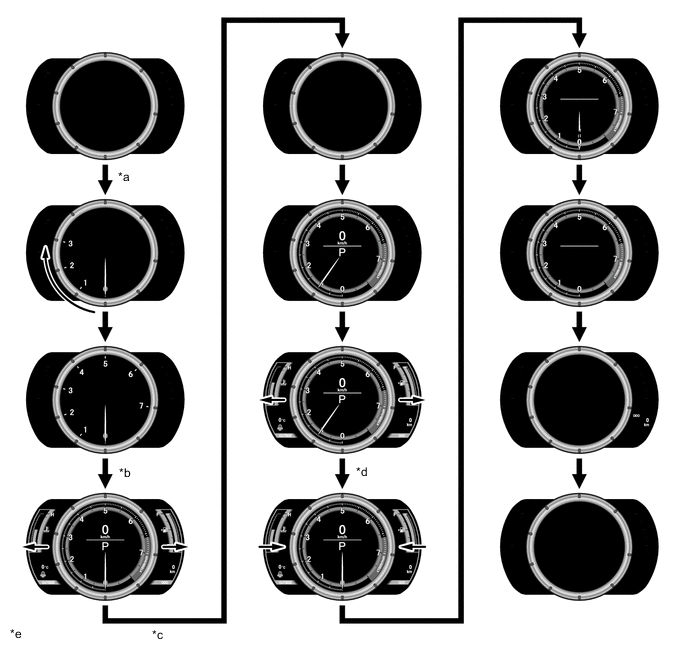
*a ACC ON *b IG ON *c Engine is started. *d IG OFF *e The illustrations shown are examples only. - -
-
-
Normal Mode/Menu Mode
-
The combination meter assembly has 2 display modes: normal mode and menu mode.
-
In normal mode, the movable meter ring is positioned at the center and the tachometer, speedometer, shift position indicator and multi-information display are displayed inside of the ring. In addition, the gauges, outside temperature gauge, odo/trip meter are displayed around the ring.
-
In menu mode, the movable meter ring moves with the display to the right and the enlarged multi-information display is displayed at the left.
-
Switching to menu mode is performed using the top switch of the steering pad switch assembly. Returning to normal mode is performed using the top switch again.
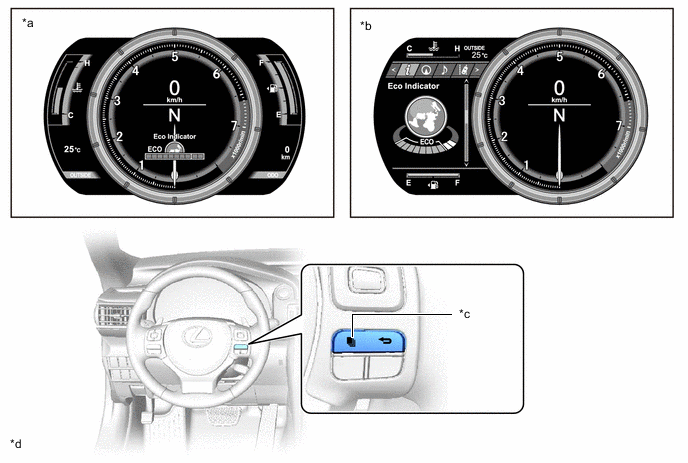
*a Normal Mode *b Menu Mode *c TOP Switch *d The illustrations shown are examples only.
-
-
Driving Mode
-
When SPORT S or SPORT S+ mode is selected as drive mode, the tachometer display is emphasized.
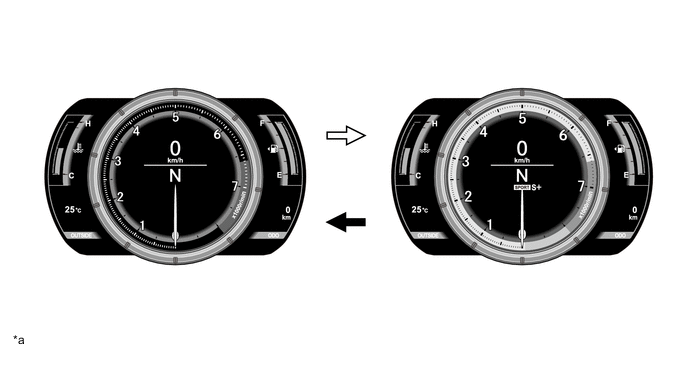
*a The illustrations shown are examples only. - - 
SPORT S, SPORT S+ MODE ON 
SPORT S, SPORT S+ MODE OFF
-
-
Vehicle Speed Indicator
-
The vehicle speed indicator, which informs the driver when a set speed is exceeded, is provided.
-
When the vehicle speed exceeds a set speed, a warning light is illuminated in yellow in the speed unit display area (except models for G.C.C. countries).
Tech Tips
The set speed can be changed using the setting function.
-
If the vehicle speed exceeds the predetermined speed*1, a warning light is illuminated in red*2/yellow*3 in the speed unit display area.
Tech Tips
*1: The predetermined vehicle speed varies according to the countries and regions. One of the following is set as a predetermined speed.
-
120 km/h: Destination packages for Taiwan and South Korea
-
120.5 +/- 3.5 km/h: Models for G.C.C. countries
-
200 km/h: Models for Europe and Australia
*2: Except models for G.C.C. countries
*3: Models for G.C.C. countries
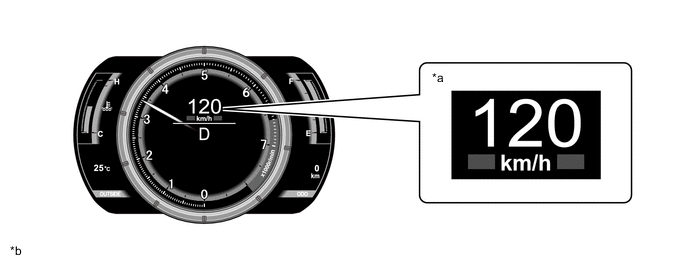
*a Vehicle speed indicator is operating *b The illustrations shown are examples only. -
-
-
Rev Indicator
-
When the engine speed exceeds a set level, the rev indicator (yellow ring) is illuminated in the tachometer.
Tech Tips
The set level can be changed using the setting function.
-
If the engine speed exceeds 6600 rpm, the rev indicator (red ring) is illuminated in the tachometer.
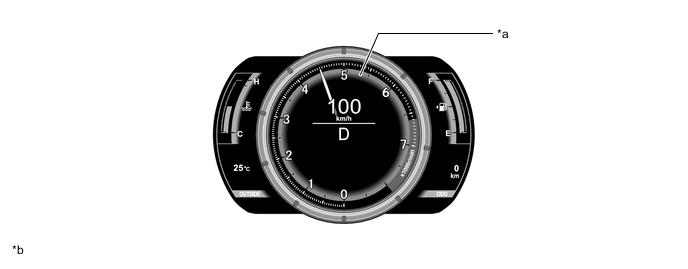
*a Rev Indicator *b The illustration shown is an example only.
-
-
Tachometer Peak Hold Display
-
The tachometer peak hold display, which displays the afterimage of the tachometer needle at the maximum engine speed, is provided.
-
If the engine speed is changed due to shift change operation, the afterimage of the maximum engine speed is displayed for 0.5 seconds.
-
This function operates when the engine speed is 5000 rpm or more.
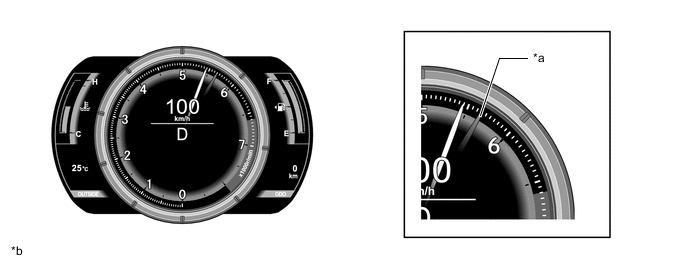
*a Tachometer Peak Hold Display *b The illustrations shown are examples only.
-
-
Multi-information Display
-
During normal mode, the multi-information display is displayed inside of the movable meter ring and, during menu mode, is displayed at the left side of the combination meter assembly.
-
The multi-information display shows the following information.
Normal Mode Item Outline Drive Information
-
The following items can be displayed. The 4 display items can be selected in the setting screen:
-
Current Fuel Consumption (Bar Display)/Average Fuel Consumption (Mark Display)
-
Total Average Fuel Consumption Between Reset Operations.
-
Average Fuel Consumption After Engine Start-up
-
Average Fuel Consumption After Refueling
-
Total Average Vehicle Speed Between Reset Operations
-
Average Vehicle Speed After Engine Start-up
-
Cruising Range After Engine Start-up
-
Total Elapsed Time Between Reset Operations
-
Elapsed Time After Engine Start-up
-
Cruising Range
-
Blank
-
In addition to the above functions, the following items can be displayed.
-
ECO Driving Indicator Zone Display
-
Tire Pressure Indicator*
-
Gear Position Indicator
-
Blank
-
The item shown can be changed using the UP/DOWN switch of the steering pad switch assembly.
*: Models with tire inflation pressure display function
Menu Mode Item Outline Information
-
The following information can be displayed on the multi-information display by switching between tabs.
-
Drive Information
-
Navigation Information*1
-
Audio Information
-
Dynamic Radar Cruise Control System Information*2
-
Lane Departure Alert System Information*3, *4
-
Stop and Start System Information*5
-
Message
-
Settings
-
The tab can be switched using the RIGHT/LEFT switch of the steering pad switch assembly.
*1: Models with navigation system
*2: Models with dynamic radar cruise control system
*3: Models with lane departure alert system
*4: Models without dynamic radar cruise control system
*5: Models with Stop and Start System
-
-
The drive information tab shows the following information.
Item Outline Drive Information
-
The following items can be displayed. The 4 display items can be selected in the setting screen:
-
Current Fuel Consumption (Bar Display)/Average Fuel Consumption (Mark Display)
-
Total Average Fuel Consumption Between Reset Operations
-
Average Fuel Consumption After Engine Start-up
-
Average Fuel Consumption After Refueling
-
Total Average Vehicle Speed Between Reset Operations
-
Average Vehicle Speed After Engine Start-up
-
Cruising Range After Engine Start-up
-
Total Elapsed Time Between Reset Operations
-
Elapsed Time After Engine Start-up
-
Cruising Range
-
Blank
-
In addition to the above functions, the following items can be displayed.
-
ECO Driving Indicator Zone Display
-
Boost Meter / Oil Pressure Gauge / Oil Temperature Gauge*1
-
Tire Pressure Indicator*2
-
Gear Position Indicator
-
Blank
-
The item shown can be changed using the UP/DOWN switch of the steering pad switch assembly.
*1: Models with 8AR-FTS Engine
*2: Models with tire inflation pressure display function
-
-
When navigation information is being displayed, current navigation information (turn-by-turn, straight guidance or direction meter) can be displayed.*
*: Models with navigation system
-
When audio information is being displayed, the audio system can be operated using the multi-information display.
-
-
-