AUDIO AND VISUAL SYSTEM
-
OUTLINE
-
Audio System
-
The following audio systems are available:
Audio System Audio Head Unit Multi-display Speaker Navigation ECU Lexus Display Audio System Radio Receiver Assembly 7-inch 6 Speakers - 10 Speakers - 10-speaker Surround Sound System 10.3-inch 10 Speakers ○*1 17-speaker Surround Sound System 10.3-inch 17 Speakers ○*1 Navigation System 10.3-inch 10 Speakers ○*2 17 Speakers ○*2 ○: Available
-: Not available
*1: Even though the navigation ECU is installed, the navigation system function is not available as the ECU is only used to display the compass screen. (Destination packages for Israel, Cyprus, Caucasus and Central and South America)
*2: For the navigation system, enhanced navigation system functions are available by installing a navigation ECU.
-
-
Operation Device
-
The multi-display is provided at the same height as the combination meter assembly to minimize changes in the driver's line of sight and ensure visibility while driving.
-
Remote touch (remote operation controller assembly) has been adopted to ensure operability of the multi-display which is placed at a position which gives priority to the visibility of the driver.
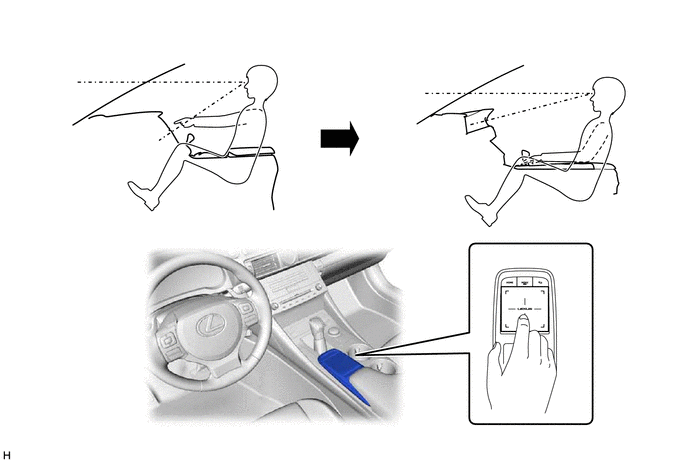
-
A remote touch with a capacitive type touchpad, which allows for intuitive screen operation using finger gestures such as a drag on the pad, is provided. A motor is built into the remote touch to generate vibrations, providing feedback to the user's hand. The vibration allows the user to easily recognize when the selected icons or buttons change, improving ease of operation while driving.
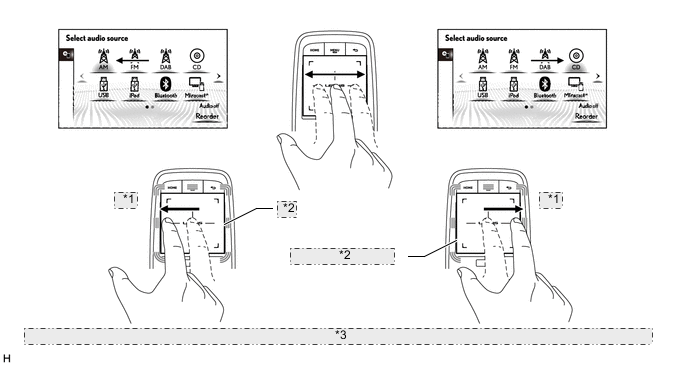
*1 Drag *2 Feedback Vibration *3 The illustrations shown are examples only. The illustrations may differ from the actual vehicle screens.
-
-
Audio Head Unit
-
In consideration of the unity with the instrument panel, a uniquely sized audio head unit is provided.
-
A Thin Film Transistor Liquid Crystal Display (TFT LCD) is used for the multi-display of the Lexus display audio system and navigation system, enabling operation of the audio screen, Bluetooth hands-free screen, vehicle information screen, etc. using the remote touch (remote operation controller assembly).
-
The audio source can be switched on the audio source selection screen. The arrangement of the audio sources displayed on the audio source screen can be changed according to the frequency of use.
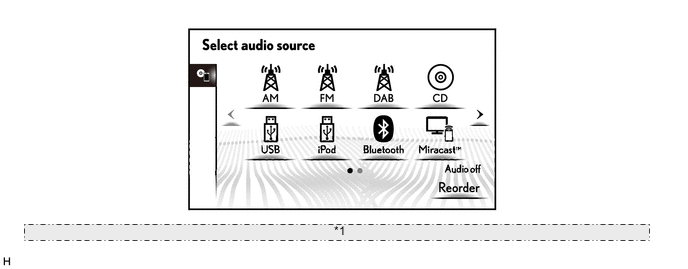
*1 The illustration shown is an example only. The illustration may differ from the actual vehicle screen. -
Discs containing MPEG audio layer-3 (MP3) files, Windows Media Audio (WMA) files and Advanced Audio Coding (AAC) files can be played.
-
Discs with the marks shown below can be played.
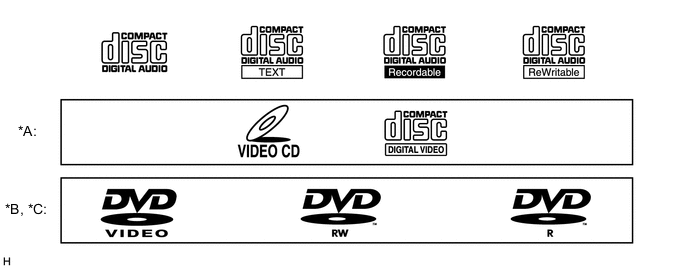
*A Destination Package for Southeast Asia *B Models for China and G.C.C. Countries and Destination Packages for Taiwan, Southeast Asia and Central and South America with Lexus Display Audio System *C Models with 10-speaker Surround Sound System, 17-speaker Surround Sound System or Navigation System - - -
The Miracast function is provided. This function enables the display of a Wi-Fi connected smartphone to be displayed on the multi-display. (Models with Miracast function)
-
A fuel consumption screen is provided in consideration of the environment.
-
-
Home Screen (Models with Lexus Display Audio System)
-
The home screen can display multiple information screens.
-
The screen can be divided into multiple display areas, and the audio screen, hands-free screen, vehicle information screen, etc. can be displayed in each desired area at the same time.
-
Displayed items are customizable, and the top screen of each function can be displayed by selecting the corresponding information screen.
Figure 1. Home Screen
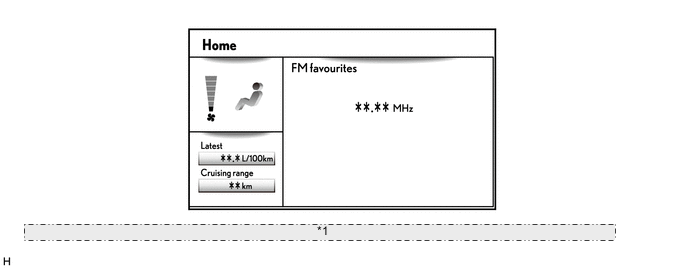
*1 The illustration shown is an example only. The illustration may differ from the actual vehicle screen.
-
-
Digital Audio Broadcast (DAB) (Models with Digital Audio Broadcast (DAB) Tuner)
-
Digital Audio Broadcast (DAB) reception is available. This mostly prevents broadcast interference, achieving clear reception with high quality sound.
-
The time shift operation function can be used to play back DAB programs at a later time.
-
Displayed items are customizable, and the top screen of each function can be displayed by selecting the corresponding information screen.
-
-
Digital TV (Models with Digital TV Tuner)
-
A digital terrestrial television broadcast tuner is integrated to receive 1seg broadcasts, enabling the user to view them in the vehicle.
Tech Tips
1seg broadcasting is a data broadcasting service. Each of digital terrestrial television broadcasting frequency bandwidth is divided into 13 segments. A single segment of the 13 is assigned for broadcasting to mobile communications terminals.
-
-
Quarter Window Glass Antenna Wire (Models with Digital Audio Broadcast (DAB) Tuner or Models with Digital TV Tuner)
-
The rear quarter window RH has a printed window glass antenna wire that receives Digital Audio Broadcast (DAB) signals*1 or 1 seg signals*2.
-
The Digital Audio Broadcast (DAB) window glass antenna wire on the rear quarter window and the Digital Audio Broadcast (DAB) window glass antenna wire on the rear window work together to create a diversity antenna that enables stable reception in circumstances where reception conditions vary greatly such as when the vehicle is moving.*1
Tech Tips
*1: Models with Digital Audio Broadcast (DAB) tuner
*2: Models with digital TV tuner
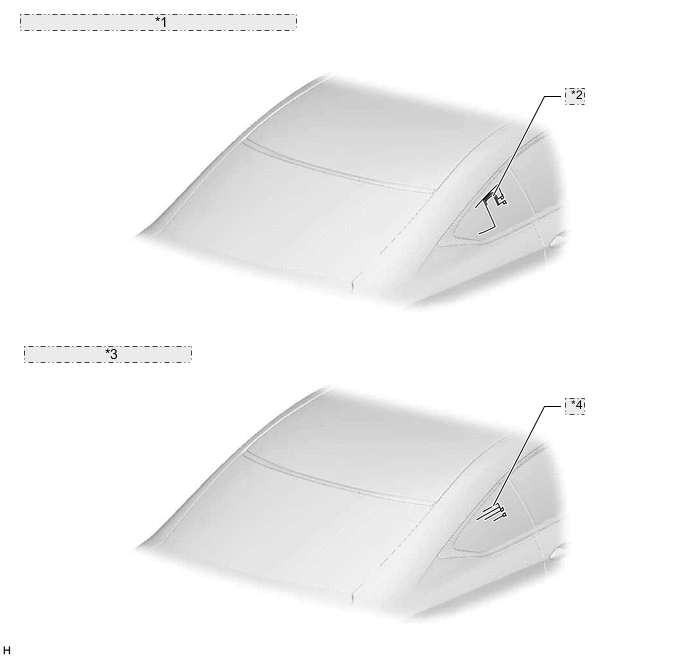
*1 Models with Digital Audio Broadcast (DAB) Tuner: *2 DAB Antenna *3 Models with Digital TV Tuner: *4 Digital TV Antenna
-
-
Lexus Enform Service (Models for Oceania)
-
Lexus Enform service is supported. The Lexus Enform service displays distributed information from content providers through compatible apps installed to a smartphone on the screen of the multi-display, and sends audio content, etc. to the speakers of the vehicle.
-
-
USB Port
-
A USB port is provided that enables operation of a USB memory device, portable audio player (USB type), iPhone, iPod classic, iPod, iPod nano or iPod touch.
-
The USB audio system supports high-resolution sound sources and high-resolution sound sources on USB devices can be played. (A high-resolution sound source has a higher bit rate than a music CD, enabling sound quality closer to that of the original recording. The definition of high-resolution is based on the standards of groups such as the CTA (Consumer Technology Association).)
-
The USB system enables the playback of video data stored on a USB memory device.
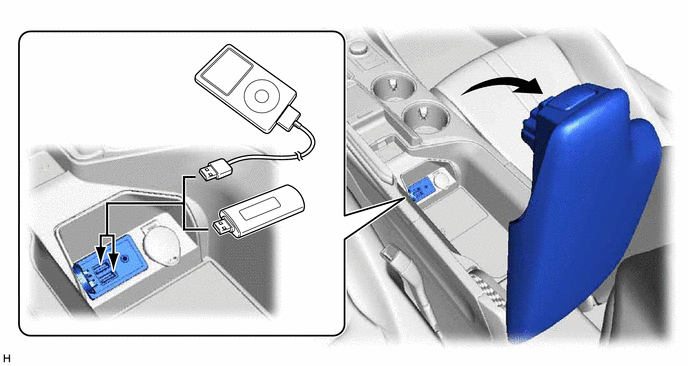
Tech Tips
-
Even if 3 or more USB devices are connected using a USB hub, only the first 2 connected USB devices will be recognized.
-
iPhone, iPod, iPod classic, iPod nano and iPod touch are trademarks of Apple Inc., registered in the U.S. and other countries.
-
The following iPod, iPod nano, iPod classic, iPod touch and iPhone devices can be used with this system.
-
Made for
-
iPod touch (6th generation)
-
iPod touch (5th generation)
-
iPod touch (4th generation)*
-
iPod touch (3rd generation)*
-
iPod touch (2nd generation)*
-
iPod touch (1st generation)*
-
iPod nano (7th generation)
-
iPod nano (6th generation)*
-
iPod nano (5th generation)*
-
iPod nano (4th generation)*
-
iPhone 6S Plus
-
iPhone 6S
-
iPhone SE
-
iPhone 6 Plus
-
iPhone 6
-
iPhone 5S
-
iPhone 5C
-
iPhone 5
-
iPhone 4S
-
iPhone 4*
-
iPhone 3GS*
-
iPhone 3G*
-
*: Models for Europe with Lexus display audio system
-
This system only supports audio playback.
-
Depending on differences between models, software versions, etc., some models may be incompatible with this system.
-
Made for
-
iPod Classic*
-
iPod with Video*
-
iPod nano (3rd generation)*
-
iPod nano (2nd generation)*
-
iPod nano (1st generation)*
-
iPhone*
-
*: Models for Europe with Lexus display audio system
-
USB memory devices that meet the following specifications are supported:
USB Communication Formats USB 2.0, High Speed (480 Mbps) File System FAT 16/32 Correspondence Class Mass Storage Class File Format MP3/WMA/AAC High-resolution Sound Source File Format WAV (LPCM)/FLAC/ALAC/OGG Vorbis -
Video data, which meets the following specifications, is supported:
File Format MPEG-4/AVI Container/Windows Media Video/RealMedia* Corresponding Screen Size MAX 1920 x 1080 Corresponding Frame Rate MAX 60i/30p *: Models for China
-
-
-
Bluetooth Audio System
-
The Bluetooth audio system enables users to enjoy music stored on a portable audio player from the vehicle speakers via Bluetooth communication.
-
The Bluetooth specifications and profiles required for operation are as follows:
Specification/Profile Version Requirements Recommendations Bluetooth Specification Version 2.0 Version 4.1 + EDR Profile Advanced Audio Distribution Profile (A2DP) Version 1.0 Version 1.3 Audio/Video Remote Control Profile (AVRCP) Version 1.0 Version 1.6 Tech Tips
-
When multiple Bluetooth-compatible devices are registered, the user can select different devices for the Bluetooth audio system and Bluetooth hands-free system.
-
The connection history of Bluetooth devices is stored in the internal memory of the audio head unit. The stored data can be exported to a USB memory device as a connection history file, which can be checked using the Global TechStream (GTS).
-
-
-
Bluetooth Hands-free System
-
The Bluetooth hands-free system allows the user to make or receive a call without taking their hands off the steering wheel when the system is linked with a Bluetooth-compatible cellular phone.
-
The Bluetooth specifications and profiles required for operation are as follows:
Specification/Profile Version Requirements Recommendations Bluetooth Specification Version 2.0 Version 4.1 + EDR Profile Hands Free Profile (HFP) Version 1.0 Version 1.7 Object Push Profile (OPP) Version 1.1 Version 1.2 Phone Book Access Profile (PBAP) Version 1.0 Version 1.2 Message Access Profile (MAP)*1 - Version 1.2 Personal Area Network Profile (PAN)*2 - Version 1.0 Serial Port Profile (SPP) - Version 1.2 Dial-up Networking Profile (DUN)*3 - Version 1.2 *1: Models for Europe and Oceania and destination packages for Israel, Cyprus, Caucasus and South Africa
*2: Models for Europe and destination packages for Israel, Cyprus and Caucasus
*3: Models for China
Tech Tips
-
The operation of the interrupt call function of the Bluetooth hands-free system may vary with the Bluetooth phone or the telephone company that is used.

"Bluetooth" is a trademark owned by Bluetooth SIG, Inc. -
Some profiles described above may not be supported by the system depending on the audio head unit equipped.
-
If the specification of the connected Bluetooth phone is lower than the recommended or does not support the functions required, the available functions may be limited.
-
If a Bluetooth-compatible cellular phone does not support the Hands Free Profile (HFP), the cellular phone cannot be registered or data transmission such as Object Push Profile (OPP) or Phone Book Access Profile (PBAP) may not be available.
-
When multiple Bluetooth-compatible devices are registered, the user can select different devices for the Bluetooth audio system and Bluetooth hands-free system.
-
The connection history of Bluetooth devices is stored in the internal memory of the audio head unit. The stored data can be exported to a USB memory device as a connection history file, which can be checked using the Global TechStream (GTS).
-
-
When a Bluetooth phone is connected to the audio head unit, e-mails and Short Message Service (SMS) messages received on the phone can be displayed or read out. In addition, it is possible to reply to the received e-mails and Short Message Service (SMS) messages. (Messages may not be displayed depending on the message service or profile that the connected Bluetooth phone supports.) (Models for Europe and Oceania and destination packages for Israel, Cyprus, Caucasus and South Africa)
-
-
Status Display
-
An area to display the status bar in which the connection status of a Bluetooth device, etc. can be checked has been provided.
-
The user can check the current time, Bluetooth connection status, signal strength, remaining battery level of a cellular phone, etc. using the status bar display.
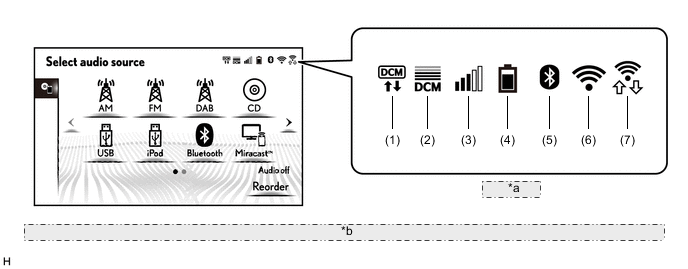
*a Status Bar *b The illustrations shown are examples only. The illustrations may differ from the actual vehicle screens. Item Outline (1) G-BOOK network communication device*1 Displays the communication device communicating with the G-BOOK network. (2) Telematics transceiver (data communication module) signal strength*1 Displays the signal strength of the telematics transceiver (data communication module). (3) Cellular phone signal strength*2 Displays the signal strength of the cellular phone connected by Bluetooth. (4) Cellular phone battery level*2 Displays the battery level of the cellular phone connected by Bluetooth. (5) Bluetooth connection status Displays the Bluetooth connection status between the audio head unit and cellular phone. (6) Wi-Fi connection status*3 Displays the Wi-Fi connection status between the audio head unit and a tethering-compatible cellular phone or mobile Wi-Fi router. (7) Wi-Fi P2P mode status*4 Displays the Wi-Fi connection status between the audio head unit and smartphone when using Wi-Fi P2P mode (Miracast). *1: Models for China
*2: May not be displayed depending on the Bluetooth specifications and profiles of the cellular phone.
*3: Models with Wi-Fi communication function
*4: Models with Miracast function
-
-
Wi-Fi Communication (Models with Wi-Fi Communication Function)
-
A wireless LAN antenna is integrated into the radio receiver assembly, enabling Wi-Fi communication to wireless clients (User's tethering-compatible cellular phone or mobile Wi-Fi router).
Tech Tips
-
The Wi-Fi communication function is a best-effort type function.
-
Wi-Fi is a registered trademark of Wi-Fi Alliance.
-
Wi-Fi communication may be unavailable depending the vehicle conditions, condition of the surroundings such as radio wave conditions around the radio receiver assembly, the distance to the device or device conditions. In addition, during Wi-Fi communication, communication may be cut or become unstable due to the conditions described above.
-
The connection history of the audio head unit and wireless clients are stored in the internal memory of the audio head unit. The stored data can be exported to a USB memory device as a connection history file, which can be checked using the Global TechStream (GTS).
Figure 2. Wi-Fi Communication Image
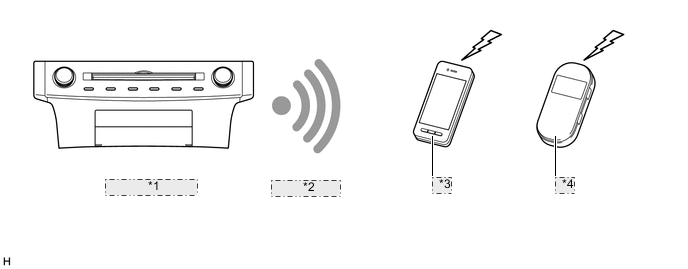
*1 Radio Receiver Assembly *2 Connection Via Wi-Fi *3 Cellular Phone *4 Mobile Wi-Fi Router -
-
-
Voice Recognition System (Except Destination Packages for G.C.C. Countries, Taiwan, Central and South America and Brazil)
-
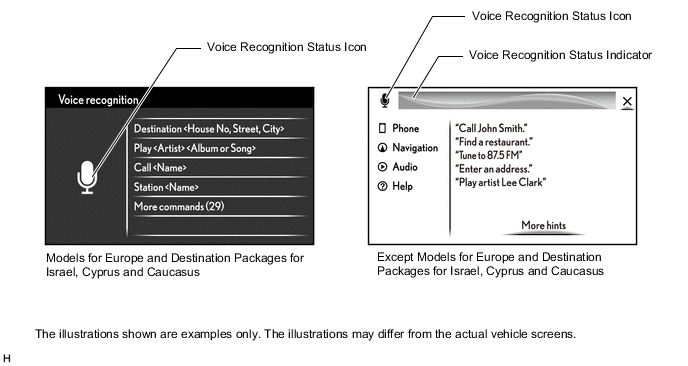
When the voice switch of the steering pad is pushed, the voice recognition system starts and the voice recognition menu screen is displayed on the multi-display.
-
Voice recognition operation sample commands are displayed to assist users who are not familiar with the voice recognition system. Also, an icon which displays a voice recognition status such as when to speak is provided. (Models for Europe and destination packages for Israel, Cyprus and Caucasus)
-
By selecting "More commands" located at the bottom of the menu screen, categories of functions that can be operated using voice commands are displayed. (Models for Europe and destination packages for Israel, Cyprus and Caucasus)
-
Systems and commands which can be operated by voice recognition are displayed to assist users who are unfamiliar with the voice recognition system. Also, an icon and indicator which displays a voice recognition status such as when to speak or the result of the voice recognition is provided. (Except models for Europe and destination packages for Israel, Cyprus and Caucasus)
-
By selecting a system from the menu screen and speaking according to the sample command, the user can operate the system with minimal words. (Except models for Europe and destination packages for Israel, Cyprus and Caucasus)
-
More sample commands can be displayed by selecting "More hints" on the bottom of the menu screen. (Except models for Europe and destination packages for Israel, Cyprus, Caucasus and South Korea and destination package for Southeast Asia with Lexus display audio system)
-
With the Grapheme to Phoneme (G2P) function which converts text to phoneme, an audio file recorded in a USB memory device, Apple product, etc. can be searched for using the voice recognition function by speaking the artist name, album name, title, playlist name, genre, etc. (Except destination package for South Korea and destination package for Southeast Asia with Lexus display audio system)
-
By transmitting words spoken by the user via the telematics transceiver (data communication module) and processing them using the voice recognition sever at the G-BOOK center, the accuracy of recognition by the voice recognition system is increased. When communication with the G-BOOK center is not possible, such as when in a poor reception area, words spoken by the user are processed by the in-vehicle device. (Models for China with navigation system)
Tech Tips
The system operates as commanded by the user even when a command not shown on the current screen is spoken.
Figure 3. Voice Recognition Screen
-
The voice recognition status icon changes to indicate whether the voice recognition system is ready to accept voice commands, or whether a voice command recognition is in progress, etc.
Status Icon Outline 
Voice recognition cannot be performed as the voice recognition system is providing voice guidance, displaying voice recognition results, etc. 
Voice recognition can be performed. 
Voice command recognition is in progress by the in-vehicle device.*1 
Voice command recognition is in progress by the in-vehicle device.*2 
Voice command recognition is in progress by the voice recognition server at the data center.*3 *1: Models for Europe and destination packages for Israel, Cyprus and Caucasus
*2: Except models for Europe and destination packages for Israel, Cyprus and Caucasus
*3: Models for China with navigation system
-
-
Mobile Assistant
-
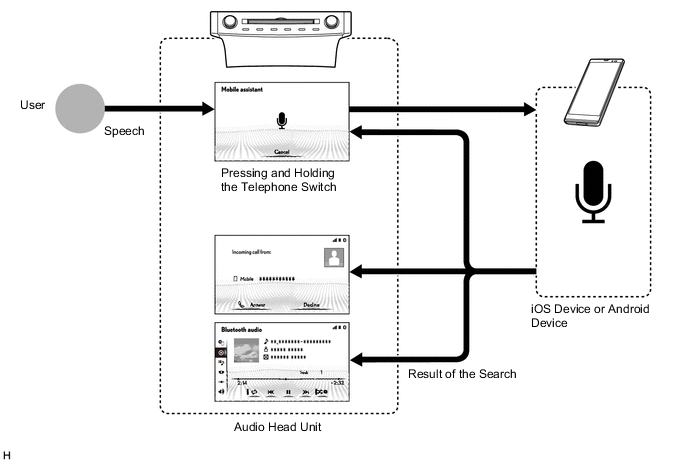
The Mobile Assistant function which assists voice input is available when an iOS smartphone or Android smartphone is connected via Bluetooth communication.
-
By pressing and holding the telephone switch of the steering pad, the Mobile Assistant screen is displayed on the multi-display and the user can ask questions without taking their eyes off the road. To minimize distraction, the iOS smartphone or Android smartphone screen will not light up.
-
Mobile Assistant feature, users can ask Mobile Assistant to call contacts, select and play music, hear and compose text messages, use Maps and get directions, read notifications, find calendar information, add reminders, and more.
-
The system responds with search results screen display and synthesized voice.
-
When the Mobile Assistant function is used to call a contact or listen to music stored on the user's smartphone, the system will automatically transition to the phone call or audio screen.
Tech Tips
-
The available features and functions may vary based on the iOS/Android version installed on the connected smartphone.
-
While a phone call is active, Mobile Assistant function cannot be used.
Figure 4. Mobile Assistant Image
-
-
-
Hand-writing Input Function (Models for Europe and China and Destination Packages for Israel, Cyprus and Caucasus)
-
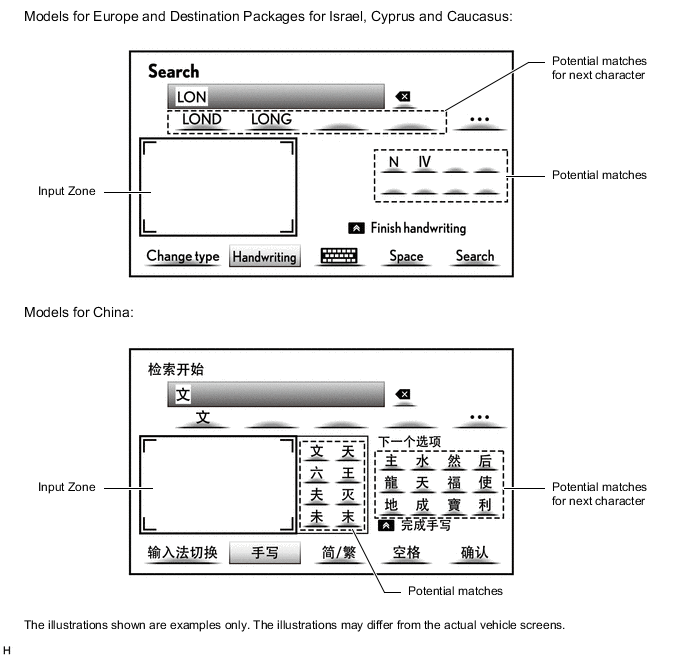
Characters input into the system by hand using the touchpad of the remote touch (remote operation controller assembly) can be displayed in the input zone of the multi-display. Furthermore, when the beginnings of a character is displayed in the input zone, the character prediction function provides potential matches.
Figure 5. Hand-writing Input Screen
-
-
App Suite Service (Models with App Suite Service)
-
The service is not available in some countries or areas.
Tech Tips
For details (service available countries list, operation, setup, etc.), refer to http://www.lexusconnect.com/tsl.
-
-
Automatic Sound Levelizer (ASL)
-
The Automatic Sound Levelizer (ASL) function automatically adjusts the audio system volume level in order to compensate for increased vehicle noise (vehicle noise tends to increase as vehicle speed increases).
-
Vehicle speed signals are received from the combination meter assembly and used for ASL control.
-
-
Valet Mode (Models with Valet Mode Function)
-
In valet mode, the screen can be locked with a 4-digit password for when using valet parking to prevent personal information registered to the head unit, such as a home address or phone number, from being seen.
-
-
Multi-information Display
-
Audio source modes, radio stations, audio tracks, etc. can be displayed on the multi-information display in the combination meter assembly.
-
Switching the audio source mode, selecting radio stations or audio tracks, etc. can be performed by operating the multi-information display on the combination meter assembly.
-
When a Bluetooth-compatible cellular phone is connected to the system, history or favorite is listed on the multi-information display and the user can make a call to a contact on the list.
-
When a cellular phone connected to the system via Bluetooth communication receives a phone call, the call information is displayed on the multi-information display in the combination meter assembly. Operating the multi-information display while the call information is displayed enables the user to answer the phone call.
-
When the voice switch of the steering pad is pushed, the voice recognition screen is displayed on the multi-information display as an interrupt display and the voice recognition mode status is displayed with a microphone icon. (Models with voice recognition system)
-
-
Class D Amplifier (Except Models with Lexus Display Audio System (with 6-speaker Type))
-
The amplifier controls the power supplied to the amplifier circuit in the most efficient way according to the received audio signals.
-
The power consumption and heat generation of the Class D amplifier is small, minimizing the size of the heatsink and related parts. This realizes a compact and lightweight amplifier.
-
-
Clari-Fi Music Restoration Technology (Models with Navigation System (with 17-speaker Type))
-
The amplifier utilizes Clari-Fi technology.
-
Files such as an MP3 or AAC have lost the audio details of the original music source during the file compression process. The Clari-Fi technology is used to restore the lost audio details and optimize data.
-
During playback of a compressed music file, the Clari-Fi technology improves the frequency characteristics, dynamic range, low frequency sounds, etc. of the music file in real time, recreating the wide soundstage of the original music source.
-
-
Steering Pad Switch
-
Switches that the driver often uses are provided on the steering wheel for convenience.
-
-
-
PRECAUTION
-
Make sure to observe the following points when using the remote touch (remote operation controller assembly):
-
Touch operation
-
Use the pad of your finger.
-
When moving the pointer or cursor only use one finger. Two or more fingers cannot be used for moving the pointer or cursor.
-
A pen or stylus pen cannot be used.
-
When operating the touchpad with a finger, do not contact the touchpad with another finger.
-
Do not apply excessive force or use a sharp object when operating the touchpad.
-
If a finger is not lifted off the touchpad in between consecutive operations, the consecutive operation may not be recognized. In this case, temporarily lift the finger off the touchpad in between consecutive operations.
-
-
In the following situations, a touchpad operation may not be correctly recognized:
-
The touchpad is being operated when wearing gloves.
-
The touchpad is being operated with a wet finger.
-
A film or coating has been applied to the surface of the touchpad.
-
There is foreign matter or water on the touchpad.
-
The vehicle is near a source of radio waves or noise such as a television tower, power plant, gasoline station, broadcasting station, large display or airport.
-
A wireless device or device that outputs radio waves is near the touchpad.
-
The surrounding area is -20°C (-4°F) or less.
-
A metallic object such as that listed below is contacting the touchpad:
-
A coin
-
A key (vehicle, house, etc.)
-
A metallic purse or wallet, etc.
-
Foil laminated paper or card
-
Foil laminated packaging such as a cigarette box
-
Heating Pad
-
Media such as a CD or DVD, or a USB cable or similar
-
If the engine switch is turned on (ACC) or on (IG) when any of the following conditions are met, it may not be possible to operate the touchpad. In this case, after eliminating the cause, wait for 30 seconds or turn the engine switch off and then on (ACC) or on (IG) to return the system to normal.
-
When a finger is contacting the touchpad.
-
When there is a finger near the touchpad.
-
When there is foreign matter on the touchpad.
-
When the touchpad is wet.
-
-
Other
-
The touchpad may not operate correctly when dirty. Make sure to frequently clean the touchpad. Make sure that the engine switch is off when cleaning the touchpad.
-
Although the remote touch (remote operation controller assembly) has a construction which resists the ingress of water and other liquids, excessive amounts of liquid may result in a malfunction.
-
If a liquid such as coffee or a sweet beverage is spilt on the remote touch (remote operation controller assembly), immediately wipe it off. If a liquid containing sugar seeps into the crevices of the touchpad, a malfunction may occur as the liquid dries.
-
-
-
-
SPECIFICATION
-
Audio System
LHD Models Design Specification Destination 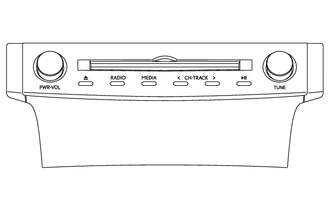
-
Display Language Supported: English, Spanish, Portuguese, Czech, Danish, Dutch, Finnish, Flemish, French, German, Greek, Italian, Norwegian, Polish, Russian, Swedish, Turkish, Hebrew, Hungarian, Romanian, Slovak and Ukrainian
-
AM/FM Tuner
-
Digital Audio Broadcast (DAB) Tuner (Models with Digital Audio Broadcast (DAB) Tuner)
-
Automatic Sound Levelizer (ASL)
-
CD Player: Compatible with MP3, Windows Media Audio (WMA) and Advanced Audio Coding (AAC) files
-
CD-TEXT Display Function
-
Voice Recognition System
-
Bluetooth Audio System
-
Bluetooth Hands-free System
-
Portable Audio Player (USB type) Interface
-
iPod/iPhone Interface
-
USB Memory Device Interface
-
USB Video
-
High-resolution Sound Source Compatible (USB audio system)
-
Voice Recognition Search (USB audio system)
-
Mobile Assistant
-
Stereo Jack Adapter
-
Miracast Function
-
Hand-writing Input Function
-
Valet Mode
-
Customizable vehicle settings can be changed
-
6-speaker System
-
Unit: Pioneer
-
Multi-display Size: 7-inch
-
Multi-display: Panasonic
Lexus Display Audio System:
Europe
-
Display Language Supported: English, Simplified Chinese and Traditional Chinese
-
AM/FM Tuner
-
Real-time Traffic Information of China (RTIC)
-
Digital Sound Processor (DSP)
-
Automatic Sound Levelizer (ASL)
-
CD Player: Compatible with MP3, Windows Media Audio (WMA) and Advanced Audio Coding (AAC) files
-
CD-TEXT Display Function
-
Voice Recognition System (Utilization of the voice recognition server is possible)
-
Bluetooth Audio System
-
Bluetooth Hands-free System
-
Portable Audio Player (USB type) Interface
-
iPod/iPhone Interface
-
USB Memory Device Interface
-
USB Video
-
High-resolution Sound Source Compatible (USB audio system)
-
Voice Recognition Search (USB audio system)
-
Mobile Assistant
-
Stereo Jack Adapter
-
Miracast Function
-
Wi-Fi Communication Function
-
Hand-writing Input Function
-
Customizable vehicle settings can be changed
-
10-speaker System
-
Unit: Pioneer
-
Stereo Amplifier: Pioneer
-
Multi-display Size: 7-inch
-
Multi-display: Panasonic
Lexus Display Audio System:
China
-
Display Language Supported: English and Arabic
-
AM/FM Tuner
-
Digital Sound Processor (DSP)
-
Automatic Sound Levelizer (ASL)
-
CD/DVD Player: Compatible with MP3, Windows Media Audio (WMA) and Advanced Audio Coding (AAC) files
-
CD-TEXT Display Function
-
Bluetooth Audio System
-
Bluetooth Hands-free System
-
Portable Audio Player (USB type) Interface
-
iPod/iPhone Interface
-
USB Memory Device Interface
-
USB Video
-
High-resolution Sound Source Compatible (USB audio system)
-
Mobile Assistant
-
Stereo Jack Adapter
-
Miracast Function
-
Wi-Fi Communication Function
-
Customizable vehicle settings can be changed
-
10-speaker System
-
Unit: Pioneer
-
Stereo Amplifier: Pioneer
-
Multi-display Size: 7-inch
-
Multi-display: Panasonic
Lexus Display Audio System:
G.C.C. Countries
-
Display Language Supported: Taiwanese Mandarin
-
AM/FM Tuner
-
Digital Sound Processor (DSP)
-
Automatic Sound Levelizer (ASL)
-
CD/DVD Player: Compatible with MP3, Windows Media Audio (WMA) and Advanced Audio Coding (AAC) files
-
CD-TEXT Display Function
-
Bluetooth Audio System
-
Bluetooth Hands-free System
-
Portable Audio Player (USB type) Interface
-
iPod/iPhone Interface
-
USB Memory Device Interface
-
USB Video
-
High-resolution Sound Source Compatible (USB audio system)
-
Mobile Assistant
-
Stereo Jack Adapter
-
Miracast Function
-
Wi-Fi Communication Function
-
Customizable vehicle settings can be changed
-
10-speaker System
-
Unit: Pioneer
-
Stereo Amplifier: Pioneer
-
Multi-display Size: 7-inch
-
Multi-display: Panasonic
Lexus Display Audio System:
Taiwan
-
Display Language Supported: English, Thai, Indonesian, Vietnamese and Malay
-
AM/FM Tuner
-
Digital Sound Processor (DSP)
-
Automatic Sound Levelizer (ASL)
-
CD/DVD Player: Compatible with MP3, Windows Media Audio (WMA) and Advanced Audio Coding (AAC) files
-
CD-TEXT Display Function
-
Video-CD (VCD) Display Function
-
Voice Recognition System
-
Bluetooth Audio System
-
Bluetooth Hands-free System
-
Portable Audio Player (USB type) Interface
-
iPod/iPhone Interface
-
USB Memory Device Interface
-
USB Video
-
High-resolution Sound Source Compatible (USB audio system)
-
Voice Recognition Search (USB audio system)
-
Mobile Assistant
-
Stereo Jack Adapter
-
Miracast Function
-
Wi-Fi Communication Function
-
Customizable vehicle settings can be changed
-
10-speaker System
-
Unit: Pioneer
-
Stereo Amplifier: Pioneer
-
Multi-display Size: 7-inch
-
Multi-display: Panasonic
Lexus Display Audio System:
Southeast Asia
-
Display Language Supported: English, Spanish and Portuguese
-
AM/FM Tuner
-
Digital Sound Processor (DSP)
-
Automatic Sound Levelizer (ASL)
-
CD/DVD Player: Compatible with MP3, Windows Media Audio (WMA) and Advanced Audio Coding (AAC) files
-
CD-TEXT Display Function
-
Bluetooth Audio System
-
Bluetooth Hands-free System
-
Portable Audio Player (USB type) Interface
-
iPod/iPhone Interface
-
USB Memory Device Interface
-
USB Video
-
High-resolution Sound Source Compatible (USB audio system)
-
Mobile Assistant
-
Stereo Jack Adapter
-
Miracast Function
-
Wi-Fi Communication Function
-
Customizable vehicle settings can be changed
-
10-speaker System
-
Unit: Pioneer
-
Stereo Amplifier: Pioneer
-
Multi-display Size: 7-inch
-
Multi-display: Panasonic
Lexus Display Audio System:
Central and South America 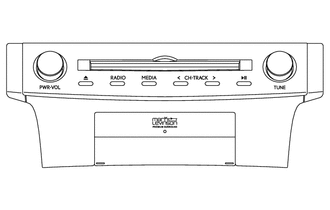
-
Display Language Supported: English, Spanish, Portuguese, Czech, Danish, Dutch, Finnish, Flemish, French, German, Greek, Italian, Norwegian, Polish, Russian, Swedish, Turkish, Hebrew, Hungarian, Romanian, Slovak and Ukrainian
-
AM/FM Tuner
-
Digital Audio Broadcast (DAB) Tuner (Only available in Digital Audio Broadcast (DAB) broadcast areas)
-
Digital Sound Processor (DSP)
-
Automatic Sound Levelizer (ASL)
-
Clari-Fi Music Restoration Technology
-
CD/DVD Player: Compatible with MP3, Windows Media Audio (WMA) and Advanced Audio Coding (AAC) files
-
CD-TEXT Display Function
-
Voice Recognition System
-
Bluetooth Audio System
-
Bluetooth Hands-free System
-
Portable Audio Player (USB type) Interface
-
iPod/iPhone Interface
-
USB Memory Device Interface
-
USB Video
-
High-resolution Sound Source Compatible (USB audio system)
-
Voice Recognition Search (USB audio system)
-
Mobile Assistant
-
Stereo Jack Adapter
-
Miracast Function
-
Wi-Fi Communication Function
-
Hand-writing Input Function
-
Valet Mode
-
Customizable vehicle settings can be changed
-
17-speaker System
-
Unit: Panasonic
-
Navigation ECU: Harman/Becker Automotive Systems (Navigation function cannot be used.)
-
Stereo Amplifier: Mark Levinson
-
Multi-display Size: 10.3-inch
-
Multi-display: Denso
17-speaker Surround Sound System:
Israel and Caucasus 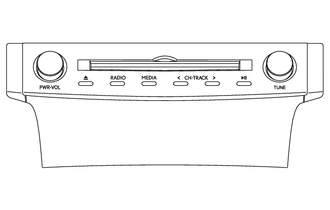
-
Display Language Supported: Korean
-
AM/FM Tuner
-
Digital Sound Processor (DSP)
-
Automatic Sound Levelizer (ASL)
-
CD/DVD Player: Compatible with MP3, Windows Media Audio (WMA) and Advanced Audio Coding (AAC) files
-
CD-TEXT Display Function
-
Voice Recognition System
-
Bluetooth Audio System
-
Bluetooth Hands-free System
-
Portable Audio Player (USB type) Interface
-
iPod/iPhone Interface
-
USB Memory Device Interface
-
USB Video
-
High-resolution Sound Source Compatible (USB audio system)
-
Mobile Assistant
-
Stereo Jack Adapter
-
Miracast Function
-
Customizable vehicle settings can be changed
-
10-speaker System
-
Unit: Pioneer
-
Stereo Amplifier: Pioneer
-
Multi-display Size: 10.3-inch
-
Multi-display: Denso
10-speaker Surround Sound System:
South Korea 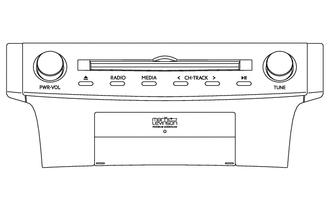
-
Display Language Supported: Korean
-
AM/FM Tuner
-
Digital Sound Processor (DSP)
-
Automatic Sound Levelizer (ASL)
-
Clari-Fi Music Restoration Technology
-
CD/DVD Player: Compatible with MP3, Windows Media Audio (WMA) and Advanced Audio Coding (AAC) files
-
CD-TEXT Display Function
-
Voice Recognition System
-
Bluetooth Audio System
-
Bluetooth Hands-free System
-
Portable Audio Player (USB type) Interface
-
iPod/iPhone Interface
-
USB Memory Device Interface
-
USB Video
-
High-resolution Sound Source Compatible (USB audio system)
-
Mobile Assistant
-
Stereo Jack Adapter
-
Miracast Function
-
Customizable vehicle settings can be changed
-
17-speaker System
-
Unit: Pioneer
-
Stereo Amplifier: Mark Levinson
-
Multi-display Size: 10.3-inch
-
Multi-display: Denso
17-speaker Surround Sound System:
South Korea
-
Display Language Supported: English, Spanish and Portuguese
-
AM/FM Tuner
-
Digital Sound Processor (DSP)
-
Automatic Sound Levelizer (ASL)
-
Clari-Fi Music Restoration Technology
-
CD/DVD Player: Compatible with MP3, Windows Media Audio (WMA) and Advanced Audio Coding (AAC) files
-
CD-TEXT Display Function
-
Bluetooth Audio System
-
Bluetooth Hands-free System
-
Portable Audio Player (USB type) Interface
-
iPod/iPhone Interface
-
USB Memory Device Interface
-
USB Video
-
High-resolution Sound Source Compatible (USB audio system)
-
Mobile Assistant
-
Stereo Jack Adapter
-
Miracast Function
-
Wi-Fi Communication Function
-
Customizable vehicle settings can be changed
-
17-speaker System
-
Unit: Pioneer
-
Navigation ECU: Pioneer (Navigation function cannot be used.)
-
Stereo Amplifier: Mark Levinson
-
Multi-display Size: 10.3-inch
-
Multi-display: Denso
17-speaker Surround Sound System:
Central and South America 
-
Display Language Supported: English, Spanish, Portuguese, Czech, Danish, Dutch, Finnish, Flemish, French, German, Greek, Italian, Norwegian, Polish, Russian, Swedish, Turkish, Hebrew, Hungarian, Romanian, Slovak and Ukrainian
-
AM/FM Tuner
-
Digital Audio Broadcast (DAB) Tuner (Only available in Digital Audio Broadcast (DAB) broadcast areas)
-
Radio Data System Traffic Message Channel (RDS-TMC) Tuner (Only available in Radio Data System Traffic Message Channel (RDS-TMC) broadcast areas)
-
Digital Sound Processor (DSP)
-
Automatic Sound Levelizer (ASL)
-
CD/DVD Player: Compatible with MP3, Windows Media Audio (WMA) and Advanced Audio Coding (AAC) files
-
CD-TEXT Display Function
-
Voice Recognition System
-
Bluetooth Audio System
-
Bluetooth Hands-free System
-
Portable Audio Player (USB type) Interface
-
iPod/iPhone Interface
-
USB Memory Device Interface
-
USB Video
-
High-resolution Sound Source Compatible (USB audio system)
-
Voice Recognition Search (USB audio system)
-
Mobile Assistant
-
Stereo Jack Adapter
-
Miracast Function
-
Wi-Fi Communication Function
-
Hand-writing Input Function
-
Valet Mode
-
Customizable vehicle settings can be changed
-
10-speaker System
-
Unit: Panasonic
-
Navigation ECU: Harman/Becker Automotive Systems
-
Stereo Amplifier: Pioneer
-
Multi-display Size: 10.3-inch
-
Multi-display: Denso
Navigation System:
Europe (including destination packages for Russia, Kazakhstan and Ukraine)
-
Display Language Supported: English, Spanish, Portuguese, Czech, Danish, Dutch, Finnish, Flemish, French, German, Greek, Italian, Norwegian, Polish, Russian, Swedish, Turkish, Hebrew, Hungarian, Romanian, Slovak and Ukrainian
-
AM/FM Tuner
-
Digital Audio Broadcast (DAB) Tuner (Only available in Digital Audio Broadcast (DAB) broadcast areas)
-
Radio Data System Traffic Message Channel (RDS-TMC) Tuner (Only available in Radio Data System Traffic Message Channel (RDS-TMC) broadcast areas)
-
Digital Sound Processor (DSP)
-
Automatic Sound Levelizer (ASL)
-
Clari-Fi Music Restoration Technology
-
CD/DVD Player: Compatible with MP3, Windows Media Audio (WMA) and Advanced Audio Coding (AAC) files
-
CD-TEXT Display Function
-
Voice Recognition System
-
Bluetooth Audio System
-
Bluetooth Hands-free System
-
Portable Audio Player (USB type) Interface
-
iPod/iPhone Interface
-
USB Memory Device Interface
-
USB Video
-
High-resolution Sound Source Compatible (USB audio system)
-
Voice Recognition Search (USB audio system)
-
Mobile Assistant
-
Stereo Jack Adapter
-
Miracast Function
-
Wi-Fi Communication Function
-
Hand-writing Input Function
-
Valet Mode
-
Customizable vehicle settings can be changed
-
17-speaker System
-
Unit: Panasonic
-
Navigation ECU: Harman/Becker Automotive Systems
-
Stereo Amplifier: Mark Levinson
-
Multi-display Size: 10.3-inch
-
Multi-display: Denso
Navigation System:
Europe (including destination packages for Russia, Kazakhstan, Ukraine and Turkey)
-
Display Language Supported: English, Simplified Chinese and Traditional Chinese
-
AM/FM Tuner
-
Real-time Traffic Information of China (RTIC) (Only available in Real-time Traffic Information of China (RTIC) broadcast areas)
-
Digital Sound Processor (DSP)
-
Automatic Sound Levelizer (ASL)
-
CD/DVD Player: Compatible with MP3, Windows Media Audio (WMA) and Advanced Audio Coding (AAC) files
-
CD-TEXT Display Function
-
Voice Recognition System (Utilization of the voice recognition server is possible)
-
Bluetooth Audio System
-
Bluetooth Hands-free System
-
Portable Audio Player (USB type) Interface
-
iPod/iPhone Interface
-
USB Memory Device Interface
-
USB Video
-
High-resolution Sound Source Compatible (USB audio system)
-
Voice Recognition Search (USB audio system)
-
Mobile Assistant
-
Stereo Jack Adapter
-
Miracast Function
-
Wi-Fi Communication Function
-
Hand-writing Input Function
-
Customizable vehicle settings can be changed
-
10-speaker System
-
Unit: Pioneer
-
Navigation ECU: Pioneer
-
Stereo Amplifier: Pioneer
-
Multi-display Size: 10.3-inch
-
Multi-display: Denso
Navigation System:
China
-
Display Language Supported: English, Simplified Chinese and Traditional Chinese
-
AM/FM Tuner
-
Real-time Traffic Information of China (RTIC) (Only available in Real-time Traffic Information of China (RTIC) broadcast areas)
-
Digital Sound Processor (DSP)
-
Automatic Sound Levelizer (ASL)
-
Clari-Fi Music Restoration Technology
-
CD/DVD Player: Compatible with MP3, Windows Media Audio (WMA) and Advanced Audio Coding (AAC) files
-
CD-TEXT Display Function
-
Voice Recognition System (Utilization of the voice recognition server is possible)
-
Bluetooth Audio System
-
Bluetooth Hands-free System
-
Portable Audio Player (USB type) Interface
-
iPod/iPhone Interface
-
USB Memory Device Interface
-
USB Video
-
High-resolution Sound Source Compatible (USB audio system)
-
Voice Recognition Search (USB audio system)
-
Mobile Assistant
-
Stereo Jack Adapter
-
Miracast Function
-
Wi-Fi Communication Function
-
Hand-writing Input Function
-
Customizable vehicle settings can be changed
-
17-speaker System
-
Unit: Pioneer
-
Navigation ECU: Pioneer
-
Stereo Amplifier: Mark Levinson
-
Multi-display Size: 10.3-inch
-
Multi-display: Denso
Navigation System:
China
-
Display Language Supported: English and Arabic
-
AM/FM Tuner
-
Digital Sound Processor (DSP)
-
Automatic Sound Levelizer (ASL)
-
CD/DVD Player: Compatible with MP3, Windows Media Audio (WMA) and Advanced Audio Coding (AAC) files
-
CD-TEXT Display Function
-
Bluetooth Audio System
-
Bluetooth Hands-free System
-
Portable Audio Player (USB type) Interface
-
iPod/iPhone Interface
-
USB Memory Device Interface
-
USB Video
-
High-resolution Sound Source Compatible (USB audio system)
-
Mobile Assistant
-
Stereo Jack Adapter
-
Miracast Function
-
Wi-Fi Communication Function
-
Customizable vehicle settings can be changed
-
10-speaker System
-
Unit: Pioneer
-
Navigation ECU: Pioneer
-
Stereo Amplifier: Pioneer
-
Multi-display Size: 10.3-inch
-
Multi-display: Denso
Navigation System:
G.C.C. Countries
-
Display Language Supported: English and Arabic
-
AM/FM Tuner
-
Digital Sound Processor (DSP)
-
Automatic Sound Levelizer (ASL)
-
Clari-Fi Music Restoration Technology
-
CD/DVD Player: Compatible with MP3, Windows Media Audio (WMA) and Advanced Audio Coding (AAC) files
-
CD-TEXT Display Function
-
Bluetooth Audio System
-
Bluetooth Hands-free System
-
Portable Audio Player (USB type) Interface
-
iPod/iPhone Interface
-
USB Memory Device Interface
-
USB Video
-
High-resolution Sound Source Compatible (USB audio system)
-
Mobile Assistant
-
Stereo Jack Adapter
-
Miracast Function
-
Wi-Fi Communication Function
-
Customizable vehicle settings can be changed
-
17-speaker System
-
Unit: Pioneer
-
Navigation ECU: Pioneer
-
Stereo Amplifier: Mark Levinson
-
Multi-display Size: 10.3-inch
-
Multi-display: Denso
Navigation System:
G.C.C. Countries
-
Display Language Supported: Taiwanese Mandarin
-
AM/FM Tuner
-
Radio Data System Traffic Message Channel (RDS-TMC) Tuner (Only available in Radio Data System Traffic Message Channel (RDS-TMC) broadcast areas)
-
Digital Sound Processor (DSP)
-
Automatic Sound Levelizer (ASL)
-
CD/DVD Player: Compatible with MP3, Windows Media Audio (WMA) and Advanced Audio Coding (AAC) files
-
CD-TEXT Display Function
-
Bluetooth Audio System
-
Bluetooth Hands-free System
-
Portable Audio Player (USB type) Interface
-
iPod/iPhone Interface
-
USB Memory Device Interface
-
USB Video
-
High-resolution Sound Source Compatible (USB audio system)
-
Mobile Assistant
-
Stereo Jack Adapter
-
Miracast Function
-
Wi-Fi Communication Function
-
Customizable vehicle settings can be changed
-
10-speaker System
-
Unit: Pioneer
-
Navigation ECU: Pioneer
-
Stereo Amplifier: Pioneer
-
Multi-display Size: 10.3-inch
-
Multi-display: Denso
Navigation System:
Taiwan
-
Display Language Supported: Taiwanese Mandarin
-
AM/FM Tuner
-
Radio Data System Traffic Message Channel (RDS-TMC) Tuner (Only available in Radio Data System Traffic Message Channel (RDS-TMC) broadcast areas)
-
Digital Sound Processor (DSP)
-
Automatic Sound Levelizer (ASL)
-
Clari-Fi Music Restoration Technology
-
CD/DVD Player: Compatible with MP3, Windows Media Audio (WMA) and Advanced Audio Coding (AAC) files
-
CD-TEXT Display Function
-
Bluetooth Audio System
-
Bluetooth Hands-free System
-
Portable Audio Player (USB type) Interface
-
iPod/iPhone Interface
-
USB Memory Device Interface
-
USB Video
-
High-resolution Sound Source Compatible (USB audio system)
-
Mobile Assistant
-
Stereo Jack Adapter
-
Miracast Function
-
Wi-Fi Communication Function
-
Customizable vehicle settings can be changed
-
17-speaker System
-
Unit: Pioneer
-
Navigation ECU: Pioneer
-
Stereo Amplifier: Mark Levinson
-
Multi-display Size: 10.3-inch
-
Multi-display: Denso
Navigation System:
Taiwan
-
Display Language Supported: English, Thai, Indonesian, Vietnamese and Malay
-
AM/FM Tuner
-
Real-time Traffic Information in the Cockpit (RTIC) (Only available in Real-time Traffic Information in the Cockpit (RTIC) broadcast areas)
-
Digital Sound Processor (DSP)
-
Automatic Sound Levelizer (ASL)
-
CD/DVD Player: Compatible with MP3, Windows Media Audio (WMA) and Advanced Audio Coding (AAC) files
-
Video-CD (VCD) Display Function
-
CD-TEXT Display Function
-
Voice Recognition System
-
Bluetooth Audio System
-
Bluetooth Hands-free System
-
Portable Audio Player (USB type) Interface
-
iPod/iPhone Interface
-
USB Memory Device Interface
-
USB Video
-
High-resolution Sound Source Compatible (USB audio system)
-
Voice Recognition Search (USB audio system)
-
Mobile Assistant
-
Stereo Jack Adapter
-
Miracast Function
-
Wi-Fi Communication Function
-
Customizable vehicle settings can be changed
-
10-speaker System
-
Unit: Pioneer
-
Navigation ECU: Pioneer
-
Stereo Amplifier: Pioneer
-
Multi-display Size: 10.3-inch
-
Multi-display: Denso
Navigation System:
Southeast Asia
-
Display Language Supported: English, Thai, Indonesian, Vietnamese and Malay
-
AM/FM Tuner
-
Real-time Traffic Information in the Cockpit (RTIC) (Only available in Real-time Traffic Information in the Cockpit (RTIC) broadcast areas)
-
Digital Sound Processor (DSP)
-
Automatic Sound Levelizer (ASL)
-
Clari-Fi Music Restoration Technology
-
CD/DVD Player: Compatible with MP3, Windows Media Audio (WMA) and Advanced Audio Coding (AAC) files
-
Video-CD (VCD) Display Function
-
CD-TEXT Display Function
-
Voice Recognition System
-
Bluetooth Audio System
-
Bluetooth Hands-free System
-
Portable Audio Player (USB type) Interface
-
iPod/iPhone Interface
-
USB Memory Device Interface
-
USB Video
-
High-resolution Sound Source Compatible (USB audio system)
-
Voice Recognition Search (USB audio system)
-
Mobile Assistant
-
Stereo Jack Adapter
-
Miracast Function
-
Wi-Fi Communication Function
-
Customizable vehicle settings can be changed
-
17-speaker System
-
Unit: Pioneer
-
Navigation ECU: Pioneer
-
Stereo Amplifier: Mark Levinson
-
Multi-display Size: 10.3-inch
-
Multi-display: Denso
Navigation System:
Southeast Asia
-
Display Language Supported: English, Spanish and Portuguese
-
AM/FM Tuner
-
Digital Sound Processor (DSP)
-
Automatic Sound Levelizer (ASL)
-
Clari-Fi Music Restoration Technology
-
CD/DVD Player: Compatible with MP3, Windows Media Audio (WMA) and Advanced Audio Coding (AAC) files
-
CD-TEXT Display Function
-
Bluetooth Audio System
-
Bluetooth Hands-free System
-
Portable Audio Player (USB type) Interface
-
iPod/iPhone Interface
-
USB Memory Device Interface
-
USB Video
-
High-resolution Sound Source Compatible (USB audio system)
-
Mobile Assistant
-
Stereo Jack Adapter
-
Miracast Function
-
Wi-Fi Communication Function
-
Customizable vehicle settings can be changed
-
17-speaker System
-
Unit: Pioneer
-
Navigation ECU: Pioneer
-
Stereo Amplifier: Mark Levinson
-
Multi-display Size: 10.3-inch
-
Multi-display: Denso
Navigation System:
Central and South America
-
Display Language Supported: English, Spanish and Portuguese
-
AM/FM Tuner
-
Digital Terrestrial Television Broadcast (Digital TV) Tuner (Only available in Digital Terrestrial Television Broadcast (Digital TV) broadcast areas)
-
Digital Sound Processor (DSP)
-
Automatic Sound Levelizer (ASL)
-
CD/DVD Player: Compatible with MP3, Windows Media Audio (WMA) and Advanced Audio Coding (AAC) files
-
CD-TEXT Display Function
-
Bluetooth Audio System
-
Bluetooth Hands-free System
-
Portable Audio Player (USB type) Interface
-
iPod/iPhone Interface
-
USB Memory Device Interface
-
USB Video
-
High-resolution Sound Source Compatible (USB audio system)
-
Mobile Assistant
-
Stereo Jack Adapter
-
Miracast Function
-
Wi-Fi Communication Function
-
Customizable vehicle settings can be changed
-
10-speaker System
-
Unit: Pioneer
-
Navigation ECU: Pioneer
-
Stereo Amplifier: Pioneer
-
Multi-display Size: 10.3-inch
-
Multi-display: Denso
Navigation System:
Brazil
-
Display Language Supported: English, Spanish and Portuguese
-
AM/FM Tuner
-
Digital Terrestrial Television Broadcast (Digital TV) Tuner (Only available in Digital Terrestrial Television Broadcast (Digital TV) broadcast areas)
-
Digital Sound Processor (DSP)
-
Automatic Sound Levelizer (ASL)
-
Clari-Fi Music Restoration Technology
-
CD/DVD Player: Compatible with MP3, Windows Media Audio (WMA) and Advanced Audio Coding (AAC) files
-
CD-TEXT Display Function
-
Bluetooth Audio System
-
Bluetooth Hands-free System
-
Portable Audio Player (USB type) Interface
-
iPod/iPhone Interface
-
USB Memory Device Interface
-
USB Video
-
High-resolution Sound Source Compatible (USB audio system)
-
Mobile Assistant
-
Stereo Jack Adapter
-
Miracast Function
-
Wi-Fi Communication Function
-
Customizable vehicle settings can be changed
-
17-speaker System
-
Unit: Pioneer
-
Navigation ECU: Pioneer
-
Stereo Amplifier: Mark Levinson
-
Multi-display Size: 10.3-inch
-
Multi-display: Denso
Navigation System:
Brazil RHD Models Design Specification Destination 
-
Display Language Supported: English, Spanish, Portuguese, Czech, Danish, Dutch, Finnish, Flemish, French, German, Greek, Italian, Norwegian, Polish, Russian, Swedish, Turkish, Hebrew, Hungarian, Romanian, Slovak and Ukrainian
-
AM/FM Tuner
-
Digital Audio Broadcast (DAB) Tuner (Models with Digital Audio Broadcast (DAB) Tuner)
-
Automatic Sound Levelizer (ASL)
-
CD Player: Compatible with MP3, Windows Media Audio (WMA) and Advanced Audio Coding (AAC) files
-
CD-TEXT Display Function
-
Voice Recognition System
-
Bluetooth Audio System
-
Bluetooth Hands-free System
-
Portable Audio Player (USB type) Interface
-
iPod/iPhone Interface
-
USB Memory Device Interface
-
USB Video
-
High-resolution Sound Source Compatible (USB audio system)
-
Voice Recognition Search (USB audio system)
-
Mobile Assistant
-
Stereo Jack Adapter
-
Miracast Function
-
Hand-writing Input Function
-
Valet Mode
-
Customizable vehicle settings can be changed
-
6-speaker System
-
Unit: Pioneer
-
Multi-display Size: 7-inch
-
Multi-display: Panasonic
Lexus Display Audio System:
Europe 
-
Display Language Supported: English, Spanish, Portuguese, Czech, Danish, Dutch, Finnish, Flemish, French, German, Greek, Italian, Norwegian, Polish, Russian, Swedish, Turkish, Hebrew, Hungarian, Romanian, Slovak and Ukrainian
-
AM/FM Tuner
-
Digital Audio Broadcast (DAB) Tuner (Only available in Digital Audio Broadcast (DAB) broadcast areas)
-
Digital Sound Processor (DSP)
-
Automatic Sound Levelizer (ASL)
-
Clari-Fi Music Restoration Technology
-
CD/DVD Player: Compatible with MP3, Windows Media Audio (WMA) and Advanced Audio Coding (AAC) files
-
CD-TEXT Display Function
-
Voice Recognition System
-
Bluetooth Audio System
-
Bluetooth Hands-free System
-
Portable Audio Player (USB type) Interface
-
iPod/iPhone Interface
-
USB Memory Device Interface
-
USB Video
-
High-resolution Sound Source Compatible (USB audio system)
-
Voice Recognition Search (USB audio system)
-
Mobile Assistant
-
Stereo Jack Adapter
-
Miracast Function
-
Wi-Fi Communication Function
-
Hand-writing Input Function
-
Valet Mode
-
Customizable vehicle settings can be changed
-
17-speaker System
-
Unit: Panasonic
-
Navigation ECU: Harman/Becker Automotive Systems (Navigation function cannot be used.)
-
Stereo Amplifier: Mark Levinson
-
Multi-display Size: 10.3-inch
-
Multi-display: Denso
17-speaker Surround Sound System:
Cyprus 
-
Display Language Supported: English, Spanish, Portuguese, Czech, Danish, Dutch, Finnish, Flemish, French, German, Greek, Italian, Norwegian, Polish, Russian, Swedish, Turkish, Hebrew, Hungarian, Romanian, Slovak and Ukrainian
-
AM/FM Tuner
-
Digital Audio Broadcast (DAB) Tuner (Only available in Digital Audio Broadcast (DAB) broadcast areas)
-
Radio Data System Traffic Message Channel (RDS-TMC) Tuner (Only available in Radio Data System Traffic Message Channel (RDS-TMC) broadcast areas)
-
Digital Sound Processor (DSP)
-
Automatic Sound Levelizer (ASL)
-
CD/DVD Player: Compatible with MP3, Windows Media Audio (WMA) and Advanced Audio Coding (AAC) files
-
CD-TEXT Display Function
-
Voice Recognition System
-
Bluetooth Audio System
-
Bluetooth Hands-free System
-
Portable Audio Player (USB type) Interface
-
iPod/iPhone Interface
-
USB Memory Device Interface
-
USB Video
-
High-resolution Sound Source Compatible (USB audio system)
-
Voice Recognition Search (USB audio system)
-
Mobile Assistant
-
Stereo Jack Adapter
-
Miracast Function
-
Wi-Fi Communication Function
-
Hand-writing Input Function
-
Valet Mode
-
Customizable vehicle settings can be changed
-
10-speaker System
-
Unit: Panasonic
-
Navigation ECU: Harman/Becker Automotive Systems
-
Stereo Amplifier: Pioneer
-
Multi-display Size: 10.3-inch
-
Multi-display: Denso
Navigation System:
Europe
-
Display Language Supported: English, Spanish, Portuguese, Czech, Danish, Dutch, Finnish, Flemish, French, German, Greek, Italian, Norwegian, Polish, Russian, Swedish, Turkish, Hebrew, Hungarian, Romanian, Slovak and Ukrainian
-
AM/FM Tuner
-
Digital Audio Broadcast (DAB) Tuner (Only available in Digital Audio Broadcast (DAB) broadcast areas)
-
Radio Data System Traffic Message Channel (RDS-TMC) Tuner (Only available in Radio Data System Traffic Message Channel (RDS-TMC) broadcast areas)
-
Digital Sound Processor (DSP)
-
Automatic Sound Levelizer (ASL)
-
Clari-Fi Music Restoration Technology
-
CD/DVD Player: Compatible with MP3, Windows Media Audio (WMA) and Advanced Audio Coding (AAC) files
-
CD-TEXT Display Function
-
Voice Recognition System
-
Bluetooth Audio System
-
Bluetooth Hands-free System
-
Portable Audio Player (USB type) Interface
-
iPod/iPhone Interface
-
USB Memory Device Interface
-
USB Video
-
High-resolution Sound Source Compatible (USB audio system)
-
Voice Recognition Search (USB audio system)
-
Mobile Assistant
-
Stereo Jack Adapter
-
Miracast Function
-
Wi-Fi Communication Function
-
Hand-writing Input Function
-
Valet Mode
-
Customizable vehicle settings can be changed
-
17-speaker System
-
Unit: Panasonic
-
Navigation ECU: Harman/Becker Automotive Systems
-
Stereo Amplifier: Mark Levinson
-
Multi-display Size: 10.3-inch
-
Multi-display: Denso
Navigation System:
Europe 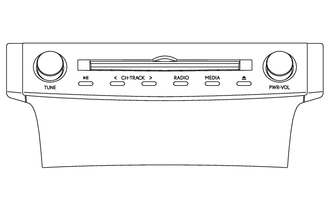
-
Display Language Supported: English
-
AM/FM Tuner
-
Digital Audio Broadcast (DAB) Tuner (Only available in Digital Audio Broadcast (DAB) broadcast areas)
-
Radio Data System Traffic Message Channel (RDS-TMC) Tuner (Only available in Radio Data System Traffic Message Channel (RDS-TMC) broadcast areas)
-
Lexus Enform Service Function
-
Digital Sound Processor (DSP)
-
Automatic Sound Levelizer (ASL)
-
CD/DVD Player: Compatible with MP3, Windows Media Audio (WMA) and Advanced Audio Coding (AAC) files
-
CD-TEXT Display Function
-
Voice Recognition System
-
Bluetooth Audio System
-
Bluetooth Hands-free System
-
Portable Audio Player (USB type) Interface
-
iPod/iPhone Interface
-
USB Memory Device Interface
-
USB Video
-
High-resolution Sound Source Compatible (USB audio system)
-
Voice Recognition Search (USB audio system)
-
Mobile Assistant
-
Stereo Jack Adapter
-
Miracast Function
-
Customizable vehicle settings can be changed
-
10-speaker System
-
Unit: Pioneer
-
Navigation ECU: Pioneer
-
Stereo Amplifier: Pioneer
-
Multi-display Size: 10.3-inch
-
Multi-display: Denso
Navigation System:
Oceania 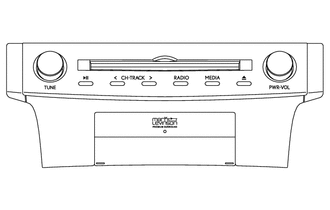
-
Display Language Supported: English
-
AM/FM Tuner
-
Digital Audio Broadcast (DAB) Tuner (Only available in Digital Audio Broadcast (DAB) broadcast areas)
-
Radio Data System Traffic Message Channel (RDS-TMC) Tuner (Only available in Radio Data System Traffic Message Channel (RDS-TMC) broadcast areas)
-
Lexus Enform Service Function
-
Digital Sound Processor (DSP)
-
Automatic Sound Levelizer (ASL)
-
Clari-Fi Music Restoration Technology
-
CD/DVD Player: Compatible with MP3, Windows Media Audio (WMA) and Advanced Audio Coding (AAC) files
-
CD-TEXT Display Function
-
Voice Recognition System
-
Bluetooth Audio System
-
Bluetooth Hands-free System
-
Portable Audio Player (USB type) Interface
-
iPod/iPhone Interface
-
USB Memory Device Interface
-
USB Video
-
High-resolution Sound Source Compatible (USB audio system)
-
Voice Recognition Search (USB audio system)
-
Mobile Assistant
-
Stereo Jack Adapter
-
Miracast Function
-
Customizable vehicle settings can be changed
-
17-speaker System
-
Unit: Pioneer
-
Navigation ECU: Pioneer
-
Stereo Amplifier: Mark Levinson
-
Multi-display Size: 10.3-inch
-
Multi-display: Denso
Navigation System:
Oceania
-
Display Language Supported: English, Simplified Chinese and Traditional Chinese
-
AM/FM Tuner
-
Digital Audio Broadcast (DAB) Tuner (Only available in Digital Audio Broadcast (DAB) broadcast areas)
-
Digital Sound Processor (DSP)
-
Automatic Sound Levelizer (ASL)
-
CD/DVD Player: Compatible with MP3, Windows Media Audio (WMA) and Advanced Audio Coding (AAC) files
-
CD-TEXT Display Function
-
Voice Recognition System
-
Bluetooth Audio System
-
Bluetooth Hands-free System
-
Portable Audio Player (USB type) Interface
-
iPod/iPhone Interface
-
USB Memory Device Interface
-
USB Video
-
High-resolution Sound Source Compatible (USB audio system)
-
Voice Recognition Search (USB audio system)
-
Mobile Assistant
-
Stereo Jack Adapter
-
Customizable vehicle settings can be changed
-
10-speaker System
-
Unit: Pioneer
-
Navigation ECU: Pioneer
-
Stereo Amplifier: Pioneer
-
Multi-display Size: 10.3-inch
-
Multi-display: Denso
Navigation System:
Hong Kong and Macau
-
Display Language Supported: English, Simplified Chinese and Traditional Chinese
-
AM/FM Tuner
-
Digital Audio Broadcast (DAB) Tuner (Only available in Digital Audio Broadcast (DAB) broadcast areas)
-
Digital Sound Processor (DSP)
-
Automatic Sound Levelizer (ASL)
-
Clari-Fi Music Restoration Technology
-
CD/DVD Player: Compatible with MP3, Windows Media Audio (WMA) and Advanced Audio Coding (AAC) files
-
CD-TEXT Display Function
-
Voice Recognition System
-
Bluetooth Audio System
-
Bluetooth Hands-free System
-
Portable Audio Player (USB type) Interface
-
iPod/iPhone Interface
-
USB Memory Device Interface
-
USB Video
-
High-resolution Sound Source Compatible (USB audio system)
-
Voice Recognition Search (USB audio system)
-
Mobile Assistant
-
Stereo Jack Adapter
-
Customizable vehicle settings can be changed
-
17-speaker System
-
Unit: Pioneer
-
Navigation ECU: Pioneer
-
Stereo Amplifier: Mark Levinson
-
Multi-display Size: 10.3-inch
-
Multi-display: Denso
Navigation System:
Hong Kong and Macau
-
Display Language Supported: English
-
AM/FM Tuner
-
Digital Audio Broadcast (DAB) Tuner (Only available in Digital Audio Broadcast (DAB) broadcast areas)
-
Radio Data System Traffic Message Channel (RDS-TMC) Tuner (Only available in Radio Data System Traffic Message Channel (RDS-TMC) broadcast areas)
-
Digital Sound Processor (DSP)
-
Automatic Sound Levelizer (ASL)
-
CD/DVD Player: Compatible with MP3, Windows Media Audio (WMA) and Advanced Audio Coding (AAC) files
-
CD-TEXT Display Function
-
Voice Recognition System
-
Bluetooth Audio System
-
Bluetooth Hands-free System
-
Portable Audio Player (USB type) Interface
-
iPod/iPhone Interface
-
USB Memory Device Interface
-
USB Video
-
High-resolution Sound Source Compatible (USB audio system)
-
Voice Recognition Search (USB audio system)
-
Mobile Assistant
-
Stereo Jack Adapter
-
Miracast Function
-
Wi-Fi Communication Function
-
Customizable vehicle settings can be changed
-
10-speaker System
-
Unit: Pioneer
-
Navigation ECU: Pioneer
-
Stereo Amplifier: Pioneer
-
Multi-display Size: 10.3-inch
-
Multi-display: Denso
Navigation System:
South Africa
-
Display Language Supported: English
-
AM/FM Tuner
-
Digital Audio Broadcast (DAB) Tuner (Only available in Digital Audio Broadcast (DAB) broadcast areas)
-
Radio Data System Traffic Message Channel (RDS-TMC) Tuner (Only available in Radio Data System Traffic Message Channel (RDS-TMC) broadcast areas)
-
Digital Sound Processor (DSP)
-
Automatic Sound Levelizer (ASL)
-
Clari-Fi Music Restoration Technology
-
CD/DVD Player: Compatible with MP3, Windows Media Audio (WMA) and Advanced Audio Coding (AAC) files
-
CD-TEXT Display Function
-
Voice Recognition System
-
Bluetooth Audio System
-
Bluetooth Hands-free System
-
Portable Audio Player (USB type) Interface
-
iPod/iPhone Interface
-
USB Memory Device Interface
-
USB Video
-
High-resolution Sound Source Compatible (USB audio system)
-
Voice Recognition Search (USB audio system)
-
Mobile Assistant
-
Stereo Jack Adapter
-
Miracast Function
-
Wi-Fi Communication Function
-
Customizable vehicle settings can be changed
-
17-speaker System
-
Unit: Pioneer
-
Navigation ECU: Pioneer
-
Stereo Amplifier: Mark Levinson
-
Multi-display Size: 10.3-inch
-
Multi-display: Denso
Navigation System:
South Africa
-
Display Language Supported: English, Thai, Indonesian, Vietnamese and Malay
-
AM/FM Tuner
-
Real-time Traffic Information in the Cockpit (RTIC) (Only available in Real-time Traffic Information in the Cockpit (RTIC) broadcast areas)
-
Digital Sound Processor (DSP)
-
Automatic Sound Levelizer (ASL)
-
CD/DVD Player: Compatible with MP3, Windows Media Audio (WMA) and Advanced Audio Coding (AAC) files
-
Video-CD (VCD) Display Function
-
CD-TEXT Display Function
-
Voice Recognition System
-
Bluetooth Audio System
-
Bluetooth Hands-free System
-
Portable Audio Player (USB type) Interface
-
iPod/iPhone Interface
-
USB Memory Device Interface
-
USB Video
-
High-resolution Sound Source Compatible (USB audio system)
-
Voice Recognition Search (USB audio system)
-
Mobile Assistant
-
Stereo Jack Adapter
-
Miracast Function
-
Wi-Fi Communication Function
-
Customizable vehicle settings can be changed
-
10-speaker System
-
Unit: Pioneer
-
Navigation ECU: Pioneer
-
Stereo Amplifier: Pioneer
-
Multi-display Size: 10.3-inch
-
Multi-display: Denso
Navigation System:
Southeast Asia
-
Display Language Supported: English, Thai, Indonesian, Vietnamese and Malay
-
AM/FM Tuner
-
Real-time Traffic Information in the Cockpit (RTIC) (Only available in Real-time Traffic Information in the Cockpit (RTIC) broadcast areas)
-
Digital Sound Processor (DSP)
-
Automatic Sound Levelizer (ASL)
-
Clari-Fi Music Restoration Technology
-
CD/DVD Player: Compatible with MP3, Windows Media Audio (WMA) and Advanced Audio Coding (AAC) files
-
Video-CD (VCD) Display Function
-
CD-TEXT Display Function
-
Voice Recognition System
-
Bluetooth Audio System
-
Bluetooth Hands-free System
-
Portable Audio Player (USB type) Interface
-
iPod/iPhone Interface
-
USB Memory Device Interface
-
USB Video
-
High-resolution Sound Source Compatible (USB audio system)
-
Voice Recognition Search (USB audio system)
-
Mobile Assistant
-
Stereo Jack Adapter
-
Miracast Function
-
Wi-Fi Communication Function
-
Customizable vehicle settings can be changed
-
17-speaker System
-
Unit: Pioneer
-
Navigation ECU: Pioneer
-
Stereo Amplifier: Mark Levinson
-
Multi-display Size: 10.3-inch
-
Multi-display: Denso
Navigation System:
Southeast Asia -
-
6-speaker System
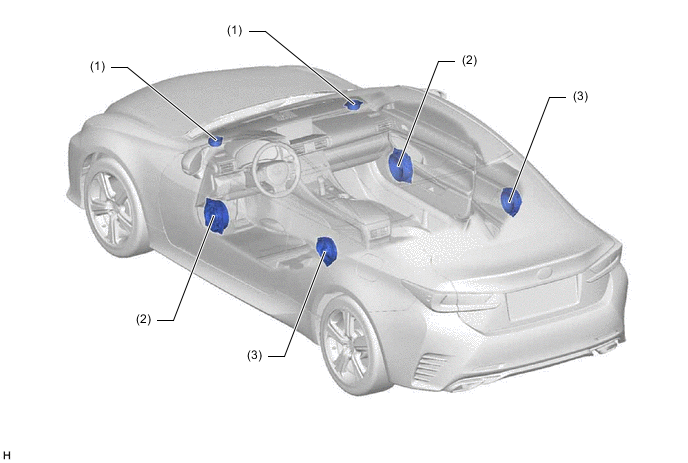
Location Speaker Name Quantity Size Impedance Rated Input Power (1) Front No. 2 Speaker Assembly 2 5.5 cm (2.2 in.) 4 Ω 20 W (2) Front No. 1 Speaker Assembly 2 18 cm (7.1 in.) 4 Ω 20 W (3) Rear Speaker Assembly 2 16 cm (6.3 in.) 4 Ω 20 W -
10-speaker System
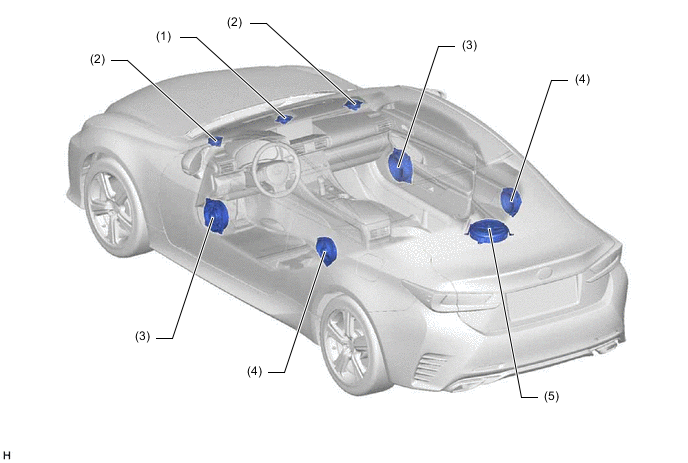
Location Speaker Name Quantity Size Impedance Rated Input Power (1) Front No. 3 Speaker Assembly 1 6.5 cm (2.6 in.) 5 Ω 16 W (2) Front No. 2 Speaker Assembly (1 + 1) x 2 9 cm (3.5 in.) 4 Ω 20 W (3) Front No. 1 Speaker Assembly 2 18 cm (7.1 in.) 4 Ω 20 W (4) Rear Speaker Assembly 2 16 cm (6.3 in.) 4 Ω 20 W (5) Rear No. 3 Speaker Assembly 1 25 cm (9.8 in.) 2.5 Ω 32 W -
17-speaker System
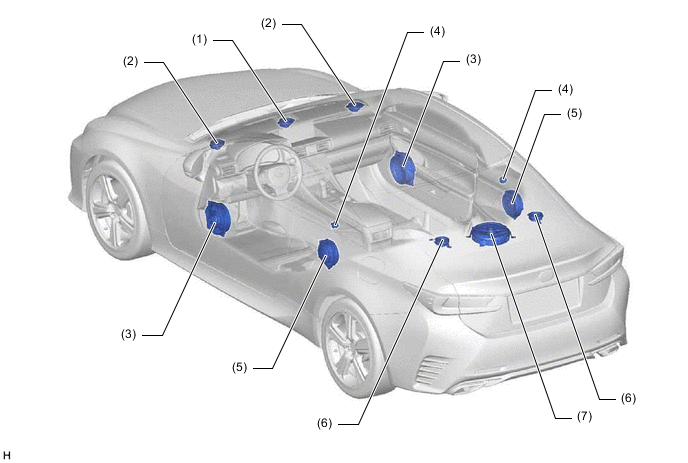
Location Speaker Name Quantity Size Impedance Rated Input Power (1) Front No. 3 Speaker Assembly 1 + 1 9 cm (3.5 in.) 8 Ω 4 W (2) Front No. 2 Speaker Assembly (1 + 1) x 2 9 cm (3.5 in.) 8 Ω 4 W (3) Front No. 1 Speaker Assembly 2 18 cm (7.1 in.) 4.3 to 6.3 Ω 13.5 W (4) Rear No. 2 Speaker Assembly 2 2.5 cm (0.9 in.) 4 Ω 0.5 W (5) Rear Speaker Assembly 2 17 cm (6.7 in.) 3.6 to 5.6 Ω 18 W (6) Rear Header Speaker Assembly (1 + 1) x 2 9 cm (3.5 in.) 8 Ω 4 W (7) Rear No. 3 Speaker Assembly 1 25 cm (9.8 in.) 4.8 to 6.8 Ω 4 W -
Steering Pad Switch Assembly
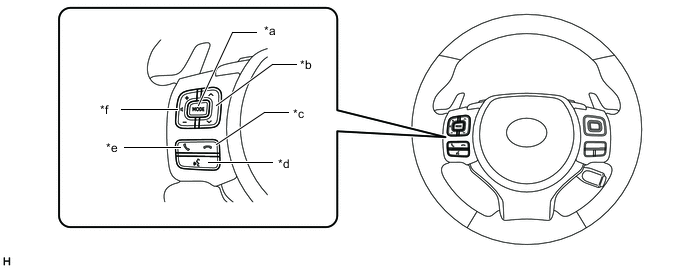
*a MODE Switch *b Seek +/- Switch *c On Hook Switch *d Voice Switch *e Off Hook Switch *f Volume +/- Switch
-
-
MAIN FEATURES
-
Remote Touch (Remote Operation Controller Assembly)
-
An exclusive hierarchical structure is used for each screen displayed on the multi-display in consideration of the remote touch (remote operation controller assembly).
Figure 6. Level Category (Models with Navigation System)
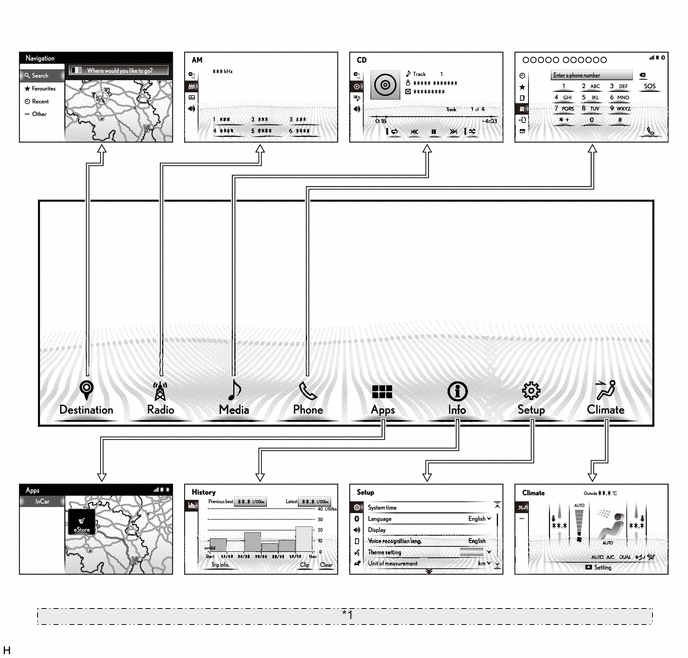
*1 The illustrations shown are examples only. The illustrations may differ from the actual vehicle screens. -
Only the switches used for the basic functions are provided on the remote touch (remote operation controller assembly). Also, operation of the cursor or pointer or scrolling of the screen, etc. can be performed intuitively using the capacitive type touchpad.
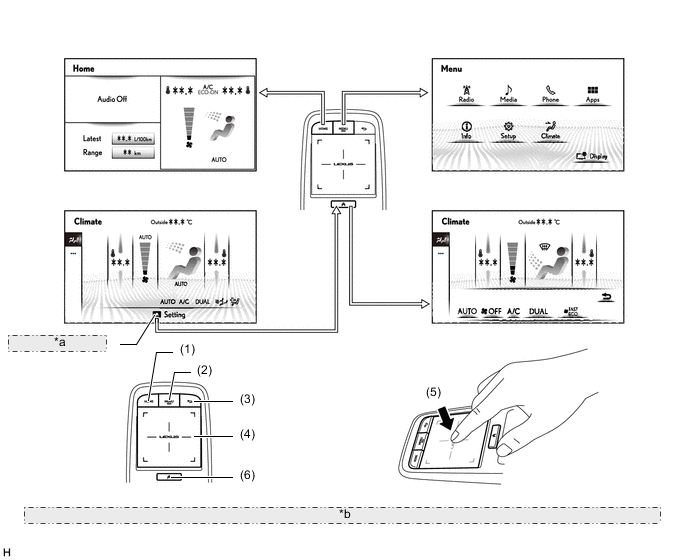
*a Sub-function Mark *b The illustrations shown are examples only. The illustrations may differ from the actual vehicle screens. NO. Switch Function (1) HOME Switch*1*2 Displays the present home screen. MAP Switch*3*4 Displays the present location screen. (2) MENU Switch Displays the menu screen. (3) Back Switch Displays the previous screen. (4) Touchpad
-
Moves the cursor or pointer, scrolls the screen, etc. by touch operation.
-
Enables characters to be entered by handwriting.*5
(5) Enter (Press the touchpad) Selects the icon and buttons currently selected with the cursor or pointer. (6) Sub-function Switch Displays the sub-function (available when the sub-function icon is displayed). *1: Models with Lexus display audio system
*2: Destination package for Central and South America with 17-speaker surround sound system
*3: Destination packages for Israel, Cyprus, Caucasus and South Korea
*4: Models with navigation system
*5: Models for Europe and China and destination packages for Israel, Cyprus and Caucasus
-
-
On the touchpad, the pointer or cursor can be moved with a drag of a finger. Other screen operations are as follows.
-
The list screen can be scrolled by performing a flick operation on the touchpad. Also, it is possible to scroll the map screen using the same operation for models with the navigation system.
Tech Tips
Flick operation on the map screen is only available during full screen display.
Figure 7. Flick Operation Image
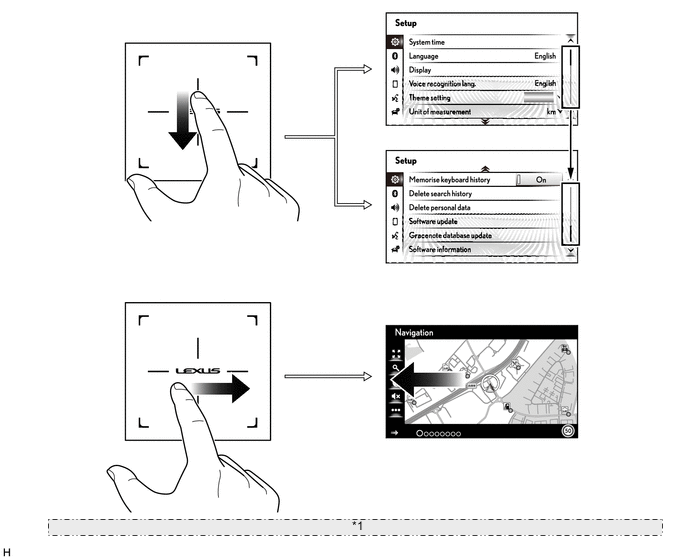
*1 The illustrations shown are examples only. The illustrations may differ from the actual vehicle screens. Touchpad Operation Function Flick
-
Scrolls a list screen.
-
Scrolls the map screen.*
*: Models with navigation system
-
Flick Operation
-
The icons and buttons currently highlighted on the screen can be selected by pressing the touchpad. A double-tap is also available.
Figure 8. Double-tap Operation Image
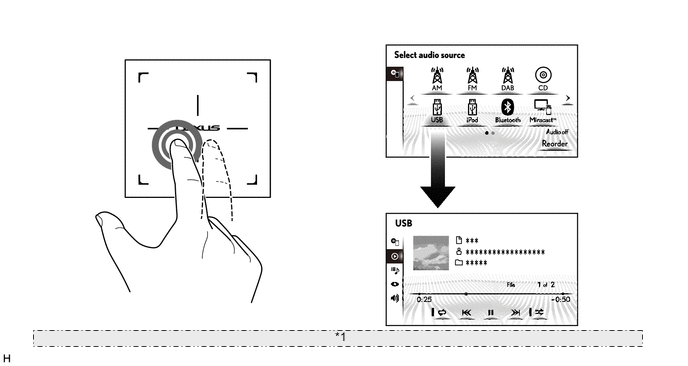
*1 The illustrations shown are examples only. The illustrations may differ from the actual vehicle screens. Touchpad Operation Function Double-tap Selects the icons or buttons currently selected with the cursor or pointer.
Double-tap Operation
-
The map scale can be changed by performing a pinch operation on the touchpad.
Figure 9. Pinch Operation Image
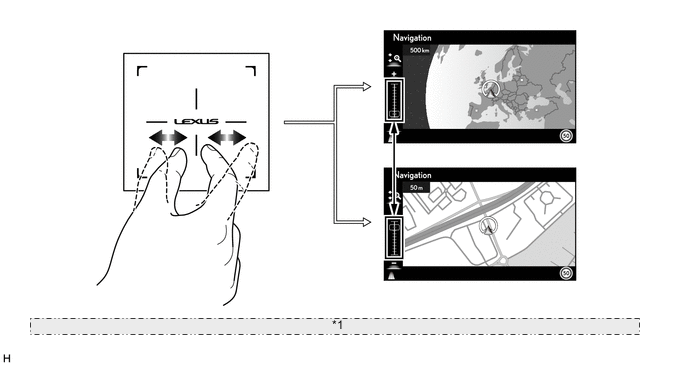
*1 The illustrations shown are examples only. The illustrations may differ from the actual vehicle screens. Touchpad Operation Function Pinch Zooms the map in and out.
Pinch Operation (Models with Navigation System)
-
-
-
Miracast Function
-
Before using the Miracast function*1*2*3, it is necessary to connect a Miracast compatible smartphone to the radio receiver assembly via Wi-Fi Direct*4 with Wi-Fi (P2P mode)*5.*6*7
-
After a connection is established, the screen of the smartphone is displayed on the multi-display. Using the smartphone, the user can operate the multi-display. If the display of the smartphone is vertical, it will also be displayed on the multi-display vertically.
-
When using the Miracast function, video played on the smartphone is displayed on the multi-display and audio is played from the vehicle speakers. When the vehicle is being driven, video will not be displayed but the audio will continue playing from the vehicle speakers.
Tech Tips
*1: The Miracast function is a best-effort type function.
*2: Miracast, Wi-Fi Direct and Wi-Fi are registered trademarks of Wi-Fi Alliance.
*3: An Android OS version 4.4 or higher device which is certified Miracast compatible by the Wi-Fi Alliance is recommended to use this function. Confirm with the mobile smartphone manufacture for the Miracast compatibility.
*4: Wi-Fi Direct is a P2P connection method enabling compatible devices to connect and communicate directly with one another.
*5: Wi-Fi (P2P mode) performs wireless communication using the same 2.4 GHz radio frequency band as Bluetooth. Depending on the usage environment, radio wave interference may occur, resulting in image distortion and audio stuttering.
*6: When Wi-Fi communication is set to on, the Wi-Fi communication and Wi-Fi (P2P mode) interfere with each other resulting in image distortion and audio stuttering.
*7: The connection history of the audio head unit and wireless clients are stored in the internal memory of the audio head unit. The stored data can be exported to a USB memory device as a connection history file, which can be checked using the Global TechStream (GTS).
Figure 10. Miracast Image
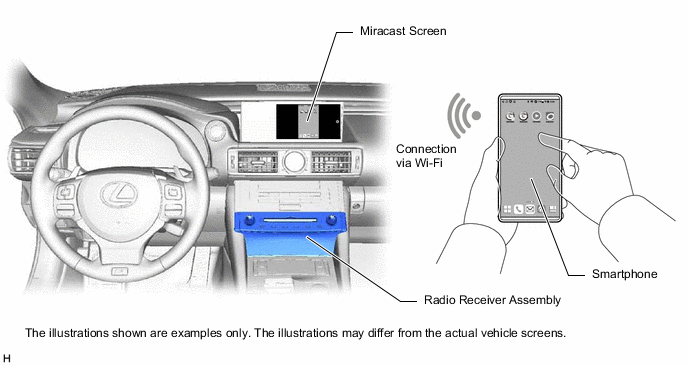
-
-
Lexus Enform Service
-
Lexus Enform service is available by connecting a smartphone*1 with Lexus Enform apps installed to the audio head unit via Bluetooth or Bluetooth and USB cable*2.*3*4 It is possible to communicate between the audio head unit, application server and content provider via the Lexus Enform apps installed to the smartphone.
-
Using Lexus Enform App Suite Connect, applicable apps can be operated via the multidisplay.*4 Also, updates of apps can be performed immediately via the multi-display.
-
Apps can be accessed by on-screen commands on the multi-display and voice recognition.
Tech Tips
*1: For known compatible phones, refer to http://www.lexus.com.au/enform.
*2: By connecting a USB cable, the function which displays images and video used by applications is available.
*3: When using Lexus Enform service for the first time, it is necessary to install Lexus Enform apps to the smartphone and to complete user registration via the application. The initial infotainment apps package will be automatically installed to the audio head unit via the smartphone.
*4: For details about Lexus Enform service, go to http://www.lexus.com.au/enform or call 1-800-023-009.
Figure 11. Lexus Enform Service Image
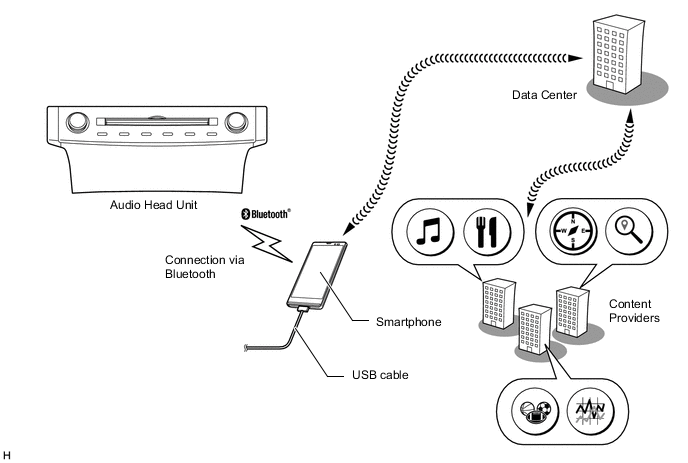
-
-
Fuel Consumption Screen
-
The fuel consumption screen displays information or history of the fuel consumption per minute or per trip, drivable distance, etc. This screen has the display functions listed below.
Tech Tips
Information displayed on the screen may slightly differ from the actual.
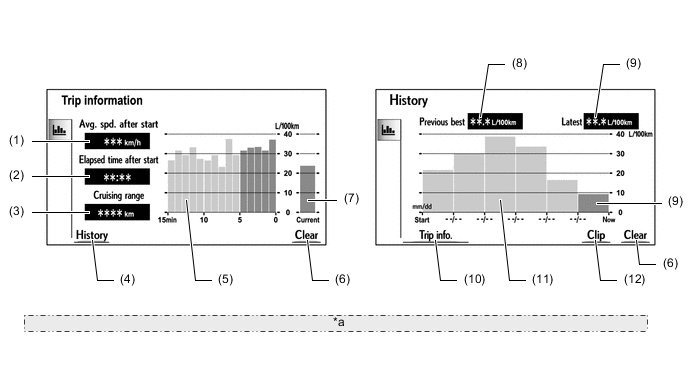
*a The illustrations shown are examples only. The illustrations may differ from the actual vehicle screens. Item Outline (1) Avg. Spd. After Start Displays an average speed value that has been calculated by the combination meter assembly, which is based on the distance driven and time elapsed since the engine switch was turned on (IG). (2) Elapsed Time After Start Displays an elapsed time value that has been calculated by the combination meter assembly, which is based on the time elapsed since the engine switch was turned on (IG). (3) Range Displays the approximate drivable distance. (4) History Switch Changes the screen to the history (fuel consumption per trip) screen. (5) Average Fuel Consumption Per Minute
-
Displays the value that has been calculated by the combination meter assembly, which is based on the driven distance and the volume of fuel consumed (fuel injection signal) since the engine switch was turned on (IG).
-
Displays the average fuel consumption for the last minute, or since clear was last selected.
(6) Clear Switch Clears the displayed information. (7) Current Fuel Consumption Displays the instantaneous (current) fuel consumption value that has been calculated based on the driven distance and the volume of fuel consumed (fuel injection signal) since the engine switch was turned on (IG). (8) Previous Best Displays the best (most economical) per trip fuel consumption. (9) Latest Displays the average fuel consumption for this trip. (10) Trip Information Switch Changes the screen to the trip information (average fuel consumption per minute) screen. (11) Average Fuel Consumption Per Trip
-
Displays the current record and the last 5 average per trip fuel consumption records or the current record and those since clear was last selected.
-
Starts calculating the average fuel consumption when the average fuel consumption displayed on the combination meter assembly is reset.
(12) Clip Switch
-
Restarts calculation of the average fuel consumption value.
-
Sends the average fuel consumption reset signal to the combination meter assembly to update the graph.
-
-
-