METER / GAUGE SYSTEM
-
FUNCTION
-
Multi Buzzer
-
The table below shows the warning and reminder functions of the buzzer in the combination meter assembly.
Priority Item 1 Restart while Driving Notification*1 2 Front Seat Belt Warning (Level 2) 3 Rear Seat Belt Warning*2 4 Front Seat Belt Warning (Level 1) 5 Vehicle Roll-away Notification 6 Brake Fluid Low Warning 7 Engine Oil Pressure Warning 8 EPS Warning 9 Engine Coolant Temperature Warning 10 Door Open when Shift Lever in P Warning/Smart Entry and Start System Warning (Continuous)*1 11 Smart Entry and Start System Warning 1 (Intermittent)*1 12 Key Reminder*3 13 Brake System Temperature Rise or Active Test 14 Temperature Warning/CRAWL Stop 15 Smart Entry and Start System Warning 2 (Intermittent)*1 16 Smart Entry and Start System Warning (Once)*1 17 Multi-information Display Warning 18 Dynamic Radar Cruise Control Cancelation due to Low Speed Warning*4 19 Immobiliser Certification Reminder 20 Parking Brake Engaged Warning 21 Door Open while Driving Warning 22 S Mode Operation Reject Warning 23 Slide Roof Warning*5 24 Turn Signal/Hazard Warning Operation *1: Models with rear seat belt warning function
*2: Models with smart entry and start system
*3: Models without smart entry and start system
*4: Models with dynamic radar cruise control system
*5: Models with sliding roof system
-
-
Multi-information Display
-
Display Function Flow
-
The multi-information display flow can be switched as shown in the flow chart below:
Figure 1. Models with Monochrome Type Multi-information Display
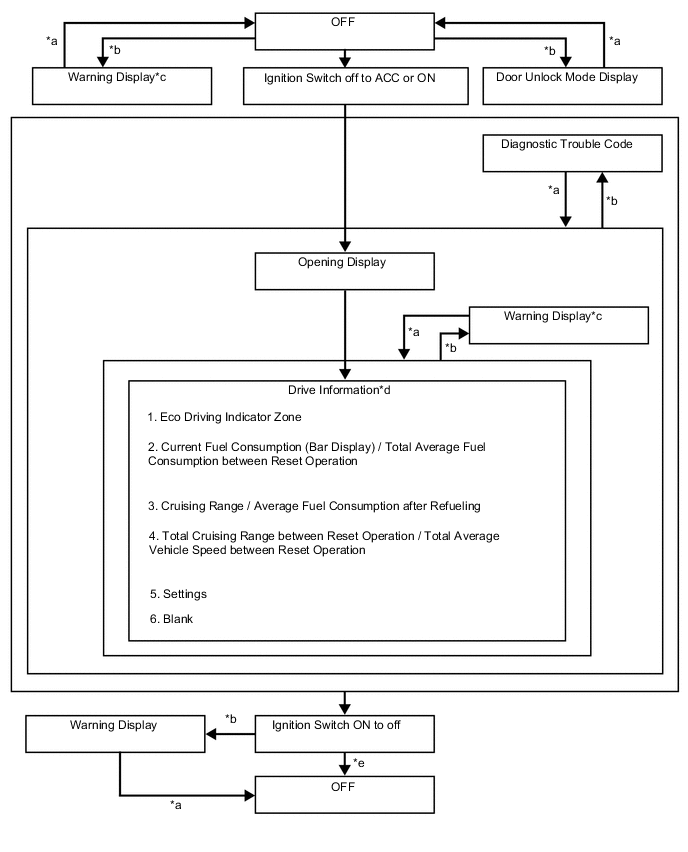
Item Display Change Condition *a Conditions are not met. *b Conditions are met. *c If there are multiple display requests, items will be displayed in sequence. *d Item or display is selected by operating the steering pad switch assembly. *e ODO display is displayed for a certain period of time after the ignition switch is turned off. Figure 2. Models with Color Type Multi-information Display
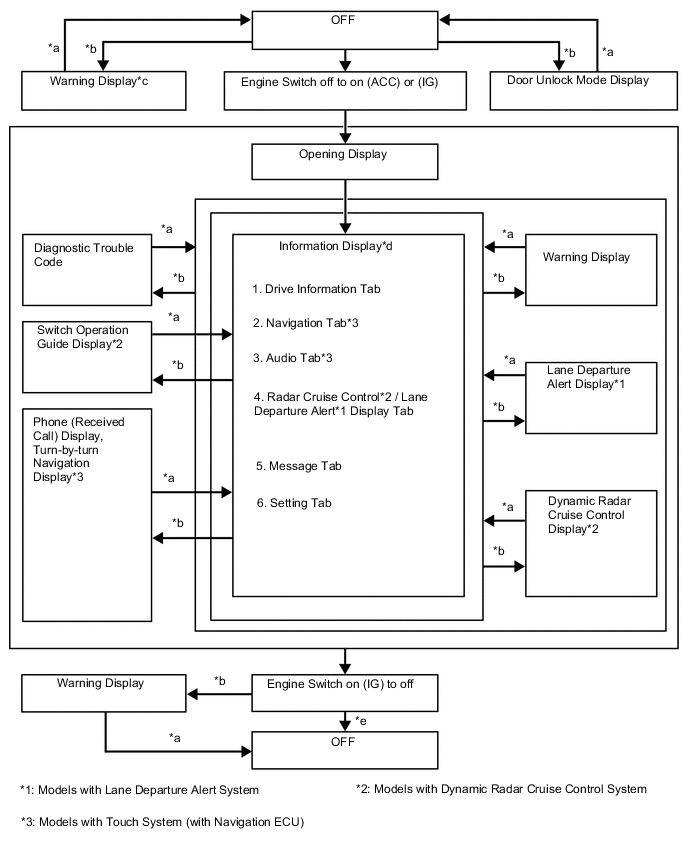
Item Display Change Condition *a Conditions are not met. *b Conditions are met. *c If there are multiple display requests, items will be displayed in sequence. *d Item or display is selected by operating the steering pad switch assembly. *e ODO display is displayed for a certain period of time after the ignition switch is turned off.
-
-
Drive Information Mode Function (Models with Monochrome Type Multi-information Display)
-
The drive information of the multi-information display is displayed in the following order each time the DISP switch of the steering pad switch assembly is pressed.
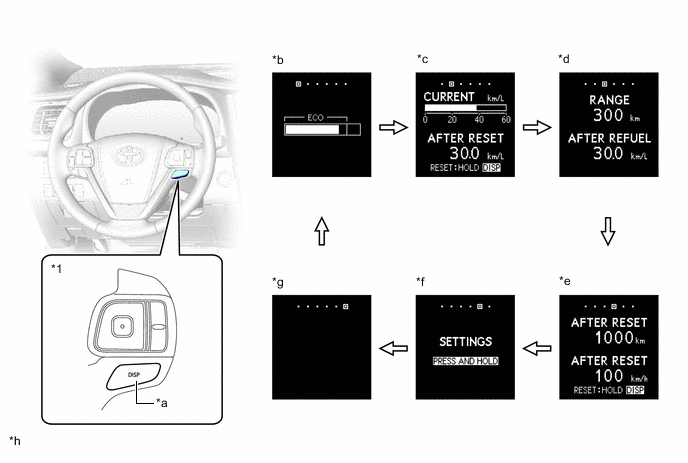
*1 Steering Pad Switch Assembly - - *a DISP Switch *b Eco Driving Indicator Zone Display *c Current Fuel Consumption (Bar Display) / Total Average Fuel Consumption between Reset Operation *d Cruising Range / Average Fuel Consumption after Refueling *e Total Cruising Range between Reset Operation / Total Average Vehicle Speed between Reset Operation *f Setting *g Blank *h The illustrations shown are examples only. 
DISP switch of the steering pad switch assembly pressed briefly - -
-
-
Display Tab Operation (Models with Color Type Multi-information Display)
-
The information currently displayed can be switched using the RIGHT/LEFT switch on the steering pad switch assembly.
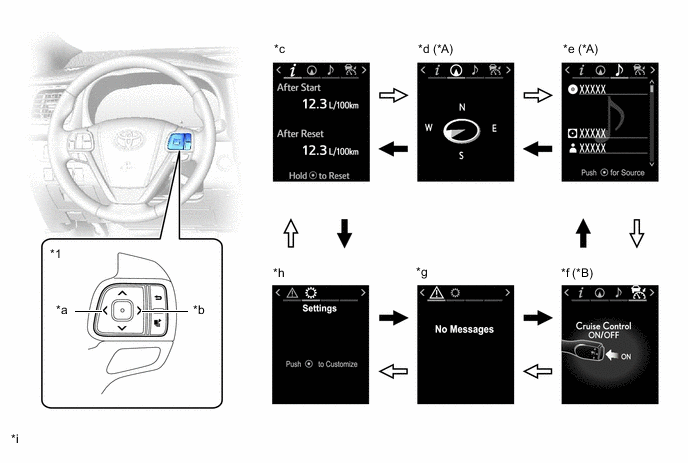
*A Models with Touch System (with Navigation ECU) *B Models with Dynamic Radar Cruise Control System / Lane Departure Alert System *1 Steering Pad Switch Assembly - - *a LEFT Switch *b RIGHT Switch *c Drive Information *d Navigation Information *e Audio Information *f Dynamic Radar Cruise Control System/Lane Departure Alert System Information *g Warning Message *h Settings *i The illustrations shown are examples only. - - RIGHT switch operation 
LEFT switch operation
-
-
Drive Information Mode Function (Models with Color Type Multi-information Display)
-
Drive information shows vehicle information such as drivable range and fuel consumption.
-
The drive information can be switched using the UP/DOWN switch on the steering pad switch assembly.
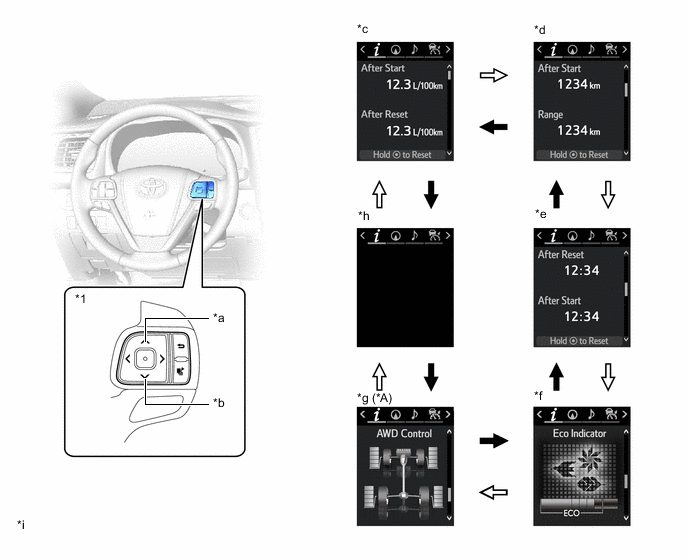
*A AWD Models - - *1 Steering Pad Switch Assembly - - *a UP Switch *b DOWN Switch *c Drive Information 1 *d Drive Information 2 *e Drive Information 3 *f Eco Indicator *g AWD Control *h Blank *i The illustrations shown are examples only. - - DOWN switch operation UP switch operation
-
-
Setting Function
-
The items displayed on the multi-information display can be customized.
-
The items can be selected on the information setting screen.
Models with Monochrome Type Multi-information Display Item Available Setting Language The language used on the multi-information display can be selected:
-
English (Default*1)
-
Russian (Default*2)
-
French
-
Spanish
Unit The unit displayed on the multi-information display can be selected:
-
km (L/100 km) (Default)
-
km (km/L)
Eco Driving Indicator Light The Eco Driving Indicator Light can be switched:
-
ON (Default)
-
OFF
*1: Models for Australia
*2: Models for Russia
Models with Color Type Multi-information Display Item Available Setting Language The language used on the multi-information display can be selected:
-
English (Default*1)
-
Russian (Default*2)
-
French
-
Spanish
Unit The unit displayed on the multi-information display can be selected:
-
km (L/100 km) (Default)
-
km (km/L)
Eco Driving Indicator Light The Eco Driving Indicator Light can be switched:
-
ON (Default)
-
OFF
TOP Switch Settings The item that is displayed when the TOP switch is pressed can be selected among the following:
-
Drive Information 1
-
Drive Information 2
-
Drive Information 3
-
Eco Driving Indicator Zone Display
-
AWD Control*3
-
Navigation Information*4
-
Audio Information
-
Radar Cruise Control System*5 / Lane Departure Alert System*6 Information
-
Warning Message
-
Settings
Drive Information 1 2 items can be selected among the following:
-
Current Fuel Consumption (Bar Display) (Default of upper area)
-
Total Average Fuel Consumption between Reset Operations (Default of lower area)
-
Average Fuel Consumption after Engine Start-up
-
Average Fuel Consumption after Refueling
-
Total Average Vehicle Speed between Reset Operations
-
Average Vehicle Speed after Engine Start-up
-
Cruising Range after Engine Start-up
-
Total Elapsed Time between Reset Operations
-
Elapsed Time after Engine Start-up
-
Cruising Range
-
Total Cruising Range between Reset Operations
Drive Information 2 2 items can be selected among the following:
-
Current Fuel Consumption (Bar Display)
-
Total Average Fuel Consumption between Reset Operations
-
Average Fuel Consumption after Engine Start-up
-
Average Fuel Consumption after Refueling (Default of lower area)
-
Total Average Vehicle Speed between Reset Operations
-
Average Vehicle Speed after Engine Start-up
-
Cruising Range after Engine Start-up
-
Total Elapsed Time between Reset Operations
-
Elapsed Time after Engine Start-up
-
Cruising Range (Default of upper area)
-
Total Cruising Range between Reset Operations
Drive Information 3 2 items can be selected among the following:
-
Current Fuel Consumption (Bar Display)
-
Total Average Fuel Consumption between Reset Operations
-
Average Fuel Consumption after Engine Start-up
-
Average Fuel Consumption after Refueling
-
Total Average Vehicle Speed between Reset Operations (Default of lower area)
-
Average Vehicle Speed after Engine Start-up
-
Cruising Range after Engine Start-up
-
Total Elapsed Time between Reset Operations
-
Elapsed Time after Engine Start-up
-
Cruising Range
-
Total Cruising Range between Reset Operations (Default of upper area)
Interruption Display The following displays that appear as soon as the set conditions are met can be switched to ON (default) or OFF:
-
Turn-by-turn Navigation Display*4
-
Incoming Telephone Display
-
Cruise Control Switch Operation Guide*5
-
Rheostat
Accent Color The accent color can be changed:
-
Clear Blue (Default)
-
Clear Turquoise
-
Deep Orange
-
Radiant Orange
Initialization The setting items can be initialized. *1: Models for Australia
*2: Models for Russia
*3: AWD Models
*4: Models with touch system (with navigation ECU)
*5: Models with dynamic radar cruise control system
*6: Models with lane departure alert system
-
-
-
Warning Mode Function
-
When a warning is necessary, the warning display interrupts the current display on the multi-information display.
-
The master warning light may illuminate or blink and the buzzer in the combination meter assembly may sound depending on the item displayed on the multi-information display.
Models with Monochrome Type Multi-information Display Priority Display Master Warning Light Buzzer 1 AWD TEST MODE*1 - - HOLDING IN ENGINE SWITCH WILL CAUSE AN EMERGENCY ENGINE STOP.*2 Blinks Sounds TO RESTART CAR, SHIFT LEVER TO "N" AND PRESS ENGINE SWITCH.*2 Blinks Sounds THE ENGINE HAS STOPPED. PLEASE PUT SHIFT LEVER INTO "P". Blinks Sounds THE ENGINE HAS STOPPED. PLEASE STOP TOUR CAR IN A SAFE PLACE. Blinks Sounds 2 THE ACCELERATOR IS STUCK. PLEASE DEPRESS BRAKE PEDAL TO STOP CAR. Blinks Sounds 3 Each door open (while driving)*3 Blinks Sounds Each door open - - CHECK SONAR*4 Illuminates - CLEAN SONAR*4 Illuminates - Door open (for glass hatch) (while driving) Blinks Sounds Door open (for glass hatch) - - 4 AUTO POWER OFF TO CONSERVE BATTERY*2 - - 5 SHIFT TO P POSITION WHEN PARKED*2 Blinks Sounds 6 EPS FAILURE. STEERING WHEEL HARDER TO TURN. Illuminates Sounds VOLTAGE ABNORMALITY. STEERING WHEEL HARDER TO TURN. Illuminates Sounds CHECK POWER STEERING SYSTEM Illuminates Sounds RELEASE PARKING BRAKE Blinks Sounds KEY NOT DETECTED*2 Blinks Sounds 7 CHECK ENTRY & START SYSTEM*2 Blinks Sounds TRANSMISSION FLUID HIGH TEMPERATURE Illuminates Sounds CHECK AWD SYSTEM*1 Illuminates Sounds 8 ENGINE STOPPED, STEERING WHEEL HARDER TO TURN. Illuminates Sounds TURN POWER OFF*2 Blinks Sounds KEY DETECTED IN VEHICLE*2 Blinks Sounds DEPRESS BRAKE PEDAL, TOUCH ENGINE SWITCH WITH KEY*2 Blinks Sounds DEPRESS BRAKE PEDAL AND PUSH ENGINE SWITCH TO START*2 - - THE ACCELERATOR IS STUCK. PLEASE CHECK THE ACCELERATOR. Blinks Sounds 9 STEERING LOCK ACTIVE Blinks Sounds AWD SYSTEM OVERHEATED. 2WD MODE ENGAGED.*1 Blinks Sounds AWD SYSTEM OVERHEATED. SWITCHING TO 2WD MODE.*1 Blinks Sounds BRAKE OVERRIDE SYSTEM FAILURE. Illuminates Sounds 10 KEY BATTERY LOW*2 Illuminates Sounds CHECK HEADLIGHT SYSTEM*5, *6 Illuminates Sounds BOTH ACCELERATOR AND BRAKE PEDALS ARE DEPRESSED. Blinks - 11 WASHER FLUID LOW - - FUEL LOW - - TRC OFF - - Engine start possible condition (smart entry and start symbol)*2 - - *1: AWD Models
*2: Models with smart entry and start system
*3: If the vehicle has reached a speed of 5 km/h (3 mph)
*4: Models with intuitive parking assist system
*5: Models with automatic headlight beam level control system
*6: Models with LED headlights
Models with Color Type Multi-information Display Priority Display Master Warning Light Buzzer 1 AWD Test Mode*1 - - Adjusting LDA Camera*2 - - Adjusting Front Radar Beam*3 - - Checking Cruise Control C/D*3 - - Checking Cruise Control Brake*3 - - BRAKE!*4 - -*5 Holding in Engine Switch Will Cause an Emergency Engine Stop. Blinks Sounds To Restart Car, Shift Lever to "N" and Press Engine Switch. Blinks Sounds The Engine Has Stopped. Please Put Shift Lever into "P". Blinks Sounds The Engine Has Stopped. Please Stop Your Car in a Safe Place. Blinks Sounds 2 Dynamic radar cruise control warning reminder indicator (image display)*3 - - Lane departure alert warning reminder indicator (image display)*2 - - The Accelerator is Stuck. Please Depress Brake Pedal to Stop Car. Blinks Sounds 3 Door open (while driving)*6 Blinks Sounds Door open - - Clearance sonar detection (image display)*7 - - Check Park Sonar System*7 Illuminates - Clean Park Sonar*7 Illuminates - Door open (for glass hatch) (while driving) Blinks Sounds Door open (for glass hatch) - - 4 Auto Power OFF to Conserve Battery - - 5 Shift to P position when parked Blinks Sounds 6 EPS Failure. Steering Wheel Harder to Turn. Illuminates Sounds Voltage Abnormality. Steering Wheel Harder to Turn. Illuminates Sounds Check Power Steering System Illuminates Sounds Release Parking Brake Blinks Sounds Key not detected Blinks Sounds 7 Engine Coolant High Temperature Illuminates Sounds Charge warning (battery symbol) - - Clean Radar Sensor*3 Illuminates Sounds Cruise Control not available*3 Illuminates Sounds LDA not available*2 Illuminates Sounds Check Entry & Start System Blinks Sounds BSM not available*8 Illuminates Sounds Check Cruise Control System*3 Illuminates Sounds Check LDA System*2 Illuminates Sounds Check PCS System*4 Illuminates Sounds Check BSM System*8 Illuminates Sounds Engine Oil Pressure Low Illuminates Sounds Transmission Fluid High Temperature Illuminates Sounds Check AWD System*1 Illuminates Sounds LDA System is Unavailable Below Approx. 50 km/h.*2 - - LDA System is Unavailable at this Speed.*2 - - 8 Dynamic radar cruise control indicator (image display)*3 - - Lane departure alert indicator (image display)*2 - - Engine Stopped, Steering Wheel Harder to Turn. Illuminates Sounds Turn Power OFF Blinks Sounds Key detected in vehicle Blinks Sounds Moon Roof opened*9 Blinks Sounds Depress brake pedal, touch engine switch with key Blinks Sounds Depress brake pedal and push engine switch to start - - The Accelerator is Stuck. Please Check the Accelerator. Blinks Sounds 9 Steering Lock active Blinks Sounds AWD system overheated. 2WD mode engaged.*1 Blinks Sounds AWD system overheated. Switching to 2WD mode.*1 Blinks Sounds Brake Override System Failure. Illuminates Sounds 10 Key Battery Low Illuminates Sounds Check Headlight System*10, *11, *12 Illuminates Sounds Both Accelerator and Brake Pedals Are Depressed. Blinks - 11 Washer Fluid Low - - Fuel Low - - TRC OFF - - Turn on the high beam to activate AHB System*10 - - VSC System Switched Off. Pre-Crash Brake System Disengaged.*4 - - PCS temporarily not available*4 - - *1: AWD Models
*2: Models with lane departure alert system
*3: Models with dynamic radar cruise control system
*4: Models with pre-crash safety system
*5: Skid control buzzer operation is activated.
*6: If the vehicle has reached a speed of 5 km/h (3 mph)
*7: Models with intuitive parking assist system
*8: Models with blind spot monitor system
*9: Models with sliding roof system
*10: Models with automatic high beam system
*11: Models with automatic headlight beam level control system
*12: Models with LED headlights
-
-
-
-
OPERATION
-
Eco Driving Indicator Light and Eco Driving Indicator Zone Display
-
The following table shows the operation of Eco Driving Indicator Light and Eco driving indicator zone display in different driving conditions:
Models with Monochrome Type Multi-information Display Driving Condition Eco Driving Indicator Light Eco Driving Indicator Zone Display While Stopped Turns off 
While Eco Driving Turns on 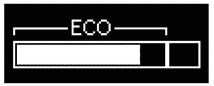
While Non-eco Driving Turns off 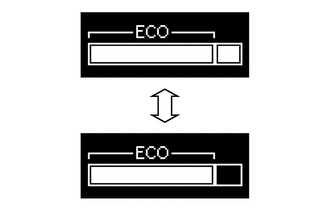
When any of the following conditions is met, operation is stopped.
-
Ignition switch off
-
Engine stopped
-
Shift lever is not in D.
-
The vehicle is being driven at a speed of 130 km/h (81 mph) or higher.
Turns off 
Models with Color Type Multi-information Display Driving Condition Eco Driving Indicator Light Eco Driving Indicator Zone Display While Stopped Turns off 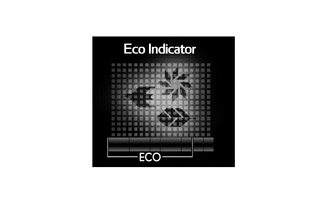
While Eco Driving Turns on 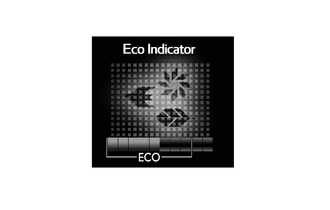
While Non-eco Driving Turns off 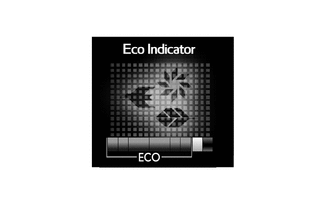
When any of the following conditions is met, operation is stopped.
-
Engine switch off
-
Engine stopped
-
Shift lever is not in D.
-
The vehicle is being driven at a speed of 130 km/h (81 mph) or higher.
Turns off 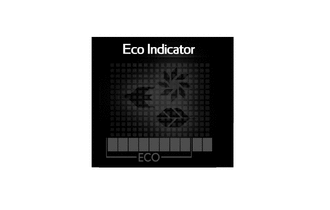
-
-
-