PARKING ASSIST MONITOR SYSTEM
-
FUNCTION OF MAIN COMPONENTS
Component Function Rear Television Camera Assembly
-
Captures images of the area behind the vehicle.
-
The parking assist guide lines that are calculated based on signals from the steering sensor are superimposed on the captured image. Then, the image is sent to the multi-display as video signals.
-
When the luggage compartment door is open, superimposing of parking assist guide lines is canceled and only the captured image is sent as video signals.
Multi-display (Accessory Meter Assembly*1 / Multi-display*2) Receives visual signals composed of the area behind the vehicle with parking assist guide lines overlaid from the rear television camera assembly, and displays them. Radio Receiver Assembly Sends signals indicating a mode change in parking guide line display functions to the rear television camera assembly. Steering Sensor Detects the angle of the steering wheel and sends the resulting signals to the rear television camera assembly. Park/Neutral Position Switch Assembly Sends an R shift position signal to the multi-display and ECM. ECM Sends an R shift position signal to the rear television camera assembly. Main Body ECU (Multiplex Network Body ECU) Sends the luggage compartment door courtesy switch signal to the rear television camera assembly. Brake Actuator Assembly
-
Skid Control ECU
Sends a vehicle speed signal to the rear television camera assembly. Clearance Warning ECU Assembly*3 Sends a clearance sonar information signal to the rear television camera assembly. Network Gateway ECU Relays and transmits data between CAN buses. Remote Touch Switches the assist modes. *1: Models with 12.3-inch display
*2: Models with 8-inch display
*3: Models with LEXUS parking assist-sensor system
-
-
SYSTEM CONTROL
-
The parking assist monitor system operates when all of the following conditions are met:
-
The engine switch is on (IG).
-
The shift lever is in R.
-
The luggage compartment door is closed.
-
-
-
FUNCTION
-
Area Displayed on Screen
-
Objects on the right of the vehicle appear on the right side of the multi-display, and objects on the left of the vehicle appear on the left side of the multi-display.
-
The rear television camera assembly uses a wide-angle lens. The perceived distance from images that appear on the screen differs from the actual distance.
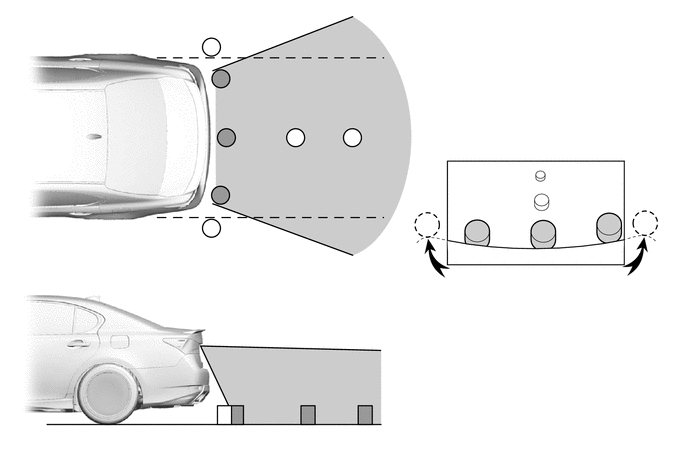
Note
The area displayed on the screen may vary according to vehicle status or road conditions. The area covered by the rear television camera assembly is limited. The rear television camera assembly does not show objects close to either corner of the bumper or show the area under the bumper.
-
-
Warning Message
-
A warning message appears at the bottom or center of the screen under the following conditions. The warning message appears in the same language that has been selected by the language selector of the multi-display assembly.
Messages Appearing at Bottom of Screen Warning Message Condition Check surroundings for safety. This message always appears during system operation. System initializing. This message appears when the steering wheel is operated while the battery terminal (-) is disconnected and then the terminal is reconnected. Guidance unavailable. This message appears if there is a malfunction in this system. Message Appearing at Center of Screen Warning Message Condition System not ready. This message appears if the system is not initialized.
-
-
Calibration Following Parts Replacement
-
The items listed below must always be adjusted whenever one of the following conditions occurs. For details, refer to the Repair Manual.
Warning Message Condition Check surroundings for safety. This message always appears during system operation. System initializing. This message appears when the steering wheel is operated while the battery terminal (-) is disconnected and then the terminal is reconnected. Guidance unavailable. This message appears if there is a malfunction in this system.
-
-
-
FAIL-SAFE
-
The table below indicates the malfunction detection items for the components in this system.
Malfunctioning Parts Detection Item Function Rear Television Camera Assembly Camera malfunction signal is detected Stops system operation and displays a dark screen Steering Sensor
-
Sensor malfunction is detected
-
Sensor open circuit signal is detected
-
Communication malfunction between the steering sensor and rear television camera assembly
Stops system operation Neutral steering point correction incomplete signal is detected Radio Receiver Assembly Malfunction of radio receiver assembly -
-
-
DIAGNOSIS
-
The radio receiver assembly is equipped with a diagnosis function which can display a diagnosis menu for the parking assist monitor system. The method for entering the diagnosis menu screen is the same as the method used for the multi-display. For details, refer to the Repair Manual.
-