NAVIGATION SYSTEM / MULTI INFORMATION SYSTEM(for Sedan)
-
OUTLINE
-
For the touch screen system, enhanced navigation system functions are available by installing a navigation ECU.
-
This navigation system supports connected services, enabling the user to utilize the online search, in which the user can search for a desired Point of Interest (POI) on the Internet and set it as a destination or a memory point within the system, Google sync function (street view and panoramio), or downloadable applications.
-
-
PRECAUTION
-
The type of ignition switch used on this model differs depending on the specifications of the vehicle. The expressions listed in the table below are used in this section.
Expression Ignition Switch
(Position)
Engine Switch
(Condition)
Ignition Switch off LOCK Off (LOCK) Ignition Switch ACC ACC On (ACC) Ignition Switch ON ON On (IG) Engine Start START On (Start)
-
-
SPECIFICATION
Component System Touch Screen System
(Navigation ECU)
Multi-display 6.1-inch wide LCD Navigation Computer Harman International Gyro Sensor Piezoelectric Ceramic Element Language Supported Voice Guidance English, German, French, Italian, Spanish, Dutch, Norwegian, Swedish, Portuguese, Danish, Finnish, Polish, Greek, Russian, Czech, Romanian, Hungarian, Slovak, Turkish and Ukrainian -
MAIN FEATURES
-
Connected Services
-
The following services are available by connecting the navigation system to Toyota's portal site via the internet using a cellular phone.
-
To use these connected services, Bluetooth setting and a portal account are required.
-
To get a portal account, access the Toyota portal site (URL:www.my.toyota.eu).
-
Available connected services are listed in the following table:
Contents Outline Online search New establishments, such as restaurants and bars, that are not registered in the navigation system can be set as a destination. Importing memory points Downloading via a cellular phone Establishments that were searched for using a personal computer can be set as a destination and can be registered as memory points. Downloading from a USB memory device Vehicle Customisation The vehicle equipment operation settings can be partially changed by remote operation via the Toyota portal site. Google Sync Function Street view
-
Street view, which shows panoramic images along streets, is available. The street view of the desired location can be displayed on the multi-display.*1
-
A location searched for using street view can be set as a destination.
Panoramio
-
The Panoramio Photo sharing site, which provides photos with location information and comments, is available. Panoramio photos of the desired location can be displayed on the multi-display.
-
Due to location information contained in the photos, it is possible to set a certain point in the displayed photo as a destination.
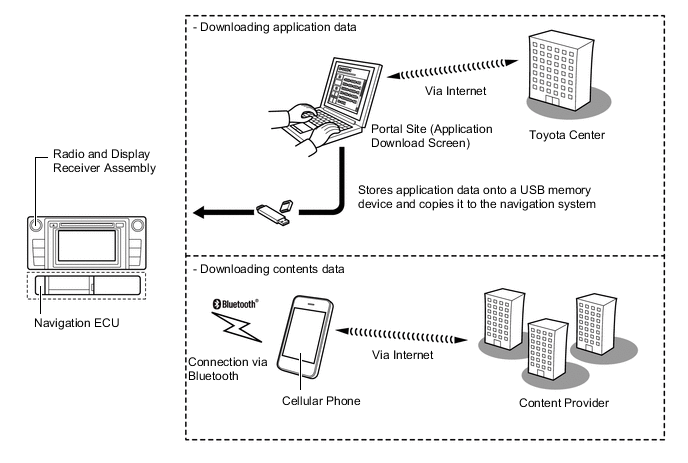
Downloadable Applications New applications can be downloaded from the Toyota portal site*2 and installed to the radio and display receiver assembly via USB memory. Using a Bluetooth connected cellular phone, information and update programs necessary for the application are accessible via the content provider of the application. *1: Up to 6 pictures per location can be displayed.
*2: For details about Toyota portal site, refer to www.my.toyota.eu.
Figure 1. Online Search
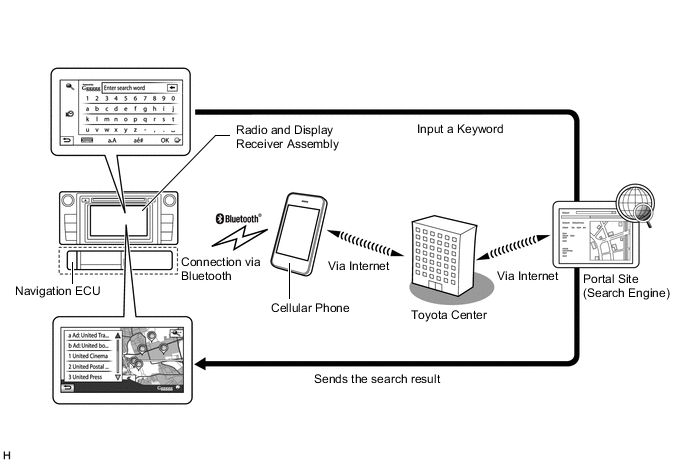
Figure 2. Importing Memory Points
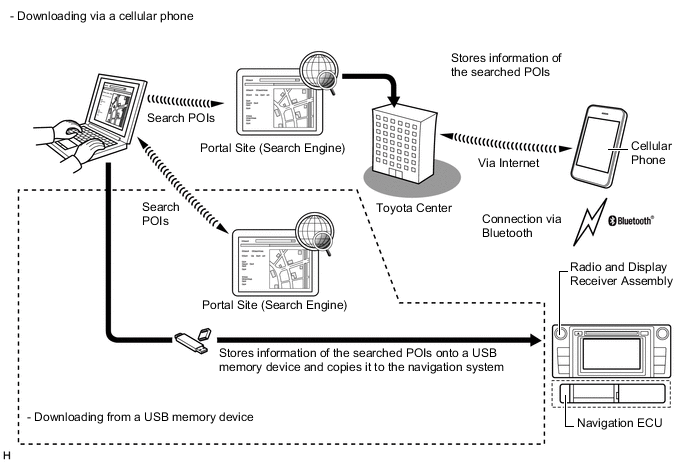
Figure 3. Vehicle Customisation
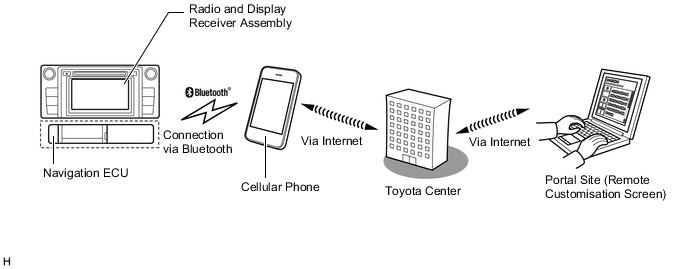
Figure 4. Downloadable Applications Image
-
-
-
The main functions of the multi-display are listed below.
Function Outline Navigation System Through the use of the Global Positioning System (GPS) and map data which is stored on a flash memory, the navigation system analyzes the position of the vehicle and indicates this position on the map that is displayed on the screen. In addition, it is possible to use the system to register memory points and navigate to a destination. Audio/Video System Serves as the display and controls for the following:
-
Radio operation
-
CD player operation
-
Bluetooth-compatible portable player operation
-
USB memory operation
-
Media transfer protocol (MTP) device operation (USB type)
-
iPod / iPhone operation
-
Portable audio player operation (AUX type)
Hands-free System When a Bluetooth-compatible cellular telephone is registered to the multi-display, the driver can make and receive calls or talk hands-free on the cellular telephone by operating the switches on the screen/steering pad. Monitor System Displays a view of the area behind the vehicle that is captured by the television camera mounted on the back door when the shift lever is moved to R. Others Fuel Consumption Screen Fuel consumption information such as average fuel consumption per minute, current fuel consumption per minute and past fuel consumption record is displayed. Language Select The language of the on-screen buttons, pop-up messages and the voice guidance can be changed.
-
English, German, French, Italian, Spanish, Dutch, Norwegian, Swedish, Portuguese, Danish, Finnish, Polish, Greek, Russian, Czech, Romanian, Hungarian, Slovak, Turkish and Ukrainian
Beep Setting The beep sound can be turned off. Delete Personal Data The following personal data can be deleted or returned to their default settings:
-
General settings
-
Navigation settings
-
Audio settings
-
Telephone settings
Screen Adjustment The brightness or contrast of the screen can be adjusted to suit the brightness of the surroundings. Diagnosis This menu contains the following items:
-
Failure Diagnosis
-
System Check
-
Diagnosis Recorder
-
Function Check / Setting
-
Panel & steering Switch
-
Touch Switch
-
Vehicle Signal
-
Ext Box
-
Service Information
-
Version Information
-
Product Information
-
-