METER / GAUGE SYSTEM
-
FUNCTION
-
Buzzer
-
The table below shows the warning and reminder functions of the buzzer in the combination meter assembly.
Priority Item 1 READY 2 Hybrid System Start while Driving Notice 3 Hybrid System Switch Operation while Driving Warning 4 Front Seat Belt Warning (Level 2) 5 Rear Seat Belt Warning*1 6 Front Seat Belt Warning (Level 1) 7 Lane Departure Alert System Cancel Warning*2 8 Unexpected Vehicle Motion Warning (Level 1) 9 Unexpected Vehicle Motion Warning (Level 2) 10 Brake Force Reduction Warning 11 Engine Oil Pressure Warning 12 EPS Warning 13 Lane Departure Alert System Warning*2 14 Engine Coolant Temperature Warning 15 Door Open when Shift Lever not in P Warning 16 Entry and Start System Warning 1 (Intermittent) 17 Brake System Temperature Rise Warning 18 Entry and Start System Warning 2 (Intermittent) 19 Entry and Start System Warning (Once) 20 Multi-information Display Warning 21 Accelerator Depression with N Position 22 Accelerator Depression Hold Warning 23 Hybrid System Warning (Intermittent) 24 Hybrid System Warning (Once) 25 Towing Prohibition Notification Buzzer 26 HV Battery Low Warning (SOC: 18 %) 27 HV Battery Low Warning (SOC: 25 %) 28 Hybrid Unit Overheat Warning 29 Radar Cruise Control Cancelation due to Low Speed Warning*3 30 Low Speed Zone Leading Vehicle Lost Warning*3 31 Immobiliser Certification Reminder 32 Speed Warning*4 33 Parking Brake Engaged Warning 34 Door Open while Driving Warning 35 Sway Warning*2 36 Road Sign Assist Indication*5 37 Shift Reject 38 EV Mode Operation Reject Warning 39 Light Reminder 40 Turn Signal/Hazard Warning Operation *1: Models with rear seat belt warning function
*2: Models with lane departure alert system
*3: Models with dynamic radar cruise control system
*4: Models for Europe
*5: Models with road sign assist system
-
-
Multi-information Display
-
Display Function Flow
-
The multi-information display flow can be switched as shown in the flow chart below:
Figure 1. Optitron Meter
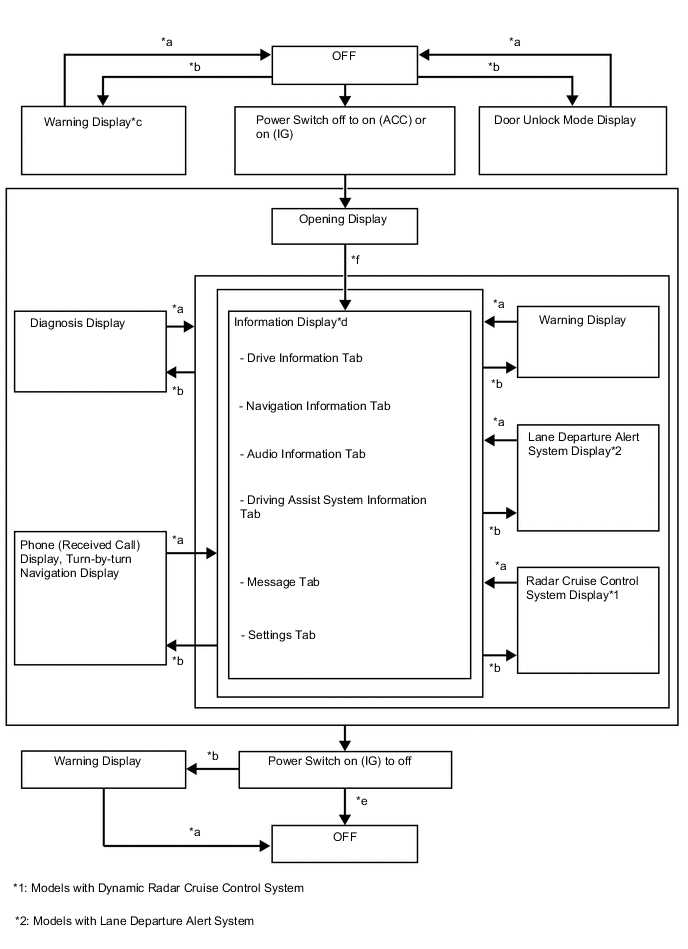
*a Conditions are not met *b Conditions are met *c If there are multiple display requests, items will be displayed in sequence. *d Item or display is selected by operating the DISP switch *e ODO display is displayed for a certain period of time after the power switch is turned off. *f After power switch on (IG) Figure 2. TFT LCD Meter
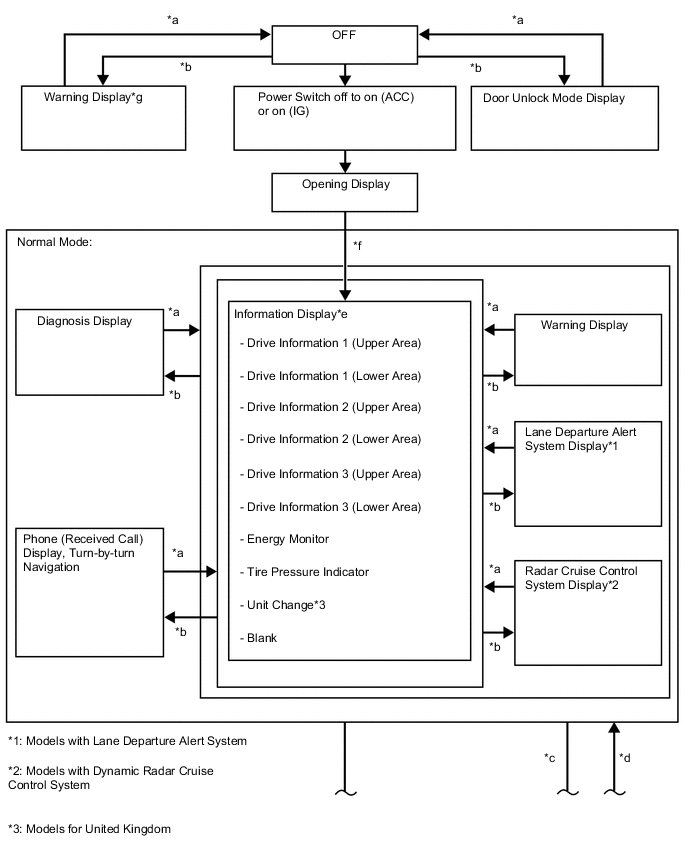
*a Conditions are not met *b Conditions are met *c Movable meter ring activated *d TOP switch operated *e Item or display is selected by operating the DISP switch *f After power switch on (IG) *g If there are multiple display requests, items will be displayed in sequence. 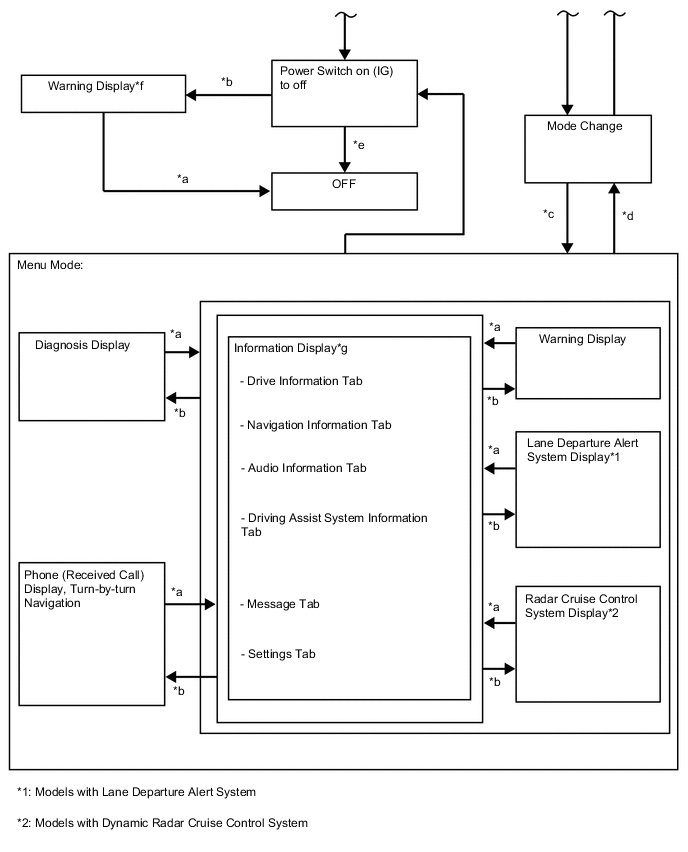
*a Conditions are not met *b Conditions are met *c Movable meter ring activated *d TOP switch operated *e ODO display is displayed for a certain period of time after the power switch is turned off *f If there are multiple display requests, items will be displayed in sequence. *g Item or display is selected by operating the DISP switch
-
-
Display Tab Operation
-
The information currently displayed can be switched using the RIGHT/LEFT switch on the steering pad switch assembly.
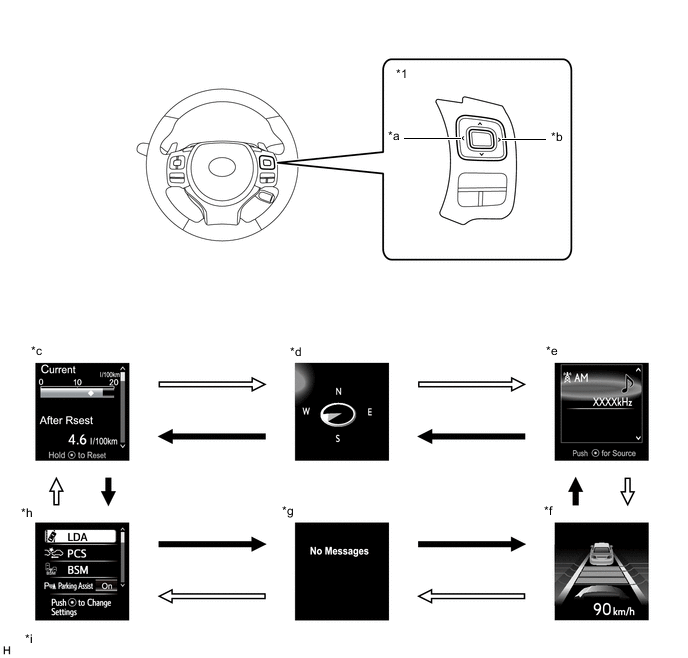
*1 Steering Pad Switch Assembly - - *a LEFT Switch *b RIGHT Switch *c Drive Information tab *d Navigation Information tab *e Audio Information tab *f Driving Assist System Information tab *g Warning Message tab *h Settings tab *i The illustrations shown are examples only. The illustrations may differ from the actual vehicle screens. - - 
RIGHT switch operation 
LEFT switch operation
-
-
Drive Information
-
Drive information shows vehicle information such as drivable range and fuel consumption.
-
The drive information can be switched using the UP/DOWN switch on the steering pad switch assembly.
Figure 3. Optitron Meter
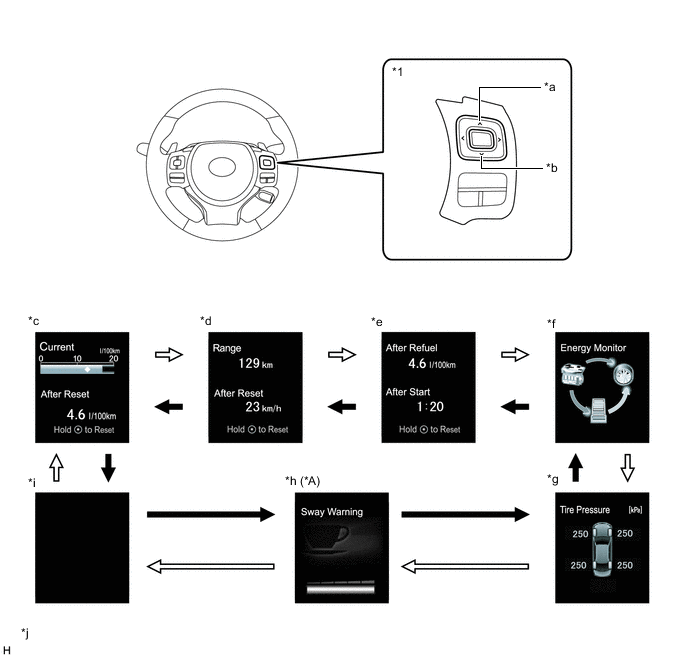
*A Models with Lane Departure Alert System - - *1 Steering Pad Switch Assembly - - *a UP Switch *b DOWN Switch *c Drive Information 1 *d Drive Information 2 *e Drive Information 3 *f Energy Monitor *g Tire Pressure Indicator *h Sway Warning *i Blank *j The illustrations shown are examples only. The illustrations may differ from the actual vehicle screens. DOWN switch operation UP switch operation Figure 4. TFT LCD Meter (Menu Mode)
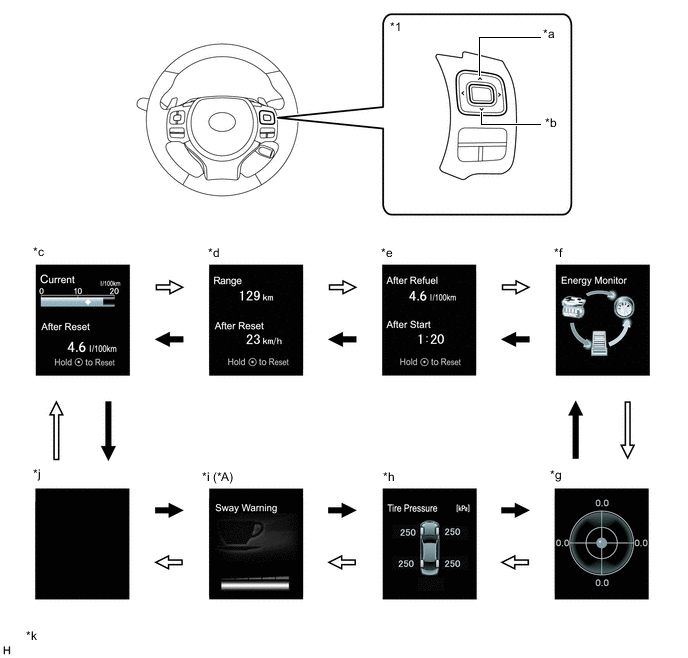
*A Models with Lane Departure Alert System - - *1 Steering Pad Switch Assembly - - *a UP Switch *b DOWN Switch *c Drive Information 1 *d Drive Information 2 *e Drive Information 3 *f Energy Monitor *g G Monitor *h Tire Pressure Indicator *i Sway Warning *j Blank *k The illustrations shown are examples only. The illustrations may differ from the actual vehicle screens. - - DOWN switch operation UP switch operation Figure 5. TFT LCD Meter (Normal Mode)
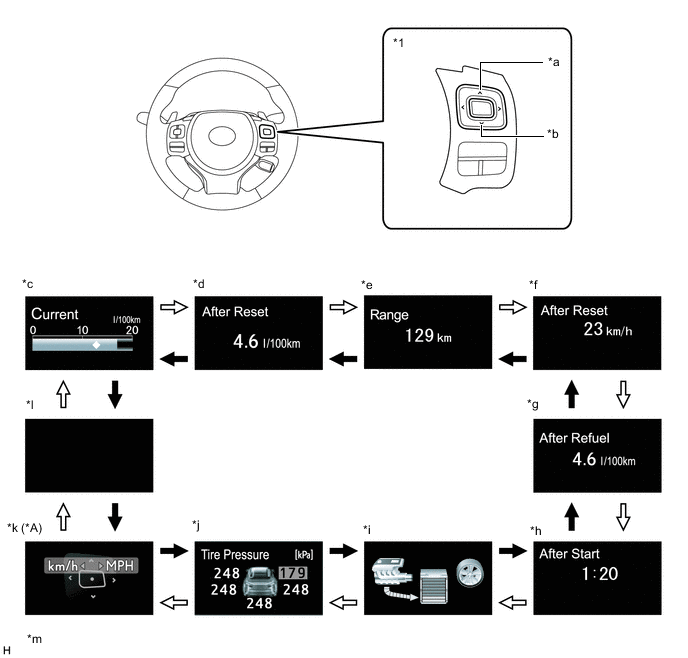
*A Models for United Kingdom - - *1 Steering Pad Switch Assembly - - *a UP Switch *b DOWN Switch *c Drive Information 1 (Upper Area) *d Drive Information 1 (Lower Area) *e Drive Information 2 (Upper Area) *f Drive Information 2 (Lower Area) *g Drive Information 3 (Upper Area) *h Drive Information 3 (Lower Area) *i Energy Monitor *j Tire Pressure Indicator *k Unit Change *l Blank *m The illustrations shown are examples only. The illustrations may differ from the actual vehicle screens. - - DOWN switch operation UP switch operation
-
-
Setting Function
-
The items displayed on the multi-information display can be customized.
-
The items can be selected on the information setting screen.
Lane Keeping Assist System (Models with Lane Keeping Assist System) Item Available Setting Lane Center
-
Setting for lane center can be set to on/off:
-
On
-
Off
Steering Assist Settings
-
Setting for steering assist can be selected:
-
Full
-
Alert
-
Assist
Steering Assist
-
Setting for steering assist can be set to on/off:
-
On
-
Off
Warning Method
-
Warning method can be changed:
-
Steering wheel vibration High (Icon is displayed)
-
Steering wheel vibration Standard (Icon is displayed)
-
Steering wheel vibration Low (Icon is displayed)
-
Buzzer (Icon is displayed)
Warning Sensitivity
-
Alert sensitivity of alert system can be changed:
-
High
-
Standard
Unsteady Driving Detection
-
Unsteady driving detection can be set to on/off:
-
On
-
Off
Unsteady Driving Detection Sensitivity
-
Unsteady driving detection sensitivity can be selected:
-
High
-
Standard
-
Low
Pre-collision System (Models with Pre-collision System) Item Available Setting PCS
-
The pre-collision system can be set to on/off:
-
On
-
Off
Pre-collision warning timing
-
The pre-collision system warning timing can be selected:
-
Far (Icon is displayed)
-
Middle (Icon is displayed)
-
Near (Icon is displayed)
Speed Warning (Models for Europe) Item Available Setting Speed Warning
-
The speed warning system can be set to on/off:
-
ON
-
OFF
Speed Setting Changes the set vehicle speed of the speed warning between 30 km/h (20 mph) and 260 km/h (160 mph) by 1 km/h or 1 mph when the UP switch or DOWN switch is pressed. Speed Indicator (Except models for Europe)*1 Item Available Setting Speed Indicator
-
The speed warning system can be set to on/off:
-
ON
-
OFF
Speed Setting
-
Changes the set vehicle speed of the speed warning between 50 km/h (30 mph) and 120 km/h (75 mph) by 1 km/h or 1 mph when the UP switch or DOWN switch is pressed*2.
-
Changes the set vehicle speed of the speed warning between 50 km/h (30 mph) and 200 km/h (125 mph) by 1 km/h or 1 mph when the UP switch or DOWN switch is pressed*3.
-
Changes the set vehicle speed of the speed warning between 50 km/h (30 mph) and 120 km/h (75 mph) by 10 km/h or 10 mph when the UP switch or DOWN switch is pressed and held*2.
-
Changes the set vehicle speed of the speed warning between 50 km/h (30 mph) and 200 km/h (125 mph) by 10 km/h or 10 mph when the UP switch or DOWN switch is pressed and held*3.
Tech Tips
The maximum value varies according to the countries and regions.
*1: Models with TFT LCD meter
*2: Destination packages for Taiwan and Philippines
*3: Except destination packages for Taiwan and Philippines
Road Sign Assist (Models with road sign assist system) Item Available Setting Road Sign Assist
-
The road sign assist system can be set to on/off:
-
ON
-
OFF
Excess Speed
-
The excess speed notification method can be selected:
-
No Notification
-
Only Visual
-
Visual & Audible
Notification The excess speed notification level can be set between -5 km/h and 10 km/h (-5 mph to 10 mph). Others
-
The other notifications method can be selected:
-
No Notification
-
Only Visual
-
Visual & Audible
Vehicle settings (Except destination packages for Hong Kong and Macau) Item Available Setting Oil Maintenance The oil maintenance management function can be reset. Meter Settings Item Available Setting Language
-
The language used on the multi-information display can be selected:
-
English
-
French
-
Spanish
-
German
-
Italian
-
Russian
Unit
-
The unit displayed on the multi-information display can be selected.
-
km (km/L)
-
km (L/100 km)
-
miles (MPG)
EV Indicator Light
-
The EV Indicator Light can be switched to ON or OFF.
-
ON
-
OFF
TOP Switch Settings*1 Displays how to register the screen which is displayed when the TOP switch is pressed. Drive Information 1 Upper Area
-
2 items can be selected among the following:
-
Current Fuel Consumption (Bar Display)/Average Fuel Consumption (Mark Display)
-
Average Fuel Consumption Between Reset Operations
-
Average Fuel Consumption After Engine Start-up
-
Average Fuel Consumption After Refueling
-
Total Average Vehicle Speed Between Reset Operations
-
Average Vehicle Speed After Engine Start-up
-
Cruising Range After Engine Start-up
-
Elapsed Time Between Reset Operations
-
Elapsed Time After Engine Start-up
-
Cruising Range
Lower Area Drive Information 2 Upper Area
-
2 items can be selected among the following:
-
Current Fuel Consumption (Bar Display)/Average Fuel Consumption (Mark Display)
-
Average Fuel Consumption Between Reset Operations
-
Average Fuel Consumption After Engine Start-up
-
Average Fuel Consumption After Refueling
-
Total Average Vehicle Speed Between Reset Operations
-
Average Vehicle Speed After Engine Start-up
-
Cruising Range After Engine Start-up
-
Elapsed Time Between Reset Operations
-
Elapsed Time After Engine Start-up
-
Cruising Range
Lower Area Drive Information 3 Upper Area
-
2 items can be selected among the following:
-
Current Fuel Consumption (Bar Display)/Average Fuel Consumption (Mark Display)
-
Average Fuel Consumption Between Reset Operations
-
Average Fuel Consumption After Engine Start-up
-
Average Fuel Consumption After Refueling
-
Total Average Vehicle Speed Between Reset Operations
-
Average Vehicle Speed After Engine Start-up
-
Cruising Range After Engine Start-up
-
Elapsed Time Between Reset Operations
-
Elapsed Time After Engine Start-up
-
Cruising Range
Lower Area Interruption Display
-
The following displays that appear as soon as the set conditions are met can be switched to ON or OFF.
-
Turn-by-turn Navigation Display
-
Incoming Telephone Display
-
Rheostat
-
Ring Guidance
Accent Color*1
-
The accent color can be changed:
-
White Heat
-
Titanium Silver
Needle Color*2
-
The needle color of the tachometer can be changed:
-
Blue
-
Red
-
White
Rev Indicator*2
-
The rev indicator setting can be switched to ON or OFF.
-
ON
-
OFF
-
The engine speed for rev indicator activation can be set at increments of 100 rpm between 2000 rpm and 6000 rpm.
Tachometer Peak Hold Function*2
-
The tachometer peak hold function can be switched to ON or OFF.
-
ON
-
OFF
Tachometer Settings
-
The tachometer can be changed:
-
Tachometer or HV Meter (Self-changing)
-
HV Meter (Always)
-
Tachometer (Always)
Initialization The setting items can be initialized. *1: Models with optitron meter
*2: Models with TFT LCD meter
-
-
-
Warning Mode Function
-
When a warning is necessary, the warning display interrupts the display in the multi-information display.
-
The master warning light may illuminate or blink and the buzzer in the combination meter assembly may sound depending on the item displayed on the multi-information display.
Priority Display Master Warning Light Buzzer 1 CDY-2 - - 2WD MAINTENANCE MODE - - 2WD CERTIFICATION MODE - - ADJUSTING FORWARD CAMERA*1 - - ADJUSTING FRONT RADAR BEAM*2, *3 - - ERROR ADJUSTING FRONT RADAR BEAM*2, *3 - - ADJUSTING FRONT RADAR BEAM VERTICAL*2, *3 - - ADJUSTING FRONT RADAR BEAM HORIZONTAL*2, *3 - - CHECKING PCS BRAKE - - CHECKING CRUISE CONTROL C/D*2 - - CHECKING CRUISE CONTROL BRAKE*2 - - Headlight System Uninitialized Visit Your Dealer - - BRAKE!*3 - - Push and Hold Power Switch for Emergency Stop Blinks Sounds Shift to N and Press Power Switch to Restart Blinks Sounds Hybrid System Stopped Shift to P Blinks Sounds Hybrid System Stopped Stop in a Safe Place Blinks Sounds 2 Vehicle approaching warning during dynamic radar cruise control*1, *2 - - Braking Power Low Stop in a Safe Place See Owner's Manual Blinks Sounds Accelerator Stuck Depress Brake to Stop Blinks Sounds Shift to P Before Exiting Vehicle Blinks Sounds Hybrid System Malfunction Do Not Be Towed Illuminates Sounds Shift to P Before Exiting Vehicle Blinks Sounds 3 Door Open (While Driving)*4 Blinks Sounds Door Open - - Clearance Sonar Obstruction Detection*5 - - Mute Temporarily*5 - - Muted Temporarily*5 - - Parking Assist Malfunction*5 Illuminates - Clean Parking Assist Sensor*5 Illuminates - 4 Power Turned Off to Save Battery - - 5 Shift to P Before Exiting Vehicle Blinks Sounds Shift Is in N Release Accelerator Before Shifting Blinks Sounds Depress Brake when Vehicle Is Stopped Hybrid System May Overheat Blinks Sounds Traction Battery Needs to be Protected Shift into P to Restart Blinks Sounds 6 Hybrid System Malfunction Stop in a Safe Place See Owner's Manual Illuminates Sounds Traction Battery Needs to be Protected Refrain From the Use of N Position Blinks Sounds Power Steering Malfunction Steering Power Low Visit Your Dealer Illuminates Sounds Steering Power Low Visit Your Dealer Illuminates Sounds Power Steering Malfunction Visit Your Dealer Illuminates Sounds Release Parking Brake Blinks Sounds Key Not Detected Check Key Location - Sounds Release Accelerator Blinks Sounds 7 Slippery Road. Cannot Shift to Lower Gear Illuminates Sounds Lane Departure Alert Driver Attention Required*1 Illuminates - LDA Hold Steering Wheel*1 - - LDA Steering Assist Unavailable Hold Steering Wheel*1 Illuminates - LDA Hold Steering Wheel*1 Illuminates Sounds 8 Check Engine Visit Your Dealer Illuminates Sounds Check Engine Reduced Engine Power Visit Your Dealer Illuminates Sounds Reduced Engine Power Visit Your Dealer Illuminates Sounds SRS Airbag System Malfunction Visit Your Dealer Illuminates Sounds Antilock Brake System Malfunction Visit Your Dealer - Sounds Engine Coolant Temp High Stop in a Safe Place See Owner's Manual Illuminates Sounds Charging System Malfunction See Owner's Manual - - Radar Cruise Control Unavailable Clean Sensor*2, *3 Illuminates Sounds Radar Cruise Control Unavailable*2 Illuminates Sounds Grille Shutter Inoperable Illuminates Sounds Smart Entry & Start System Malfunction See Owner's Manual Illuminates - Blind Spot Monitor Unavailable*6 Illuminates Sounds Cruise Control Malfunction Visit Your Dealer*2 Illuminates Sounds Lane Departure Alert Malfunction Visit Your Dealer*1 Illuminates Sounds Front Camera Unavailable*1, *3, *12 - - Lane Departure Alert Unavailable*1 Illuminates Sounds Lane Departure Alert Turned On Steering Assist Active*1 - - Lane Departure Alert Turned On Steering Assist Inactive*1 - - Front Camera Vision Blocked Clean and Demist Windshield*1, *3, *12 - - Front Camera Unavailable Remove Debris On Windshield*1, *3, *12 - - Pre-Collision System Malfunction Visit Your Dealer*3 Illuminates Sounds Blind Spot Monitor System Malfunction Visit Your Dealer*6 Illuminates Sounds Oil Pressure Low Stop in a Safe Place See Owner's Manual Illuminates Sounds Transmission Fluid Temp High See Owner's Manual Illuminates Sounds Braking Power Low Visit Your Dealer - Sounds POP UP HOOD Activated. Illuminates Sounds POP UP HOOD Failure. Illuminates Sounds Lane Departure Alert Unavailable Below Approx 50 km/h*1 - - Lane Departure Alert Unavailable Below Approx 32 MPH*1 - - Lane Departure Alert Unavailable at Current Speed*1 - - 9 Hybrid System Stopped Steering Power Low Illuminates Sounds Turn Off Vehicle - - Would You Like to Take a Break?*1 - Sounds Please Take a Break*1 - Sounds Key Left inside Vehicle - - Turn Lights Off Blinks Sounds Moon Roof Open*7 Blinks Sounds Window Open Blinks Sounds Window / Moon Roof Open*7 Blinks Sounds Depress Brake and Then Touch Key to Power Switch - Sounds Depress Brake and Power to Start - - Depress Brake and Power to Start - Sounds 10 Steering Wheel Lock Press Power Switch while Turning Wheel Blinks Sounds To Start Vehicle, Put Shift Lever into P Blinks Sounds Drive-Start Control Malfunction Visit Your Dealer Illuminates Sounds Brake Override Malfunction Visit Your Dealer Illuminates Sounds 11 Key Battery Low - Sounds Engine Oil Level Low Add or Replace - - Hybrid System Overheated Reduced Output Power Illuminates Sounds Headlight System Malfunction Visit Your Dealer Illuminates Sounds RSA Malfunction Visit Your Dealer*8 Illuminates Sounds Accelerator and Brake Pedals Depressed Simultaneously Blinks - 12 Maintenance Required for Hybrid Battery Cooling Parts at Your Dealer - - Aux Battery Low See Owner's Manual - - Windshield Washer Fluid Low - - Fuel Low - - Roads May Be Icy Drive with Care - Sounds Traction Control Turned Off - - Oil Maintenance Required Soon*9 - - Maintenance Required Soon*10 - - Injector Maintenance Required Soon*11 - - Oil Maintenance Required Visit Your Dealer*9 - - Maintenance Required Visit Your Dealer*10 - - Injector Maintenance Required Visit Your Dealer*11 - - To Activate Auto High Beam, Switch Headlights to High Beam*12 - - Resetting Maintenance Data*10 - - A New Key has been Registered Contact Your Dealer for Details - - Depress Brake and Power to Start - - VSC Turned Off Pre-Collision Brake System Unavailable*3 - - Pre-Collision System Unavailable*3 - - High Power Consumption Partial Limit On AC/Heater Operation Blinks - Pre-Collision System Unavailable*3 - - Pre-Collision System Unavailable Clean Sensor*3 - - Pre-Collision System Off*3 - - EV Mode Unavailable - Sounds EV Mode Unavailable System Warming Up - Sounds EV Mode Unavailable Hybrid Battery Low - Sounds EV Mode Unavailable Speed Range Exceeded - Sounds EV Mode Unavailable Reduce Acceleration to Activate - Sounds EV Mode Deactivated - Sounds EV Mode Deactivated Hybrid Battery Low - Sounds EV Mode Deactivated Speed Range Exceeded - Sounds EV Mode Deactivated Accelerator Depressed Too Far - Sounds Theft Sensor Turned Off - - Theft Sensor Turned On - - *1: Models with lane departure alert system
*2: Models with dynamic radar cruise control system
*3: Models with pre-collision system
*4: If the vehicle has reached a speed of 5 km/h (3 mph)
*5: Models with LEXUS parking assist-sensor system
*6: Models with blind spot monitor system
*7: Models with sliding roof system
*8: Models with road sign assist system
*9: Except destination packages for Hong Kong and Macau
*10: Models with maintenance required reminder function
*11: Destination package for Philippines
*12: Models with automatic high beam system
-
-
-