MONITOR SYSTEM
-
CONSTRUCTION
-
When reverse is selected, the display shows the image from the rear television camera assembly.
-
When the multi-display assembly shows the image of the area behind the vehicle, the parking guide lines are also displayed.
-
A description of the parking guide line mode display is provided in the following diagram.
Tech Tips
The illustrations shown are examples only. The illustrations may differ from the actual vehicle screens.
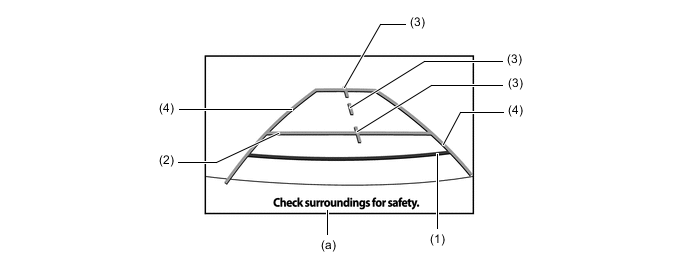
Item Description (1) Distance Guide Line (Red) Indicates a position on the ground about 0.5 m (1.5 ft.) behind the rear bumper. (2) Distance Guide Line (Blue) Indicates a position on the ground about 1.0 m (3.0 ft.) behind the rear bumper. (3) Vehicle Center Guide Lines (Blue) These lines indicate the estimated position on the ground of the center of the vehicle. (4) Vehicle Width Extension Guide Lines (Blue) Indicate the estimated vehicle width. (a) Warning Message Display Area Area where warning messages are displayed.
-