METER / GAUGE SYSTEM
-
OPERATING CONDITION
-
Hybrid System Indicator and Illumination Function
-
The hybrid system indicator will begin to operate when both of the following conditions are met:
-
The hybrid system is operating (the READY indicator light is illuminated).
-
Other than park (P), neutral (N), or reverse (R) is selected.
-
-
Hybrid system indicator linked illumination function (blue) can operate when all of the following conditions are met:
-
The hybrid system is operating (the READY indicator light is illuminated).
-
The vehicle is being driven with a shift state other than park (P), neutral (N) or reverse (R) selected.
-
The needle of the hybrid system indicator is in the CHARGE area or ECO area.
-
SPORT mode is not selected.
-
EV drive mode is not selected.
-
The hybrid system is normal.
-
The hybrid system temperature is normal.
-
The vehicle is being driven at a speed of 130 km/h (81 mph) or less.
-
-
-
-
FUNCTION
-
Combination Meter Assembly
-
Buzzer Function
-
The table below shows the warning and reminder functions of the buzzer in the combination meter assembly.
1 READY 2 Shift State R Indication 3 Seat Belt Warning (Level 2) 4 Seat Belt Warning (Level 1 for Rear Seat)*1 5 Seat Belt Warning (Level 1) 6 Brake System Warning 7 EPS Warning 8 Entry and Start System Warning (Continuous) 9 Entry and Start System Warning (Intermittent) 10 Brake System Temperature Warning 11 Hill-start Assist Control Indication 12 Entry and Start System Warning (Once) 13 Multi-information Display Warning 14 Accelerator Depression with Neutral (N) Selected 15 Accelerator Hold Warning 16 HV Battery Low Warning 17 HV Battery Charge Request 18 Dynamic Radar Cruise Control Cancellation due to Low Vehicle Speed*2 19 Immobiliser Certification Reminder 20 Park (P) Request 21 Speed Limit Exceed Warning*3 22 Parking Brake Engaged Warning 23 Door Open while Driving Warning 24 Sports Shift Reject Warning 25 Shift Operation Reject Warning 26 EV Drive Mode Reject Warning 27 Headlight Reminder 28 Sliding Roof Open Warning
-
*1: Models with rear seat belt warning function
-
*2: Models with dynamic radar cruise control system
-
*3: Models for G.C.C. countries
-
-
-
Multi-information Display
-
Display Function Flow (Models with Monochrome Type Multi-information Display)
-
The multi-information display can be switched as shown in the flow chart below;
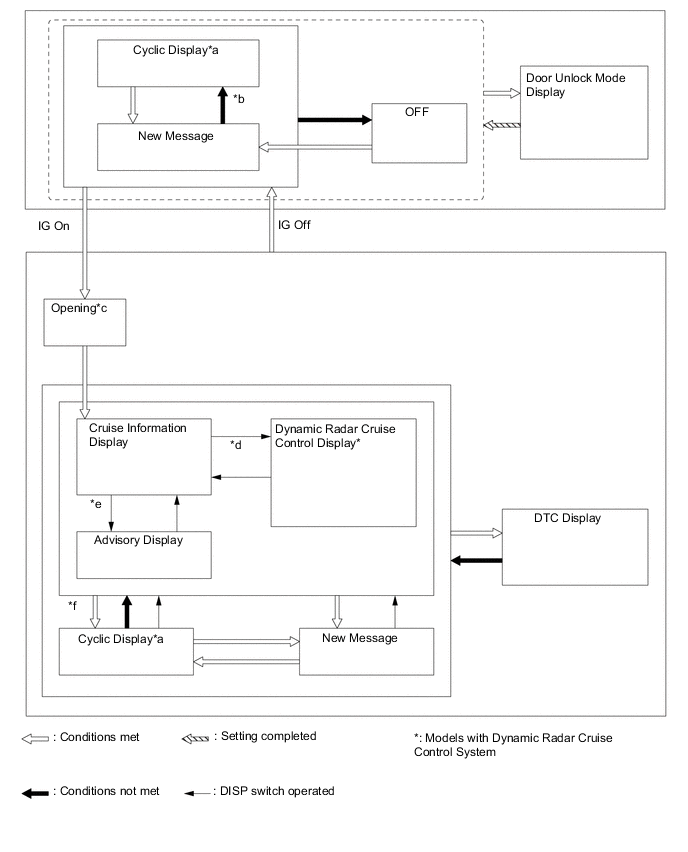
No. Transition Condition *a If the display conditions for 2 or more messages are met, relevant messages are alternately displayed for 2 seconds each. *b Conditions are not met and all new messages have been displayed. *c If the hybrid system is turned off during the "Opening" display, the "Opening" display will be shown from the beginning. *d The dynamic radar cruise control system is turned on. *e If the DISP switch is used to change from an advisory message to the cruise information display screen, repeatedly operating the DISP switch will cycle through the cruise information screens and then return to the advisory message if the display conditions are still met. *f If the DISP switch is not operated for more than 6 seconds with any of the warning message display conditions still met, the relevant warning messages are displayed.
-
-
Display Function Flow (Models with Color Type Multi-information Display)
-
The multi-information display can be switched as shown in the flow chart below;
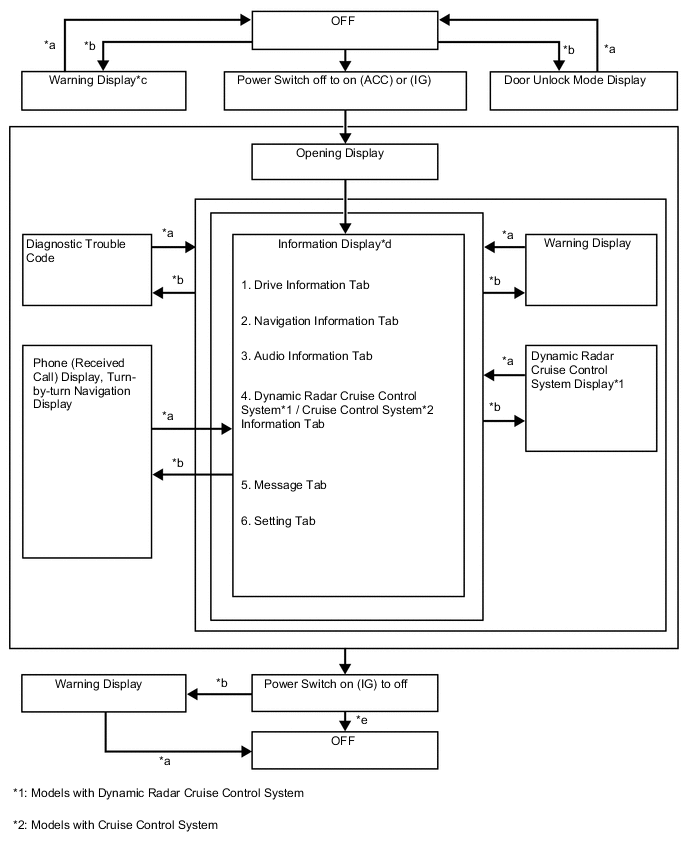
No. Transition Condition *a Conditions are not met *b Conditions are met *c If there are multiple display requests, items will be displayed in sequence. *d Item or display is selected by operating the steering pad switch assembly. *e ODO display is displayed for a certain period of time after the power switch is turned off.
-
-
Cruise Information Mode Function (Models with Monochrome Type Multi-information Display)
-
The cruise information is displayed in the following order each time the DISP switch of the steering pad switch assembly is pressed.
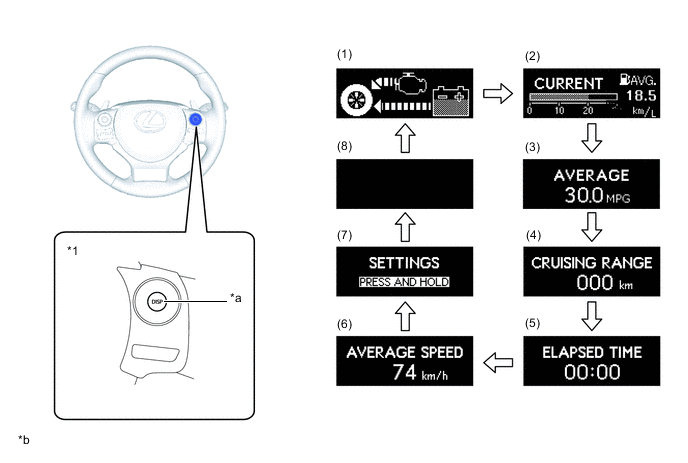
Text in Illustration *1 Steering Pad Switch Assembly - - *a DISP Switch *b Illustrations shown are examples only. No. Information Outline (1) Energy Monitor
-
Displays the energy transmission direction for checking the current drive method (engine, motor or both), whether the engine is being used to generate power or whether energy is being regenerated.
-
The energy flow, which appears in the form of an arrow, also shows the SOC of the HV battery in 8 levels.
-
This display is updated every 0.3 seconds.
(2) Current Fuel Consumption and Average Fuel Consumption Since Refueling Current Fuel Consumption:
-
Displays the value calculated by the combination meter assembly based on the engine speed and fuel injection signals from the No. 1 injector.
-
This display is updated every 0.6 seconds.
Average Fuel Consumption Since Refueling:
-
Displays the value calculated by the combination meter assembly based on the distance driven since refueling and the fuel consumption volume (fuel injection signals from the No. 1 injector).
-
The combination meter assembly determines the vehicle has been refueled through the signal from the fuel sender gauge.
-
This display is updated every 10 seconds.
(3) Average Fuel Consumption
-
Displays a value that has been calculated by the combination meter assembly based on the distance driven and the fuel consumption volume (fuel injection signal from the No. 1 cylinder).
-
This display is updated every 10 seconds.
(4) Cruising Range
-
Displays a value that has been calculated by the combination meter assembly. When the power switch is turned on (IG), the combination meter assembly calculates the range based on continuously monitoring and storing information on fuel consumption data, and the residual fuel volume.
-
This display is updated every 10 seconds.
(5) Elapsed Time Displays the length of time since the hybrid control system was started. (6) Average Speed
-
Displays the average vehicle speed calculated by the combination meter assembly based on the vehicle speed signal.
-
This display is updated every 10 seconds.
(7) Settings
-
Allows the customization of the display and illumination of the combination meter assembly.
-
On models without a navigation system, some vehicle functions can also be customized.
(8) Blank Screen - -
-
Display Tab Operation (Models with Color Type Multi-information Display)
-
The information currently displayed can be switched using the RIGHT/LEFT switch of the steering pad switch assembly.
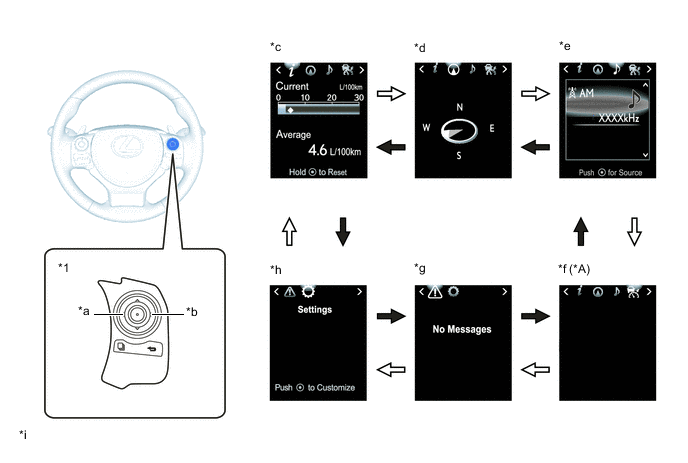
Text in Illustration *A Models with Dynamic Radar Cruise Control System or Cruise Control System - - *1 Steering Pad Switch Assembly - - *a LEFT Switch *b RIGHT Switch *c Drive Information *d Navigation Information *e Audio Information *f Dynamic Radar Cruise Control System / Cruise Control System Information *g Warning Message *h Settings *i Illustrations shown are examples only. - - 
RIGHT switch operation 
LEFT switch operation
-
-
Drive Information Mode Function (Models with Color Type Multi-information Display)
-
The drive information tab shows vehicle information such as drivable range and fuel consumption.
-
The drive information display can be changed by using the UP/DOWN switch of the steering pad switch assembly.
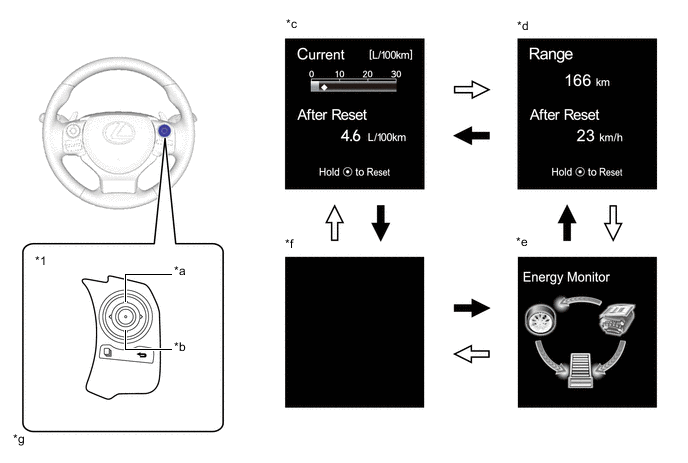
Text in Illustration *1 Steering Pad Switch Assembly - - *a UP Switch *b DOWN Switch *c Drive Information 1 *d Drive Information 2 *e Energy Monitor *f Blank *g Illustrations shown are examples only. - - DOWN switch operation UP switch operation
-
-
Warning Mode Function (Models with Monochrome Type Multi-information Display)
-
When a warning is necessary, the warning display interrupts the current display on the multi-information display.
-
The master warning light may illuminate or blink and the buzzer in the combination meter assembly may sound depending on the item displayed on the multi-information display.
Priority Warning Master Warning Light Buzzer 1 MAINTENANCE MODE - - CERTIFICATION MODE - - ADJUSTING FRONT RADAR BEAM*1, *2 - - CHECKING CRUISE CONTROL C/D*1 - - CHECKING CRUISE CONTROL BRAKE*1 - - BRAKE!*2 - - 2 Door open (image display) - Sounds LEXUS parking assist-sensor system warning (image display)*3 - - CHECK SONAR*3 Illuminates Sounds CLEAN SONAR*3 Illuminates Sounds 3 AUTO POWER OFF TO CONSERVE BATTERY - - 4 Vehicle approaching warning during radar cruise control (image display)*1 - - 5 SHIFT TO P POSITION Blinks Sounds SHIFT TO P POSITION AND PUSH POWER SWITCH TO TURN POWER OFF Blinks Sounds SHIFT TO P POSITION WHEN PARKED Blinks Sounds N POSITION Blinks Sounds DEPRESS THE BRAKE PEDAL WHEN VEHICLE IS AT A STANDSTILL Blinks Sounds TRACTION BATTERY PRESERVATION MODE RESTART AFTER SHIFTING THE P POSITION Blinks Sounds LOW TRACTION BATTERY CHARGE WHEN NOT IN N POSITION Blinks Sounds SWITCHED TO N. TO ENGAGE P, STOP CAR THEN PRESS P SWITCH Blinks Sounds AUX BATTERY LOW. SHIFTING UNAVAILABLE. SEE OWNER'S MANUAL. Blinks Sounds SHIFTING BRIEFLY UNAVAILABLE. WAIT A MOMENT AND TRY AGAIN. Blinks Sounds CANNOT SHIFT TO B. SHIFT TO D ONCE TO SHIFT TO B. Blinks Sounds CANNOT SHIFT TO D OR R. START HYBRID SYSTEM AND TRY AGAIN. Blinks Sounds SHIFTING UNAVAILABLE. DEPRESS BRAKE BEFORE SHIFTING. Blinks Sounds SWITCHED TO N. SHIFT TO D ONCE TO SHIFT TO B. Blinks Sounds SWITCHED TO N. TO SHIFT TO D, STOP CAR FIRST. Blinks Sounds SWITCHED TO N. TO SHIFT TO R, STOP CAR FIRST. Blinks Sounds 6 P LOCK MALFUNCTION WHEN PARKING, PARK IN FLAT PLACE AND APPLY PARKING BRAKE SECURELY Illuminates Sounds CHECK HYBRID SYSTEM Illuminates Sounds SHIFT MALFUNCTION. SEE OWNER'S MANUAL. Illuminates Sounds 7 RELEASE PARKING BRAKE Blinks Sounds KEY NOT DETECTED Blinks Sounds SPEED LIMIT EXCEED*4 Blinks Sounds 8 CLEAN RADAR SENSOR*1, *2 Illuminates Sounds CRUISE CONTROL NOT AVAILABLE*1 Illuminates Sounds 9 CHECK CRUISE CONTROL SYSTEM*1 Illuminates Sounds CHECK PCS SYSTEM*2 Illuminates Sounds CHECK HEADLIGHT SYSTEM*5 Blinks Sounds 10 TURN POWER OFF Blinks Sounds KEY DETECTED IN VEHICLE Blinks Sounds TURN LIGHTS OFF Blinks Sounds MOONROOF OPENED*6 Blinks Sounds DEPRESS BRAKE PEDAL, TOUCH POWER SWITCH WITH KEY Blinks Sounds DEPRESS BRAKE PEDAL AND PUSH POWER SWITCH TO START Blinks Sounds 11 SHIFT TO P POSITION TO START Blinks Sounds 12 KEY BATTERY LOW Illuminates Sounds HYBRID SYSTEM OVERHEAT Illuminates Sounds 13 LOW WASHER FLUID - - PCS TEMPORARILY NOT AVAILABLE*2 - - EV MODE CURRENTLY NOT AVAILABLE - Sounds EV MODE NOT AVAILABLE WARMING UP - Sounds EV MODE NOT AVAILABLE LOW BATTERY - Sounds EV MODE NOT AVAILABLE EXCESSIVE SPEED - Sounds EV MODE NOT AVAILABLE EXCESSIVE ACCELERATION - Sounds EV MODE DEACTIVATED - Sounds EV MODE DEACTIVATED LOW BATTERY - Sounds EV MODE DEACTIVATED EXCESSIVE SPEED - Sounds EV MODE DEACTIVATED EXCESSIVE ACCELERATION - Sounds THEFT SENSOR OFF - - THEFT SENSOR ON - -
-
*1: Models with dynamic radar cruise control system
-
*2: Models with pre-crash safety system
-
*3: Models with LEXUS parking assist-sensor system
-
*4: Models for G.C.C. countries
-
*5: Models with LED headlights
-
*6: Models with sliding roof system
-
-
Warning Mode Function (Models with Color Type Multi-information Display)
-
When a warning is necessary, the warning display interrupts the current display on the multi-information display.
-
The master warning light may illuminate or blink and the buzzer in the combination meter assembly may sound depending on the item displayed on the multi-information display.
Priority Display Master Warning Light Buzzer 1 Maintenance Mode - - Certification Mode - - Adjusting Front Radar Beam*1, *2 - - Checking Cruise Control C/D*1 - - Checking Cruise Control Brake*1 - - BRAKE!*2 - - 2 Door open (image display) - Sounds Clearance sonar obstruction detection (image display)*3 - - Check Park Sonar System Illuminates Sounds Clean Park Sonar Illuminates Sounds 3 Auto Power OFF to Conserve Battery - - 4 Vehicle approaching warning during dynamic radar cruise control (image display)*1 - - 5 Shift to "P" position Blinks Sounds Shift to "P" position and push power switch to turn power off Blinks Sounds Shift to P position when parked Blinks Sounds N position Blinks Sounds Depress brake pedal when vehicle is at a standstill Blinks Sounds Traction battery preservation mode
Restart after shifting to P position
Blinks Sounds Traction battery Low
Charges when not in N position
Blinks Sounds Switched to "N".
To engage "P", stop car then press "P" switch.
Blinks Sounds Aux battery low. Shifting unavailable. See owner's manual. Blinks Sounds Shifting briefly unavailable. Wait a moment and try again. Blinks Sounds Cannot shift to B. shift to D once to shift to B. Blinks Sounds Cannot shift to D or R. Start hybrid system and try again. Blinks Sounds Shifting unavailable. Depress brake before shifting. Blinks Sounds Switched to N. Shift to D once to shift to B. Blinks Sounds Switched to N. To shift to D, stop car first. Blinks Sounds Switched to N. To shift to R, stop car first. Blinks Sounds 6 "P" Lock malfunction
When parking, park in flat place and apply parking brake securely
Illuminates Sounds Check Hybrid System
Stop the vehicle in a safe place immediately
Illuminates Sounds Shift malfunction. See owner's manual. Illuminates Sounds 7 Release Parking Brake Blinks Sounds Key not detected Blinks Sounds Speed Limit Exceeded*4 Blinks Sounds 8 Clean Radar Sensor*1, *2 Illuminates Sounds Cruise Control not available*1 Illuminates Sounds 9 Check Cruise Control System*1 Illuminates Sounds Check PCS System*2 Illuminates Sounds Check Headlight System*5 Blinks Sounds 10 Turn Power OFF Blinks Sounds Key detected in vehicle Blinks Sounds Turn Light Off Blinks Sounds Moon Roof opened*6 Blinks Sounds Depress brake pedal, touch POWER switch with key Blinks Sounds Depress brake pedal and push POWER switch to start Blinks Sounds 11 Shift to P position to start Blinks Sounds 12 Key Battery Low Illuminates Sounds Hybrid System Overheat
Output Power is limited
Illuminates Sounds 13 Washer Fluid Low - - PCS temporarily not available*2 - - EV mode currently not available - Sounds EV mode not available
Warming up
- Sounds EV mode currently not available
Low battery
- Sounds EV mode currently not available
Excessive speed
- Sounds EV mode currently not available
Excessive acceleration
- Sounds EV mode deactivated - Sounds EV mode deactivated
Low battery
- Sounds EV mode deactivated
Excessive speed
- Sounds EV mode deactivated
Excessive acceleration
- Sounds Theft Sensor OFF - - Theft Sensor ON - - *1: Models with dynamic radar cruise control system
*2: Models with pre-crash safety system
*3: Models with LEXUS parking assist-sensor system
*4: Models for G.C.C. countries
*5: Models with LED headlights
*6: Models with sliding roof system
-
-
Rear Seat Belt Warning Function (Models with Rear Seat Belt Warning Function)
-
The combination switch assembly displays the rear seat belt warning based on the rear seat belt buckle switches and courtesy switches for the rear doors. If a warning is necessary, the buzzer in the combination meter assembly will also sound.
-
The flow of operations that results in a rear seat belt warning are as follows:
Step Condition Transition Multi-information Display Buzzer 1 Power switch is off. Warning is not displayed. No Sound 2
-
Power switch is turned on (IG).
-
A seat belt is fastened.
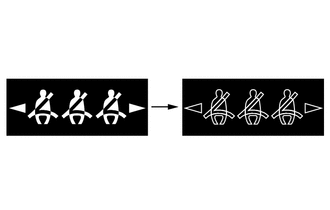
In this case, 3 seats will be displayed as being unfastened regardless of the number of occupants. If seat belts are then fastened, the display for the relevant seat will go off. 3 Any of the rear seat belts are unfastened. 
If the vehicle speed exceeds 20 km/h (12 mph):
-
Sounds for 30 seconds*1
-
Sounds for an additional 90 seconds*2
-
Seats with an unfastened seat belt will be displayed regardless of the number of occupants.
4
-
When one of the following conditions is met, the buzzer will stop sounding.
-
The seat belt is refastened.
-
The vehicle speed decreases to less than approximately 2 km/h (1.2 mph) and either the parking brake is applied or park (P) is selected.

Stops sounding
-
Seats with an unfastened seat belt will be displayed regardless of the number of occupants.
-
The warning message will be displayed for approximately 34 seconds and then go off.
*1: Sound at an interval of 1.2 seconds.
*2: Sound at an interval of 0.4 seconds.
-
-
-
-
Customization Function (Models with Monochrome Type Multi-information Display)
-
Items that can be customized are displayed when the DISP switch of the steering pad switch assembly is pressed and held.
-
Press the DISP switch briefly to select the item to be customized. Press and hold the DISP switch to confirm the selection.
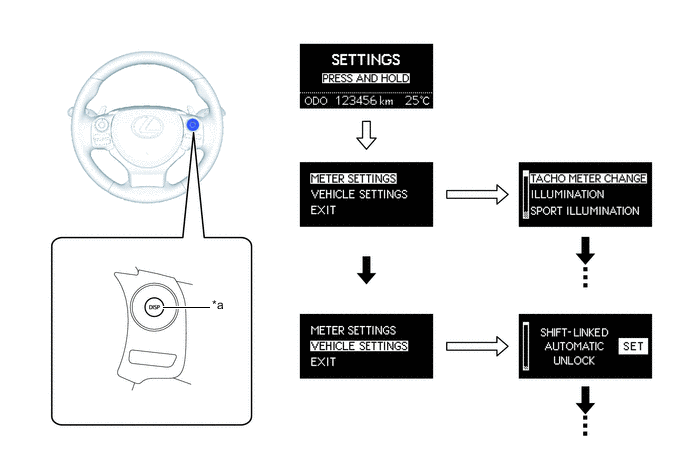
Text in Illustration *a DISP Switch - - DISP Switch pressed and held DISP Switch pressed briefly -
The following items of the combination meter assembly can be customized:
Item Available Setting Tachometer*1
-
Auto
-
Keep On
-
Off
Eco Lamp*1
-
Eco Drive Support
-
Keep On
-
Off
Sport Lamp*1
-
Auto
-
Off
Lamp Brightness*1
-
Bright
-
Standard
EV Indicator
-
Auto
-
Off
Language LHD Models for Europe
-
English
-
French
-
Spanish
-
Russian*2
-
Chinese*2
-
German*3
-
Italian*3
RHD Models for Europe
-
English
-
French
-
Spanish
-
German
-
Italian
Others
-
English
-
French
-
Spanish
-
Chinese
Unit
-
km (km/L)
-
km (L/100km)
-
miles (MPG)
-
*1: Models with Optitron Type Combination Meter Assembly
-
*2: Destination package for Russia and Ukraine
-
*3: Except destination package for Russia and Ukraine
-
-
The following items of the vehicle can be customized:
Item Available Setting Door Shift-linked Automatic Unlock
-
On
-
Off
Vehicle Speed-linked Automatic Lock
-
On
-
Off
Shift-linked Automatic Lock
-
On
-
Off
Driver Door Linked Unlock
-
On
-
Off
Lock/Unlock Answer Back (Keyless Entry Feedback)
-
On
-
Off
Automatic Relock Time Adjustment
-
30 seconds
-
60 seconds
-
120 seconds
-
Off
Remote 2-press Unlock
-
On
-
Off
Keyless Entry Feedback Buzzer Volume Adjustment
-
Off
-
Level 1 (Minimum)
-
Level 2
-
Level 3
-
Level 4
-
Level 5
-
Level 6
-
Level 7 (Maximum)
Entry and Start System Entry and Start System
-
On
-
Off
Select Doors to Unlock
-
Driver
-
All
Lighting Headlight Off Time Adjustment
-
30 seconds
-
60 seconds
-
90 seconds
-
Off
Light Sensor Sensitivity
-
-2
-
-1
-
Standard
-
+1
-
+2
Daytime Running Light*
-
On
-
Off
Interior Light Off Time Adjustment
-
7.5 seconds
-
15 seconds
-
30 seconds
-
Off
Exterior Light Off Time Adjustment
-
7.5 seconds
-
15 seconds
-
30 seconds
-
Off
Air Conditioning Automatic Air Conditioning System Mode
-
On
-
Off
*: Models for China
-
-
-
Customization Function (Models with Color Type Multi-information Display)
-
The items displayed on the multi-information display can be customized.
-
The following items can be selected on the information setting screen.
Item Available Setting Language LHD Models for Europe
-
English
-
French
-
Spanish
-
Russian*1
-
Chinese*1
-
German*2
-
Italian*2
RHD Models for Europe
-
English
-
French
-
Spanish
-
German
-
Italian
Others
-
English
-
French
-
Spanish
-
Chinese
Unit
-
km (km/L)
-
km (L/100km)
-
miles (MPG)
EV Indicator
-
ON
-
OFF
TOP Switch Settings The item that is displayed when the TOP switch is pressed can be selected among the following:
-
Drive Information 1
-
Drive Information 2
-
Energy Monitor
-
Blank
-
Navigation Information
-
Audio Information
-
Dynamic Radar Cruise Control System*3 / Cruise Control System*4 Information
-
Warning Message
-
Settings
Drive Information 1 2 items can be selected among the following:
-
Current Fuel Consumption (Bar Display)
-
Total Average Fuel Consumption between Reset Operations
-
Average Fuel Consumption after Hybrid System Start-up
-
Average Fuel Consumption after Refueling
-
Total Average Vehicle Speed between Reset Operations
-
Average Vehicle Speed after Hybrid System Start-up
-
Total Elapsed Time between Reset Operations
-
Elapsed Time after Hybrid System Start-up
-
Cruising Range
-
Cruising Range after Hybrid System Start-up
-
Blank
Drive Information 2 2 items can be selected among the following:
-
Current Fuel Consumption (Bar Display)
-
Total Average Fuel Consumption between Reset Operations
-
Average Fuel Consumption after Hybrid System Start-up
-
Average Fuel Consumption after Refueling
-
Total Average Vehicle Speed between Reset Operations
-
Average Vehicle Speed after Hybrid System Start-up
-
Total Elapsed Time between Reset Operations
-
Elapsed Time after Hybrid System Start-up
-
Cruising Range
-
Cruising Range after Hybrid System Start-up
-
Blank
Interruption Display The following displays that appear as soon as the set conditions are met can be switched ON or OFF:
-
Turn-by-turn Navigation Display*3
-
Incoming Telephone Display
Accent Color
-
White Heat
-
Titanium Silver
Tachometer
-
ON (Self-changing)
-
HV meter (Always)
-
Tachometer (Always)
Eco Lamp
-
Eco Drive Support
-
Keep ON
-
Off
Sport Lamp
-
Auto
-
Off
Lamp Brightness
-
Bright
-
Standard
Initialization The set items can be initialized. *1: Destination package for Russia and Ukraine
*2: Except destination package for Russia and Ukraine
*3: Models with dynamic radar cruise control system
*4: Models with cruise control system
-
-
-