METER / GAUGE SYSTEM
-
OPERATING CONDITION
-
Hybrid System Indicator and Illumination Function
-
The hybrid system indicator will begin to operate when both of the following conditions are met:
-
The hybrid system is operating (the READY indicator light is illuminated).
-
A shift state other than park (P), neutral (N), or reverse (R) is selected.
-
-
The hybrid system indicator linked illumination function (blue) can operate when all of the following conditions are met:
-
The hybrid system is operating (the READY indicator light is illuminated).
-
The vehicle is being driven with a shift state other than park (P), neutral (N) or reverse (R) selected.
-
The needle of the hybrid system indicator is in the CHARGE area or ECO area.
-
SPORT mode is not selected.
-
EV drive mode is not selected.
-
The hybrid system is normal.
-
The hybrid system temperature is normal.
-
The vehicle is being driven at a speed of 130 km/h (81 mph) or less.
-
-
-
-
FUNCTION
-
Buzzer
-
The table below shows the warning and reminder functions of the multi buzzer in the combination meter assembly.
-
Models with Dot LCD Type Multi-information Display
Priority Item 1 READY 2 Combined Shift State R Indication and Seat Belt Warning*1 3 Reverse Warning 4 Driver Seat Belt Warning (Maximum 5 times) 5 Driver Seat Belt Warning (Once) 6 Front Passenger Seat Belt Warning (Once) 7 Seat Belt Warning (Level 2) 8 Rear Seat Belt Warning (Level 1)*2 9 Seat Belt Warning (Level 1) 10 Brake Force Reduction Warning 11 EPS Warning 12 Entry and Start System Warning (Continuous) 13 Entry and Start System Warning (Intermittent) 14 Brake System Temperature Warning / Active Test 15 Entry and Start System Warning (Once) 16 Multi-information Display Warning 17 Accelerator Depression in N Position 18 Accelerator Hold Warning 19 Hybrid Battery Low Warning (Continuous) 20 Hybrid Battery Low Warning (Intermittent) 21 Immobiliser Certification Reminder 22 P Position Select Advice 23 Speed Limit Exceed Warning*1 24 Parking Brake Engaged Warning 25 Door Open while Driving Warning 26 Sports Shift Reject Warning 27 Shift Operation Reject Warning 28 EV Drive Mode Reject Warning 29 Light Reminder 30 Sliding Roof Open Warning*3 *1: Models for G.C.C. countries
*2: Models with rear seat belt warning function
*3: Models with sliding roof system
-
Models with TFT LCD Type Multi-information Display
Priority Item 1 READY 2 Combined Shift State R Indication and Seat Belt Warning*1 3 Reverse Warning (Intermittent) 4 Reverse Warning (Once) 5 Driver Seat Belt Warning (Maximum 5 Times)*1 6 Driver Seat Belt Warning (Once)*1 7 Front Passenger Seat Belt Warning (Once)*1 8 Seat Belt Warning (Level 2)*1 9 Seat Belt Warning (Level 2)*2 10 Seat Belt Warning (Level 1)*1 11 Rear Seat Belt Warning (Level 1)*2 12 Seat Belt Warning (Level 1)*2 13 Lane Departure Alert System Cancel Warning*3 14 Brake Force Reduction Warning 15 EPS Warning 16 Lane Departure Alert System Warning*3 17 Door Open when Shift Lever not in P Warning 18 Smart Access System with Push Button Start Warning (Intermittent) 19 Brake System Temperature Warning/Active Test 20 Smart Access System with Push Button Start Warning (Once) 21 Multi-information Display Warning 22 Accelerator Depression in N Position 23 Accelerator Hold Warning 24 Hybrid Battery Low Warning (Continuous) 25 Hybrid Battery Low Warning (Intermittent) 26 Dynamic Radar Cruise Control Cancelation due to Low Speed Warning*4 27 Immobiliser Certification Reminder 28 Speed Limit Exceed Warning*1 29 Parking Brake Engaged Warning 30 Door Open while Driving Warning 31 Vehicle Sway Warning*3 32 Road Sign Assist Indication*5 33 Sport Shift Reject Warning 34 Shift Operation Reject Warning 35 EV Drive Mode Reject Warning 36 Light Reminder 37 Sliding Roof Open Warning*6 *1: Models for G.C.C. countries
*2: Except models for G.C.C. countries
*3: Models with lane departure alert system
*4: Models with dynamic radar cruise control system
*5: Models with road sign assist system
*6: Models with sliding roof system
-
-
-
Multi-information Display
-
Display Function Flow (Models with Dot LCD Type Multi-information Display)
-
The multi-information display can be switched as shown in the flow chart below:
-
Models with Dot LCD Type Multi-information Display
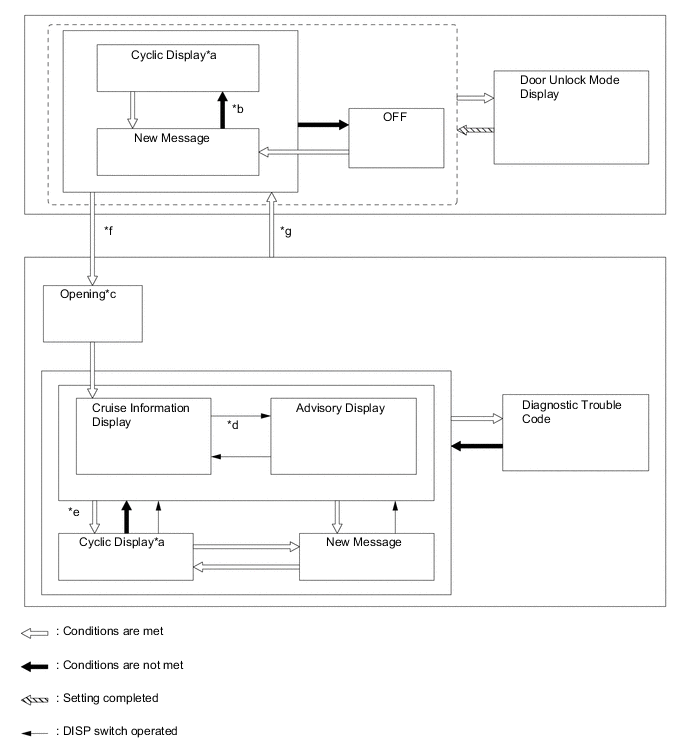
No. Transition Condition *a If the display conditions for 2 or more messages are met, relevant messages are alternately displayed for 2 seconds each. *b Conditions are not met and all new messages have been displayed. *c If the hybrid system is turned off during the "Opening" display, the "Opening" display will be shown from the beginning. *d If the DISP switch is used to change from an advisory message to the cruise information display screen, repeatedly operating the DISP switch will cycle through the cruise information screens and then return to the advisory message if the display conditions are still met. *e If the DISP switch is not operated for more than 6 seconds with any of the warning message display conditions still met, the relevant warning messages are displayed. *f IG On *g IG Off -
Models with TFT LCD Type Multi-information Display
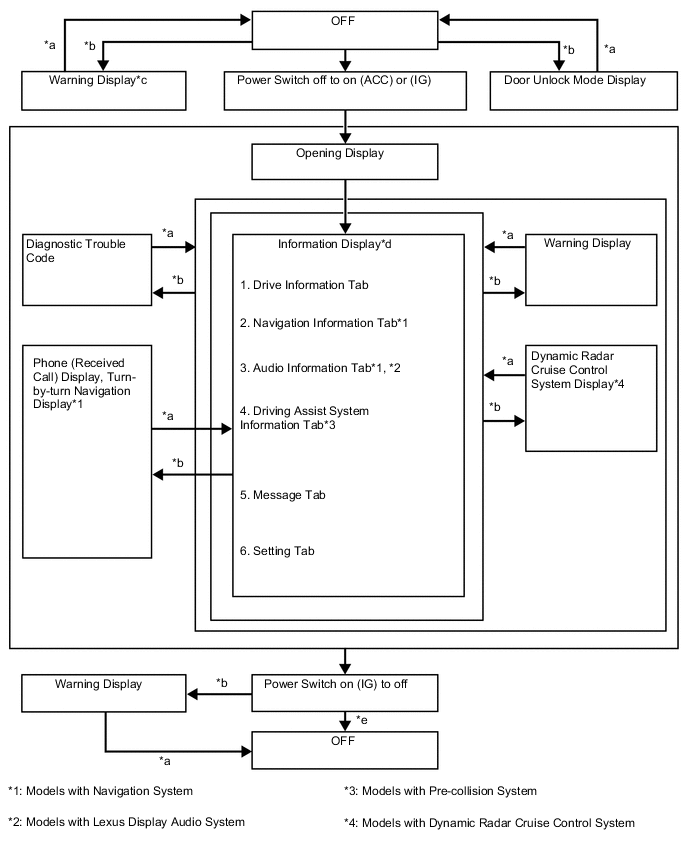
No. Transition Condition *a Conditions are not met *b Conditions are met *c If there are multiple display requests, items will be displayed in sequence. *d Item or display is selected by operating the steering pad switch assembly. *e ODO display is displayed for a certain period of time after the power switch is turned off.
-
-
Cruise Information Mode Function (Models with Dot LCD Type Multi-information Display)
-
The cruise information is displayed in the following order each time the DISP switch of the steering pad switch assembly is pressed.
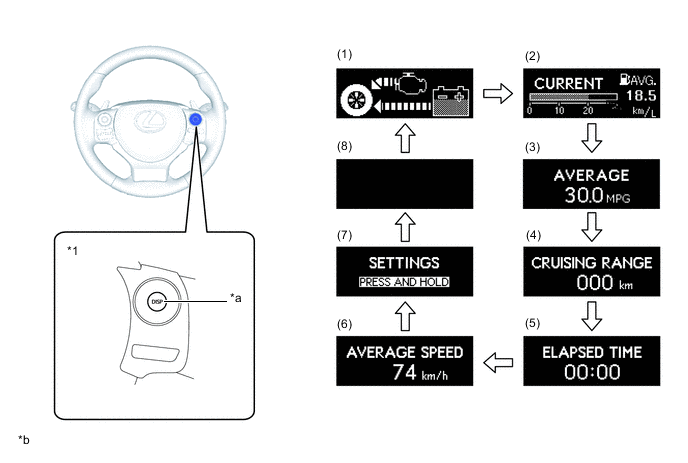
*1 Steering Pad Switch Assembly - - *a DISP Switch *b Illustrations shown are examples only. No. Information Outline (1) Energy Monitor
-
Displays the energy transmission direction for checking the current drive method (engine, motor or both), whether the engine is being used to generate power or whether energy is being regenerated.
-
The energy flow, which appears in the form of an arrow, also shows the SOC of the HV battery in 8 levels.
-
This display is updated every 0.3 seconds.
(2) Current Fuel Consumption and Average Fuel Consumption Since Refueling Current Fuel Consumption:
-
Displays the value calculated by the combination meter assembly based on the engine speed and fuel injection signals from the No. 1 injector.
-
This display is updated every 0.6 seconds.
Average Fuel Consumption Since Refueling:
-
Displays the value calculated by the combination meter assembly based on the distance driven since refueling and the fuel consumption volume (fuel injection signals from the No. 1 injector).
-
The combination meter assembly determines the vehicle has been refueled through the signal from the fuel sender gauge.
-
This display is updated every 10 seconds.
(3) Average Fuel Consumption
-
Displays a value that has been calculated by the combination meter assembly based on the distance driven and the fuel consumption volume (fuel injection signal from the No. 1 cylinder).
-
This display is updated every 10 seconds.
(4) Cruising Range
-
Displays a value that has been calculated by the combination meter assembly. When the power switch is turned on (IG), the combination meter assembly calculates the range based on continuously monitoring and storing information on fuel consumption data, and the residual fuel volume.
-
This display is updated every 10 seconds.
(5) Elapsed Time Displays the length of time since the hybrid control system was started. (6) Average Speed
-
Displays the average vehicle speed calculated by the combination meter assembly based on the vehicle speed signal.
-
This display is updated every 10 seconds.
(7) Settings
-
Allows the customization of the display and illumination of the combination meter assembly.
-
On models without a navigation system, some vehicle functions can also be customized.
(8) Blank Screen - -
-
-
Display Tab Operation (Models with TFT LCD Type Multi-information Display)
-
The information currently displayed can be switched using the RIGHT/LEFT switch of the steering pad switch assembly.
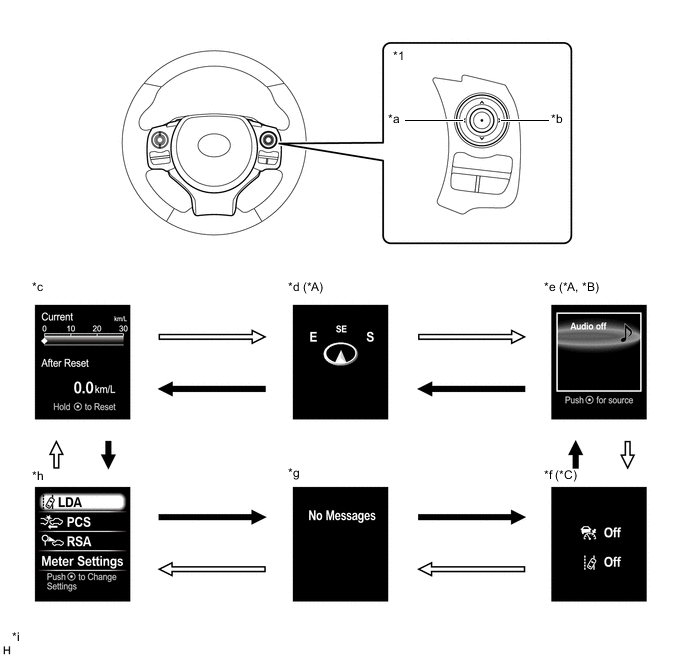
*A Models with Navigation System *B Models with Lexus Display Audio System *C Models with Pre-collision System - - *1 Steering Pad Switch Assembly - - *a LEFT Switch *b RIGHT Switch *c Drive Information *d Navigation Information *e Audio Information *f Driving Assist System Information *g Warning Message *h Settings *i The illustrations shown are examples only. - - 
RIGHT switch operation 
LEFT switch operation
-
-
Drive Information Mode Function (Models with TFT LCD Type Multi-information Display)
-
The drive information tab shows vehicle information such as drivable range and fuel consumption.
-
The drive information display can be switched using the UP/DOWN switch of the steering pad switch assembly.
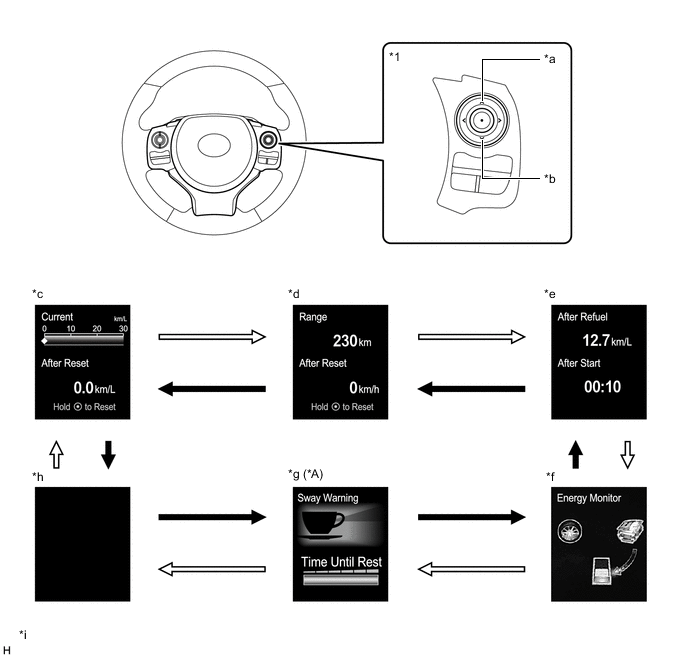
*A Models with Lane Departure Alert System - - *1 Steering Pad Switch Assembly - - *a UP Switch *b DOWN Switch *c Drive Information 1 *d Drive Information 2 *e Drive Information 3 *f Energy Monitor *g Vehicle Sway Warning *h Blank *i The illustrations shown are examples only. - - DOWN switch operation UP switch operation
-
-
Customization Function (Models with Dot LCD Type Multi-information Display)
-
Items that can be customized are displayed when the DISP switch of the steering pad switch assembly is pressed and held.
-
Press the DISP switch briefly to select the item to be customized. Press and hold the DISP switch to confirm the selection.
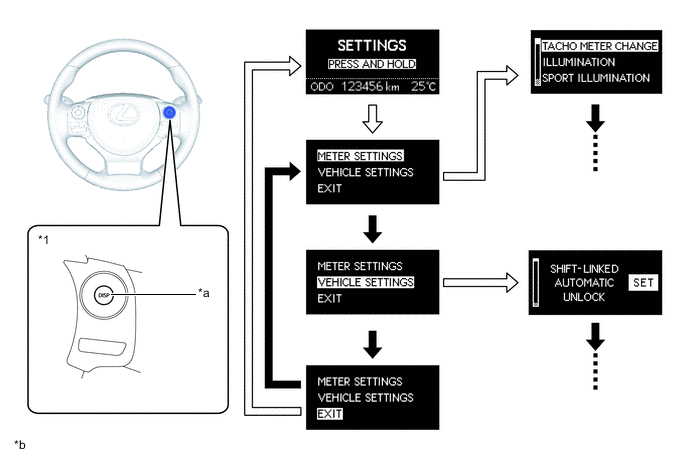
*1 Steering Pad Switch Assembly - - *a DISP Switch *b The illustrations shown are examples only. DISP Switch pressed and held DISP Switch pressed briefly -
The following items of the combination meter assembly can be customized:
Item Available Setting Tachometer*1
-
Auto
-
Keep On
-
Off
Eco Lamp*1
-
Eco Drive Support
-
Keep On
-
Off
Sport Lamp*1
-
Auto
-
Off
Lamp Brightness*1
-
Bright
-
Standard
EV Indicator
-
Auto
-
Off
Language LHD Models for Europe
-
English
-
French
-
Spanish
-
Russian*2
-
Chinese*2
-
German*3
-
Italian*3
RHD Models for Europe
-
English
-
French
-
Spanish
-
German
-
Italian
Others
-
English
-
French
-
Spanish
-
Chinese
Unit
-
km (km/L)
-
km (L/100km)
-
miles (MPG)
*1: Models with Optitron Type Combination Meter Assembly
*2: Destination package for Russia and Ukraine
*3: Except destination package for Russia and Ukraine
-
-
The following items of the vehicle can be customized:
Item Available Setting Door Shift-linked Automatic Unlock
-
On
-
Off
Vehicle Speed-linked Automatic Lock
-
On
-
Off
Shift-linked Automatic Lock
-
On
-
Off
Driver Door Linked Unlock
-
On
-
Off
Lock/Unlock Answer Back (Keyless Entry Feedback)
-
On
-
Off
Automatic Relock Time Adjustment
-
30 seconds
-
60 seconds
-
120 seconds
-
Off
Remote 2-press Unlock
-
On
-
Off
Keyless Entry Feedback Buzzer Volume Adjustment
-
Off
-
Level 1 (Minimum)
-
Level 2
-
Level 3
-
Level 4
-
Level 5
-
Level 6
-
Level 7 (Maximum)
Entry and Start System Entry and Start System
-
On
-
Off
Select Doors to Unlock
-
Driver
-
All
Lighting Headlight Off Time Adjustment
-
30 seconds
-
60 seconds
-
90 seconds
-
Off
Light Sensor Sensitivity
-
-2
-
-1
-
Standard
-
+1
-
+2
Daytime Running Light*
-
On
-
Off
Interior Light Off Time Adjustment
-
7.5 seconds
-
15 seconds
-
30 seconds
-
Off
Exterior Light Off Time Adjustment
-
7.5 seconds
-
15 seconds
-
30 seconds
-
Off
Air Conditioning Automatic Air Conditioning System Mode
-
On
-
Off
*: Models for China
-
-
-
Customization Function (Models with TFT LCD Type Multi-information Display)
-
The items displayed on the multi-information display can be customized.
-
The following items can be selected on the information setting screen.
Pre-collision System (Models with Pre-collision System) Item Available Setting PCS
-
The pre-collision system can be set to on/off:
-
On
-
Off
Pre-collision warning timing
-
A pre-collision system warning timing can be selected:
-
Far (Icon is displayed)
-
Middle (Icon is displayed)
-
Near (Icon is displayed)
Lane Departure Alert System (Models with Lane Departure Alert System) Item Available Setting Steering Assist
-
Setting for steering assist can be set to on/off:
-
On
-
Off
Warning Sensitivity
-
Alert sensitivity of alert system can be changed:
-
High
-
Standard
Vehicle Sway Warning
-
Vehicle sway warning can be set to on/off:
-
On
-
Off
Vehicle Sway Warning Sensitivity
-
Vehicle sway warning sensitivity can be selected:
-
High
-
Standard
-
Low
Road Sign Assist (Models with Road Sign Assist System) Item Available Setting Road Sign Assist
-
The road sign assist system can be set to on/off:
-
ON
-
OFF
Excess Speed
-
The excess speed notification method can be selected:
-
No Notification
-
Only Visual
-
Visual & Audible
Notification The excess speed notification level can be set between -5 km/h and 10 km/h (-5 mph to 10 mph). Others
-
The other notifications method can be selected:
-
No Notification
-
Only Visual
-
Visual & Audible
Meter Settings Item Available Setting Language LHD Models for Europe
-
The language used on the multi-information display can be selected:
-
English
-
French
-
Spanish
-
Russian*1
-
Chinese*1
-
German*2
-
Italian*2
RHD Models for Europe
-
The language used on the multi-information display can be selected:
-
English
-
French
-
Spanish
-
German
-
Italian
Others
-
The language used on the multi-information display can be selected:
-
English
-
French
-
Spanish
-
Chinese
-
Arabic*3, *4
Unit
-
The unit displayed on the multi-information display can be selected.
-
km (km/L)
-
km (L/100km)
-
miles (MPG)
EV Indicator
-
The EV indicator can be switched:
-
ON
-
OFF
Drive Information 1
-
2 items can be selected among the following:
-
Current Fuel Consumption (Bar Display)
-
Total Average Fuel Consumption between Reset Operations
-
Average Fuel Consumption after Refueling
-
Cruising Range
-
Elapsed Time after Hybrid System Start-up
-
Average Vehicle Speed after Hybrid System Start-up
-
Total Average Vehicle Speed between Reset Operations
-
Total Elapsed Time between Reset Operations
-
Cruising Range after Hybrid System Start-up
-
Average Fuel Consumption after Hybrid System Start-up
-
Blank
Drive Information 2
-
2 items can be selected among the following:
-
Current Fuel Consumption (Bar Display)
-
Total Average Fuel Consumption between Reset Operations
-
Average Fuel Consumption after Refueling
-
Cruising Range
-
Elapsed Time after Hybrid System Start-up
-
Average Vehicle Speed after Hybrid System Start-up
-
Total Average Vehicle Speed between Reset Operations
-
Total Elapsed Time between Reset Operations
-
Cruising Range after Hybrid System Start-up
-
Average Fuel Consumption after Hybrid System Start-up
-
Blank
Drive Information 3
-
2 items can be selected among the following:
-
Current Fuel Consumption (Bar Display)
-
Total Average Fuel Consumption between Reset Operations
-
Average Fuel Consumption after Refueling
-
Cruising Range
-
Elapsed Time after Hybrid System Start-up
-
Average Vehicle Speed after Hybrid System Start-up
-
Total Average Vehicle Speed between Reset Operations
-
Total Elapsed Time between Reset Operations
-
Cruising Range after Hybrid System Start-up
-
Average Fuel Consumption after Hybrid System Start-up
-
Blank
TOP Switch Settings
-
The item that is displayed when the TOP switch is pressed can be selected among the following:
-
Drive Information 1
-
Drive Information 2
-
Drive Information 3
-
Energy Monitor
-
Vehicle Sway Warning*5
-
Blank
-
Audio Information
-
Driving Assist System Information*6
-
Warning Message
-
Settings
Interruption Display
-
The following displays that appear as soon as the set conditions are met can be switched ON or OFF:
-
Turn-by-turn Navigation Display*7
-
Incoming Telephone Display
Accent Color
-
The accent color can be changed:
-
White Heat
-
Titanium Silver
Tachometer
-
The tachometer can be changed:
-
Tachometer or Hybrid System Indicator (Self-changing)
-
Hybrid System Indicator (Always)
-
Tachometer (Always)
Initialization The set items can be initialized. *1: Destination package for Ukraine
*2: Except destination package for Ukraine
*3: Models for G.C.C. countries
*4: Destination package for Saudi Arabia and Jordan
*5: Models with lane departure alert system
*6: Models with pre-collision system
*7: Models with navigation system
-
-
-
Warning Mode Function (Models with Monochrome Type Multi-information Display)
-
When a warning is necessary, the warning display interrupts the current display of the multi-information display.
-
The master warning light may illuminate or blink and the buzzer in the combination meter assembly may sound depending on the item displayed on the multi-information display.
-
Models with Dot LCD Type Multi-information Display
Priority Warning Master Warning Light Buzzer 1 MAINTENANCE MODE - - CERTIFICATION MODE - - 2 Door open (image display) - Sounds LEXUS parking assist-sensor system warning (image display)*1 - - CHECK SONAR*1 Illuminates Sounds CLEAN SONAR*1 Illuminates Sounds 3 AUTO POWER OFF TO CONSERVE BATTERY - - 4 SHIFT TO P POSITION Blinks Sounds SHIFT TO P POSITION AND PUSH POWER SWITCH TO TURN POWER OFF Blinks Sounds SHIFT TO P POSITION WHEN PARKED Blinks Sounds N POSITION Blinks Sounds DEPRESS THE BRAKE PEDAL WHEN VEHICLE IS AT A STANDSTILL Blinks Sounds TRACTION BATTERY NEEDS TO BE PROTECTED SHIFT INTO P TO RESTART Blinks Sounds TRACTION BATTERY NEEDS TO BE PROTECTED REFRAIN FROM THE USE OF N POSITION Blinks Sounds 5 AUX BATTERY LOW. SHIFTING UNAVAILABLE. SEE OWNER'S MANUAL. Blinks Sounds SHIFTING BRIEFLY UNAVAILABLE. WAIT A MOMENT AND TRY AGAIN. Blinks Sounds CANNOT SHIFT TO B. SHIFT TO D ONCE TO SHIFT TO B. Blinks Sounds CANNOT SHIFT TO D OR R. START HYBRID SYSTEM AND TRY AGAIN. Blinks Sounds SHIFTING UNAVAILABLE. DEPRESS BRAKE BEFORE SHIFTING. Blinks Sounds SWITCHED TO N. SHIFT TO D ONCE TO SHIFT TO B. Blinks Sounds SWITCHED TO N. TO SHIFT TO D, STOP CAR FIRST. Blinks Sounds SWITCHED TO N. TO SHIFT TO R, STOP CAR FIRST. Blinks Sounds SWITCHED TO N. TO ENGAGE P, STOP CAR THEN PRESS P SWITCH. Blinks Sounds 6 P LOCK MALFUNCTION WHEN PARKING, PARK IN FLAT PLACE AND APPLY PARKING BRAKE SECURELY Illuminates Sounds CHECK HYBRID SYSTEM Illuminates Sounds SHIFT MALFUNCTION. SEE OWNER'S MANUAL. Illuminates Sounds 7 RELEASE PARKING BRAKE Blinks Sounds KEY NOT DETECTED Blinks Sounds SPEED LIMIT EXCEED*2 Blinks Sounds 8 CHECK HEADLIGHT SYSTEM*3 Blinks Sounds 9 TURN POWER OFF Blinks Sounds KEY DETECTED IN VEHICLE Blinks Sounds TURN LIGHTS OFF Blinks Sounds MOONROOF OPENED*4 Blinks Sounds DEPRESS BRAKE PEDAL, TOUCH POWER SWITCH WITH KEY Blinks Sounds DEPRESS BRAKE PEDAL AND PUSH POWER SWITCH TO START Blinks Sounds 10 SHIFT TO P POSITION TO START Blinks Sounds 11 KEY BATTERY LOW Illuminates Sounds HYBRID SYSTEM OVERHEAT Illuminates Sounds 12 MAINTENANCE REQUIRED FOR TRACTION BATTERY COOLING PARTS SEE OWNER'S MANUAL - - / Sounds LOW WASHER FLUID - - EV MODE CURRENTLY NOT AVAILABLE - Sounds EV MODE NOT AVAILABLE WARMING UP - Sounds EV MODE NOT AVAILABLE LOW BATTERY - Sounds EV MODE NOT AVAILABLE EXCESSIVE SPEED - Sounds EV MODE NOT AVAILABLE EXCESSIVE ACCELERATION - Sounds EV MODE DEACTIVATED - Sounds EV MODE DEACTIVATED LOW BATTERY - Sounds EV MODE DEACTIVATED EXCESSIVE SPEED - Sounds EV MODE DEACTIVATED EXCESSIVE ACCELERATION - Sounds THEFT SENSOR OFF - - THEFT SENSOR ON - - *1: Models with LEXUS parking assist-sensor system
*2: Models for G.C.C. countries
*3: Models with LED headlights
*4: Models with sliding roof system
-
Models with TFT LCD Type Multi-information Display
Priority Display Master Warning Light Buzzer 1 MAINTENANCE MODE - - CERTIFICATION MODE - - ADJUSTING FORWARD CAMERA*1 - - ADJUSTING FRONT RADAR BEAM*2 - - ADJUSTING FRONT RADAR BEAM*2 - - ADJUSTING FRONT RADAR BEAM VERTICAL*3 - - ADJUSTING FRONT RADAR BEAM HORIZONTAL*3 - - CHECKING PCS BRAKE*3 - - CHECKING CRUISE CONTROL C/D*2 - - CHECKING CRUISE CONTROL BRAKE*2 - - BRAKE!*3 - - 2 Dynamic radar cruise control warning reminder indicator / Lane departure alert warning reminder indicator (image display)*1, *2 - Sounds Shift to P Before Exiting Vehicle Blinks Sounds 3 Door open (while driving) (image display)*4 Blinks Sounds Door open (while stopping) (image display) - - Clearance sonar obstruction detection (image display)*5 - - Parking Assist Malfunction*5 Illuminates - Clean Parking Assist Sensor*5 Illuminates - 4 Power Turned Off to Save Battery - - 5 Vehicle approaching warning during dynamic radar cruise control (image display)*2 - - 6 Shift to P Before Exiting Vehicle. Blinks Sounds Shift Is in N Release Accelerator Before Shifting Blinks Sounds Depress Brake when Vehicle Is Stopped Hybrid System May Overheat Blinks Sounds Traction battery needs to be protected. Shift into P to restart. Blinks Sounds Aux battery low. Shifting unavailable. See owner's manual. Blinks Sounds Shifting briefly unavailable. Wait a moment and try again. Blinks Sounds Cannot shift to "B". Shift to "D" once to shift to "B". Blinks Sounds Cannot shift to "D" or "R". Start Hybrid System and try again. Blinks Sounds Shifting unavailable. Depress brake before shifting. Blinks Sounds Switched to "N". Shift to "D" once to shift to "B". Blinks Sounds Switched to "N". To shift to "D", stop car first. Blinks Sounds Switched to "N". To shift to "R", stop car first. Blinks Sounds Switched to "N". To engage "P", stop car then press "P" switch. Blinks Sounds 7 "P" Lock malfunction When parking, park in flat place and apply parking brake securely Illuminates Sounds "P" Lock malfunction When parking, park in flat place and apply parking brake securely Illuminates Sounds 8 Traction Battery Needs to be Protected Refrain From the Use of N Position Blinks Sounds Release Parking Brake Blinks Sounds Key Not Detected Check Key Location Blinks Sounds Speed Limit Exceeded*6 Blinks Sounds 9 LDA Hold Steering Wheel*1 - - LDA Steering Assist Unavailable Hold Steering Wheel*1 Illuminates - 10 "P" Lock malfunction When parking, park in flat place and apply parking brake securely Illuminates Sounds Radar Cruise Control Unavailable Clean Sensor*2 Illuminates Sounds Radar Cruise Control Unavailable*2 Illuminates Sounds Radar Cruise Control Unavailable Depress Brake to Resume Driving*2 - - Cruise Control Malfunction Visit Your Dealer*2 Illuminates Sounds Cruise Control Fault Press Brake to Deactivate Visit Your Dealer*2 Illuminates Sounds Lane Departure Alert Malfunction Visit Your Dealer*1 Illuminates Sounds Front Camera Unavailable*1, *3 - - Lane Departure Alert Unavailable*1 Illuminates Sounds Lane Departure Alert Turned On Steering Assist Active*1 - - Lane Departure Alert Turned On Steering Assist Inactive*1 - - Front Camera Vision Blocked Clean and Demist Windshield*1, *3 - - Pre-Collision System Malfunction Visit Your Dealer*3 Illuminates Sounds Radar Cruise Active Please Pay Attention to Other Vehicles*2 - - Lane Departure Alert Unavailable Below Approx 50 km/h*1 - - Lane Departure Alert Unavailable at Current Speed*1 - - 11 Lane departure alert warning indicator (image display)*1 - Sounds Turn Off Vehicle Blinks Sounds Would You Like to Take a Break?*1 - Sounds Please Take a Break*1 - Sounds Shift to "P" position and push power switch to turn power off Blinks Sounds Key Left inside Vehicle - - Turn Lights Off Blinks Sounds Moon Roof opened*7 Blinks Sounds Depress Brake and Then Touch Key to Power Switch Blinks Sounds Depress brake and power to start. Blinks Sounds 12 To Start Vehicle, Put Shift Lever into P Blinks Sounds 13 Key Battery Low Illuminates Sounds Hybrid System Overheated Reduced Output Power Illuminates Sounds Headlight System Malfunction Visit Your Dealer Illuminates Sounds 14 Maintenance required for Traction battery cooling parts See owner's manual - - / Sounds Aux Battery Low See Owner's Manual - - Windshield Washer Fluid Low - - To Activate Auto High Beam, Switch Headlights to High Beam*8 - - Pre-Collision System Unavailable*3 - - Pre-Collision System Unavailable Clean Sensor*3 - - Pre-Collision System Off*3 - - EV Mode Unavailable - Sounds EV Mode Unavailable System Warming Up - Sounds EV Mode Unavailable Hybrid Battery Low - Sounds EV Mode Unavailable Speed Range Exceeded - Sounds EV Mode Unavailable Reduce Acceleration to Activate - Sounds EV Mode Deactivated - Sounds EV Mode Deactivated Hybrid Battery Low - Sounds EV mode Deactivated Speed Range Exceeded - Sounds EV Mode Deactivated Accelerator Depressed Too Far - Sounds Theft Sensor OFF - - Theft Sensor ON - - *1: Models with lane departure alert system
*2: Models with dynamic radar cruise control system
*3: Models with pre-collision system
*4: If the vehicle has reached a speed of 5 km/h (3 mph)
*5: Models with LEXUS parking assist-sensor system
*6: Models for G.C.C. countries
*7: Models with sliding roof system
*8: Models with LED headlights
-
-
Rear Seat Belt Warning Function (Models with Rear Seat Belt Warning Function)
-
The combination switch assembly displays the rear seat belt warning based on the rear seat belt buckle switches and courtesy switches for the rear doors. If a warning is necessary, the buzzer in the combination meter assembly will also sound.
-
The flow of operations that results in a rear seat belt warning are as follows:
Step Condition Transition Multi-information Display Buzzer 1 Power switch is off. Warning is not displayed. No Sound 2
-
Power switch is turned on (IG).
-
A seat belt is fastened.
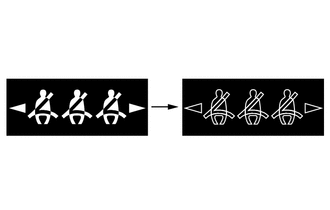
In this case, 3 seats will be displayed as being unfastened regardless of the number of occupants. If seat belts are then fastened, the display for the relevant seat will go off. 3 Any of the rear seat belts are unfastened. 
If the vehicle speed exceeds 20 km/h (12 mph):
-
Sounds for 30 seconds*1
-
Sounds for an additional 90 seconds*2
-
Seats with an unfastened seat belt will be displayed regardless of the number of occupants.
4
-
When one of the following conditions is met, the buzzer will stop sounding.
-
The seat belt is refastened.
-
The vehicle speed decreases to less than approximately 2 km/h (1.2 mph) and either the parking brake is applied or park (P) is selected.

Stops sounding
-
Seats with an unfastened seat belt will be displayed regardless of the number of occupants.
-
The warning message will be displayed for approximately 34 seconds and then go off.
*1: Sound at an interval of 1.2 seconds.
*2: Sound at an interval of 0.4 seconds.
-
-
-
-