METER / GAUGE SYSTEM
-
FUNCTION
-
Multi Buzzer
-
The table below shows the warning and reminder functions of the buzzer in the combination meter assembly.
Priority Item 1 Pre-crash Safety Warning*1 2 Electric Parking Brake IOA Warning 3 Electric Parking Brake IOA Warning (Twice) 4 Entry and Start System Warning (Intermittent)*2 5 Seat Belt Warning (Level 2) 6 Seat Belt Warning (Level 1) 7 Key Reminder*3 8 ASL Buzzer 9 Brake Fluid Low Warning 10 LDA Warning*1 11 Parking Brake Engaged Warning 12 Engine Oil Pressure Warning 13 Door Open while Driving Warning 14 Stop and Start System Warning 15 RSA Buzzer*1 16 EPS Warning 17 Engine High Temperature Warning 18 Multi-information Display Warning 19 Light Reminder 20 Entry and Start System Warning (Once)*2 21 Turn Signal/Hazard Warning Operation
-
*1: Models with Toyota Safety Sense
-
*2: Models with entry and start system
-
*3: Models without entry and start system
-
-
-
Multi-information Display (Models with Optitron Type Combination Meter Assembly with TFT Color Multi-information Display)
-
Display Function Flow
-
The multi-information display can be switched as shown in the flowchart below:
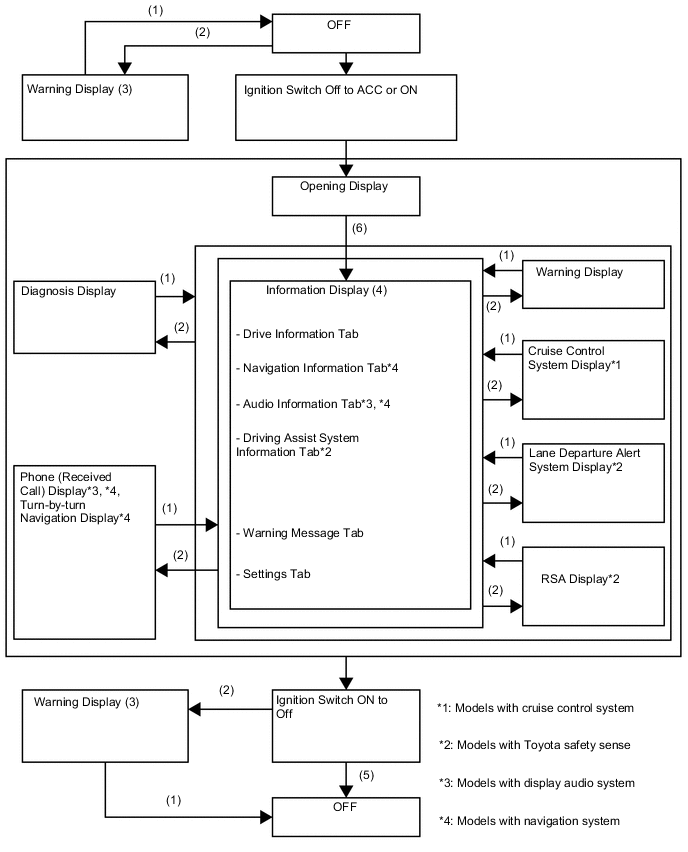
(1) Conditions are not met. (2) Conditions are met. (3) If there are multiple display requests, items will be displayed in sequence. (4) Item or display is selected by operating the steering pad switch assembly switch. (5) Multi-information display is displayed for a certain period of time after the ignition switch is turned off. (6) After ignition switch is turned to ON. -
-
Display Tab Operation
-
The information currently displayed can be switched using the RIGHT/LEFT switch on the steering pad switch assembly.
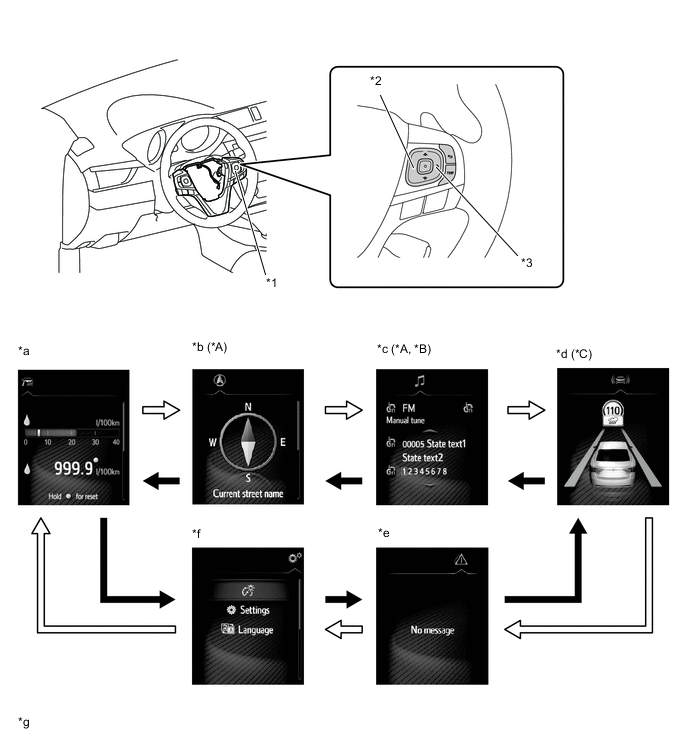
Text in Illustration *A Models with Navigation System *B Models with Display Audio System *C Models with Toyota Safety Sense - - *1 Steering Pad Switch Assembly *2 LEFT Switch *3 RIGHT Switch - - *a Drive Information *b Navigation Information *c Audio Information *d Cruise Control System/Lane Departure Alert System/RSA Information *e Warning Message *f Settings *g The illustrations shown are examples only. The illustrations may differ from the actual vehicle screen. - - 
RIGHT Switch Operation 
LEFT Switch Operation -
-
Drive Information
-
Drive information shows vehicle information such as the drivable range and fuel consumption.
-
The drive information can be switched using the UP/DOWN switch on the steering pad switch assembly.
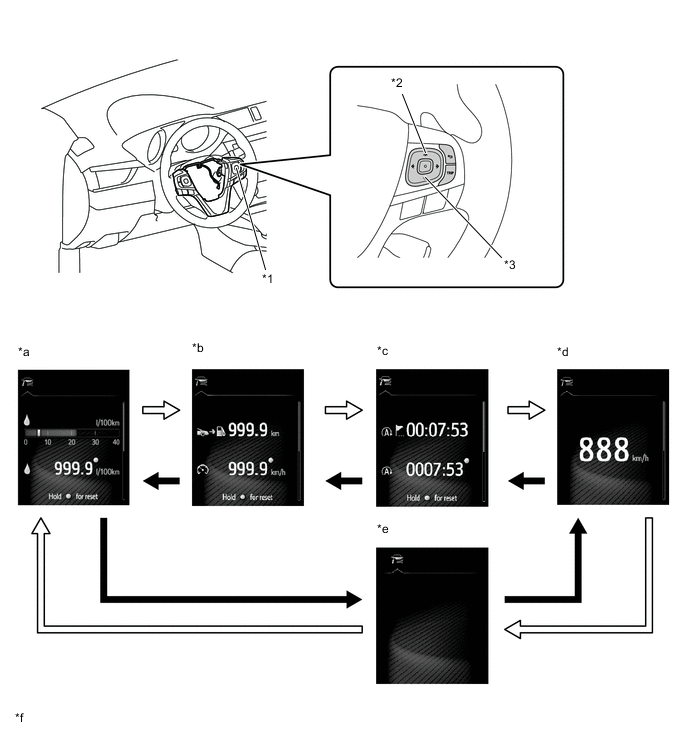
Text in Illustration *1 Steering Pad Switch Assembly *2 UP Switch *3 DOWN Switch - - *a Drive Information 1 *b Drive Information 2 *c Drive Information 3 *d Digital Vehicle Speed *e Blank *f The illustrations shown are examples only. The illustrations may differ from the actual vehicle screen. DOWN Switch Operation UP Switch Operation -
-
Setting Function
-
The items displayed on the multi-information display can be customized.
-
The items can be selected on the information setting screen.
Item Available Setting Language The language displayed on the multi-information display can be selected.
-
English
-
French
-
Spanish
-
German
-
Italian
-
Russian
-
Portuguese
-
Turkish
-
Czech
-
Danish
-
Greek
-
Hungarian
-
Dutch
-
Norwegian
-
Polish
-
Romanian
-
Slovak
-
Finnish
-
Swedish
-
Ukrainian
Unit The unit displayed on the multi-information display, display audio system or navigation system can be selected.
-
km (km/L)
-
km (L/100 km)
-
miles (MPG)
The unit displayed on the multi-information display can be selected.
-
°C (Celsius)
-
°F (Fahrenheit)
Drive Information 1 2 items can be selected among the following:
-
Current Fuel Consumption (Bar Display)
-
Current Fuel Consumption (Value Display)
-
Average Fuel Consumption Between Reset Operations
-
Average Fuel Consumption After Engine Start-up
-
Average Fuel Consumption After Refueling
-
Average Vehicle Speed Between Reset Operations
-
Average Vehicle Speed After Engine Start-up
-
Elapsed Time Between Reset Operations
-
Elapsed Time After Engine Start-up
-
Cruising Range
-
Cruising Range After Engine Start-up
-
Stop and start system operation time
-
Stop and start system total operation time
-
Blank
Drive Information 2 2 items can be selected among the following:
-
Current Fuel Consumption (Bar Display)
-
Current Fuel Consumption (Value Display)
-
Average Fuel Consumption Between Reset Operations
-
Average Fuel Consumption After Engine Start-up
-
Average Fuel Consumption After Refueling
-
Average Vehicle Speed Between Reset Operations
-
Average Vehicle Speed After Engine Start-up
-
Elapsed Time Between Reset Operations
-
Elapsed Time After Engine Start-up
-
Cruising Range
-
Cruising Range After Engine Start-up
-
Stop and start system operation time
-
Stop and start system total operation time
-
Blank
Drive Information 3 2 items can be selected among the following:
-
Current Fuel Consumption (Bar Display)
-
Current Fuel Consumption (Value Display)
-
Average Fuel Consumption Between Reset Operations
-
Average Fuel Consumption After Engine Start-up
-
Average Fuel Consumption After Refueling
-
Average Vehicle Speed Between Reset Operations
-
Average Vehicle Speed After Engine Start-up
-
Elapsed Time Between Reset Operations
-
Elapsed Time After Engine Start-up
-
Cruising Range
-
Cruising Range After Engine Start-up
-
Stop and start system operation time
-
Stop and start system total operation time
-
Blank
Pop-up Display Select to set the pop-up displays, which may appear in some situations, on/off. Lane Departure Alert (LDA) Select to adjust Lane Departure Alert (LDA) sensitivity. Road Sign Assist (RSA) Select to activate/deactivate Road Sign Assist (RSA). Instrument Panel Light Select to adjust brightness of the instrument panel light. Adaptive Front-lighting System (AFS) Select to activate/deactivate Adaptive Front-lighting System (AFS). Stop and Start System Select to set up stop and start system priority. Clock Select to adjust time or set a clock format. Tire Pressure Warning System Select to set up the tire pressure warning system. Initialization Initialization -
-
Warning Mode Function
-
When a warning is necessary, the warning display interrupts the display in the multi-information display.
-
The master warning light may illuminate or blink and the buzzer in the combination meter assembly may sound depending on the item displayed on the multi-information display.
Priority Display* Master Warning Light Buzzer 1 ADJUSTING FRONT CAMERA - - CHECKING PRE-CRASH BRAKE - - BRAKE! - Sounds Graphic Display (Pre-crash Safety Warning) - - 2 Apply parking brake. Blinks Sounds Brake effectiveness is reduced due to failure, please stop in a safe area and check manual. - - 3 Graphic Display (Door Open (While Driving)) Blinks Sounds Graphic Display (Door Open) - - 4 Auto power off to conserve battery. - - 5 Check power steering system. Blinks Sounds Stop & Start system malfunction. Inspect at dealer. Blinks Sounds Release parking brake. Blinks Sounds Key not detected. Blinks Sounds 6 Parking brake overheat. Blinks Sounds 7 Check charging system. Illuminates - LDA not available. Illuminates Sounds Check clutch switch. Illuminates Sounds Check cruise control system. Illuminates Sounds Check speed limiter system. Illuminates Sounds Check LDA system. Illuminates Sounds Check Pre-Crash Safety. Illuminates Sounds Check RSA system. Illuminates Sounds Check steering lock system. Illuminates Sounds Engine oil pressure low. Illuminates Sounds Parking brake inoperable. Illuminates Sounds Check parking brake system. Illuminates Sounds LDA system is unavailable below approx. 50 km/h. - - 8 Turn power off. Blinks Sounds Key detected in vehicle. Blinks Sounds Turn lights OFF. Blinks Sounds Depress clutch pedal, Touch ENGINE switch with key. Blinks Sounds Depress clutch pedal and push ENGINE switch to start Blinks Sounds Stop & Start system active. Shift to N and depress clutch to restart. - - 9 Steering lock active. Blinks Sounds 10 Key battery low. Illuminates Sounds Drain water from fuel filter. Illuminates Sounds Headlight system malfunction. Visit your dealer. Illuminates Sounds DPF full, engine service required. Illuminates - 11 Graphic Display (Sensitivity setting for Pre-crash Safety System) - - Replace fuel filter. - - TRC OFF. - - Oil Maintenance required soon. - - Oil maintenance required. - - Resetting oil maintenance data. - - Resetting of oil maintenance data incomplete. - - Pre-Crash Brake is disabled due to VSC OFF. - - Pre-Crash Safety temporarily not available. - - Front sensor systems are temporarily unavailable due to inappropriate temp. Wait a moment. - - Front Camera Vision Blocked Clean and Demist Windshield - - DPF full. See owner's manual. - - DPF manual regeneration in process. - - Pre-Crash Safety OFF. - - Tech Tips
*: The warning message differs by vehicle specification.
-
-
-
Multi-information Display (Models with Optitron Type Combination Meter Assembly with TFT Monochrome Multi-information Display)
-
Display Function Flow
-
The multi-information display can be switched as shown in the flowchart below:
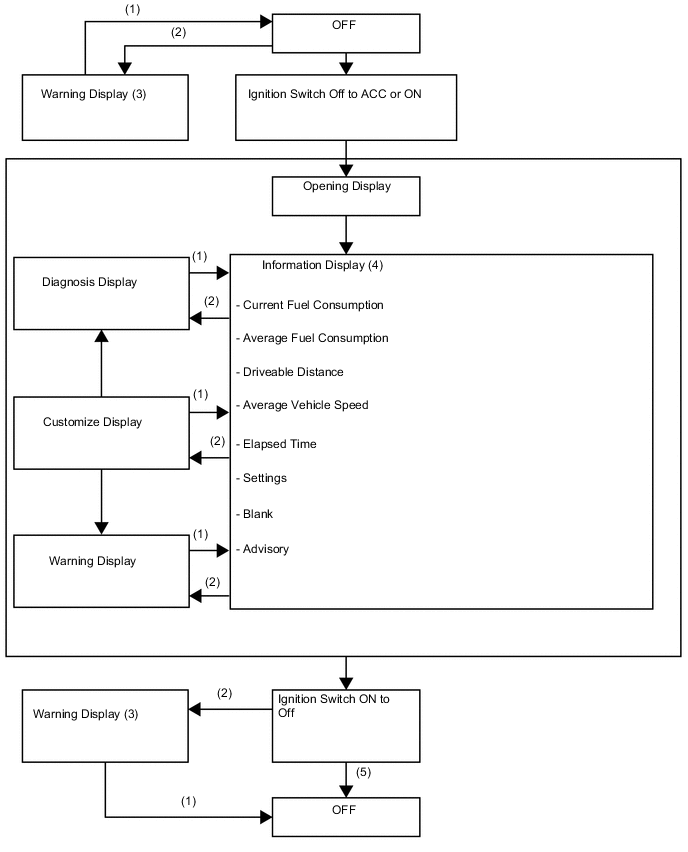
(1) Conditions are not met. (2) Conditions are met. (3) If there are multiple display requests, items will be displayed in sequence. (4) Item or display is selected by operating the steering pad switch assembly. (5) Multi-information display is displayed for a certain period of time after the ignition switch is turned off. -
-
Cruise Information Display
-
Cruise information shows vehicle information such as the drivable range and fuel consumption.
-
The cruise information can be switched using the DISP switch on the steering pad switch assembly.
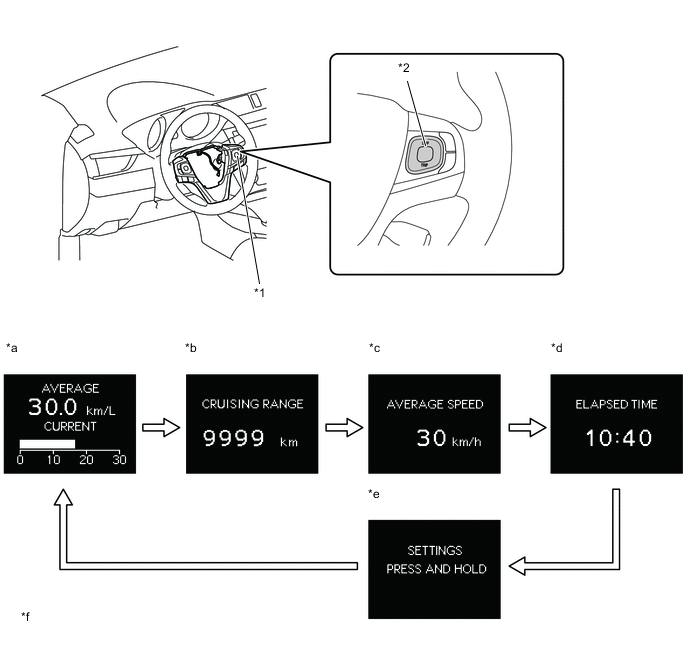
Text in Illustration *1 Steering Pad Switch Assembly *2 DISP Switch *a Average Fuel Consumption/Instantaneous Fuel Consumption *b Cruising Range *c Average Vehicle Speed After Engine Start-up *d Driving Time after Engine Start-up *e Setting *f The illustrations shown are examples only. The illustrations may differ from the actual vehicle screen. DISP Switch Pressed Briefly - - -
-
Setting Function
-
The items displayed on the multi-information display can be customized.
-
The items can be selected on the information setting screen.
Item Available Setting Language The language displayed on the multi-information display can be selected.
-
English
-
French
-
Spanish
-
German
-
Italian
-
Russian
-
Portuguese
-
Turkish
Unit The unit displayed on the multi-information display, display audio system or navigation system can be selected.
-
km (km/L)
-
km (L/100 km)
-
miles (MPG)
The unit displayed on the multi-information display can be selected.
-
°C (Celsius)
-
°F (Fahrenheit)
-
-
Warning Mode Function
-
When a warning is necessary, the warning display interrupts the display in the multi-information display.
-
The master warning light may illuminate or blink and the buzzer in the combination meter assembly may sound depending on the item displayed on the multi-information display.
Priority Display* Master Warning Light Buzzer 1 ADJUSTING FRONT CAMERA - - CHECKING PRE-CRASH BRAKE - - BRAKE! - Sounds Graphic Display (Pre-crash Safety Warning) - - 2 APPLY PARKING BRAKE. Blinks Sounds EFFECTIVENESS IS REDUCED DUE TO FAILURE, PLEASE STOP IN A SAFE AREA AND CHECK MANUAL. - - 3 Graphic Display (Door Open (While Driving)) Blinks Sounds Graphic Display (Door Open) - - 4 AUTO POWER OFF TO CONSERVE BATTERY. - - 5 CHECK POWER STEERING SYSTEM. Blinks Sounds STOP & START SYSTEM MALFUNCTION. INSPECT AT DEALER. Blinks Sounds RELEASE PARKING BRAKE. Blinks Sounds KEY NOT DETECTED. Blinks Sounds 6 PARKING BRAKE OVERHEAT. Blinks Sounds 7 CHECK CHARGING SYSTEM Illuminates - LDA NOT AVAILABLE. Illuminates Sounds CHECK CLUTCH SWITCH. Illuminates Sounds CHECK CRUISE CONTROL SYSTEM. Illuminates Sounds CHECK SPEED LIMITER SYSTEM. Illuminates Sounds CHECK LDA SYSTEM. Illuminates Sounds CHECK PRE-CRASH SAFETY. Illuminates Sounds CHECK STEERING LOCK SYSTEM. Illuminates Sounds ENGINE OIL PRESSURE LOW. Illuminates Sounds PARKING BRAKE INOPERABLE. Illuminates Sounds CHECK RSA SYSTEM Illuminates Sounds CHECK PARKING BRAKE SYSTEM. Illuminates Sounds LDA SYSTEM IS UNAVAILABLE BELOW APPROX. 32MPH. - - 8 TURN POWER OFF. Blinks Sounds KEY DETECTED IN VEHICLE. Blinks Sounds TURN LIGHTS OFF. Blinks Sounds DEPRESS CLUTCH PEDAL, TOUCH ENGINE SWITCH WITH KEY. Blinks Sounds DEPRESS CLUTCH PEDAL AND PUSH ENGINE SWITCH TO START. Blinks Sounds STOP & START SYSTEM ACTIVE. SHIFT TO N AND DEPRESS CLUTCH TO RESTART. - - 9 STEERING LOCK ACTIVE. Blinks Sounds 10 KEY BATTERY LOW. Illuminates Sounds DRAIN WATER FROM FUEL FILTER. Illuminates Sounds HEADLIGHT SYSTEM MALFUNCTION. VISIT YOUR DEALER. Illuminates Sounds DPF FULL, ENGINE SERVICE REQUIRED. Illuminates - 11 Graphic Display (Sensitivity setting for Pre-crash Safety System) - - REPLACE FUEL FILTER. - - TRC OFF. - - OIL MAINTENANCE REQUIRED SOON. - - OIL MAINTENANCE REQUIRED. - - RESETTING OIL MAINTENANCE DATA. - - RESETTING OF OIL MAINTENANCE DATA INCOMPLETE. - - PRE-CRASH BRAKE IS DISABLED DUE TO VSC OFF. - - PRE-CRASH SAFETY TEMPORARILY NOT AVAILABLE. - - FRONT SENSOR SYSTEMS ARE TEMP. UNAVAILABLE DUE TO INAPPROPRIATE TEMPERATURE. WAIT A MOMENT. - - FRONT CAMERA VISION BLOCKED CLEAN AND DEMIST WINDSHIELD - - DPF FULL. SEE OWNER'S MANUAL. - - DPF MANUAL REGENERATION IN PROCESS. - - PRE-CRASH SAFETY OFF. - - Tech Tips
*: The warning message differs by vehicle specification.
-
-
-
Oil Maintenance Management System
-
Remaining Oil Maintenance Mileage Display
-
The remaining oil maintenance mileage is calculated based on the driving pattern (fuel consumption, engine running time and vehicle mileage) by the ECM. In addition, the ECM displays the remaining oil maintenance mileage on the multi-information display.
-
The calculated remaining oil maintenance mileage is counted down. When the calculated remaining oil maintenance mileage counts down to 1000 km, "OIL MAINTENANCE REQUIRED SOON" is displayed on the multi-information display to urge the driver to change the oil.
-
In addition, when the calculated remaining oil maintenance mileage becomes less than 1000 km, the black and white of the mileage on the multi-information display are inverted.

-
After the calculated remaining oil maintenance mileage counts down to 0 km, the mileage showed on the display indicates a negative number.

Tech Tips
-
The calculated oil maintenance mileage may not reach 20000 km (10000 km for Turkey and Balkan) depending on the driving conditions (low speed or bad fuel consumption) in order to maintain the quality of the engine oil.
-
When in ODO mode, the remaining oil maintenance mileage is displayed on the multi-information display for 5 seconds after the ignition switch is turned to ON. Also, the driver can display the mileage by operating the ODO/TRIP reset knob
-
-
-
-
Rear Seat Belt Warning
-
The rear seat belt warning function indicates the state of the rear seat belts using the telltale light assembly.
-
The combination meter assembly sends a rear seat belt warning signal to the telltale light assembly based on the rear seat belt buckle switches and courtesy switches for the rear doors. When the signal is received, the telltale light assembly operates the lights. If a warning is necessary, the buzzer in the combination meter assembly will also sound.
-
The flow of operations that results in a rear seat belt warning is as follows:
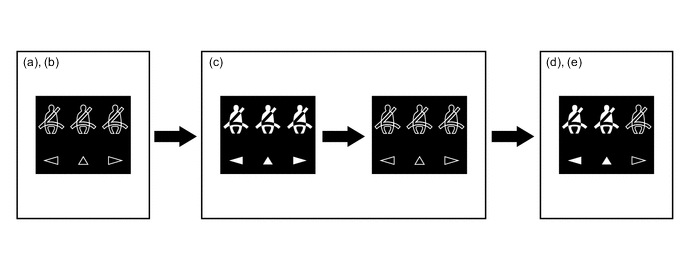
Step Condition Transition Multi-information Display Buzzer (a) The ignition switch is off. Any warning is not displayed. No sound (b) A rear door is opened then closed. (c)
-
The Ignition switch is turned to ON.
-
A seat belt is fastened.
-
In this case, all seats will be displayed as being unfastened regardless of the number of occupants. If seat belts are then fastened, the display for the relevant seat will go off.
-
The warning will be displayed for approximately 34 seconds and then go off.
(d) Any of the rear seat belts are unfastened. Seats with an unfastened seat belt will be displayed regardless of the number of occupants. If the vehicle speed exceeds 20 km/h (12 mph):
-
Sounds for 30 seconds*1
-
Sounds for an additional 90 seconds*2
(e) When one of the following conditions is met, the buzzer will stop sounding.
-
The seat belt is refastened.
-
The vehicle speed is lower than approximately 2 km/h (1.2 mph) and the parking brake is applied.
-
Seats with an unfastened seat belt will be displayed regardless of the number of occupants.
-
The warning message will be displayed for approximately 34 seconds and then go off.
Stops sounding Tech Tips
*1: Sound cycle is 1.2 seconds.
*2: Sound cycle is 0.4 seconds.
-
-
-