NAVIGATION SYSTEM / MULTI INFORMATION SYSTEM
-
OUTLINE
-
An extension box, into which the navigation ECU is built, is used.
-
Since the extension box is mounted under the radio and display receiver assembly, a navigation system that supports flash Solid State Drive (SSD) type map data media can be used.
-
A fuel consumption screen is provided in consideration of the environment.
-
The navigation system sends navigation information to the combination meter assembly. The user can view a compass display and turn-by-turn directions to the destination on the multi-information display.
-
Google Sync Function
-
The Google sync function is supported, enabling the user to view and operate the following Google-provided web services on the navigation system. This function requires access to the internet from a tethering-compatible cellular phone or mobile Wi-Fi router, which is connected to the radio and display receiver assembly via Bluetooth or Wi-Fi communication.
-
Google street view shows panoramic images along streets. The street view of the desired location can be downloaded to the radio and display receiver assembly.
-
The Panoramio photo sharing site offers photos with location information and comments. The panoramio photos of the desired location can be downloaded to the radio and display receiver assembly and displayed on the multi-display. Due to location information contained in the photos, it is possible to set a certain point in the displayed photo as a destination.
-
-
-
Wi-Fi Communication
-
A wireless LAN antenna is integrated in the radio and display receiver assembly, enabling Wi-Fi communication to a user's tethering-compatible cellular phone or mobile Wi-Fi router.
Tech Tips
-
Wi-Fi communication may be unavailable depending on the vehicle conditions, surrounding conditions such as radio wave conditions around the radio and display receiver assembly, distance to the device or device conditions. In addition, during Wi-Fi communication, the communication may be cut or become unstable due to the conditions described above.
-
If a tethering-compatible cellular phone is already connected to the radio and display receiver assembly via Bluetooth, a connection via Wi-Fi communication is not available. To connect via Wi-Fi, cancel the Bluetooth connection and then establish a Wi-Fi connection.
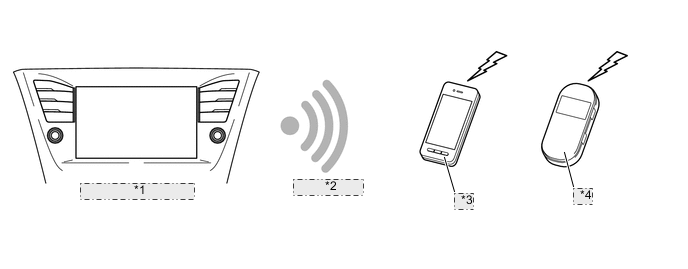
*1 Radio and Display Receiver Assembly *2 Connection via Wi-Fi *3 Cellular Phone *4 Mobile Wi-Fi Router
-
-
-
-
SPECIFICATION
Item Specification Display 8-inch Wide Video Graphics Array (WVGA) Thin Film Transistor (TFT) Extension Box (Navigation ECU) Manufacturer HARMAN BECKER AUTOMOTIVE SYSTEMS Gyro Sensor Piezoelectric Ceramic Piece Map Data Media Extension Box Voice Guidance Supported Languages English, German, French, Flemish, Turkish, Ukrainian, Hungarian, Czech, Slovak, Romania, Italian, Spanish, Dutch, Norwegian, Swedish, Portuguese, Danish, Finnish, Polish, Greek and Russian Voice Recognition Support Languages* English, German, French, Italian, Spanish, Dutch, Swedish, Portuguese Polish, Czech, Greek, Danish, Finnish, Turkish and Russian
-
*: Models with extension box (high grade type)
-
-
MAIN FEATURES
-
Voice Recognition System (Models with Extension Box (High Grade Type))
-
When the voice recognition system starts operating, the commands that the system is able to recognize are displayed on the radio and display receiver assembly.
-
-
Connected Service
-
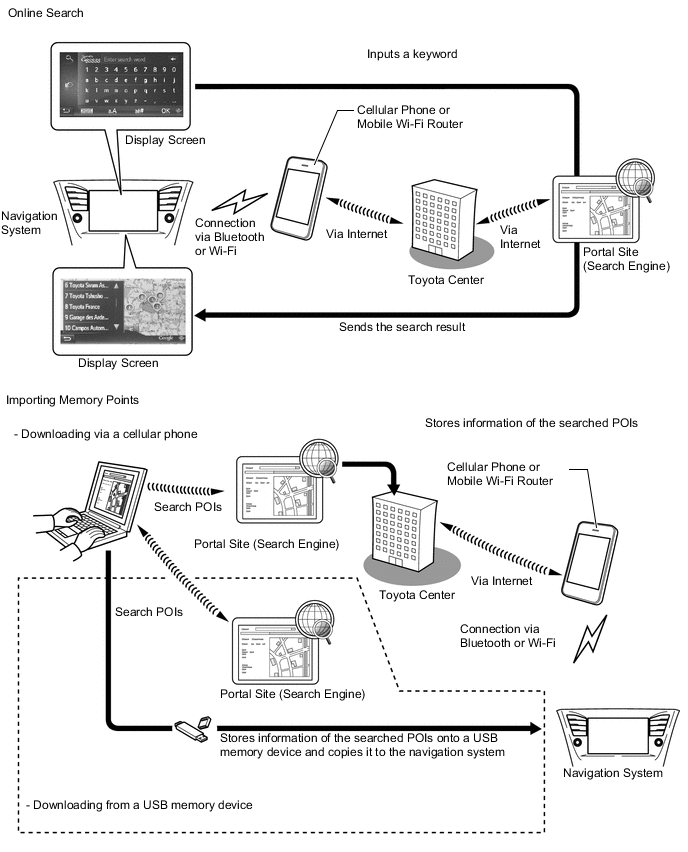
The following services are available by accessing the Toyota portal site from a tethering-compatible cellular phone, which is connected to the radio and display receiver assembly (with extension box) via Bluetooth communication.
-
To use these connected services, Bluetooth settings are required and a portal account is required.
-
To get a portal account, access the Toyota portal site (URL: www.my.toyota.eu).
Contents Outline Online Search New establishments, such as restaurants and bars, that are not registered in the navigation system can be set as a destination. Street View* The street view of a desired location can be displayed. Panoramio* The available pictures on the network, comments and other information can be displayed. Importing Memory Points and Routes Downloading via a Cellular Phone Memory points and routes that were searched for using a personal computer can be set as a destination and can be registered as memory points. Downloading from a USB Memory Device Vehicle Customization The vehicle equipment operation settings can be partially changed by remote operation via the Toyota portal site. Tech Tips
*: Updates are necessary depending on the model.
-
-
The main functions of the navigation system are listed below:
Contents Outline Navigation System Through the use of the Global Positioning System (GPS) and map data stored on an extension box, the navigation system analyzes the position of the vehicle and indicates the current position on the map displayed on the screen. In addition, the user can use the system to register memory points and navigate to a destination. Audio/Video System Serves as the display and controls for the following operations:
-
Radio operation
-
Bluetooth-compatible portable audio player operation
-
iPod/iPhone operation
-
USB memory operation
-
Portable audio player operation (AUX type)
Hands-free System When a Bluetooth-compatible cellular telephone is registered to the radio and display receiver assembly, the driver can make and receive calls or talk hands-free on the cellular telephone by operating the switches on the screen/steering pad. Monitor System When the shift lever is moved to R, a view of the area behind the vehicle captured by the television camera mounted on the back door*1 or luggage compartment door*2 is displayed on the screen. Vehicle Information Trip Information Screen Fuel consumption information such as average fuel consumption per minute is displayed. General Settings Language Selection The language of the screen buttons, pop-up messages and the voice guidance can be changed. Volume Settings
-
Navigation prompt volume (Nav): The user can adjust the volume of voice guidance.
-
Phone volume-incoming: The user can adjust the volume of incoming calls.
-
Phone volume-outgoing: The user can adjust the volume of outgoing calls.
-
Ringtone volume: The user can adjust the volume of the ringtone.
-
Voice dialog volume (Voice): The user can adjust the volume of voice dialog.
Unit of Measurement Selection The user can change the unit of measure for distance. Fuel Consumption Unit Selection The user can change the unit of measure for fuel consumption. Beep Selection The user can sound beeps. Animations Selection The user can animations on or off. Automatic Text Scrolling The user can set the automatic text scrolling on/off. This function is not available while driving. Backup Stored Contacts to USB The entries stored in the "Stored" list on the "My destinations" screen and "Contacts" screen can be transferred to a USB memory device. Restore Contact Backup from USB Backed-up data can be transferred from a USB memory device to the navigation system. Transferred entries will be stored in the "Stored" list on the "My Destinations" screen and "Contacts" screen. Delete All Personal Data The user can delete all personal data stored in this system. System Information Selection The user can display the system information and select the "Audio information" on the screen to switch the system information screen. Open Source Information Selection
-
The user can display open source information.
-
Notices related to third party software used in this product are enlisted. (This includes instructions for obtaining such software, where applicable.)
Display Settings The brightness, contrast and day/night mode of the screen can be adjusted. Diagnosis This menu contains the following items:
-
Failure Diagnosis
-
System Check
-
Diagnosis Recorder
-
Function Check/Setting
-
Panel and Steering Switch
-
Microphone Check
-
Vehicle Signal
-
Touch Switch
-
System Sensor Check
-
DAB Reception Check*3
-
Service Information
-
Version Information
-
Product Information
-
*1: Wagon models
-
*2: Sedan models
-
*3: Models with Digital Audio Broadcast (DAB)
-
-
-
PRECAUTION
-
Ignition Switch Expressions
-
The type of ignition switch used on this model differs depending on the specifications of the vehicle. The expressions listed in the table below are used in this section.
Expression Ignition Switch (Position) Engine Switch (Condition) Ignition Switch off LOCK Off (Lock) Ignition Switch ACC ACC On (ACC) Ignition Switch ON ON (IG) On (IG) Engine Start START On (Start)
-
-