AUDIO AND VISUAL SYSTEM
-
OUTLINE
-
Audio System
-
The audio systems shown below are provided:
Audio System Audio Head Unit Speaker Base Audio System Radio Receiver Assembly 6 Speakers Display Audio System Radio and Display Receiver Assembly 6 Speakers 11 Speakers Navigation System Radio and Display Receiver Assembly + Extension Box (Navigation ECU) 6 Speakers 11 Speakers
-
-
Audio Head Unit
-
A high-definition Wide Video Graphics Array (WVGA) screen is used for the radio and display receiver assembly. The WVGA screen supports flick operation.
-
Discs containing MPEG audio layer-3 (MP3) files, Windows Media Audio (WMA) files and Advanced Audio Coding (AAC) files* can be played.
-
*: Models with display audio system or navigation system
-
-
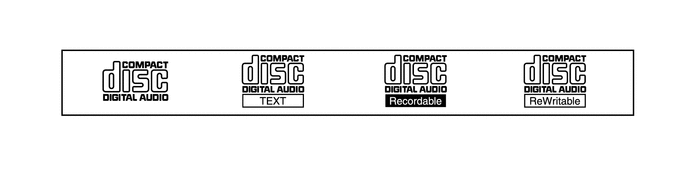
Discs with the marks shown below can be played:
-
-
Digital Audio Broadcast (DAB)
-
Digital Audio Broadcast (DAB) reception is available. This prevents broadcast interference, achieving clear reception with high quality sound.
-
A time shift operation function can be used to play back programs at a later time.
Tech Tips
The amount of playback possible depends on the bit rate of the DAB station to be recorded, the amount of DAB unit memory, and the time at which reception of the broadcast began.
-
-
USB/AUX Port
-
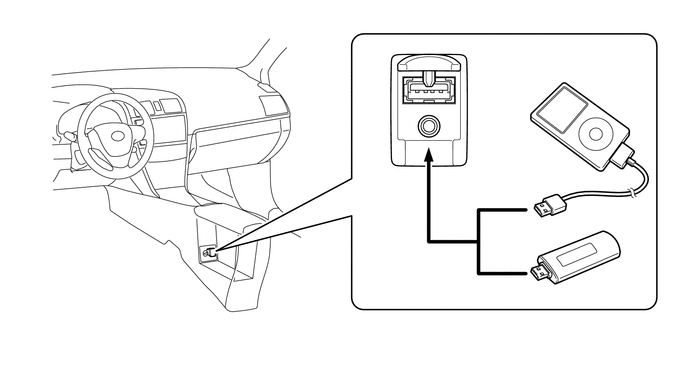
A USB port is provided that enables the use of a USB memory device, portable audio player (USB type), iPhone, iPod, iPod classic, iPod nano or iPod touch.
Tech Tips
-
iPhone, iPod, iPod classic, iPod nano and iPod touch are trademarks of Apple Inc., registered in the U.S. and other countries.
-
The following iPod, iPod nano, iPod classic, iPod touch and iPhone devices can be used with this system.
-
Made for
-
iPod touch (5th generation)
-
iPod touch (4th generation)
-
iPod touch (3rd generation)
-
iPod touch (2nd generation)
-
iPod touch (1st generation)
-
iPod classic
-
iPod nano (7th generation)
-
iPod nano (6th generation)
-
iPod nano (5th generation)
-
iPod nano (4th generation)
-
iPod nano (3rd generation)
-
iPod nano (2nd generation)
-
iPod nano (1st generation)
-
iPhone 5
-
iPhone 4S
-
iPhone 4
-
iPhone 3GS
-
iPhone 3G
-
iPhone
-
-
Depending on differences between models or software versions etc., some models might be incompatible with this audio system.
-
USB memory devices that meet the following specifications are supported:
USB Communication Formats
-
USB 2.0, Full Speed (12 Mbps)
-
USB 2.0, High Speed (480 Mbps)*
File System FAT 16/32 Correspondence Class Mass Storage Class File Formats MP3, WMA, AAC*
-
*: Models with display audio system or navigation system
-
-
-
Bluetooth Audio System
-
The Bluetooth audio system enables users to enjoy music played on a portable audio player from the vehicle speakers via wireless communication.
-
The Bluetooth specifications and profiles required for operation are as follows:
Specification/Profile Version Bluetooth Specification Version 1.1 or higher*1/Version 2.0 or higher*2 Required Version 2.1 + EDR or higher*1/Version 3.0 + EDR or higher*2 Recommended Profile Advanced Audio Distribution Profile (A2DP) Version 1.0 or higher Required Advanced Audio Distribution Profile (A2DP) Version 1.2 or higher Recommended Audio/Video Remote Control Profile (AVRCP) Version 1.0 or higher Required Audio/Video Remote Control Profile (AVRCP) Version 1.3 or higher*1 Recommended Audio/Video Remote Control Profile (AVRCP) Version 1.4 or higher*2 Recommended
-
*1: Models with base audio system
-
*2: Models with display audio system or navigation system
-
-
-
Bluetooth Hands-free System
-
The Bluetooth hands-free system allows the user to make or receive a call without taking their hands off the steering wheel when the system is linked with a Bluetooth-compatible cellular phone.
-
The Bluetooth specifications and profiles required for operation are as follows:
Specification/Profile Version Bluetooth Specification Version 1.1 or higher*1/Version 2.0 or higher*2 Required Version 2.1 + EDR or higher*1/Version 3.0 + EDR or higher*2 Recommended Profile Hands Free Profile (HFP) Version 1.0 or higher Required Hands Free Profile (HFP) Version 1.5*1/1.6*2 or higher Recommended Object Push Profile (OPP) Version 1.1 or higher Required Phone Book Access Profile (PBAP) Version 1.0 or higher Recommended Personal Area Networking (PAN) Version 1.0 or higher*2 Required Message Access Profile (MAP) Version 1.0 or higher*2 Required
-
*1: Models with base audio system
-
*2: Models with display audio system or navigation system
Tech Tips
-
The operation of the interrupt call function of the Bluetooth hands-free system may vary with the Bluetooth phone or the telephone company that is used.

"Bluetooth" is a trademark owned by Bluetooth SIG, Inc. -
Some profiles described above may not be supported by the system depending on the audio head unit equipped.
-
If the specification of the connected Bluetooth phone is lower than the recommended specification or does not support the functions required, the available functions may be limited.
-
Registration and connection of a Bluetooth phone is not available when only Object Push Profile (OPP), Phone Book Access Profile (PBAP) and Message Access Profile (MAP) are supported.
-
-
When a Bluetooth phone is connected to the audio head unit, e-mails and Short Message Service (SMS) messages received on the phone can be displayed or read out. In addition, it is possible to reply to the received e-mail and Short Message Service (SMS) messages. (Messages may not be displayed depending on the message service or profile that the connected Bluetooth phone supports.)
-
The user can confirm the signal strength and remaining battery level of the connected Bluetooth phone by using the status icons displayed on the screen. The status icons are displayed in any mode.
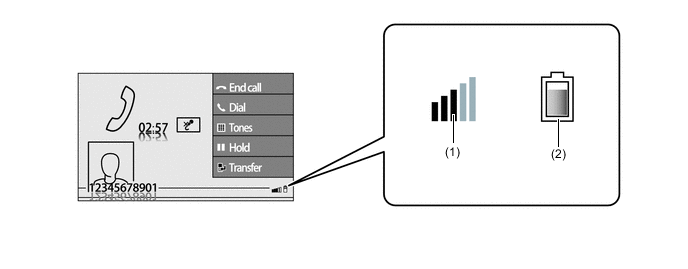
Item Outline (1) Cellular phone signal strength*1 Displays the signal strength received by the cellular phone. (2) Cellular phone battery level*1, *2 Displays the battery level of the Bluetooth connected cellular phone. Tech Tips
*1: May not be displayed depending on the Bluetooth specifications and profiles of the cellular phone.
*2: Models with display audio system or navigation system
-
-
Automatic Sound Levelizer (ASL)
-
The Automatic Sound Levelizer (ASL) function automatically adjusts the audio system volume level in order to compensate for increased vehicle noise (vehicle noise tends to increase as vehicle speed increases).
-
Vehicle speed signals are received from the combination meter assembly and used for ASL control.
-
-
Steering Pad Switch Assembly
-
Switches that the driver often uses are provided on the steering wheel for convenience.
-
-
-
SPECIFICATION
-
Audio Head Unit
Audio Head Unit Design Specification Radio Receiver Assembly 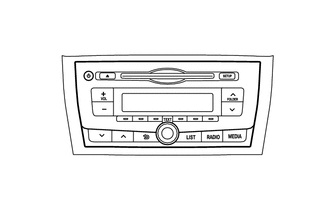
-
AM/FM Tuner
-
CD Player
-
CD-TEXT Display Function
-
MP3 and WMA Playback Function
-
Stereo Jack Adapter (USB, AUX Port)
-
6-speaker System
-
Unit: Panasonic
Base Audio System:
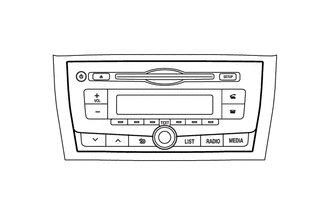
-
AM/FM Tuner
-
CD Player
-
CD-TEXT Display Function
-
MP3 and WMA Playback Function
-
Bluetooth Audio System
-
Bluetooth Hands-free System
-
Stereo Jack Adapter (USB, AUX Port)
-
6-speaker System
-
Unit: Panasonic
Base Audio System:
-
Radio and Display Receiver Assembly
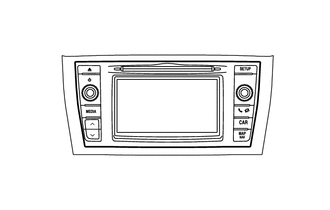
-
6.1-inch WVGA Thin Film Transistor (TFT)
-
AM/FM Tuner
-
CD Player
-
CD-TEXT Display Function
-
MP3, WMA and AAC Playback Function
-
Digital Audio Broadcast (DAB)*
-
Bluetooth Audio System
-
Bluetooth Hands-free System
-
Stereo Jack Adapter (USB, AUX Port)
-
iPod/iPhone Operation Function
-
6-speaker System or 11-speaker System
-
Unit: Panasonic
Display Audio System:
-
6.1-inch WVGA TFT
-
AM/FM Tuner
-
CD Player
-
CD-TEXT Display Function
-
MP3, WMA and AAC Playback Function
-
Digital Audio Broadcast (DAB)*
-
Bluetooth Audio System
-
Bluetooth Hands-free System
-
Stereo Jack Adapter (USB, AUX Port)
-
iPod/iPhone Operation Function
-
Radio Data System Traffic Message Channel (RDS-TMC) Tuner
-
Extension Box: Harman Becker
-
6-speaker System or 11-speaker System
-
Unit: Panasonic
Navigation System:
-
*: Models with Digital Audio Broadcast (DAB)
-
-
6-speaker System

Location Speaker Type Caliber Impedance Input Range *1 Front Tweeter x 2 25 mm (1.0 in.) 4 Ω 20 W *2 Front Speaker x 2 150 mm x 230 mm (6.0 in. x 9.0 in.) 4 Ω 20 W *3 Rear Speaker x 2 160 mm (6.3 in.) 4 Ω 20 W -
11-speaker System
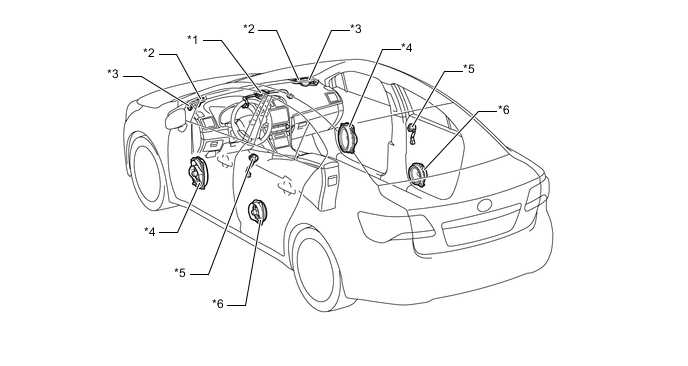
Location Speaker Type Caliber Impedance Input Range *1 Center Speaker x 1 80 mm (3.1 in.) 4 Ω 5 W *2 Front Tweeter x 2 25 mm (1.0 in.) 4 Ω 20 W *3 Front Squawker x 2 50 mm (2.0 in.) 8 Ω 10 W *4 Front Woofer x 2 150 mm x 230 mm (6.0 in. x 9.0 in.) 2 Ω 30 W *5 Rear Tweeter x 2 25 mm (1.0 in.) 4 Ω 20 W *6 Rear Speaker x 2 160 mm (6.3 in.) 4 Ω 20 W
-
-
MAIN FEATURES
-
MirrorLinkTMFunction
-
To utilize the MirrorLinkTMfunction, it is necessary to connect a compatible smartphone* to the radio and display receiver assembly using a USB cable.
Tech Tips
*: This function is not available if the smartphone is not compliant with MirrorLinkTMof the Car Connectivity Consortium.
-
After a connection is established, the screen of the smartphone is displayed on the radio and display receiver assembly. Using this screen, the user can operate applications installed on the smartphone and listen to the audio of the smartphone via the vehicle speakers. Operation via the smartphone is also possible.
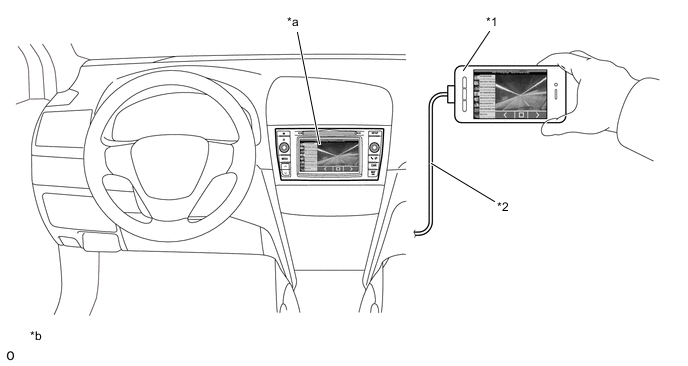
Text in Illustration *1 Smartphone *2 Connection via USB Cable *a MirrorLinkTMScreen
*b The illustration shows an example for Android.
-
-
-
PRECAUTION
-
Ignition Switch Expressions
-
The type of ignition switch used on this model differs depending on the specifications of the vehicle. The expressions listed in the table below are used in this section.
Expression Ignition Switch (Position) Engine Switch (Condition) Ignition Switch off LOCK Off (Lock) Ignition Switch ACC ACC On (ACC) Ignition Switch ON ON On (IG) Engine Start START On (Start)
-
-