LANE DEPARTURE ALERT SYSTEM
-
OUTLINE
-
The lane departure alert system assists the driver to keep the vehicle in its lane. When the system determines that the vehicle may deviate from its current lane while driving on a road with white (or yellow) lines, the driver is warned via a buzzer and message on the multi-information display.
-
The lane departure alert system also operates on roads with only one lane marker.
-
The lane departure alert system is controlled by the pre-crash safety city sensor.
-
This system has a last memory function which memorizes the state of the LDA main switch just before the ignition switch is turned off and resumes the previous state when the ignition switch is turned ON again.
-
-
PRECAUTION
-
General Handling Precautions
-
Use the lane departure alert system with clear lane markers.
-
The lane departure alert system alerts the driver of unintentional deviation from the lane. It does not aim to assist the steering operation while the driver releases the steering wheel or does not pay attention to the road ahead.
-
When a failure is detected in the system and the lane departure alert system is stopped.
-
Since this does not affect normal driving, keep driving carefully.
-
When the engine is stopped and started again and the LDA switch is turned on, the lane departure alert system can be resumed as soon as the system returns to normal.
Tech Tips
However, normal driving can continue. Contact your Toyota dealer if any error alert is output repeatedly after turning the ignition switch ON (IG) again.
-
-
Changing tires or changing suspension parts may lead to a decline in performance of the system.
-
Depending on road surface conditions, it may be difficult to hear the warning sound.
-
Do not modify the headlights or attach stickers to the surface of the light.
-
Do not install or place anything on the hood or the grille. Also, do not install a grille guard (bull bars, kangaroo bar etc.).
-
Keep the windshield clean at all times. If the windshield glass is dirty or covered with an oily film, water droplets, snow, etc., clear the windshield glass. If the inner side of the windshield glass in front of the pre-crash safety city sensor is dirty, clean away the dirt.
-
Do not attach objects, such as stickers, transparent stickers, etc., and so forth, to the outer side of the windshield glass in front of the pre-crash safety city sensor (shaded area in the illustration).

Text in Illustration *a From the top of the windshield glass to approximately 10 cm (4.0 in.) below the bottom of the pre-crash safety city sensor. *b Approximately 20 cm (7.9 in.) (Approximately 10 cm (4.0 in.) to the right and left from the center of the pre-crash safety city sensor). -
Do not install or attach anything to the inner side of the windshield glass under the pre-crash safety city sensor (shaded area in the illustration).

Text in Illustration *a Approximately 10 cm (4.0 in.) (Starting from the bottom of the pre-crash safety city sensor). *b Approximately 20 cm (7.9 in.) (Approximately 10 cm (4.0 in.) to the right and left from the center of the pre-crash safety city sensor). -
If there is a large difference in temperature between the inside and outside of the vehicle, such as in winter, the windshield glass is likely to fog up easily. If the part of the windshield glass in front of the pre-crash safety city sensor is fogged up or covered with condensation or ice, the PCS OFF warning light may flash and the system may be temporarily disabled. In this case, use the windshield defogger to remove the fog, etc.
-
If the area of the windshield glass in front of the pre-crash safety city sensor is covered with water droplets, use the windshield glass wipers to remove them. If the water droplets are not sufficiently removed, the performance of the pre-crash safety city sensor may be reduced.
-
If water droplets cannot be properly removed from the area of the windshield glass in front of the pre-crash safety city sensor by the windshield glass wipers, replace the wiper insert or wiper blade.
-
Do not attach window tinting to the windshield glass.
-
Replace the windshield glass if it is damaged or cracked.
-
Do not install an antenna in front of the pre-crash safety city sensor.
-
Do not get the pre-crash safety city sensor wet.
-
Do not allow bright lights to shine into the pre-crash safety city sensor.
-
Do not dirty or damage the pre-crash safety city sensor. When cleaning the inside of the windshield glass, do not allow glass cleaner to contact the lens. Also, do not touch the lens.
-
Do not subject the pre-crash safety city sensor to a strong impact.
-
Do not change the installation position or direction of the pre-crash safety city sensor or remove it.
-
Do not disassemble the pre-crash safety city sensor.
-
Do not install an electronic devices or devices that emit strong electric waves near the pre-crash safety city sensor.
-
Do not modify any components of the vehicle around the pre-crash safety city sensor (inside rear view mirror, dun visor, etc.) or ceiling.
-
Do not attach any accessories that may obstruct the pre-crash safety city sensor to the hood, front grille or front bumper.
-
If a surfboard or other long object is to be mounted on the roof, make sure that it will not obstruct the pre-crash safety city sensor.
-
Do not modify the headlights or other lights.
-
Do not attach anything to or place anything on the instrument panel.
CAUTION:
The pre-crash safety city sensor uses lasers to detect vehicles ahead of your vehicle. The pre-crash safety city sensor is classified as class 1M laser product according to the IEC 60825-1 standard. Under normal usage conditions, these lasers are not harmful to the naked eye. However, it is necessary to observe the following precautions. Failure to do so may result in the loss of eyesight or severe visual impairment.
-
To avoid hazardous laser radiation exposure, never attempt to disassemble the pre-crash safety city sensor (e.g. remove the lenses). When disassembled, the pre-crash safety city sensor is classified as a class 3B laser product according to the IEC 60825-1 standard. Class 3B lasers are hazardous and pose a risk of eye injury under direct exposure.
-
Do not attempt to look into the pre-crash safety city sensor with a magnifying glass, microscope or other optical instrument within a distance of less than 100 mm (3.9 in.).
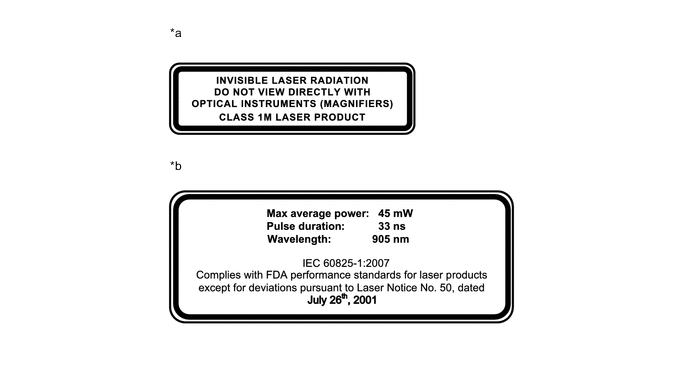
Text in Illustration *a Laser Classification Label *b Laser Explanatory Label Laser Emission Data Max Average Power 45 mW Pulse Duration 33 ns Wavelength 905 nm Divergence (Horizontal x Vertical) 28° x 12°
-
-
-
Precautions Concerning Road Conditions
-
If the system cannot recognize lane markers under the following conditions, the system will not operate.
-
When driving on a sharp curve.
-
When lane markers are extremely narrow or extremely wide.
-
When the vehicle leans to one side an unusual amount due to a heavy load or improper tire inflation pressure.
-
When the following distance between your vehicle and the vehicle ahead is extremely short.
-
When the lane markers are yellow. (These may be more difficult for the system to recognize compared to white markers.)
-
When the lane markers are broken, Botts' dots (raised pavement markers) or stone.
-
When the lane markers are on a curb etc.
-
When lane markers are obscured or partially obscured by sand, dirt, etc.
-
When there are shadows on the road running parallel with lane markers or if a shadow covers the lane markers.
-
When driving on a particularly bright road surface, such as concrete.
-
When driving on a road surface that is bright due to reflected light.
-
When driving in a location where the light level changes rapidly, such as the entrance to or exit from a tunnel.
-
When sunlight or the headlights of oncoming vehicles are shining directly into the camera lens.
-
When driving on roads that are branching, merging, intersection or before a ticket checkpoint.
-
When driving on a road surface that is wet due to rain, previous rainfall, standing water, etc.
-
When the vehicle experiences strong up-and-down motion such as when driving on an extremely rough road or on a seam in the pavement.
-
When headlight brightness at nighttime is reduced due to dirt on the lenses or when the headlights are misaligned.
-
When driving on winding roads or roads that are uneven.
-
When driving on rough or unpaved roads.
-
-
If the distance between vehicles is extremely short, lane markers may not be recognized correctly. Maintain an appropriate distance from the vehicle ahead.
-
When the vehicle is parked during hot weather, the system will not operate for a while after the ignition switch ON (IG). When the temperature in the cabin reaches the appropriate level at which the pre-crash safety city sensor can operate, the system can be resumed.
-
-
Precautions for Lane Departure Alert System
-
Keep the vehicle in the lane by turning the steering wheel appropriately and driving carefully.
-
The lane departure alert system does not prevent lane deviation. It only alerts the driver of lane deviation by displaying a warning message and sounding a buzzer.
-
When the warning is activated, operate the steering wheel appropriately to guide the vehicle back into the lane.
-
The warning can be activated while the vehicle is being driven between approximately 50 km/h (32 mph) or more.
-
-
The alarm may be activated early or may not be activated under the following conditions.
-
When driving with tire chains, a spare tire or similar equipment.
-
When there are objects or structures along the roadside that might be misinterpreted as lane markers (such as guardrails, curbs, reflector posts, etc.).
-
When driving on snowy roads.
-
When pavement lane markers are difficult to see due to rain, snow, fog, sand, dirt, etc.
-
When there are visible lines on the pavement from road repairs or if the remains of old lane markers are still visible on the road.
-
When driving on a road with lane closures due to maintenance or when driving in a temporary lane.
-
-
-
Ignition Switch Expressions
-
The type of ignition switch used on this model differs depending on the specifications of the vehicle. The expressions listed in the table below are used in this section.
Expression Ignition Switch (Position) Power Switch (Condition) Ignition Switch off LOCK Off (Lock) Ignition Switch ACC ACC On (ACC) Ignition Switch ON (IG) ON (IG) On (IG) Ignition Switch ON (READY) ON (READY) On (Ready)
-
-