METER / GAUGE SYSTEM GENERAL
-
OUTLINE
-
Combination Meter Assembly
-
An Optitron type combination meter assembly is provided.
-
The combination meter assembly has a built-in meter ECU and buzzer.
-
The 2 Liquid Crystal Display (LCD) are provided for the combination meter assembly.
-
The combination meter assembly has a multi-information display.
-
The maintenance require reminder function is provided on models for U.S.A. to inform the driver when maintenance is necessary.
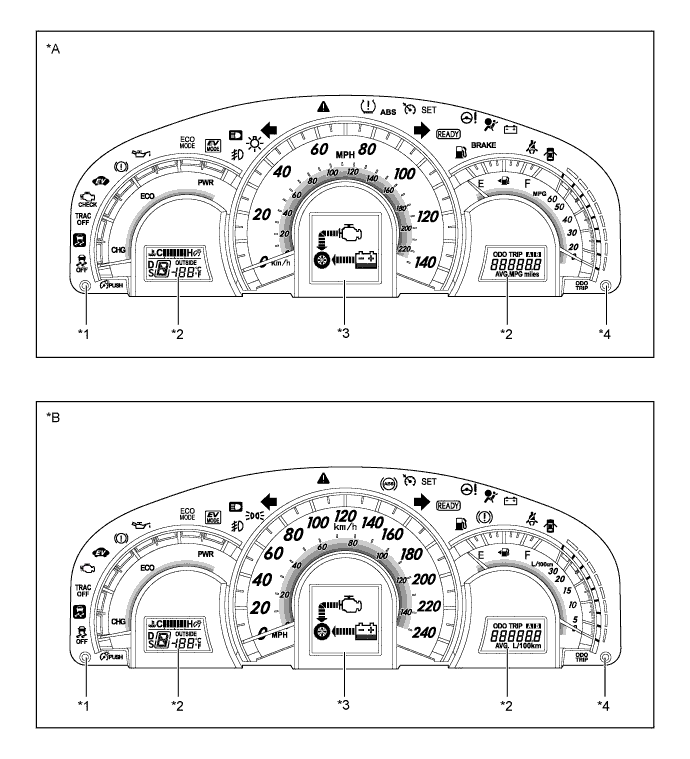
Text in Illustration *A Models for U.S.A. *B Destination Package for Canada *1 Rheostat Switch *2 LCD *3 Multi-information Display *4 ODO/TRIP Switch 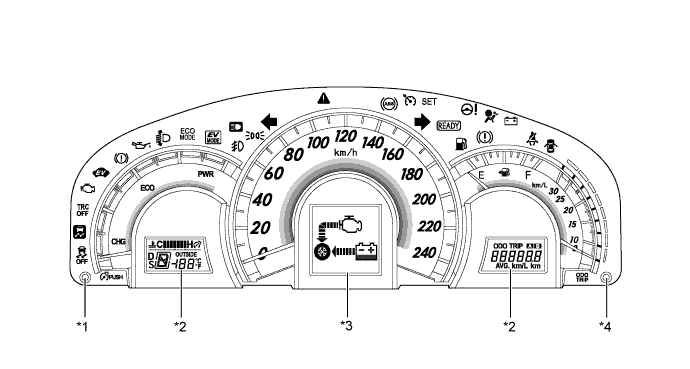
Text in Illustration (Destination Package for South Korea:) *1 Rheostat Switch *2 LCD *3 Multi-information Display *4 ODO/TRIP Switch
-
-
-
MAIN FEATURES
-
Combination Meter Assembly
-
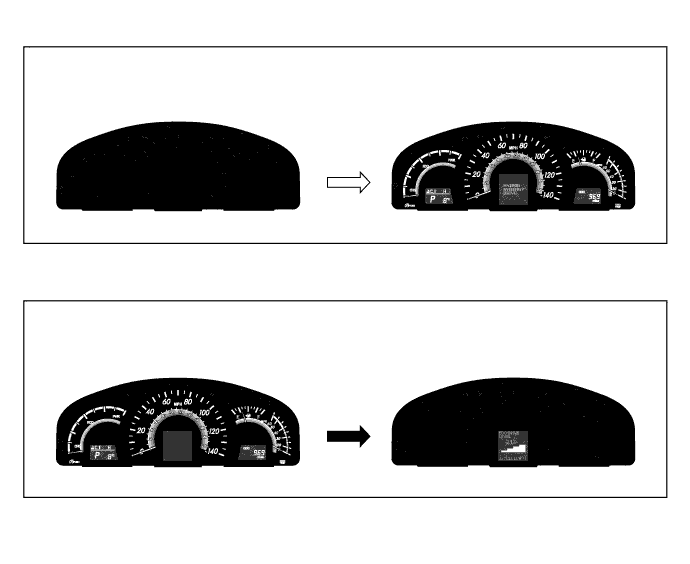
An illumination control which allows for anticipation of a pleasant drive is used. If the power switch is turned on (IG), the illumination control operates as follows:
-
When the power switch is turned on (IG), the opening display appears on the multi-information display.
-
The following illuminations fade in: the speedometer, Hybrid System Indicator, fuel gauge, fuel consumption meter needle indicator, 2 LCD displays and meter panel illumination.
-
When the power switch is turned off, all the illuminations fade out. During this period, the multi-information display shows the Eco drive level for 3 seconds.
Text in Illustration 
Power switch off to on 
Power switch switch on to off
-
-
-
Hybrid System Indicator
-
The Hybrid System Indicator displays the total of the HV battery and engine output as the hybrid system output.
-
The scale for the Hybrid System Indicator is divided into 3 areas (Charge, Eco, Power). The role of each area is as follows.
Area Function Charge The Charge area indicates when energy regeneration is occurring. Eco
-
The Eco area indicates when the vehicle is being driven Eco-friendly.
-
The Hybrid Eco area indicates that the vehicle is driven in a manner that promotes frequent motor only operation. (Based on various conditions, the power management ECU controls if the engine should be stopped to enhance fuel efficiency.)
Power The Power area indicates that the Eco-friendly driving range is being exceeded (during full power driving etc.). 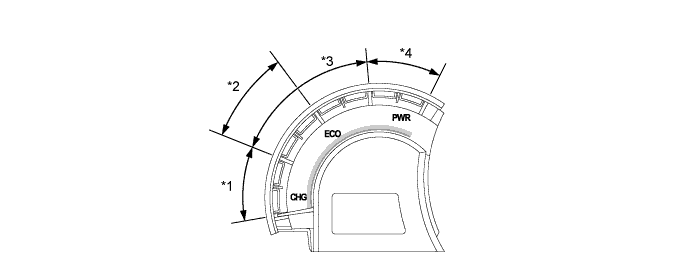
Text in Illustration *1 Charge Area *2 Hybrid Eco Area *3 Eco Area *4 Power Area -
-
-
Fuel Consumption Gauge
-
A needle indicator type average fuel consumption gauge is provided on the combination meter assembly. The needle indicator indicates the value in accordance with the average fuel consumption value displayed on the multi-information display.
-
An instantaneous fuel consumption gauge is provided. This gauge is a segment type indicator and is arranged outside the average fuel consumption gauge. This arrangement enables the driver to check the average and instantaneous fuel consumption simultaneously, assisting eco-friendly driving.
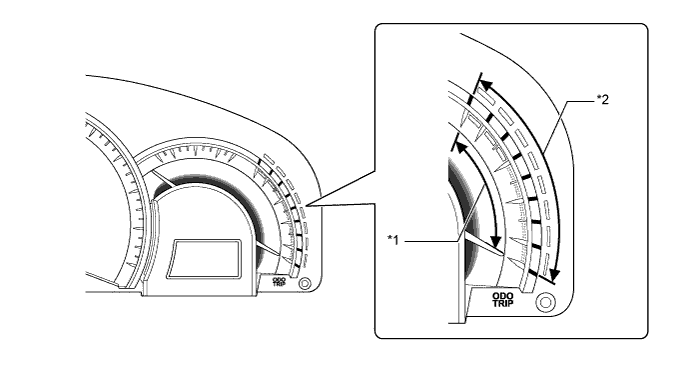
Text in Illustration *1 Average Fuel Consumption Gauge *2 Instantaneous Fuel Consumption Gauge
-
-
LCD Display
-
The 2 LCDs are provided. Each display shows the following information.
Item Outline LCD (Hybrid System Indicator Side)
-
The following information items are always displayed.
-
Shift Position Indicator
-
Engine Coolant Temperature Gauge (segment type display)
-
Ambient Temperature
-
When the rheostat switch is pressed, the engine coolant temperature gauge will change into meter illumination adjustment mode. The meter illumination can be switched between 6 levels.
LCD (Fuel Gauge Side)
-
The following information items can be displayed. The item shown can change by pressing the ODO/TRIP switch.
-
Odometer
-
Trip Meter A
-
Trip Meter B
-
-
-
Multi-information Display
-
The multi-information display shows the following information.
Mode Outline Cruise Information
-
The item shown can be changed by pushing the DISP switch in the steering pad switch assembly.
-
In cruise information mode, the following information can be displayed:
-
Cruising Range and Average Fuel Consumption
-
Average Vehicle Speed and Elapsed Time
-
Eco Drive Level
-
Energy Monitor
-
Settings
-
Blank Screen
Clearance Sonar Display* The obstruction detection state of the clearance sonars is displayed. Warning The warning display will interrupt the multi-information display immediately when a warning occurs. Customization
-
The following display, performance or illumination of the combination meter assembly can be customized:
-
Language
-
Instantaneous Fuel Consumption Gauge
-
EV Drive Indicator Light
-
*: Models with intuitive parking assist system
-
-
-