NAVIGATION SYSTEM / MULTI INFORMATION SYSTEM GENERAL
-
OUTLINE
-
The following navigation systems are provided:
Navigation System Head Unit Entune Premium Audio with Navigation and App Suite System Navigation Receiver Assembly Entune Premium JBL Audio with Navigation and App Suite System -
The multi-display of the navigation receiver assembly is a wide 7-inch Liquid Crystal Display (LCD) with a pressure sensitive touch panel, offering improved ease of use.
-
The map database of the navigation system is stored in the microSD card (disc player disc) installed in the navigation receiver assembly. A microSD card (disc player disc), which has the latest map database stored, can be purchased to replace the old one and update to the latest map database.
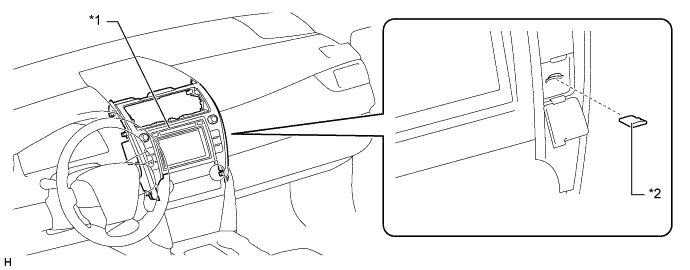
Text in Illustration *1 Navigation Receiver Assembly *2 microSD Card (Disc Player Disc) -
The navigation system has a voice recognition system that uses natural speech technology to interpret a user's intent based on their natural speech pattern. The system recognizes natural speech patterns as voice recognition commands.
-
The language of the screen buttons, pop-up messages and voice guidance can be set to either English, French or Spanish.
-
The map now covers Mexico and Hawaii, ensuring marketability.
-
The navigation receiver assembly supports HD data services that enable the navigation system to receive and use information from HD radio signals.
-
A fuel consumption screen is provided in consideration of the environment.
-
A multiple display function is provided. Due to this function, a map screen and audio screen or vehicle information screen can be displayed on the navigation receiver assembly simultaneously. Displayed items are customizable, and the top screen of each function can be displayed by selecting the corresponding information screen.
-
Entune App Suite
-
The Entune App Suite is supported. This Entune App Suite makes it possible to operate specified applications on the navigation receiver assembly by using Bluetooth to connect the navigation receiver assembly to a cellular phone with the Entune App Suite application installed.
-
-
-
MAJOR DIFFERENCE
-
The 2014 models have been modified from the 2013 models as shown below:
-
New navigation systems, which use a microSD card as a map data storage media, have been adopted.
-
-
-
PRECAUTION
-
The type of ignition switch used on this model differs depending on the specifications of the vehicle. The expressions listed in the table below are used in this section.
Expression Ignition Switch
(Position)
Engine Switch
(Condition)
Ignition Switch off LOCK Off (LOCK) Ignition Switch ACC ACC On (ACC) Ignition Switch ON ON On (IG) Engine Start START On (Start) -
When ejecting the microSD card, observe the following precautions to avoid damaging it.
-
The micro SD card (disc player disc) stores map data or various programs which are required to operate the navigation system. With the microSD card (disc player disc) removed, the navigation system will not operate properly. Do not remove the microSD card (disc player disc) unless necessary, such as for a map update.
-
Do not insert anything other than a microSD card (disc player disc) into the microSD card slot after removing the microSD card (disc player disc).
-
Do not insert a dusty or dirty microSD card (disc player disc) into the microSD card slot, as it may cause a malfunction.
-
After the micro SD card (disc player disc) is inserted, make sure that it is secure in the microSD card slot.
-
When handling a microSD card (disc player disc), observe the following precautions. Failure to do so may cause a malfunction.
-
Do not touch the metal contacts of the microSD card (disc player disc) with your fingers or metal objects.

-
Do not bend, drop or strike a microSD card (disc player disc), as it is a precision electronic component and may become damaged.
-
-
Avoid the following environments when storing a removed microSD card (disc player disc). Failure to do so may cause the microSD card (disc player disc) to malfunction and generate errors in the navigation system.
-
Areas where static electricity or electrical noise is present
-
In extremely hot or humid areas
-
Areas exposed to direct-sunlight
-
Areas where condensation may form
-
Areas where corrosive gases may be generated
-
-
Do not peel the label on the microSD card or attach a new label or sticker.
-
-
-
SPECIFICATION
Multi-display 7-inch Wide LCD Navigation Computer Fujitsu Ten Gyro Sensor Piezoelectric Ceramic Element Map Data Media microSD Card (Disc Player Disc) microSD Card AISIN AW Language Supported Voice Guidance English, French and Spanish Voice Recognition -
MAIN FEATURES
-
Entune App Suite
-
The Entune App Suite makes it possible to operate specified applications on the multi-display by using Bluetooth to connect the navigation system to a cellular phone with the Entune App Suite application installed.
-
The Entune App Suite enables communication between the navigation system, application server and content provider utilizing the Entune App Suite application installed on a cellular phone.
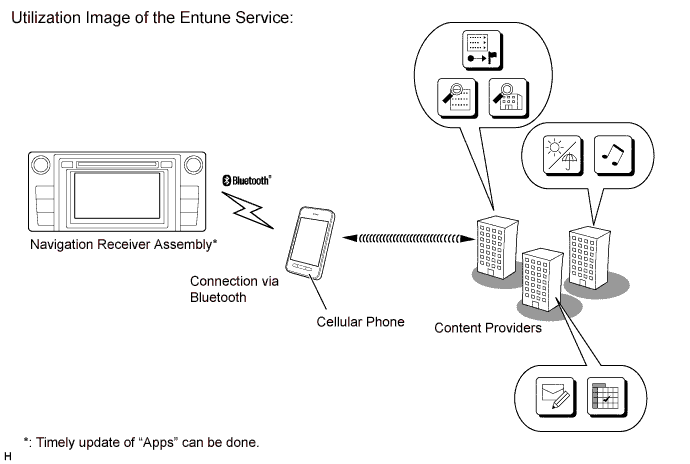
-
The Entune App Suite application can be accessed by on-screen commands on the multi-display and voice recognition.
-
Some applications support the off-board voice recognition system, enabling spoken words that are not included in the voice recognition database of the navigation receiver assembly to be recognized. The center voice recognition system has a database within itself, thus more voice data can be recognized than usual.
-
Based on the result of the words spoken while the user is using apps, this system displays the information the user requested on the screen. Depending on the spoken words, the system connects to the call center. The call center will send back information based on the voice recognition result of the spoken words, and it will be displayed on the apps screen. This allows the user to operate apps as if they are having a conversation.
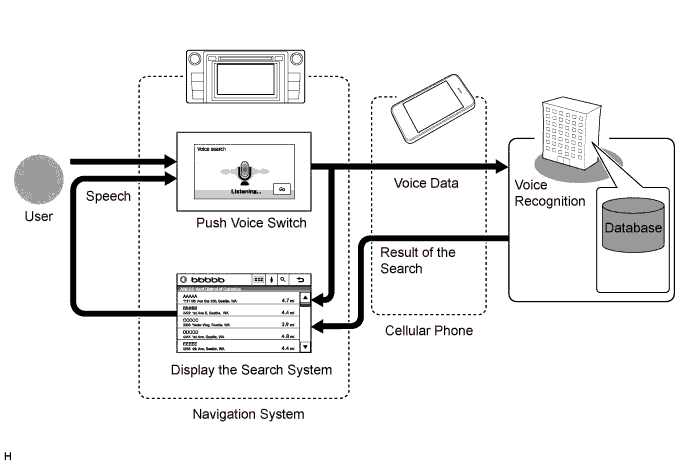
-
-
HD Radio Data Services
-
The navigation system receives HD radio data service information from HD radio signals and displays it on the multi-display. Additionally, the navigation function, which utilizes real-time information, is available.
-
The following HD radio data services are available:
Service Function Traffic Information
-
Displays traffic information received via HD radio signals.
-
A list of current traffic information can be displayed along with information on an incident's distance and position relative to the vehicle.
-
A map with predictive traffic data can be displayed.
-
Traffic information along the route that has been registered and stored can be displayed.
-
Displays traffic congestion information using icons, arrows and indicators on the map screen.
Weather Information
-
Displays weather information received via HD radio signals.
-
Weather information of the current location or selected city for up to 3 days from the current date can be displayed.
-
Doppler weather radar information can be displayed on the map screen.
Tech Tips
Traffic information and weather information are also provided via the Entune application.
-
-
-
Voice Recognition System
-
When the voice recognition system starts operating, the commands that the system is able to recognize are displayed on the multi-display.
-
In the aim of enabling the user to operate the system with minimal spoken words, the recognition command screen is designed to show not only sample spoken words for short-cut commands, but also tabs for the major functions such as Audio, Navigation and Phone. When a tab is selected, a detailed list of the voice recognition commands will be displayed for the corresponding function.
Tech Tips
Other functions still can be operated by voice recognition commands when a tab is selected for a specific function.
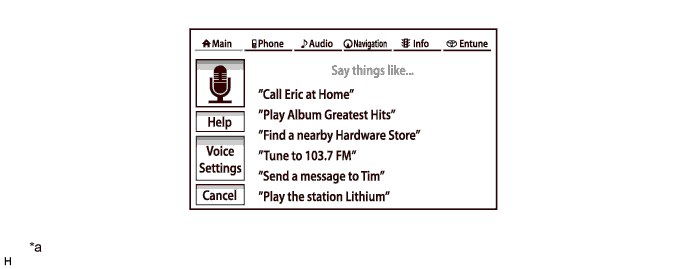
Text in Illustration *a The Illustrations shown are examples only. The illustrations may differ from the actual vehicle screens. - - -
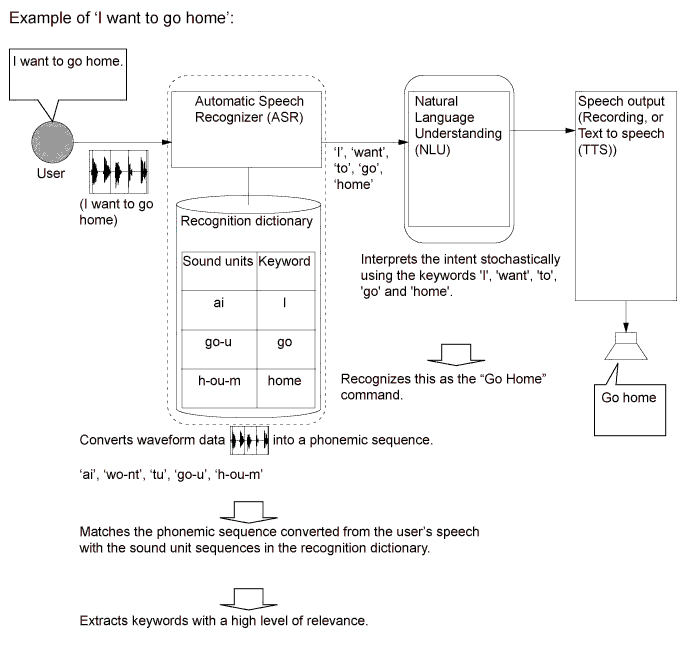
The natural speech technology* adopted for this voice recognition system can recognize a user's natural speech as voice recognition commands. ("Natural speech" refers to naturally spoken utterances that include several keywords.)
Tech Tips
*: Natural speech technology is available in English, French and Spanish.
-
Natural speech technology enhances usability because the user does not have to memorize voice recognition commands exactly.
-
Natural speech technology uses the system's Automatic Speech Recognizer (ASR) and Natural Language Understanding (NLU) to recognize voice recognition commands.
-
The ASR extracts keywords from a user's natural speech using a phonemic sequence (the units of sound that make up a phrase or sentence).
-
The NLU analyzes these extracted keywords based on their probable meaning, interpreting the intent of the user's utterances.
-
-
In order to interpret the intent of a user's speech, the NLU unit records key words in a data table.
-
The data table is organized by task. This data is used to interpret the probable meaning of the user.
-
Even if the user does not say the indicated voice command ("Go Home"), speech with a similar meaning can be recognized (for example: "Lets go home" and "Take me home").
Tech Tips
The natural speech technology used by the voice recognition system does not function in the following cases.
-
When the key words used are not in the data table.
-
When a phrase includes several intentions (Ex. "Go home... actually, no... I want to call Bob.")
-
When spoken instructions are for a level that cannot be recognized by the system. (Ex. When the user attempts to carry out a task from a different level while another task is still in progress, such as trying to make a phone call while the Destination screen is being displayed after giving the 'Destination' command.)
-
-
-
The main functions of the multi-display are listed below.
Function Outline Navigation System Through the use of the Global Positioning System (GPS) and map data which is stored on a microSD card, the navigation system analyzes the position of the vehicle and indicates the position on the map that is displayed on the screen. In addition, it is possible to use the system to register memory points and navigate to a destination. Audio/Video System Serves as the display and controls for the following:
-
Radio operation
-
HD radio operation
-
XM satellite radio operation (Models with stereo component tuner assembly)
-
CD player operation
-
Bluetooth-compatible portable player operation
-
USB memory device operation
-
iPod / iPhone operation
-
Portable audio player operation (AUX type)
Hands-free System When a Bluetooth-compatible cellular phone is registered to the navigation system, the driver can make and receive calls or talk hands-free on the cellular phone by operating the switches on the screen/steering pad. Speech Command System Operates the navigation, audio, and hands-free systems based on voice commands. Monitor System Displays a view of the area behind the vehicle that is captured by the television camera mounted on the luggage compartment door when the shift lever is moved to R. Others Fuel Consumption Screen Fuel consumption information such as average fuel consumption per minute, current fuel consumption per minute and past fuel consumption record is displayed. Maintenance Information The maintenance information function can be used to inform the driver of the inspection or replacement timing of the following items based on the calendar function and distance driven.
-
Engine oil: Replace engine oil
-
Oil filter: Replace engine oil filter
-
Rotation: Rotate tires
-
Tires: Replace tires
-
Battery: Replace battery
-
Brake pad: Replace brake pads
-
Wipers: Replace wiper blades
-
Coolant: Replace engine coolant
-
Brake oil: Replace brake fluid
-
Trans. fluid: Replace ATF
-
Service: Scheduled maintenance
-
Air filter: Replace air filter
-
Personal: New information items can be created separately from the provided items
Language Select The language of the screen buttons, pop-up messages and the voice guidance can be changed. English, French and Spanish are available. Beep Setting The beep sound can be turned off. Screen Color Theme Setting The screen color theme can be changed. Screen Setting This enables automatic return to the navigation screen from the audio screen. Keyboard Layout The keyboard layout can be changed. Delete Personal Data Deletes or returns registered or changed personal settings to their default conditions. For example:
-
General settings
-
Navigation settings
-
Audio settings
-
Phone settings
Screen Adjustment The brightness or contrast of the screen can be adjusted to suit the brightness of the surroundings. Diagnosis This menu contains the following items:
-
Failure Diagnosis
-
System Check
-
SD Check
-
Diagnosis Recorder
-
Function Check / Setting
-
Panel & Steering Switch
-
Touch Switch
-
Microphone Check
-
System Sensors Check
-
Vehicle Signal
-
HF Voice Quality Setting
-
Camera Setting (Models with parking assist monitor system)
-
Service Information
-
Version Information
-
Product Information
-
-