METER / GAUGE SYSTEM DETAILS
-
FUNCTION
-
Buzzer Function
-
The table below shows the warning and reminder functions of the buzzer in the combination meter assembly.
1 Downshift Reject Warning 2 Parking Brake Engaged Warning 3 Door Open Driving Warning 4 Sliding Roof Open Warning 5 Seat Belt Warning 6 Smart Entry and Start System Warning*1 7 Key Reminder*2 8 Hill-start Set/Reset Indication Buzzer 9 Multi-information Display Warning - -
-
*1: Models with smart entry and start system
-
*2: Models without smart entry and start system
-
-
When downshifting is attempted while driving at a vehicle speed at which downshifting is impossible, the buzzer sounds twice (approximately 0.25 seconds X 2) as a warning and the downshift is prohibited.
-
-
Maintenance Required Reminder Function
-
A maintenance required reminder message will appear to inform the driver of maintenance requirements.
-
The combination meter assembly calculates the vehicle driving distance based on the signals from the skid control ECU.
-
There are 2 types of warnings: one is displayed when the vehicle driving distance is 4500 miles or more since the last time the system was reset, and the other is displayed when the driving distance is 5000 miles or more.
-
The maintenance required reminder message appears on the multi-information display as follows:
4500 miles or more 5000 miles or more "Oil Maintenance Required Soon" appears for approximately 15 seconds "Oil Maintenance Required" warning remains on -
After the required maintenance has been performed, the accumulated vehicle driving distance memorized in the combination meter assembly should be reset to zero using the "TRIP" meter reset knob.
Tech Tips
The accumulated vehicle driving distance memorized in the combination meter assembly can be reset using the following procedure.
-
Turn the ignition switch to ON, and make sure that the TRIP A is displayed on its Liquid Crystal Display (LCD).
-
Turn the ignition to off. While pushing the "TRIP" meter reset knob, turn the ignition switch ON.
-
With the ignition switch ON, keep holding the "TRIP" meter reset knob (for at least 5 seconds) with the LCD counting down. Release the "TRIP" meter reset knob when the resetting procedure has completed.
-
As the resetting completes, the multi-information display will display "Resetting Oil Maintenance Data COMPLETE" for 1 second (TFT display) or the odometer will display "000000" for 1 second.
-
-
-
Multi-information Display Flow Function
-
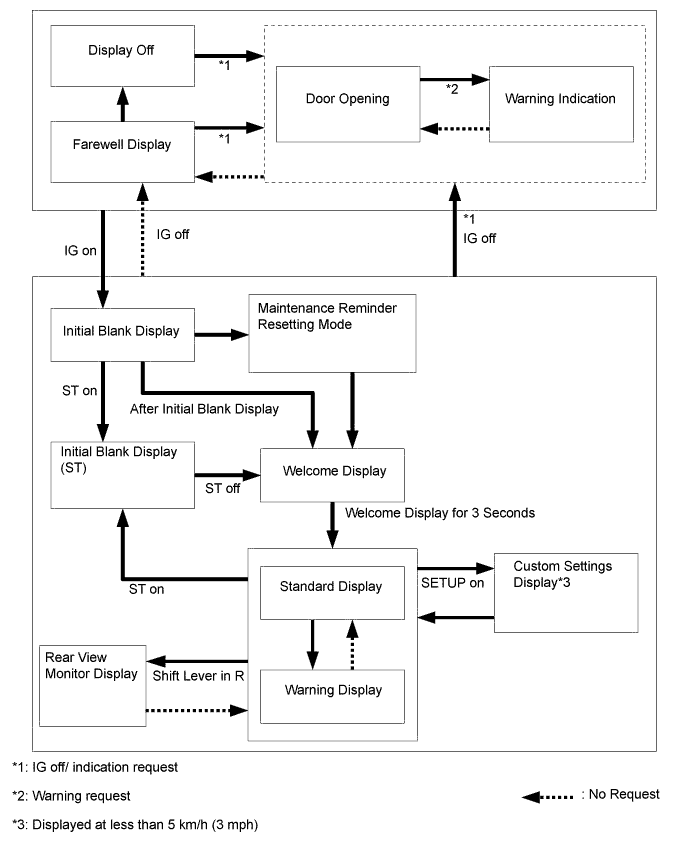
The Thin Film Transistor (TFT) type multi-information display flow can be switched as shown in the flow chart below:
-
-
Cruise Information Display Function
-
The cruise information is displayed in the following order each time the INFO switch is pressed.
Information Outline Current Fuel Economy
-
Displays the value that has been calculated by the combination meter assembly. When the ignition switch is ON, the combination meter assembly calculates this value based on the distance driven and the fuel consumption volume (fuel injection signal from the No. 1 cylinder).
-
This display is updated every 0.5 seconds.
Distance To Empty
-
Displays the value that has been calculated by the combination meter assembly. This calculation is based on the fuel consumption data that the combination meter assembly continuously monitors and stores in its memory and the residual fuel volume data, provided that the ignition switch is ON.
-
This display is updated every 10 seconds.
Average Fuel Economy
-
Displays a value that has been calculated by the combination meter assembly based on the distance driven and the fuel consumption volume (fuel injection signal from the No. 1 cylinder).
-
This display is updated every 10 seconds.
Average Speed
-
Displays a value that has been calculated by the combination meter assembly based on the vehicle speed signal and the elapsed time since the engine start signal.
-
This display is updated every 10 seconds.
Trip Timer
-
Calculates and displays the elapsed time since the engine start signal was input into the combination meter assembly.
-
The display is updated every second.
-
-
-
Warning Display Function for TFT Display
-
When a warning is necessary, the warning display interrupts the display in the multi-information display.
-
The master warning light may illuminate or blink and the buzzer in the combination meter assembly may sound depending on the item in the multi-information display.
Priority Warning Master Warning Light Buzzer 1 Door Open - - 2 Door Open (While Driving) Blinks - 3 Parking brake engaged Blinks* - 4 Oil Maintenance Required Illuminates - 5 Oil Maintenance Required Soon Illuminates - - Resetting Oil Maintenance Data (COMPLETE) Illuminates - 6 Low Washer Fluid Illuminates - 7 Check VSC Illuminates Sounds 8 Low Oil Pressure Blinks Sounds 9 Engine Coolant Hot Blinks Sounds 10 Moon Roof Open Blinks - 11 Key is not detected Blinks - 12 Low Key Battery Blinks Sounds 13 Depress brake pedal and push engine switch to start Blinks - 14 Shift to P position to start Blinks - 15 Check Steering Lock System Blinks - 16 Steering Lock is still active Blinks - 17 Check SRS Airbag System Illuminates Sounds 18 Check Brake System Illuminates Sounds 19 Check ABS System Illuminates Sounds 20 Key Detected in Vehicle Blinks Sounds 21 Turn Power Off Key not Detected Blinks Sounds 22 Depress brake pedal, touch engine switch with key Blinks Sounds 23 Please Stop Vehicle to Change Settings - - 24 Auto power off to conserve battery - - 25 Shift to P position and push engine switch to turn power off Blinks -
-
*: If the vehicle has reached a speed of 5 km/h (3 mph).
-
-
-
Custom setting Function for TFT Display
-
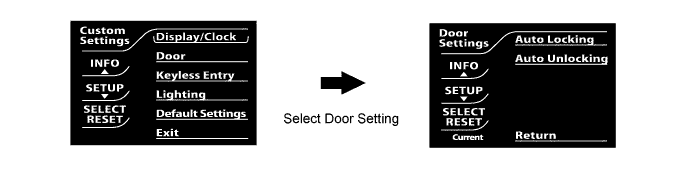
Settings that can be customized are displayed in the following order each time the SETUP switch is pressed. 5 items can be customized.
-
The items and default settings are as follows:
Item Customizing Value Default Display/Clock Clock Adjustment - Units
-
Metric
-
US (English) (Mile)
Metric Language
-
Chinese*1
-
Russian*2
-
English
-
French
-
Spanish
-
Chinese*1
-
Russian*2
Layout
-
Standard font (1 info line)
-
Standard font (2 info lines)
-
Large font (1 info line)
Standard font (1 info line) Screen Setting
-
Climate/Info
-
Brightness
-
Contrast
-
Back Monitor
-
Brightness
-
Contrast
-
Color
-
Tone
Initial Setting Door Door Automatic Locking*1
-
Shift from park
-
Speed above 12 MPH (20 km/h)
-
Off
Shift from park Door Automatic Unlocking
-
Shift from park
-
Driver door open
-
Off
Shift to park Keyless Entry (Wireless Door Lock Control) Feedback
(Answer Back)
-
Off
-
Lamps
-
Lamps and Tone
Lamps and Tone Relock Timer
-
30 seconds
-
60 seconds
-
120 seconds
-
Off
60 seconds All Doors Unlock
-
1 press (1-step)
-
2 press (2-step)
2 press (2-step) Lighting Headlamps Automatic Off Timer
-
Off
-
30 seconds
-
60 seconds
-
90 seconds
30 seconds Courtesy Lamps Timer
-
7.5 seconds (Displayed as 8 seconds)
-
15 seconds
-
30 seconds
-
Courtesy Lamps Disable
15 seconds Automatic High Beams
-
On
-
Off
On *1: Models for China
*2: Destination package for Russia
-
-
-