NAVIGATION SYSTEM / MULTI INFORMATION SYSTEM GENERAL
-
OUTLINE
-
The 2 types of navigation system are as follows:
System Type Premium Display Audio System Radio and Display Receiver Assembly with Extension Module Premium Display Audio with JBL System HDD Navigation System Navigation Receiver Assembly -
The display is a wide 7.0-inch*1 or 6.1-inch*2 Liquid Crystal Display (LCD) with a pressure sensitive touch panel, offering improved ease of use.
-
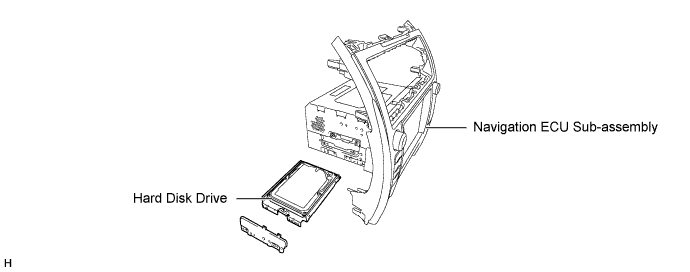
A Hard Disk Drive (HDD) is used for the navigation receiver assembly on models for U.S.A. and Canada. The HDD is available separately, enhancing serviceability. For details, refer to the Repair Manual.
-
The navigation system has a voice recognition system that uses natural speech technology to interpret a user's intent based on their natural speech pattern. The system recognizes natural speech patterns as voice recognition commands.
-
The language of the screen buttons, pop-up messages and voice guidance can be selected from among English, French and Spanish.
-
Hawaii has been added to the map coverage area, ensuring marketability.
-
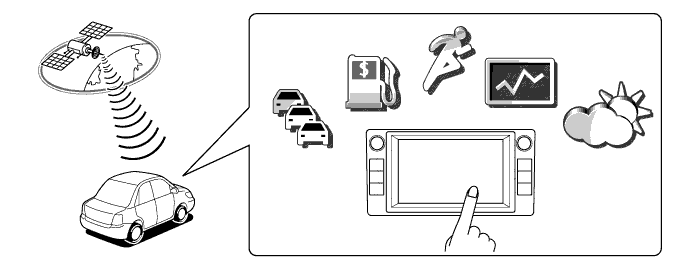
The navigation receiver assembly type (HDD navigation system) supports XM services that enable the navigation system to receive and use information from XM satellite radio.
Tech Tips
XM services are subscription-based XM Satellite Radio services that provide convenient features to subscribers.
-
A fuel consumption screen is provided in consideration of the environment.
-
On the HDD navigation system, the audio screen or vehicle information screen can be displayed on the right side of the map screen.
-
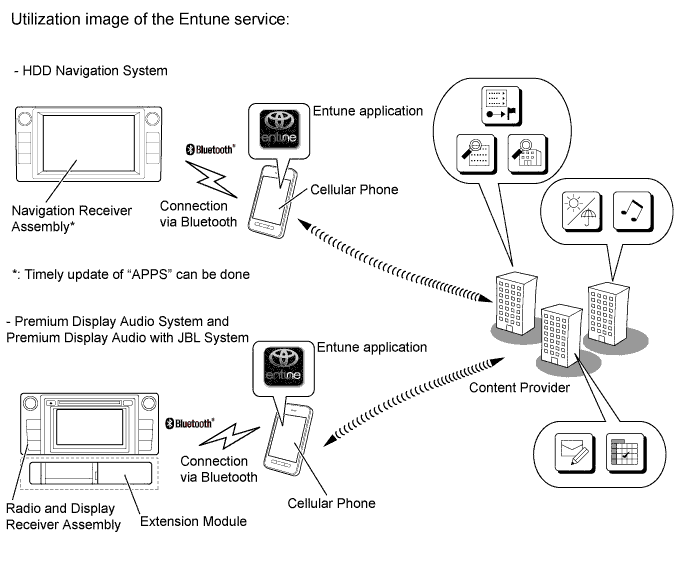
The Entune service is supported. This service makes it possible to operate specified applications on the navigation system by using Bluetooth to connect the navigation system to a cellular phone with the Toyota Entune application installed.
-
*1: Models with navigation receiver assembly
-
*2: Models with premium display audio system or premium display audio with JBL system
-
-
-
SPECIFICATION
Component System HDD Navigation System Premium Display Audio System and Premium Display Audio with JBL System
(Extension Module)
Multi-display 7.0-inch wide LCD 6.1-inch wide LCD Navigation Computer Fujitsu Ten Harman Becker Hard Disk Drive DENSO - Gyro Sensor Piezoelectric Ceramic Element Map Data Media HDD (Capacity 80 GB) Flash Memory (Capacity 8 GB) Language Supported Voice Guidance English, French and Spanish English and Spanish*1
English and French*2
Voice Recognition -
*1: Models for U.S.A.
-
*2: Models for Canada
-
-
MAIN FEATURES
-
XM Services
-
XM services receive information from XM satellite radio and show it on the multi-display. Additionally, the navigation function, which utilizes real-time information, is available.
-
The following XM Services are available:
Service Function XM NavTraffic Displays traffic congestion information using icons, arrows and indicators on the navigation map in accordance with the traffic information received via XM satellite radio. XM NavWeather* -
Displays weather information received via XM satellite radio.
-
Gives weather warnings issued within an approx. 25 km (15.5 mile) radius of the vehicle location through voice and graphics.
-
Displays weather forecasts for 3 days when a city icon on the map is pressed or when the city name is selected from the list on the screen.
XM Stocks* -
Displays stock price information received via XM satellite radio.
-
Displays up to 10 user-registered stock symbols and their price information.
XM Sports* -
Displays sports related news received via XM satellite radio.
-
Allows the user to register up to 5 teams.
XM Fuel Prices* -
Displays gas station information (location and fuel price) received via XM satellite radio.
-
Received information is displayed in a list and the icons can be displayed on the map screen.
-
Allows the user to select the kind and brand of fuel to be displayed.
-
*: Except models for Canada
Tech Tips
-
XM NavTraffic, XM NavWeather and XM TravelLink require separate XM subscription(s).
-
XM Sports, XM Stocks and XM Fuel Prices are available with an XM TravelLink subscription.
-
XM Sports and XM Stocks are included with an XM Satellite Radio subscription.
-
-
-
Entune
-
The Entune service makes it possible to operate specified applications on the multi-display by using Bluetooth to connect the navigation system to a cellular phone with the Toyota Entune application installed.
-
The Entune service enables communication between the navigation system, application server and content provider utilizing the Entune application installed on a cellular phone.
-
The following applications ("Apps") are available for the Entune service: Local business search*1, *2, internet radio*1, *2, Restaurant reservation service*2, Movie ticket purchase*2, Fuel Price information*2, Sports information*2, Stock information*2, Local traffic information*1, *2, weather information*2, etc. However, since this supported application lineup is subject to change, visit http://www.toyota.com/Entune/ for details on the Entune service.
-
For the navigation receiver assembly (HDD navigation system), when the "Apps" soft button is selected and an update is available, the user will see a pop up notifying them that an update is available. They will have the option of accepting or canceling the update. For the details of the applications ("Apps") update on the extension module type navigation system, visit http://www.toyota.com/Entune/.
-
*1: Models with HDD navigation system
-
*2: Models with premium display audio system or premium display audio with JBL system
-
-
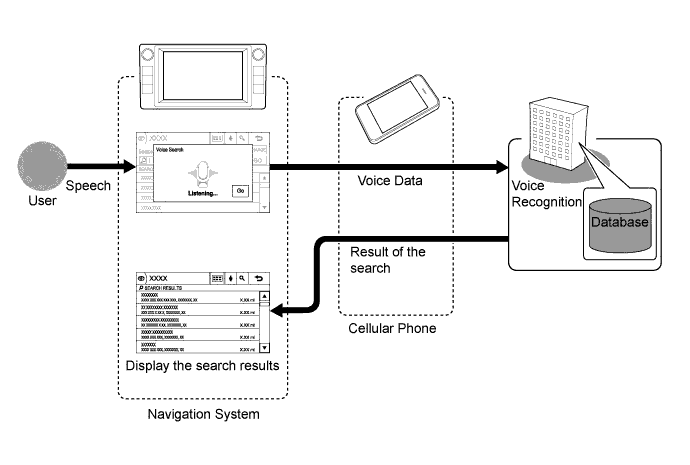
The Entune service search engine supports the center voice recognition system, enabling spoken words that are not included in the voice recognition database of the navigation system to be recognized. The center voice recognition system has a database within itself, thus more voice data can be recognized than usual.*
-
*: Models with HDD navigation system
-
-
-
Voice Recognition System
-
When the voice recognition system starts operating, the commands that the system is able to recognize are displayed on the multi-display.
-
A shortcut menu is provided on the voice recognition command screen, enabling the user to operate the system with fewer voice commands.
-
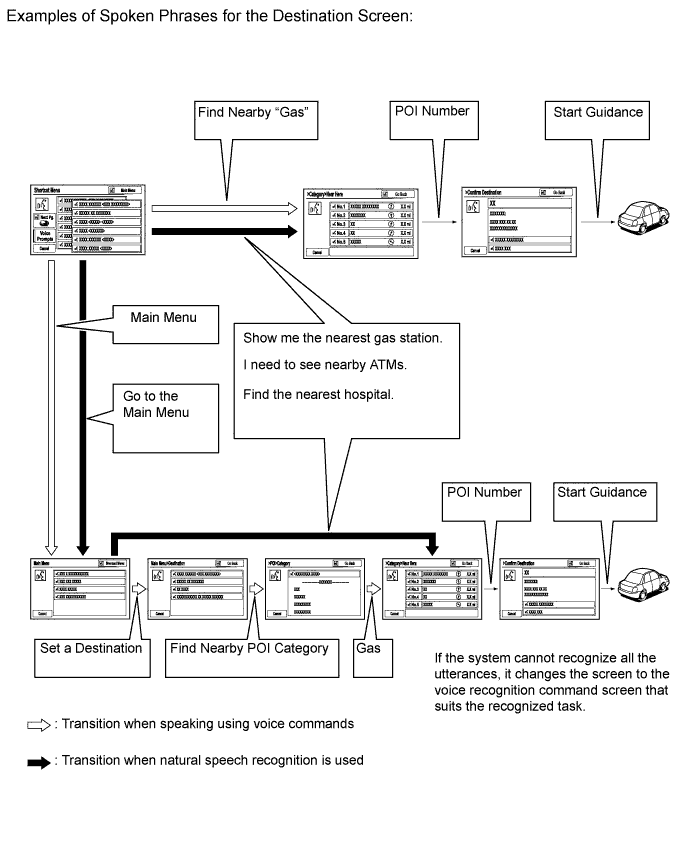
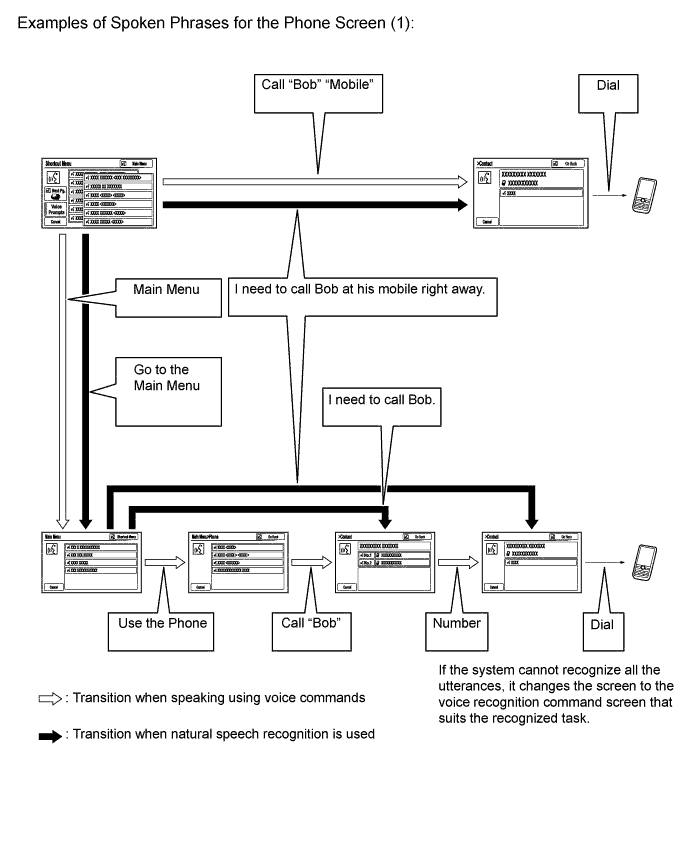
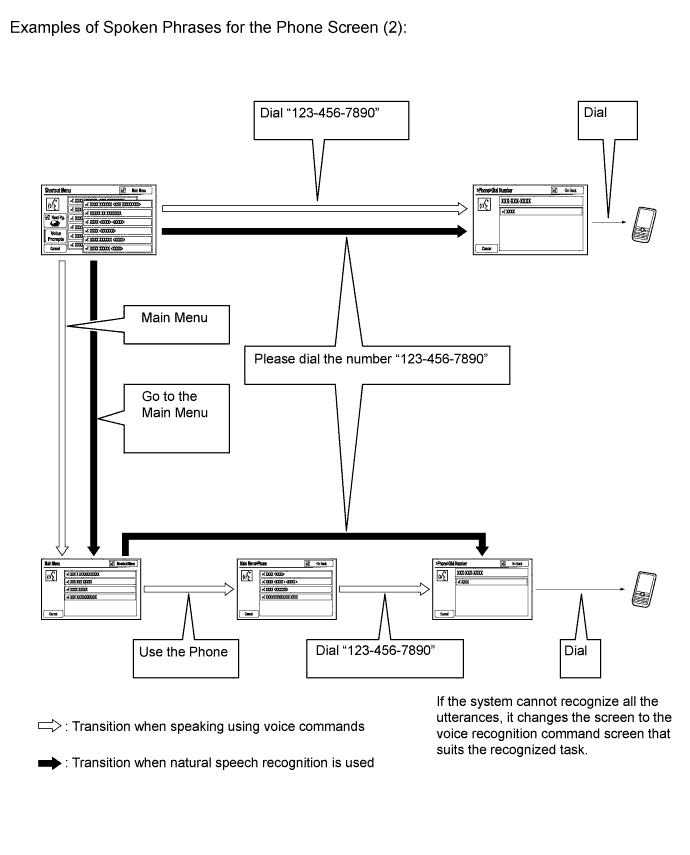
The natural speech technology* adopted for this voice recognition system can recognize a user's natural speech as voice recognition commands. ("natural speech" refers to naturally spoken utterances that include several keywords.)
-
Natural speech technology* enhances the usability because the user does not have to memorize voice recognition commands exactly.
-
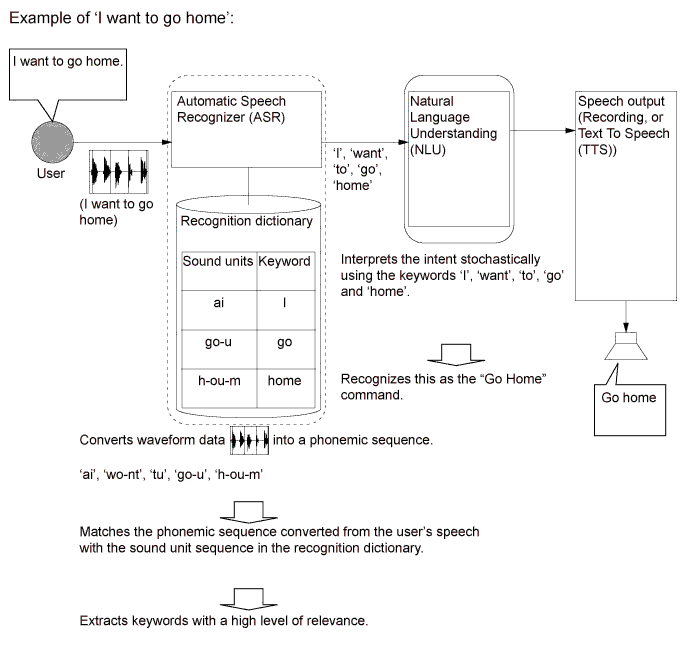
Natural speech technology* uses the system's Automatic Speech Recognizer (ASR) and Natural Language Understanding (NLU) to recognize voice recognition commands.
-
The ASR extracts keywords from a user's natural speech using a phonemic sequence (the units of sound that make up a phrase or sentence).
-
The NLU analyzes these extracted keywords based on their probable meaning, interpreting the intent of the user's utterances.
-
*: Natural speech technology does not apply to French or Spanish.
-
-
In order to interpret the intent of a user's speech, the NLU unit records key words in a data table.
-
The data table is organized by task, and the data is used to interpret the probable meaning of the user.
-
Even if the user does not say the indicated voice command ("Go Home"), speech with a similar meaning can be recognized (for example: "Lets go home" and "Take me home").
Tech Tips
The natural speech technology used by the voice recognition system does not function in the following cases.-
When the key words used are not in the data table.
-
When inputting address elements such as the city name in the address input screen.
-
When a phrase includes several intentions (Ex. "Go home... actually, no... I want to call Bob.")
-
When spoken instructions are for a level that cannot be recognized by the system. (Ex. When the user attempts to carry out a task from a different level while another task is still in progress, such as trying to make a phone call while the Destination screen is being displayed after giving the 'Destination' command.)
-
-
-
The main functions of the multi-display are listed below.
Function Outline Navigation System Through the use of the Global Positioning System (GPS) and map data which is stored on a flash memory*1 or HDD*2, the navigation system analyzes the position of the vehicle and indicates the position on the map that is displayed on the screen. In addition, it is possible to use the system to register memory points and navigate to a destination. Audio/Video System Serves as the display and controls for the following:
-
Radio operation
-
XM satellite radio operation
-
CD player operation*1
-
DVD player operation*2
-
Bluetooth-compatible portable player operation
-
USB memory operation (USB type)
-
Media transfer protocol (MTP) device operation (USB type)*1
-
iPod / iPhone operation
-
Portable audio player operation (AUX type)
Hands-free System When a Bluetooth-compatible cellular telephone is registered to the multi-display, the driver can make and receive calls or talk hands-free on the cellular telephone by operating the switches on the screen/steering pad. Speech Command System Operates the navigation, audio, and hands-free systems based on voice commands. Monitor System Displays a view of the area behind the vehicle that is captured by the television camera mounted on the luggage compartment door when the shift lever is moved to R. Others Maintenance Information*2 Can be used to inform the driver of the inspection or replacement timing for the following items based on the Global Positioning System (GPS) information and distance driven.
-
Engine oil: Replace engine oil
-
Oil filter: Replace engine oil filter
-
Rotation: Rotate tires
-
Tires: Replace tires
-
Battery: Replace auxiliary battery
-
Brake pad: Replace brake pads
-
Wipers: Replace wiper blades
-
Coolant: Replace engine coolant
-
Brake oil: Replace brake fluid
-
Trans. fluid: Replace ATF
-
Service: Scheduled maintenance
-
Air filter: Replace air filter
-
Personal: New information items can be created separately from the provided items
Calendar*1 Displays schedule information stored in a cellular phone on the multi-display. Language Select The language of the on-screen buttons, pop-up messages and the voice guidance can be changed.
-
English, French and Spanish are available.*2
-
English and Spanish are available. (Models for U.S.A.)*1
-
English and French are available. (Models for Canada)*1
Beep Setting The beep sound can be turned off. Picture Slide Show*1 Performs a slide show of picture data stored in a USB memory device. Screen Setting*2 -
This enables the opening or screen off images to be changed to one copied from a USB memory device.
-
This enables automatic return to the navigation screen from the audio screen.
Keyboard Layout The keyboard layout can be changed. Delete Personal Data The following personal data can be deleted or returned to their default settings:
-
Maintenance conditions*2
-
Maintenance information "off" setting*2
-
Address book
-
Areas to avoid*2
-
Previous points
-
Route guidance
-
Route trace*2
-
Phonebook data
-
Call history data
-
Speed dial data
-
Bluetooth phone data
-
Bluetooth device data
-
Phone sound settings
-
Phone display settings*2
-
Bluetooth setting
-
Message settings
-
Sound setting
-
Audio setting
-
Bluetooth audio setting
Screen Adjustment The brightness or contrast of the screen can be adjusted to suit the brightness of the surroundings. Diagnosis This menu contains the following items:
-
Failure Diagnosis
-
System Check
-
HDD Check*2
-
Diagnosis Recorder*2
-
Function Check / Setting
-
Panel & steering Switch
-
Touch Switch
-
Mic & Voice Recognition*2
-
Color Bar
-
GPS & Vehicle Sensors*2
-
Vehicle Signal
-
HF Voice Quality Setting*2
-
EXT BOX*1
-
Service Information
-
Program Update*2
-
Version Information
-
*1: Models with premium display audio system or premium display audio with JBL system
-
*2: Models with HDD navigation system
-
-