MULTI-TERRAIN MONITOR SYSTEM GENERAL
-
OUTLINE
-
In the multi-terrain select, the multi-terrain monitor system uses television camera assemblies located on the front grille, outer rear view mirror assembly and back door*1 or spare tire back door carrier*2 and displays images on the multi display*3 or accessory meter assembly*4 to allow the driver to see blind spots around the vehicle, thus assisting the driver's vision.
-
A switch to turn the multi-terrain monitor system on and off and to switch the screen display is located on the steering wheel.
-
The system consists of the television camera assemblies, multi display assembly*3, accessory meter assembly*4, steering pad switch and parking assist ECU.
-
*1: Models without back door spare tire carrier
-
*2: Models with back door spare tire carrier
-
*3: Models with navigation system
-
*4: Models without navigation system
-
-
-
PRECAUTION
-
In the following cases, it may become difficult to see items in the image on the screen, but this does not indicate a malfunction.
-
In the dark (for example, at night)
-
When the temperature near the lens is very high or low
-
When water droplets are present on the television camera, or when humidity is high (for example, when it rains)
-
When foreign matter (for example, mud or salt) is present on the television camera lens
-
When sunlight or headlights are shining directly into the television camera lens
-
-
If a bright light (for example, sunlight reflected off the vehicle body) is picked up by the television camera, the smear effect*, a phenomenon experienced by a CCD camera, may occur.
Tech Tips
*: A phenomenon that occurs when a bright light is received by the television camera and transmitted to the screen. The light source will appear to have a vertical streak above and below it.
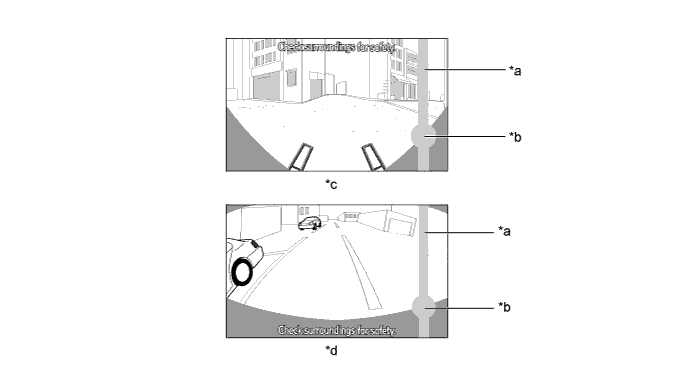
Text in Illustration *a Vertical Streak *b Bright Light *c Front View Mode *d Rear View Mode -
Initialization Function During Part Replacement
-
The initialization function must always be performed whenever one of the conditions indicated in the table below occurs.
Parts Name Condition Initialization Item Television Camera Assemblies -
Camera position shifting
-
Removal and reassembly
-
Replacement
-
Deformation due to the mount area having been struck
Camera position adjustment*
-
Roll angle, pan angle, tilt angle
Parking Assist ECU Replacement Camera position adjustment*
-
Roll angle, pan angle, tilt angle
-
*: Models with multi display assembly
-
-
The initialization function described above is performed on the service menu screen.
-
The method for displaying the service menu screen is the same as that for the multi display. For details, refer to the corresponding Repair Manual for this model.
-
-