METER / GAUGE SYSTEM DETAILS
-
OPERATING CONDITION
-
Eco Driving Indicator
-
Eco Driving Indicator starts to operate when all of the following conditions are met:
Condition Ignition switch (engine switch*) is ON. Engine is running. Shift lever is in D. Drive mode is normal. When the vehicle is at a speed of about 130 km/h (81 mph) or below. -
*: Models with entry and start system
-
-
Eco Driving Indicator stops operation when any of the the following conditions are met:
Condition Ignition switch (engine switch*) is off. Shift lever is in any position other than D. Drive mode is in any other mode except normal. When the vehicle is at a speed of about 130 km/h (81 mph) or over. -
*: Models with entry and start system
-
-
-
-
FUNCTION
-
Buzzer Function
-
The table below shows the warning and reminder functions of the multi buzzer in the combination meter assembly:
Item -
Reverse Warning*1
-
Light Reminder
-
Multi-information Display Warning Mode Indication
-
Front Seat Belt Warning
-
Rear Seat Belt Warning
-
Speed Warning*2
-
Fuel Sedimenter Warning*3
-
Key Reminder*4
-
Entry and Start System Warning*5
-
Parking Brake Unreleased Warning
-
Door Open Driving Warning
-
4WD System
-
Downshift Reject Warning*6
-
Engine Immobiliser System Warning
-
Cruise Control System*7
-
Sliding Roof Open Warning*8
-
VSC
-
Hill-start Assist Control
-
Temperature Increase of Hydraulic Brake Booster Assembly
-
*1: Models with automatic transmission or RA61F manual transmission
-
*2: Models for G.C.C. countries
-
*3: Models for Australia, G.C.C. countries and general countries with diesel engine
-
*4: Models without entry and start system
-
*5: Models with entry and start system
-
*6: Models with A750F automatic transmission
-
*7: Models with dynamic radar cruise control system
-
*8: Models with sliding roof system
-
-
-
Multi-information Display (Optitron Display Type Combination Meter Assembly)
-
The multi-information display can be switched by operating the multi-information switch located on the steering pad.
-
The multi-information display indicates as follows:
Display Outline Cruise Information In the cruise information display, 7 types of information can be displayed.
-
Steering Angle
-
Cruising Range
-
Average Fuel Consumption After Refueling
-
Current Fuel Consumption
-
Average Fuel Consumption and Eco Driving Indicator Zone Display*1
-
Average Vehicle Speed
-
Elapsed Time
Outside Temperature Displays the outside temperature. Multi-function Switch*2 The settings of the following systems can be changed:
-
TOYOTA Parking Assist-sensor System
-
Intelligent AFS
-
2nd Start System
Multi-terrain select can be entered.
Warning If necessary, the warning display and advisory display will interrupt the multi-information display immediately. Customization*2 The language, units, Eco Driving Indicator Light, lighting system, door lock system and power seat control system can be set up from this screen. The customization display is available only while the vehicle is stopped. If vehicle movement is detected during setup, the setup will be canceled automatically. Tech Tips
*1: Models with Eco Driving Indicator
*2: The items displayed differ by vehicle specification.
-
-
The multi-information display undergoes the following transition:
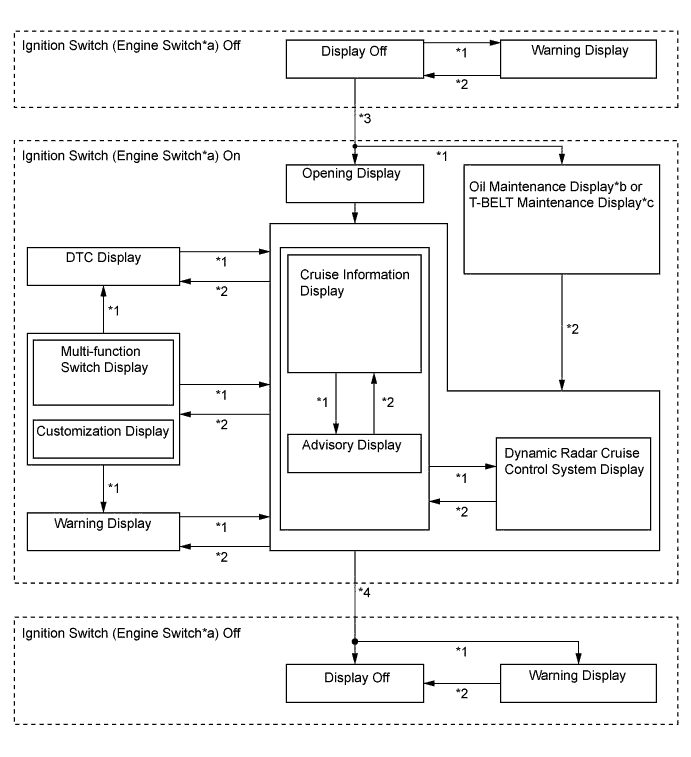
No. Condition *1 Conditions are met. *2 Conditions are not met. *3 Ignition switch (engine switch*a) is turned to ON. *4 Ignition switch (engine switch*a) is turned off. -
*a: Models with entry and start system
-
*b: Models for Europe with 1KD-FTV engine
-
*c: Models with 1KD-FTV engine
-
-
Cruise Information Display
The cruise information display can be switched by operating the ENTER switch of the multi-information switch upward or downward. The counter can be reset by pressing and holding either the ENTER switch of the multi-information switch or the RESET switch of the accessory meter assembly for 0.8 seconds or more.
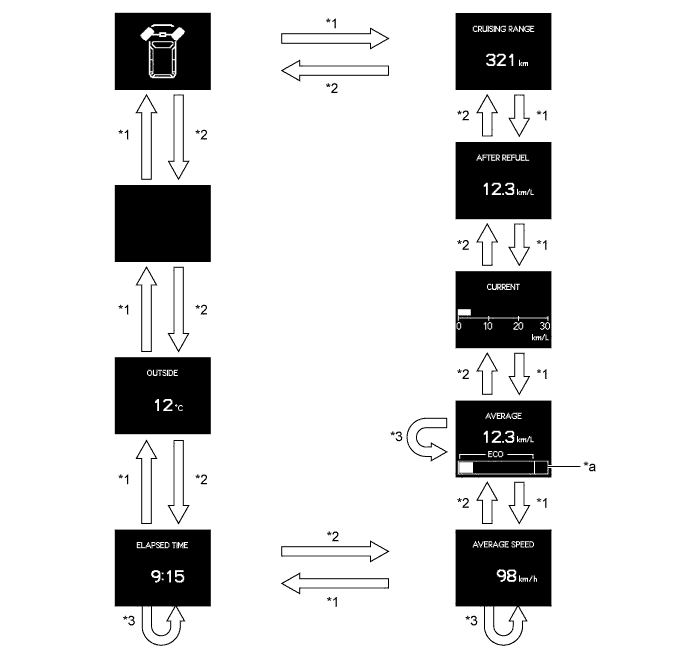
No. Condition *1 The ENTER switch is operated downward. *2 The ENTER switch is operated upward. *3 The ENTER switch or the RESET switch*b is pressed and held for 0.8 seconds or more to reset the counter. -
*a: Models with Eco Driving Indicator
-
*b: Models with accessory meter assembly
Display Outline Steering Angle 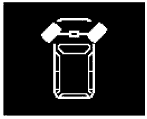
-
Calculates and displays the steering angle, which is based on signals from the steering angle sensor. The steering angle is displayed in 7 stages (1 for neutral and 3 each for left and right) in accordance with the operation of the steering wheel.
-
The steering angle display will also be displayed at the same time as the door open warning display or TOYOTA parking assist-sensor system display.
Cruising Range 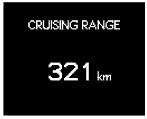
-
Displays the value that has been calculated by the meter ECU, which is based on the fuel consumption data that the meter ECU continuously monitors and stores in its memory, and the residual fuel volume data, provided that the ignition switch (engine switch*) is turned to ON.
-
The display updates every 10 seconds.
Average Fuel Consumption After Refueling 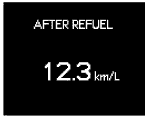
-
Displays the value that has been calculated by the meter ECU, which is based on the driven distance and the fuel consumption volume (fuel injection amount signal from ECM via CAN) after refueling.
-
The display updates every 10 seconds.
Current Fuel Consumption 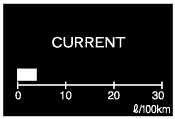
-
Displays the value that has been calculated by the meter ECU, which is based on the driven distance and the fuel consumption volume (fuel injection amount signal from ECM via CAN), provided that the ignition switch (engine switch*) is turned to ON.
-
The display updates every 10 seconds.
Average Fuel Consumption 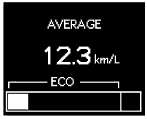
-
Displays the value that has been calculated by the meter ECU, which is based on the driven distance and the fuel consumption volume (fuel injection amount signal from ECM via CAN).
-
The display updates every 10 seconds.
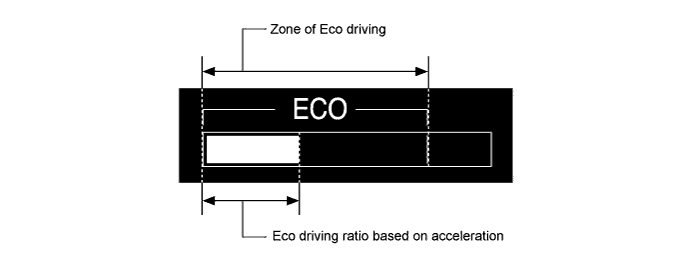
Eco Driving Indicator Zone Display* Eco driving ratio based on acceleration is shown with a bar graph. Average Vehicle Speed 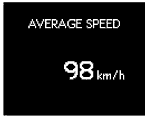
-
Displays the value that has been calculated by the meter ECU, which is based on the elapsed time and driven distance after the ignition switch (engine switch*) is turned to ON or since the counter was reset.
-
The display updates every 10 seconds.
Elapsed Time 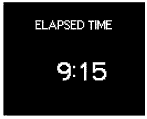
Displays the time that has elapsed since the ignition switch (engine switch*) has been turned to ON or since the counter was reset. Outside Temperature 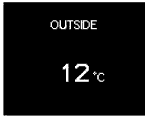
-
Displays the outside temperature.
-
The display updates every second.
-
*: Models with Eco Driving Indicator
-
-
Multi-function Switch Display
-
The multi-function switch display can be switched to by pressing the menu switch quickly (for less than 1.7 seconds).
-
The selection screen for each system can be switched to by operating the ENTER switch upward or downward.
-
By pressing the ENTER switch while a selection screen is being displayed, each system can be turned on or off, and the multi-terrain select can be entered.
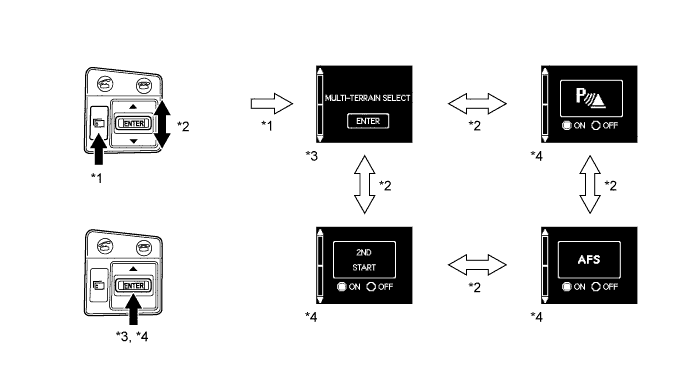
No. Outline *1 The menu switch is pressed quickly (for less than 1.7 seconds) to enter the multi-function switch display. *2 Each system is switched by operating the ENTER switch upward or downward. *3 The ENTER switch is pressed to enter the Multi-terrain Select. *4 The system is turned on or off each time the ENTER switch is pressed. -
-
Warning Display
-
The warning display and the advisory display interrupt the display in the multi-information display if the display conditions are met.
Priority Display Master Warning Light Multi Buzzer 1 BRAKE! - - 2 Warning for Collision with Vehicle Ahead - - CRAWL HAS BEEN DEACTIVATED Illuminates Sounds 3 Door Open (While Driving) Blinks Sounds Door Open - - TOYOTA Parking Assist-sensor Warning - - Glass Hatch Open (While Driving) Blinks Sounds Glass Hatch Open - - 4 AUTO POWER OFF TO CONSERVE BATTERY - - 5 SHIFT TO P POSITION WHEN ALIGHTING Blinks Sounds 6 RELEASE PARKING BRAKE Blinks - KEY NOT DETECTED Blinks Sounds 7 CLEAN RADAR SENSOR Illuminates Sounds CRUISE CONTROL NOT AVAILABLE Illuminates Sounds 8 CHECK CLUTCH SWITCH Illuminates Sounds CHECK CRUISE CONTROL SYSTEM Illuminates Sounds CHECK PCS SYSTEM Illuminates Sounds CHECK STEERING LOCK SYSTEM Illuminates Sounds ENGINE OIL PRESSURE LOW Illuminates Sounds HIGH AUTOMATIC TRANSMISSION FLUID TEMP. STOP THE VEHICLE IN A SAFE PLACE Illuminates Sounds CHECK TRANSMISSION SYSTEM Illuminates Sounds CHECK AIR SUSPENSION SYSTEM Illuminates Sounds Fuel Filter Maintenance Reqd Illuminates Sounds Check Fuel System Illuminates Sounds 9 TURN POWER OFF Blinks Sounds SHIFT TO P POSITION AND PUSH ENGINE SWITCH TO TURN POWER OFF Blinks Sounds KEY DETECTED IN VEHICLE Blinks Sounds MOONROOF OPEN Blinks Sounds DEPRESS BRAKE PEDAL, TOUCH ENGINE SWITCH WITH KEY Blinks Sounds DEPRESS CLUTCH PEDAL, TOUCH ENGINE SWITCH WITH KEY Blinks Sounds DEPRESS BRAKE PEDAL AND PUSH ENGINE SWITCH TO START Blinks Sounds DEPRESS CLUTCH PEDAL AND PUSH ENGINE SWITCH TO START Blinks Sounds SHIFT TO P POSITION TO START Blinks Sounds 10 STEERING LOCK ACTIVE Blinks Sounds CRAWL NOT AVAILABLE SELECT L4 AND SHIFT TO D or R POSITION - - CRAWL NOT AVAILABLE CHECK SYSTEM OPERATION CONDITIONS - - 11 KEY BATTERY LOW Illuminates Sounds DRAIN WATER FROM FUEL FILTER Illuminates Sounds ENGINE OIL LOW Illuminates Sounds CHECK SONAR SYSTEM Illuminates Sounds CLEAN SONAR Illuminates Sounds DPF FULL ENGINE SERVICE REQUIRED Illuminates Sounds 12 TRC OFF - - CRAWL IS ACTIVATED SPEED HI-MED-LO - - OIL MAINTENANCE REQUIRED SOON - - OIL MAINTENANCE REQUIRED - - RESETING OF OIL MAINTENANCE DATA COMPLETE - - RESETING OF OIL MAINTENANCE DATA INCOMPLETE - - T-BELT MAINTENANCE REQUIRED - - RESETING OF T-BELT MAINTENANCE DATA NOW POSSIBLE - - RESETING OF T-BELT MAINTENANCE DATA COMPLETE - - PCS NOT AVAILABLE TEMPORARILY - - MULTI-TERRAIN SELECT NOT AVAILABLE - - OPERATION NOT POSSIBLE WHEN MULTI-TERRAIN SELECT ACTIVATED - - MULTI-TERRAIN SELECT HAS BEEN CANCELLED - Sounds DPF FULL SEE MANUAL - - DPF MANUAL REGENERATION IN PROCESS - -
Tech Tips
The items displayed differ by vehicle specification.
-
-
Customization Display
-
The customization display can be switched to by pressing and holding the menu switch (for 1.7 seconds or more).
-
The customization item can be switched by operating the ENTER switch upward or downward.
-
The setting display can be switched to by pressing the ENTER switch while a customization item is being displayed.
-
Settings can be changed by operating the ENTER switch upward or downward while the setting display is being shown.
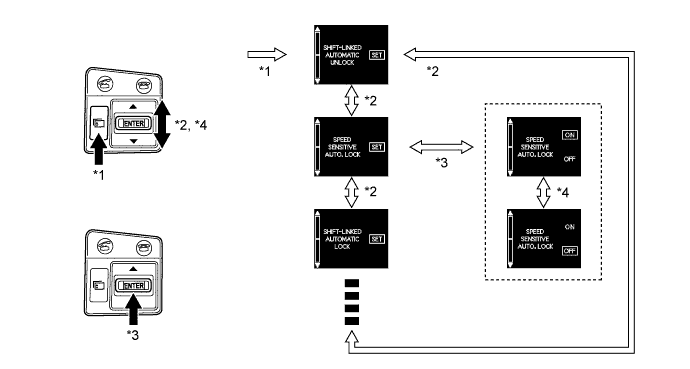
No. Outline *1 The menu switch is pressed and held (for 1.7 seconds or more) to enter the customization display. *2 The ENTER switch is operated upward or downward to switch the customization item. *3 The ENTER switch is pressed to switch the customization item and setting display. *4 The ENTER switch is operated upward or downward to change the setting.
-
The items and available settings are as follows:
Item Available Setting SHIFT-LINKED AUTOMATIC UNLOCK -
On
-
Off
SPEED SENSITIVE AUTO. LOCK -
On
-
Off
SHIFT-LINKED AUTOMATIC LOCK -
On
-
Off
DRIVER DOOR-LINKED UNLOCK -
On
-
Off
LOCK/UNLOCK ANSWER BACK RESPONSE -
On
-
Off
AUTO. RELOCK TIME ADJUSTMENT -
120 sec.
-
60 sec.
-
30 sec.
-
Off
REMOTE 2-PRESS UNLOCK -
On
-
Off
ENTRY AND START SYSTEM -
On
-
Off
SELECT DOORS TO UNLOCK -
Driver
-
All
LOCK FEEDBACK VOLUME -
Level 7
-
Level 6
-
Level 5
-
Level 4
-
Level 3
-
Level 2
-
Level 1
-
Off
HEADLIGHT OFF TIME ADJUSTMENT -
90 sec.
-
60 sec.
-
30 sec.
-
Off
LIGHT SENSOR SENSITIVITY -
+2
-
+1
-
Normal
-
-1
-
-2
DAYTIME RUNNING LIGHTS -
On
-
Off
INTERIOR LIGHTS OFF TIME ADJUSTMENT -
30 sec.
-
15 sec.
-
7.5 sec.
-
Off
EXT. LIGHTS OFF TIME ADJUSTMENT -
30 sec.
-
15 sec.
-
7.5 sec.
-
Off
DRIVER'S SEAT EASY EXIT -
Full
-
Partial
-
Off
DISPLAY UNIT CHANGE -
Km (km/h)
-
Km (l/100km)
-
Miles
DISPLAY LANGUAGE CHANGE -
Russian
-
Chinese
-
Italian
-
Spanish
-
German
-
French
-
English
ECO INDICATOR DISPLAY -
On
-
Off
-
Tech Tips
The items displayed differ by vehicle specification.
-
-
-
Multi-information Display (Analog Display Type Combination Meter Assembly)
-
The multi-information display can be switched by operating the ODO/TRIP switch located on the combination meter cluster.
-
The multi-information display indicates as follows:
Display Outline Odo/Trip ODO, TRIP A and TRIP B can be selected. Cruise Information*1 In the cruise information display, 5 types of information can be displayed.
-
Cruising Range
-
Current Fuel Consumption
-
Average Fuel Consumption and Eco Driving Indicator Zone Display*2
-
Average Vehicle Speed
Customization*2 Eco Driving Indicator Light can be turned activated/deactivated. -
*1: Except models with 5L-E engine
-
*2: Models with Eco Driving Indicator
-
-
The multi-information display undergoes the following transition in accordance with the operation of the ODO/TRIP switch or the RESET switch of the accessory meter assembly:
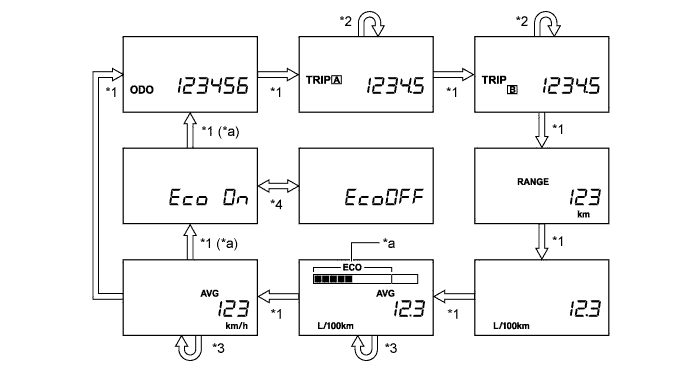
No. Condition *1 The ODO/TRIP switch is pressed quickly (for less than 0.8 seconds). *2 The ODO/TRIP switch is pressed and held (for 0.8 seconds or more) to reset. *3 The ODO/TRIP switch or the RESET switch is pressed and held (for 0.8 seconds or more) to reset. *4 The ODO/TRIP switch is pressed and held (for 0.8 seconds or more). -
*a: Models with Eco Driving Indicator
-
-
-
Eco Driving Indicator
-
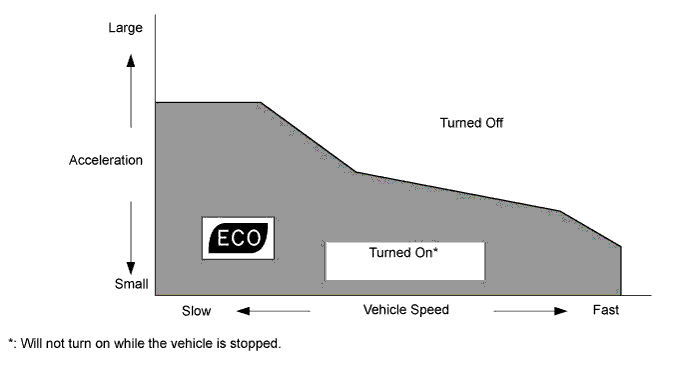
The operating diagram of Eco Driving Indicator is as follows:
-
When the ECM, using information (such as vehicle speed, accelerator pedal operation, shift lever position, engine speed signal (engine RPM data), shift range, drive mode, and so on), calculates that the vehicle is driven in Eco-frendly, it turns on Eco Driving Indicator Light and shows the bar graph of Eco Driving Indicator Zone Display within Zone of Eco driving.
-
When the ECM calculates that the acceleration exceeds Zone of Eco driving, it turns off Eco Driving Indicator Light and blinks the right side of Eco Driving Indicator Zone Display.
-
The operation of Eco Driving Indicator is as follows:
Vehicle Condition Eco Driving Indicator Zone Display Eco Driving Indicator Light Analog Display Type Combination Meter Assembly Optitron Display Type Combination Meter Assembly Stopped 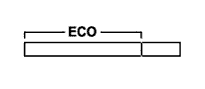

Turns off Eco Driving 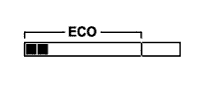
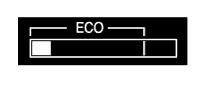
Turns on Non-Eco Driving 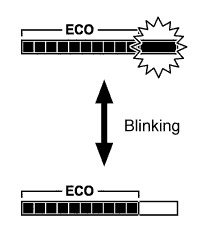
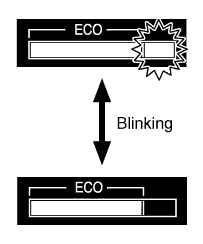
Turns off -
Eco Driving Indicator Light can be deactivated off in the following ways: Eco Driving Indicator Light can be deactivated from Eco Driving Indicator Light customization display of the multi-information display.
-
-
Front Seat Belt Warning Function
-
When the ignition switch (engine switch*) is ON, this system detects the condition of the seat belts based on the signals from the driver and front passenger seat belt buckle switches and the occupant detection sensor.
-
On models except models for G.C.C. countries, the multi buzzer sounds when the vehicle speed exceeds 20 km/h (12.4 mph) to emphasize the fact that the seat belt is unbuckled. After 30 seconds, the sound changes for emphasis. The sound continues for 90 seconds. Once a multi buzzer begins to sound, it will continue until the seat belt is buckled or the ignition switch (engine switch*) is turned off.
-
*: Models with entry and start system
-
-
On the models for G.C.C. countries, when the seat belt is unbuckled, the multi buzzer sounds 5 times 1.8 seconds after the ignition switch (engine switch*) is turned to ON. The multi buzzer sounds when the vehicle speed exceeds 20 km/h (12.4 mph) to emphasize the fact that the seat belt is unbuckled. After 9.6 seconds, the sound changes for emphasis. The sound continues for 20 seconds. Once a multi buzzer begins to sound, it will continue until the seat belt is buckled or the ignition switch (engine switch*) is turned off.
-
*: Models with entry and start system
Tech Tips
Upon receiving a request from a user who cannot wear a seat belt for a special reason, the multi buzzer warning can be canceled using the intelligent tester II. For details, refer to the corresponding Repair Manual for this model.
-
-
Occupant Detection Sensor
-
The occupant detection sensor, which is enclosed in the seat cushion of the front passenger seat, is used to detect whether or not the front passenger seat is occupied.
-
This sensor consists of a construction in which 2 electrode sheets sandwich a spacer. When the occupant is seated, the electrode sheets come in contact with each other through the hole provided in the spacer portion, thus enabling the current to flow.
-
Thus, the sensor detects whether or not an occupant is seated in the front passenger seat.
-
-
-
-
CONSTRUCTION
-
Accessory Meter Assembly
-
An accessory meter assembly which can display cruise information is used. The accessory meter assembly can also be used in the monitor system, wide-view front and side monitor system or multi-terrain monitor system.
-
The display language will be the same as that set for the combination meter assembly.
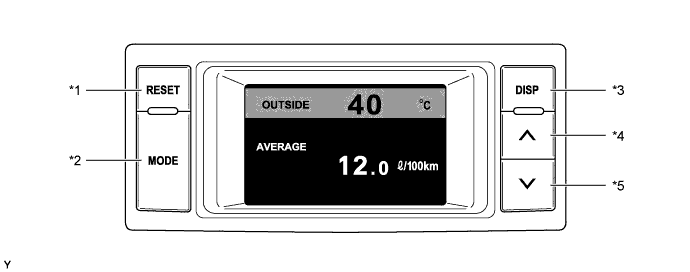
Text in Illustration *1 RESET Switch *2 MODE Switch *3 DISP Switch *4 Up Switch *5 Down Switch - - -
The accessory meter assembly has following functions:
Function Outline Outside Temperature Display Displays the outside temperature. Cruise Information Display In the cruise information display, 5 types of information can be displayed.
-
Cruising Range
-
Average Fuel Consumption After Refueling and Current Fuel Consumption
-
Average Fuel Consumption
-
Average Vehicle Speed
-
Elapsed Time
Screen Adjustment Display The following adjustments can be made:
-
Contrast Adjustment
-
Brightness Adjustment
-
Switching Day Mode On/Off
Monitor System Display The image of each system is displayed. Wide View Front and Side Monitor System Display Multi-terrain Monitor System Display -
-
The display of the accessory meter assembly undergoes the following transition:
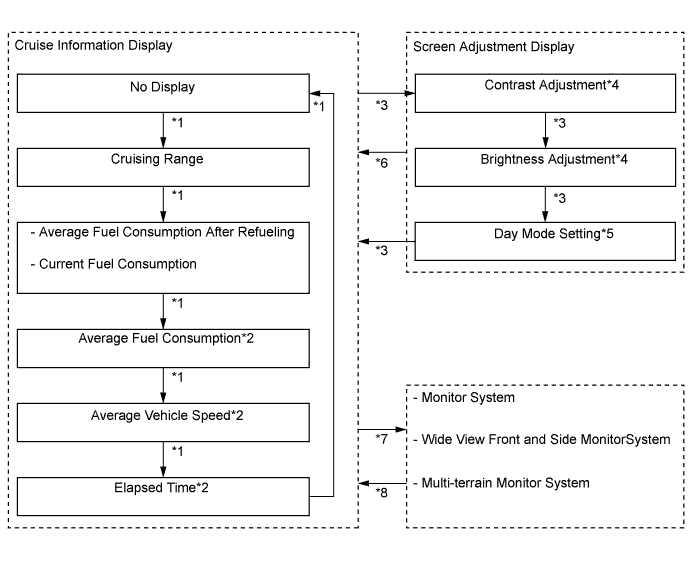
Text in Illustration *1 MODE switch is pressed *2 RESET switch is pressed and held (for 0.8 seconds or more) to reset the counter *3 DISP switch is pressed *4 Adjustment in 11 stages is possible by operating the up/down switch *5 On/off can be set by operating the up/down switch *6 No operation is performed for 10 seconds *7 Each system starts operating *8 Each system finishes operating
-
-
-
FAIL-SAFE
-
Eco Driving Indicator
-
When any of the following conditions are met, Eco Driving Indicator Light is turned off and Eco Driving Indicator Zone Display is stopped:
-
The engine failure signal is detected
-
The failure of CAN Communications
-
-
-