METER / GAUGE SYSTEM DETAILS
-
OPERATING CONDITION
-
Eco Driving Indicator Light Operation
-
Eco Driving Indicator Light can operate when all of the following conditions are met:
-
The engine switch is on (IG) and the engine is running.
-
The vehicle is being driven with the shift lever in D.
-
SPORT mode is not selected.
-
The vehicle is at a speed of about 130 km/h (81 mph) or below.
-
-
The following table shows the operation of the Eco driving indicator light and Eco driving indicator zone display in different driving conditions:
Driving Condition Eco Driving Indicator Light Eco Driving Indicator Zone Display While Stopped Turns off 
While Eco Driving Turns on 
While Non-Eco Driving Turns off 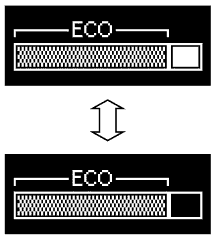
When any of the following conditions is met, operation is stopped.
-
The shift lever is not in D.
-
SPORT mode is selected.
-
The vehicle is at a speed of about 130 km/h (81 mph) or higher.
Turns off 
-
-
-
-
FUNCTION
-
Combination Meter Assembly
-
Buzzer Function
-
The table below shows the warning and reminder functions of the buzzer in the combination meter assembly.
1 Driver Side Seat Belt Warning (Maximum 5 Times)*1 2 Driver Side Seat Belt Warning (Once) 3 Passenger Side Seat Belt Warning (Once) 4 Front Seat Belt Warning (Level 2) 5 Rear Seat Belt Warning*2 6 Front Seat Belt Warning (Level 1) 7 EPS Warning 8 Smart Entry and Start System Warning (Continuous) 9 Smart Entry and Start System Warning 1 (Intermittent) 10 Smart Entry and Start System Warning 2 (Intermittent, maximum 9 times) 11 Smart Entry and Start System Warning (Once) 12 Multi-information Display Warning 13 Dynamic Radar Cruise Control Warning*3 14 Immobiliser Certification Reminder 15 Speed Limit Exceed Warning*1 16 Parking Brake Engaged Warning 17 Door Open while Driving Warning 18 S Mode Operation Reject Warning 19 Headlight Reminder 20 Turn Signal/Hazard Warning Operation *1: Models for G.C.C. countries
*2: Models for Australia
*3: Models with dynamic radar cruise control system
-
-
-
Multi-information Display
-
Display Function Flow
-
The multi-information display flow can be switched as shown in the flow chart below:
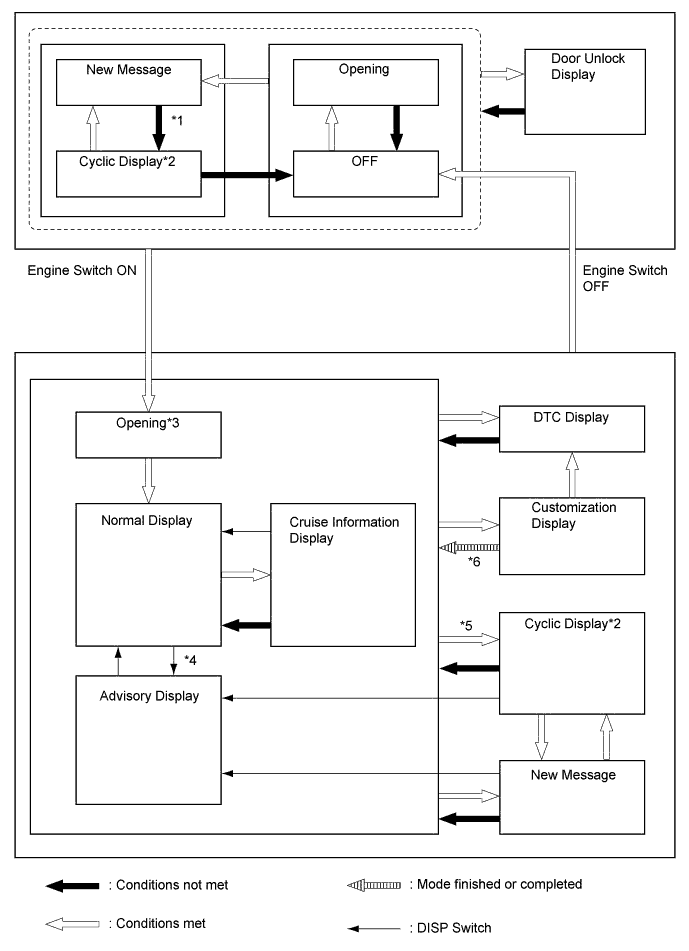
No. Transition Condition *1 Conditions are not met and all new messages have been displayed. *2 If the display conditions for 2 or more messages are met, relevant messages are alternately displayed for 2 seconds each. *3 If the engine switch is turned off during the "Opening" display, the "Opening" display will be shown from the beginning. *4 If the DISP switch is used to change from an advisory message to the cruise information display screen, repeatedly operating the DISP switch will cycle through the cruise information screens and then return the advisory message if the display conditions are still met. *5 If the DISP switch is not operated for more than 6 seconds with any of the caution or warning message display conditions still met, the relevant caution or warning messages are displayed. *6 Conditions for displaying new messages are met, or the vehicle speed is more than 8 km/h (5 mph).
-
-
Maintenance Required Reminder Function (Models for Australia)
-
A maintenance required reminder message will appear to inform the driver of maintenance requirements.
-
The combination meter assembly calculates the vehicle driving distance based on the signals from the skid control ECU.
-
There are 2 types of warnings: one is displayed when the vehicle driving distance is 14500 km/h or more since the last time the system was reset, and the other is displayed when the driving distance is 15000 km/h or more.
-
The maintenance required reminder message appears on the multi-information display as follows:
14500 km/h or more 15000 km/h or more MAINTENANCE REQUIRED SOON appears for approximately 15 seconds MAINTENANCE REQUIRED warning remains on -
After the required maintenance has been performed, the accumulated vehicle driving distance memorized in the combination meter assembly should be reset to zero using the ODO/TRIP switch.
Tech Tips
The accumulated vehicle driving distance memorized in the combination meter assembly can be reset using the following procedure.
-
Turn the engine switch on (IG), and make sure that the TRIP A is displayed on the multi-information display.
-
Turn the engine switch off. While pushing the ODO/TRIP switch, turn the engine switch on (IG).
-
With the engine switch on (IG), keep holding the ODO/TRIP switch (for at least 5 seconds) with the multi-information display counting down. Release the ODO/TRIP switch when the resetting procedure has completed.
-
As the resetting completes, the multi-information display will show complete message for 1 second or the odometer will display "000000" for 1 second.
-
-
-
Rear Seat Belt Warning (Models for Australia)
-
The rear seatbelt warning function indicates the state of the rear seat belts using the telltale light assembly.
-
The combination meter assembly sends a rear seat belt warning signal to the telltale light assembly based on the rear seat belt buckle switches and courtesy switches for the rear doors. When the signal is received, the telltale light assembly operates the lights. If a warning is necessary, the buzzer in the combination meter assembly will also sound.
-
The flow of operations that results in a rear seat belt warning is as follows:
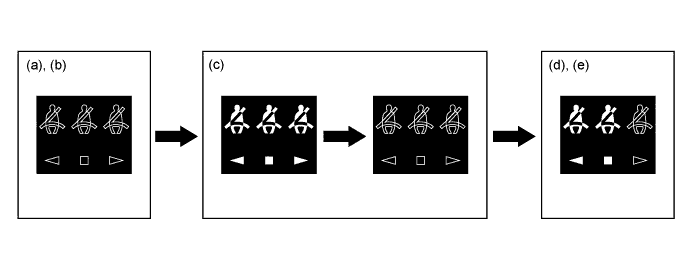
Step Condition Transition Multi-information Display Buzzer (a) The engine switch is off. Warning is not displayed. No Sound (b) A rear door is opened then closed. (c)
-
The engine switch is turned on (IG).
-
A seat belt is fastened.
-
In this case, all seats will be displayed as being unfastened regardless of the number of occupants. If seat belts are then fastened, the display for the relevant seat will go off.
-
The warning will be displayed for approximately 34 seconds and then go off.
(d) Any of the rear seat belts are unfastened.
-
Seats with an unfastened seat belt will be displayed regardless of the number of occupants.
If the vehicle speed exceeds 20 km/h (12 mph):
-
Sounds for 30 seconds*1
-
Sounds for an additional 90 seconds*2
(e)
-
When one of the following conditions is met, the buzzer will stop sounding.
-
The seat belt is refastened.
-
Vehicle speed is lower than approximately 2 km/h (1.2 mph) and either the parking brake is applied or the shift lever is in P.
-
Seats with an unfastened seat belt will be displayed regardless of the number of occupants.
-
The warning message will be displayed for approximately 34 seconds and then go off.
Stops sounding -
-
*1: Sound cycle is 1.2 seconds
-
*2: Sound cycle is 0.4 seconds
-
-
Cruise Information Mode Function
-
The cruise information is displayed in the following order each time the DISP switch of the steering pad switch assembly is pressed.
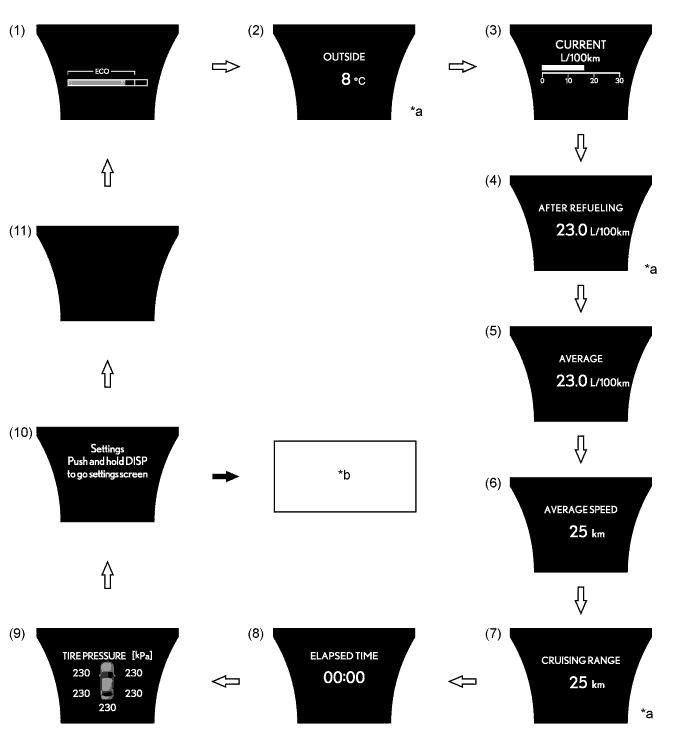
Text in Illustration *a The item that is always displayed does not appear when the cruise information item is switched as shown above. *b The item selection screen is displayed. 
DISP switch pressed briefly. 
DISP switch pressed and held.
-
The cruise information mode items displayed are as follows:
No. Information Outline (1) Eco Driving Indicator Zone Display
-
Displays Eco driving state by the movement of the bar on Eco driving indicator zone display after the comparison of Eco driving range with the current acceleration.
-
Displays a value that has been calculated by the ECM. When the engine switch is turned on (IG), the ECM calculates the Eco driving ratio based on the vehicle speed, accelerator pedal operation, shift position, engine speed, shift range and driving mode signals.
-
This display is updated every 0.2 seconds.
(2) Ambient Temperature Displays the ambient temperature. (3) Current Fuel Consumption
-
Displays a value that has been calculated by the combination meter assembly. When the engine switch is turned on (IG), the combination meter assembly calculates this value based on the distance driven and the fuel consumption volume (fuel injection signal from the No. 1 injector).
-
This display is updated every 0.5 seconds.
(4) Average Fuel Consumption After Refueling
-
Displays the value calculated by the combination meter assembly based on the distance driven since refueling and the fuel consumption volume (fuel injection signals from the No. 1 injector).
-
The combination meter assembly determines the vehicle has been refueled through the signal from the fuel sender gauge.
-
This display is updated every 10 seconds.
(5) Average Fuel Consumption
-
Displays a value that has been calculated by the combination meter assembly based on the distance driven and the fuel consumption volume (fuel injection signal from the ECM).
-
This display is updated every 10 seconds.
(6) Average Speed
-
Displays the average vehicle speed calculated by the combination meter assembly based on the engine start signal and vehicle speed signal.
-
This display is updated every 10 seconds.
(7) Cruising Range
-
Displays a value that has been calculated by the combination meter assembly. When the engine switch is turned on (IG), the combination meter assembly calculates the range based on continuously monitoring and storing information on fuel consumption data, and the residual fuel volume.
-
This display is updated every 10 seconds.
(8) Elapsed Time Displays the length of time since the engine was started. (9) Tire Inflation Pressure Displays the tire inflation pressure. (10) Settings Customizes the combination meter assembly language display, Eco Driving Indicator Light and instantaneous fuel consumption gauge deactivated or activated display states. (11) Blank Screen - -
-
Customization Function
-
In the settings screen of cruise information mode, pressing and holding the DISP switch enters setting mode.
-
Press the DISP switch briefly to select the item to be customized. Press and hold the DISP switch to confirm the selection.
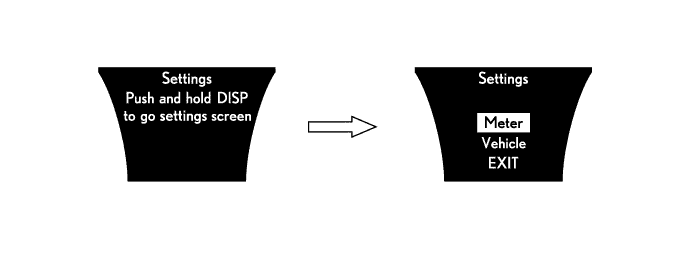
Text in Illustration DISP switch pressed and held. - -
-
In settings mode, the following items of the combination meter assembly can be customized.
Item Available Setting Meter Language
-
English
-
French
-
Spanish
-
Chinese
-
Russian
Units
-
Km (km/L)
-
Km (L/100km)
Eco Lamp (Meter Panel Illumination / Eco Driving Indicator Light
-
On (Always) / On
-
On (Always) / Off
-
On (Self-lighting) / Off
-
Off / On
-
Off / Off
Drive Monitor
-
Fuel consumption
-
Cruising range
-
Outside
Lamp brightness
-
Bright
-
Standard
Sport Lamp
-
On
-
Off
Door* Auto Unlock by Shift to P
-
On
-
Off
Auto Lock by Speed
-
On
-
Off
Auto Lock by Shift from P
-
On
-
Off
Auto Unlock by Driver Door
-
On
-
Off
Lock/Unlock Feedback-Lights
-
On
-
Off
Auto Relock Timer
-
120 sec.
-
60 sec.
-
30 sec.
-
Off
Remote 2-Press Unlock
-
On
-
Off
Smart Entry and Start System* Access System with Elec. Key
-
On
-
Off
Select Doors to Unlock
-
Driver's Door
-
All Doors
Lock/Unlock Feedback-Tone
-
Level 7 (Maximum)
-
Level 6
-
Level 5
-
Level 4
-
Level 3
-
Level 2
-
Level 1 (Minimum)
-
Off
Lighting* Headlamps-On Sensitivity
-
Level 5
-
Level 4
-
Level 3
-
Level 2
-
Level 1
Daytime Running Lights
-
On
-
Off
Interior Lights Off Timer
-
30 sec.
-
15 sec.
-
7.5 sec.
-
Off
Exterior Lights Off Timer
-
30 sec.
-
15 sec.
-
7.5 sec.
-
Off
Seat* Driver's Seat Easy Exit
-
Full
-
Partial
-
Off
*: On models with the 8-speaker sound system, customization can be performed on the combination meter assembly. On models with the HDD navigation system, if a communication between multi-media module receiver assembly and the combination meter assembly is disrupted, customization can be performed on the combination meter assembly.
-
-
Warning Mode Function
-
When a warning is necessary, the warning display interrupts the display in the multi-information display.
-
The master warning light may illuminate or blink and the buzzer in the combination meter assembly may sound depending on the item displayed on the multi-information display.
Priority Indication/Warning Master Warning Light Buzzer 1 Adjusting LDA Camera*1 - - Adjusting Front Radar Beam*2, *3 - - BRAKE!*3 - - 2 Vehicle approaching warning during dynamic radar cruise control*2 - - Lane Departure Alert*1 - - 3 Door Open (While Driving)*4 Blinks Sounds Door Open - - Clearance Sonar Obstruction Detection*5 - - Check Park Sonar System*5 Illuminates - Clean Park Sonar*5 Illuminates - 4 Auto Power OFF to Conserve Battery - - 5 Shift to P position Blinks Sounds Shift to P position when parked Blinks Sounds 6 Check Power Steering System Illuminates Sounds Release Parking Brake Blinks Sounds Key not detected Blinks Sounds Speed Limit Exceeded Blinks - 7 Engine coolant temperature warning Illuminates Sounds Clean Radar Sensor*2, *3 Illuminates Sounds Cruise Control not available*2 Illuminates Sounds LDA not available*1 Illuminates Sounds Check Entry & Start System Blinks Sounds BSM not available*6 Illuminates Sounds Check Cruise Control System Illuminates Sounds Check LDA System*1 Illuminates Sounds Check PCS System*3 Illuminates Sounds Check BSM System*6 Illuminates Sounds Engine Oil Pressure Low Illuminates Sounds 8 Dynamic Radar Cruise Control and Lane Departure Alert on*1, *2 - - Turn Power OFF Blinks Sounds Key detected in vehicle Blinks Sounds Turn Lights Off Blinks Sounds Moon Roof opened*7 Blinks Sounds Window opened Blinks Sounds Window/Moon Roof opened*7 Blinks Sounds Depress brake pedal touch engine switch with key Blinks Sounds Depress brake pedal and push engine switch to start Blinks Sounds Shift to P position to Start Blinks Sounds 9 Steering Lock active Blinks Sounds Shift to P position when starting Blinks Sounds 10 Key Battery Low Illuminates Sounds Engine Oil Level Low Illuminates Sounds Check AHB System*8 Illuminates Sounds Tire inflation pressure display - - 11 Washer Fluid Low - - Fuel Low - - TRC OFF - - Maintenance required soon*9 - - Maintenance required*9 - - Turn on the high beam to activate AHB System*8 - - Resetting Maintenance Data*9 - - Resetting Maintenance Data incomplete*9 - - POWER ON - - Engine start ready state - - Door unlock mode change display - Sounds PCS temporarily not available*3 - - Theft Sensor OFF*10 - - Theft Sensor ON*10 - -
-
*1: Models with lane departure alert system
-
*2: Models with dynamic radar cruise control system
-
*3: Models with pre-crash safety system
-
*4: If the vehicle has reached a speed of 5 km/h (3 mph)
-
*5: Models with LEXUS parking assist-sensor system
-
*6: Models with blind spot monitor system
-
*7: Models with sliding roof system
-
*8: Models with automatic high beam system
-
*9: Models with maintenance required reminder function
-
*10: Models with intrusion sensor
-
-
-