NEW FEATURES
-
GENERAL
-
The garage door opener system enables a garage door to be opened or closed from inside the vehicle by operating one of the garage door opener switches that is provided in the inner rear view mirror assembly.
-
Up to 3 transmitter codes can be registered in the garage door opener system.
-
Indicator lights are provided to enable the operator to verify the operation mode of the garage door opener system.
-
Transmitter code based systems that use a rolling code are supported. An opener with the rolling code function changes the transmitter code each time the garage door opener switch is pressed. For details, refer to the Repair Manual.
-
-
PARTS LOCATION
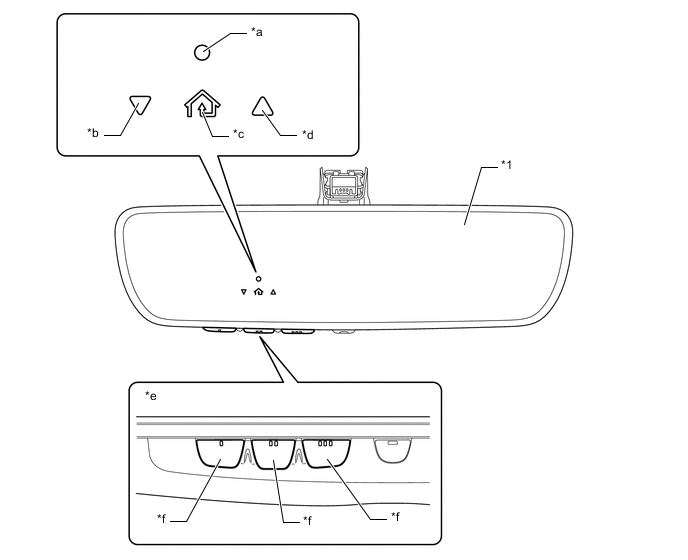
*1 Inner Rear View Mirror Assembly - - *a HomeLink Indicator Light *b Garage Door Operation Indicator Light (Closing) *c HomeLink Icon *d Garage Door Operation Indicator Light (Opening) *e Bottom View *f Garage Door Opener Switch -
FUNCTION
-
The following tables show the modes and the operation of the HomeLink indicator light and garage door operation indicator lights.
HomeLink Indicator Light Mode Function Indicator Light Transmission Mode While a switch is being pressed, the garage door opener transmits the code that was previously registered. Even if the button is pressed continuously, the transmission stops after 20 seconds.
-
Rolling Code: Green (Flash → ON)
-
Except Rolling Code: Green
Learning Mode (New Code Registration) When a switch is pressed and released, the mode changes to learning mode in which a transmitter code can be registered. If no codes are registered within 55 seconds after entering learning mode, the mode changes to low power mode.
-
During Learning Mode: Orange (Slow Flashing)
-
Registration Completed: Green (Quick Flashing)
Learning Mode (Overwrite) When a switch is pressed and held for 20 seconds, the mode changes to learning mode in which an existing transmitter code can be overwritten. If no codes are registered within 55 seconds after entering learning mode, the mode changes to low power mode. All Delete Mode When the 2 outer garage door opener switches are pressed simultaneously for 10 seconds, all the transmitter codes that are registered to the 3 switches are cleared. By releasing these switches within 10 seconds after clearing the codes, the switches will automatically select learning mode the next time the switches are pressed. By keeping the switches pressed for longer than 10 seconds after clearing the codes, all the switches will be registered with a code for operation verification. Code Clearing Completed: Green (Quick Flashing) Low Power Mode If a switch remains pressed longer than 120 seconds, such as in the case in which the pressed switch does not release itself, low power mode will be automatically selected to reduce power consumption. OFF Garage Door Operation Indicator Lights Mode Function Indicator Light Listen Mode* When a garage door is operated in transmission mode, the garage door operation indicator lights show the operation status.
-
Currently Opening/Closing: Orange (Flashing)
-
Opening/Closing Completed: Green
-
Signals Not Received: Red (Flashing)
Tech Tips
*: Only available for compatible devices
-
-