MULTI-TERRAIN MONITOR SYSTEM
-
GENERAL PRECAUTIONS
-
Do not rely solely upon the multi-terrain monitor system. As with unequipped models, drive carefully while directly confirming the safety of your surroundings.
-
When driving, directly confirm the safety of your surroundings. Do not drive while only viewing the monitor screen.
-
The image displayed on the monitor screen may differ from actual conditions. Also, since the area captured by each television camera is limited, do not drive straight, make left and right turns or operate the vehicle in reverse while only viewing the monitor screen. Doing so can lead to unforeseen accidents, such as collisions with other vehicles, etc. Always drive carefully while directly confirming the safety of your surroundings with the inner rear view mirror assembly, outer rear view mirror assembly, etc.
-
The position of the guidelines displayed on the monitor screen may differ according to the number of passengers and load capacity. Always check the rear and drive while directly confirming the safety of your surroundings.
-
Use the multi-terrain monitor system with all the doors closed.
-
When the road surface is slick (frozen or covered with snow), do not use the panoramic view monitor system while using snow chains and driving on slopes. Doing so can lead to unforeseen accidents such as collisions with other vehicles, etc.
-
These are just some of the operation procedures for each mode of the multi-terrain monitor system. The steering wheel timing and amount the steering wheel should be turned differ depending on the road condition, road surface and vehicle condition when parking. Use the multi-terrain system with full understanding of the above conditions. Always confirm that there is appropriate space before attempting to park the vehicle and operate the system.
-
-
PRECAUTIONS FOR PANORAMIC VIEW MODE SCREEN DISPLAY
-
The panoramic view is an image created by combining images from the front, rear, left and right side television camera assemblies. Since the possible display area and display contents are limited, use the panoramic view monitor with full understanding of the panoramic view characteristics.
-
Since the vehicle icon displayed in the panoramic view is displayed using computer graphics, the vehicle color, shape and size may differ from the actual vehicle.
-
The clearness of the image at the four corners may be reduced, but this is not a malfunction.
-
The panoramic view may appear lighter or darker according to the lighting intensity near each television camera assembly.
-
The guidelines shown in the image could be deviated when the vehicle height is other than N (vehicles equipped with a vehicle height adjustment function).
-
The panoramic view does not anything above each television camera assembly installation position and imaging range.
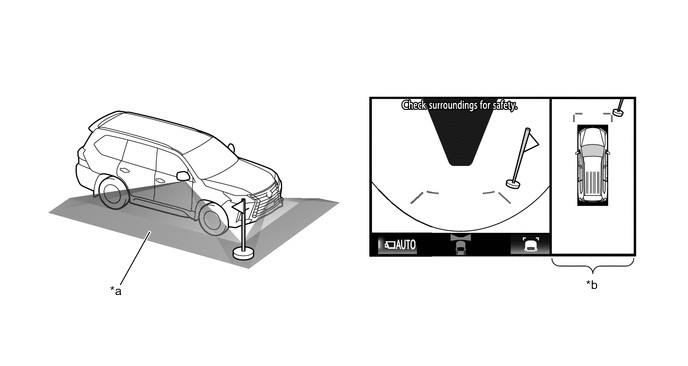
*a Imaging Range (Reference) *b Panoramic View -
There are blind spots near the vehicle that cannot be displayed on the panoramic view.
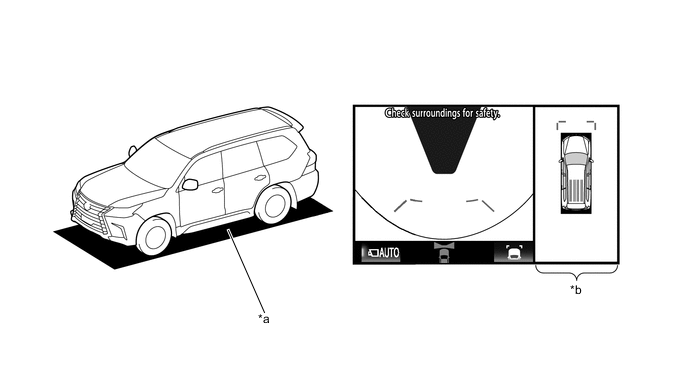
*a Blind Spot Area not Displayed on Screen *b Panoramic View -
Objects displayed on the wide front view and rear view may not be displayed on the panoramic view.
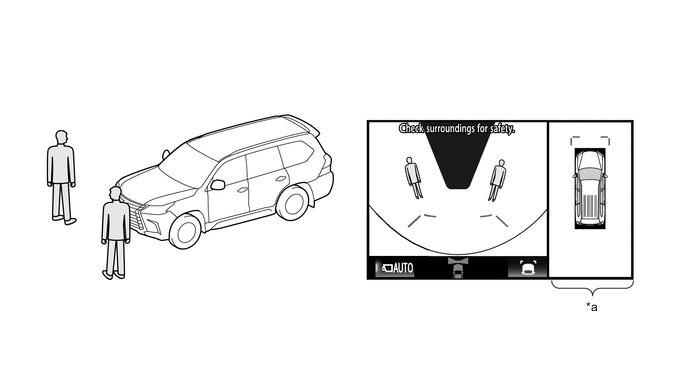
*a Panoramic View - - -
The panoramic view may display objects such as people and obstacles in a way that may differ from actual conditions.

*a Panoramic View - - -
If the back door with installed rear television camera assembly and front door with installed side television camera assembly (built into the outer rear view mirror assembly) are open, the panoramic view may not correctly display.
-
-
PRECAUTIONS FOR UNDER VEHICLE TERRAIN VIEW MODE SCREEN DISPLAY
-
The tire position guide lines and vehicle shape guide lines may differ from actual vehicle positions depending on the number of passengers, cargo weight, road grade, road surface conditions, brightness of the surrounding environment, etc. Always drive while directly confirming the safety of your surroundings.
-
The images displayed were previously captured. Therefore, the under vehicle terrain view may differ from actual conditions in the following situations.
-
Obstacles enter the display range after the image is captured.
-
Sand, snow, etc. is driven through by the vehicle.
-
An obstacle has moved.
-
Water or mud is flowing within the display range.
-
When the vehicle is moved significantly such as slip.
-
-
The tire position guide lines and vehicle shape guide lines may differ from actual vehicle shape in the following situations.
-
The tires are changed.
-
Optional equipment is installed.
-
-
-
PRECAUTIONS FOR TELEVISION CAMERA ASSEMBLY IMAGE
-
Do not subject the television camera assemblies to impacts. The multi-terrain monitor system may stop operating normally.
-
Since each television camera assembly is equipped with a special lens, the distance displayed on the monitor differs from actual conditions.
-
Since the lens of the front television camera assembly is made of glass, the lens can be damaged by flying rocks and other debris in the same way as windshield glass.
-
The area covered by the front television camera assembly is limited. The front television camera assembly does not show objects close to either corner of the bumper or under the bumper.
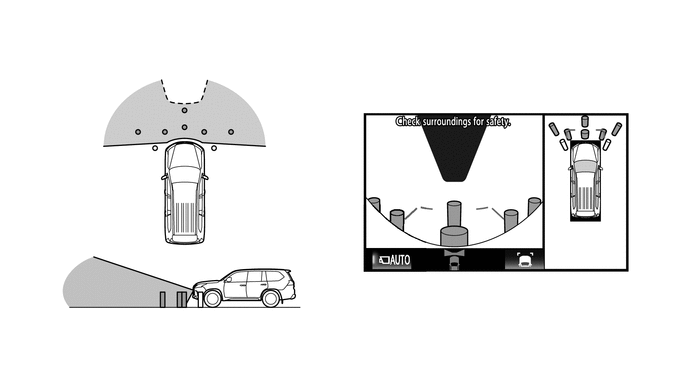
-
The area covered by the rear television camera assembly is limited. The rear television camera assembly does not show objects close to either corner of the bumper or under the bumper.
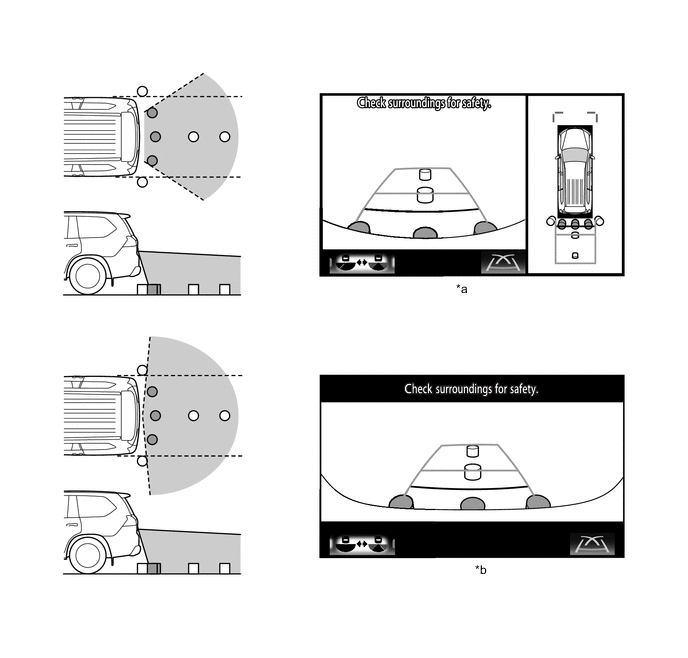
*a Panoramic View and Rear View *b Wide Rear View -
There are limits to the imaging range of the side television camera assemblies.
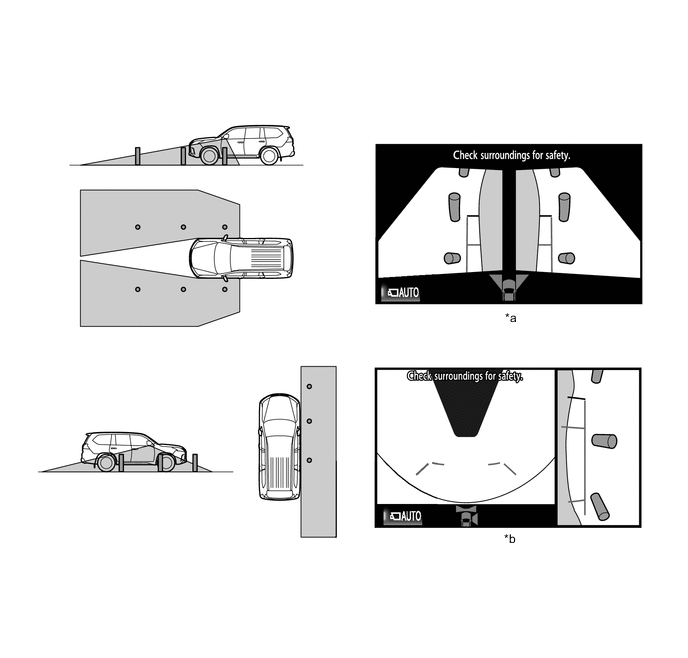
*a Side Simultaneous View *b Side View and Wide Front View -
When the outside air temperature is low, the screen may become darker or appear faint. Since moving objects in particular may become distorted or disappear, always drive carefully while directly confirming the safety of your surroundings.
-
When light from the sun or headlights directly strikes the lens, the vehicle is in a dark location (at night, etc.), or the temperature near the lens is high or low, the screen may become difficult to see, but this is not a malfunction.
-
When washing the vehicle, do not aim a high pressure washer nozzle directly at or around the television camera assemblies. The television camera assembly may malfunction due to the high water pressure.
-
Do not disassemble or modify the television camera assemblies as they use a waterproof construction. Water leakage may occur or the assemblies may operate incorrectly.
-
If the television camera assemblies are subject to sudden temperature changes, the system may stop operating normally.
-
If an organic solvent, wax, oil film remover, glass coating, etc., is present on a television camera assembly lens, immediately wipe off with a soft cloth and wash with water.
-
If a television camera assembly lens is dirty, the camera cannot capture clear images. If water, snow, dirt or other foreign matter is present, wash with water and wipe with a soft cloth. Also, if extremely dirty, wash with a mild detergent.
-
Do not strongly rub the television camera assembly lenses. The lens may become damaged and unable to capture clear images.
-
When under halogen, sodium and mercury lights, etc., the lights themselves and areas illuminated by the lights may appear to fade in and out, resulting in a "flicker effect".
-
-
ROAD CONDITION PRECAUTIONS
-
Depending on the number of occupants, the load conditions, the slope of the road, and bumps in the road, a disparity may occur between the display indication and the actual distance on the road surface. Operate the vehicle carefully.
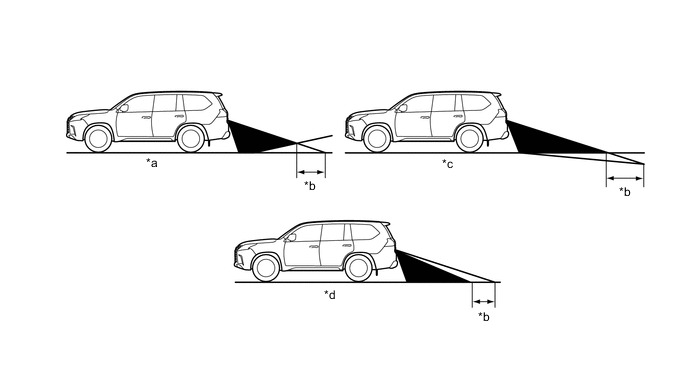
*a Steep Uphill Incline behind Vehicle *b Disparity *c Steep Downhill Incline behind Vehicle *d Steep Downhill Incline behind Vehicle -
If a steep uphill incline is behind the vehicle, an obstacle appears to be further away than it actually is, as shown in the illustration below.
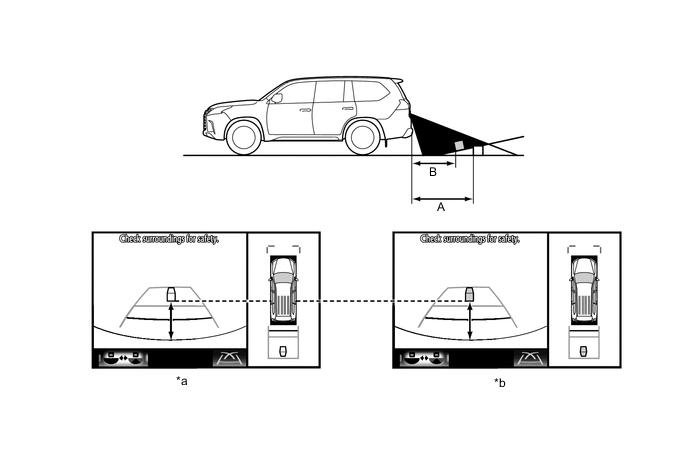
*a Screen Image in Case A *b Screen Image in Case B
-
-
PRECAUTIONS FOR 3-DIMENSIONAL OBSTACLES
-
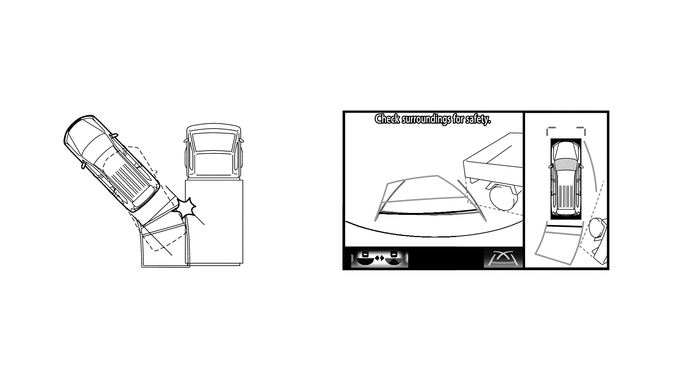
Drive carefully when any 3-dimensional objects such as walls or vehicles are behind the vehicle as the distance and estimated guide lines are provided based on the road surface.
-
When passing close to a 3-dimensional object, the vehicle may come into contact with the object even if the estimated vehicle path seems not to be in contact with it on the screen.
-
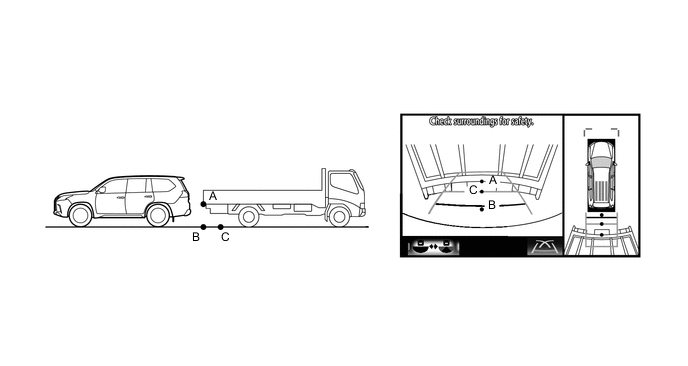
The distance indication as shown on the screen varies between 3-dimensional objects such as a vehicle and objects on a flat plane such as the road surface. As shown in the following illustration, points A and B are actually vertically in the same position and point C is a short distance away from them: however, the points are displayed in order of distance from the vehicle, B, C and A. Therefore, the vehicle will come into contact with the 3-dimensional object if it is backed up to point B on the screen.
-
On slippery roads such as snowy roads, the estimated vehicle path and actual vehicle path may not match.
-
When only one parking line is provided, the vehicle may seem to be parallel to the line on the screen even if it is not actually parallel.
-