PARKING ASSIST MONITOR SYSTEM
-
SYSTEM OPERATION
-
Manual Assist
-
Parking Guide Line Mode
-
To use the parking guide line mode for manual assist to park the vehicle in the parking space illustrated below, perform the following procedure:
-
Move the shift lever to reverse.
-
The manual assist mode is selected.
-
An image appears on the display panel as illustrated on the right.

-
Back the vehicle and stop at the position in which the parking guide line comes in contact with the left side of the intended parking position.
-
Turn the steering wheel fully to the right and back the vehicle.

*a Parking Guide Line - - -
Continue backing the vehicle until the vehicle is parallel to the plotted lines.
-
Once the vehicle is parallel, aim the steering wheel straight ahead and back the vehicle to the target stop position.

-
-
Estimated Guide Line Mode
-
To use the estimated guide line mode for manual assist to park the vehicle in the parking space illustrated below, perform the following procedure:
-
Move the shift lever to reverse.
-
The manual assist mode is selected.
-
The estimated guide line mode is selected.
-
An image appears on the display panel as illustrated on the right.

-
Turn the steering wheel so that the estimated guide lines are within the parking space, and back up carefully.

-
When the rear of the vehicle is within the parking space, turn the steering wheel in order to equalize the left and right intervals between the vehicle width extension lines and the parking space sidelines.
-
When the vehicle width extension guide lines and the parking space sidelines are parallel, straighten the steering wheel and then carefully back up until the entire vehicle is within the parking space.

-
-
-
Parallel Parking Assist Mode
-
To use the parallel parking assist mode to park the vehicle in the parking space illustrated below, perform the following procedure:
-
Stop the vehicle parallel to the road or the curb, at a side-to-side clearance of about 1 m (3.3 ft.) from the parked vehicle, approximately one-half car length forward of the parked vehicle.
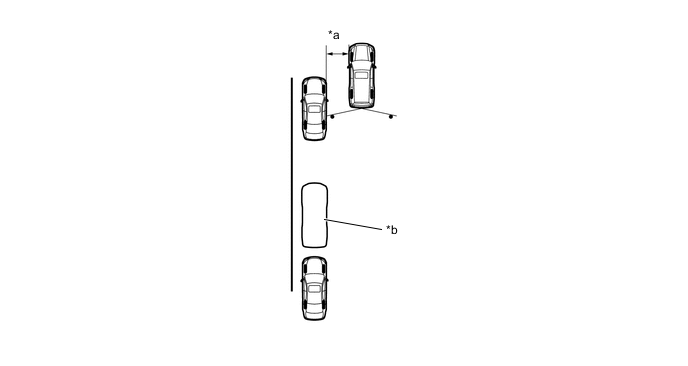
*a Approx. 1 m (3.3 ft.) *b Target Parking Position -
Aim the steering wheel straight ahead and move the shift lever to reverse.
-
The parallel parking assist mode is selected.
-
An image shows on the display panel as illustrated on the right.

*A Europe and Australia Models - - *1 Mode Select Switch - - -
Drive the vehicle straight back and stop when the green vertical line of the target parking position is aligned with the rear end of the parked vehicle.

*A Europe and Australia Models - - *1 Mode Select Switch - - *a Green Vertical Line - - -
When the steering wheel is turned, the green outline will appear.

*A Europe and Australia Models - - *1 Mode Select Switch - - *a Green Outline - - -
Continue turning the steering wheel, and the green outline will move in the direction of the target parking position, while the outline changes into a shape as illustrated on the right. Keep turning the steering wheel until the green outline reaches the target parking position. At this time, the green vertical line opposite to the target parking position will disappear when the steering wheel is turned more than 90 degrees.

*A Europe and Australia Models - - *1 Mode Select Switch - - *a Green Outline - - -
However, if the steering wheel is turned too much, the message as shown in the right illustration is displayed and the green outline will change to red to inform the driver that the assist operation is not possible. Also, when your vehicle is away from the shoulders too much, the same condition will occur even adjusting the green outline at the normal position.

*A Europe and Australia Models - - *1 Mode Select Switch - - *a The green outline changes to red - - -
Keep the steering wheel in the same position and start backing up. Then, the green vertical line and green outline disappear, and a parking guide line appears in the direction of the target parking position.

*a Parking Guide Line - - -
Keep the steering wheel in the same position and back up. Stop when the parking guide line reaches the left end of the target parking position.

-
With the vehicle at a standstill, fully turn the steering wheel in the opposite direction. Then, as illustrated on the right, the same guide line appears as in the manual assist.
-
The same screen displays as those in the manual assist mode will appear in future steps. Therefore, the guide line mode (parking guide line, guide line deletion, estimated guide line) is the mode set for manual assist.

-
Using the distance guide line slowly back the vehicle until the vehicle is parallel to the road or curb, while paying attention to the vehicles in front and in back. The parking maneuver is completed once the vehicle is parallel.

*a Distance Guide Line - -
Tech Tips
If a battery terminal is disconnected, the assist function will not operate properly. This is because the present neutral steering point that is detected by the steering sensor does not match the neutral steering point that is stored in the memory of the parking assist ECU.
Therefore, if the parking assist ECU detects that a battery terminal has been disconnected and the system is operated again after reconnecting the battery terminal, a "System Initializing" warning message appears at the bottom of the screen. When this occurs, take one of the following corrective actions:
-
With the engine switch ON (IG) and the vehicle at a standstill, fully turn the steering wheel to the right, then fully turn it to the left (this procedure can be started either with a right or left turn).
-
Drive the vehicle at a speed of approximately 20 km/h (12 mph) for 5 minutes or more, on a road with a minmal number of curves.
-
-
-