MULTI DISPLAY
-
12.3-inch Display
-
12.3-inch display, which has a high contrast, can show a wide range of the map, utilizing its large screen.
-
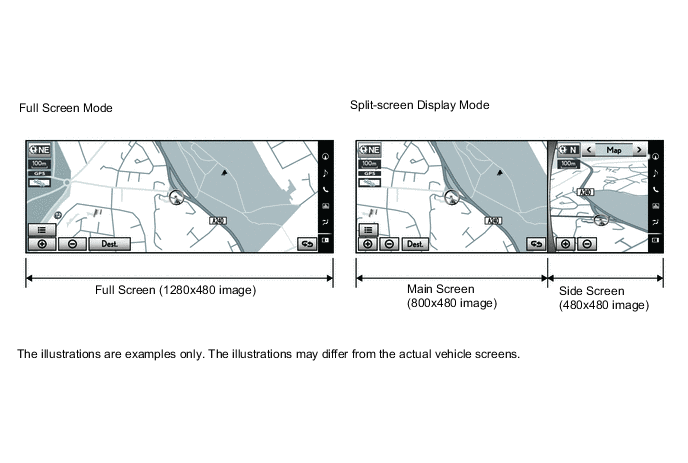
12.3-inch display also has full screen mode* which displays the map and menu top screen with full size, and split-screen display mode which displays both main screen and side screen.
-
Full screen mode describes the image with 1280x480 image and split-screen display mode describes with 800x480 image on the main screen, and with 480x480 image on the side screen.
-
*: Some models display all screens with full screen.
Figure 1. The range of image described with 12.3-inch display
-
-
Side screen menu bar has been set on right side of the screen, which enables the operation of the side screen such as switching the screen mode displayed on the screen.
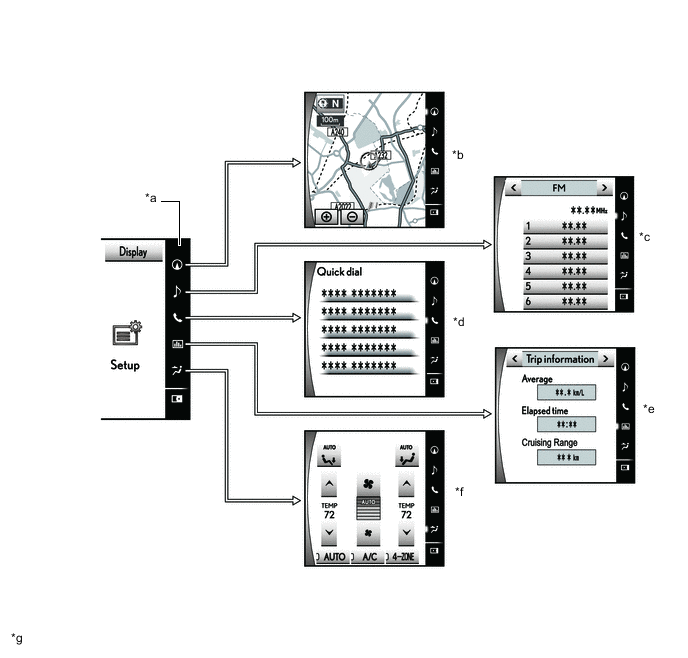
*a Side Screen Menu Bar *b Map Screen Mode *c Audio Screen Mode *d Quick Dial Screen Mode *e Vehicle Information Screen Mode *f Air Conditioning Control Screen Mode *g The illustrations are examples only. The illustrations may differ from the actual vehicle screens. - - Side Screen Menu Bar Button Function Side Screen Menu Bar Button Side Screen Display Mode Outline 
Map Screen Mode
-
Displays the map screen.
-
Enables the operation such as displaying the map and changing the scale.

Audio Screen Mode
-
Displays the audio screen.
-
Enables the operation such as displaying audio status information, switching audio source, and selecting the music and the radio channel.

Quick Dial Screen Mode
-
Displays the quick dial screen.
-
Enables users to call contacts selected and registered in the favorite list.

Vehicle Information Screen Mode
-
Displays the vehicle information screen.
-
Displays trip information and vehicle information such as the past record.

Air Conditioning Control Screen Mode
-
Displays the air conditioning control screen.
-
Enables the air conditioning system operation such as switching ON/OFF, temperature setting, and switching the outlet.

Side Screen Open* Displays the side screen. 
Side Screen Close* Hides the side screen. *: Models with split-view display function
-
-
Moreover, the side screen displays the screen while making/arriving a call* in the hands-free system and the mode screen in the drive mode select as an interruption.
-
*: On the setup screen, users can select the place to display from the main screen or side screen.
-
-
-
Remote Touch Operation
-
An exclusive hierarchical structure is used for each screen displayed on the multi-display in consideration of the remote touch.
-
All panel buttons that were previously provided on the touch panel are brought together on the remote touch. In addition, a seesaw switch is provided to make it easier to change the map scale and scroll the screen.
-
To operate the remote touch, the MENU button is pressed to display the Menu screen. From the Menu screen, Nav, Radio, Media, Telephone, Info, Climate, Setup or Display, can be selected to operate each function.
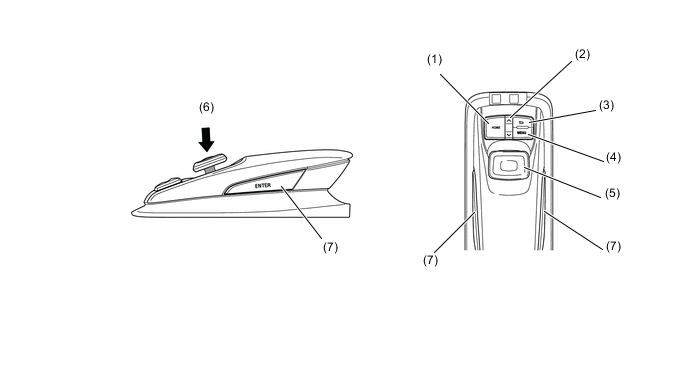
No. Switch Function (1) HOME*1
-
Displays the present location screen.
-
Displays the present home screen.
MAP*2 Displays the present location screen. (2) Seesaw Switch
-
Changes the map scale.
-
Scrolls the list screen.
(3) Back Switch Returns to previous screen while operating the display. (4) MENU Displays the menu screen. (5) Switch Knob Moves the pointer displayed on the screen. (6) Press in (Enter) Selects the icon highlighted by the pointer. (7) ENTER Switch *1: Models without map data media
*2: Models with map data media
-
-
-
Lexus Enform Service
-
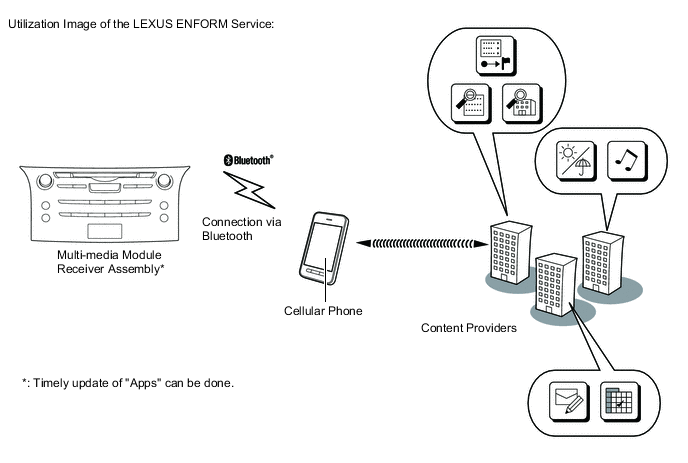
The LEXUS ENFORM service makes it possible to operate specified applications on the multi-display assembly by using Bluetooth to connect the navigation system to a cellular phone with the LEXUS ENFORM application installed.
-
The LEXUS ENFORM service enables communication between the navigation system, application server and content provider utilizing the LEXUS ENFORM application installed on a cellular phone.
-
-
Voice Recognition System
-
When the voice recognition system starts operating, the commands that the system is able to recognize are displayed on the multi-display.
-
-
Main Functions of Multi-display
Function Outline Navigation System Through the use of the Global Positioning System (GPS) and map data which is stored on a microSD card, the navigation system analyzes the position of the vehicle and indicates the position on the map that is displayed on the screen. In addition, it is possible to use the system to register memory points and navigate to a destination. Audio/Video System Serves as the display and controls for the following:
-
Radio operation
-
CD/DVD player operation
-
Sound Library operation (Models for China)
-
Bluetooth-compatible portable player operation
-
iPod/iPhone operation
-
USB memory device operation
-
Portable audio player/external device operation (AUX type)
Air Conditioning System Operation and control of the air conditioning system can be performed through the use of the automatic air conditioning switches displayed on the multi-display. Hands-free System When a Bluetooth-compatible cellular phone is registered to the navigation system, the driver can make and receive calls or talk hands-free on the cellular phone by operating the switches on the screen/steering pad. Speech Command System Operates the navigation, audio, and hands-free systems based on voice commands. Multi-terrain Monitor System Displays the bird's-eye view movie of the vehicle composed by 4 television cameras attached on all direction of the body, and the movie captured by each television camera considering the position of shift lever or the condition of vehicle speed. Parking Assist Monitor System Displays a view of the area behind the vehicle that is captured by the rear television camera mounted on the back door when the shift lever is moved to R. LEXUS Parking Assist-sensor System Detects obstacles and displays information on the multi-display to inform the driver. Others Fuel Consumption Screen Fuel consumption information such as average fuel consumption per minute, current fuel consumption per minute and past fuel consumption record is displayed. Remote Touch Setting The following settings of each function of the remote touch can be changed:
-
Pointer sound
-
Selection sound
-
Error sound
-
Pointer sound volume
-
Feedback force
Maintenance Information The maintenance information function can be used to inform the driver of the inspection or replacement timing of the following items based on the calendar function and distance driven.
-
ENGINE OIL: Replace engine oil
-
OIL FILTER: Replace engine oil filter
-
ROTATION: Rotate tires
-
TYRE/Tires: Replace tires
-
BATTERY: Replace battery
-
BRAKE PAD: Replace brake pads
-
WIPERS: Replace wiper blades
-
LLC/Coolant: Replace engine coolant
-
BRAKE OIL: Replace brake fluid
-
ATF/Trans. Fluid: Replace ATF
-
SERVICE: Scheduled maintenance
-
AIR FILTER: Replace air filter
-
PERSONAL: New information items can be created separately from the provided items
Language Select (Models with Language Select Function) The language of the screen buttons, pop-up messages and the voice guidance can be changed. Button Color Setting The button color can be changed. Screen Setting This enables automatic return to the navigation screen from the audio screen. Keyboard Layout The keyboard layout can be changed. Delete Personal Data Deletes or returns registered or changed personal settings to their default conditions. For example:
-
General settings
-
Navigation settings
-
Audio settings
-
Telephone/Phone settings
-
LEXUS ENFORM settings (Models for Australia)
-
G-BOOK settings (Models for China)
Screen Adjustment The brightness or contrast of the screen can be adjusted to suit the brightness of the surroundings. Diagnosis This menu contains the following items:
-
Failure Diagnosis
-
System Check
-
SD Check
-
DCM Check (Models for China)
-
Diagnosis Recorder
-
Function Check/Setting
-
Panel and Steering Switch
-
Remote Touch Switch
-
Microphone Check
-
System Sensors Check
-
Vehicle Signal
-
Sound Library Setting (Models for China)
-
HF Voice Quality Setting
-
Camera Setting
-
DAB Reception Check (Models with Digital Audio Broadcast (DAB) Tuner)
-
Service Information
-
G-BOOK Info for Contract (Models for China)
-
DCM Information (Models for China)
-
Emergency Call History (Models for Europe)
-
Security History (Models for China)
-
Program Update
-
Version Information
-
Memory point backup (Except Destination Package for Southeast Asia)
-
Repro Info
-
Product Information
-