AUDIO AND VISUAL SYSTEM DETAILS
-
FUNCTION OF MAIN COMPONENTS
Function Component Audio Head Unit Operates the respective functions in accordance with the signals from the switches or a voice command. Telephone Microphone Assembly*1 Transmits the voice input signal to the audio head unit. Steering Pad Switch Assembly Transmits the operation signals from the switches to the audio head unit. No. 1 Stereo Jack Adapter Assembly Transmits information about the portable audio player connected to the USB port or AUX port to the multi-media interface ECU*2 or radio and display assembly*1. Multi-media Interface ECU*2 Transmits signals from the stereo jack adapter assembly to the audio head unit.
-
*1: Models with radio and display assembly
-
*2: Models without radio and display assembly
-
-
FUNCTION
-
Bluetooth Audio System
-
The functions of the Bluetooth audio system that can be used vary with the version of the Audio/Video Remote Control Profile (AVRCP) supported by the Bluetooth audio player that is being used.
-
The functions of the Bluetooth audio system are as follows:
Function Outline Audio/Video Remote Control Profile (AVRCP) Version 1.0 Version 1.3 Version 1.4 or higher Play Starts playing the music. ○ ○ ○ Stop Stops playing the music. ○ ○ ○ Pause Pauses the music. ○ ○ ○ Track Up/Down Changes the track. ○ ○ ○ Fast Up/Down Fast-forwards or reverses. ○ ○ ○ Album Up/Down Changes the album. - ○ ○ Repeat (Single Repeat) Repeats the selected music. - ○ ○ Random (All Track Random) Plays all the music in the portable audio device at random. - ○ ○ Music Information Shows the track number, play time, track name, artist name and album name. - ○ ○ Remaining Battery Level Shows the remaining battery level of the Bluetooth audio player. - ○ ○ Music List Shows the music list. - - ○ Tech Tips
○: Available
-: Not available
Some functions may only be available on certain types of portable player.
-
Other functions are as follows:
Function Outline Set Bluetooth Audio Player Registering Bluetooth Audio Player In order to use the Bluetooth audio system of a Bluetooth audio player, it is necessary to register it in the audio head unit. Once a Bluetooth audio player is registered, the Bluetooth audio system becomes available automatically. The user can register up to 2 Bluetooth audio players. Deleting Bluetooth Audio Player The user can delete a Bluetooth audio player. Connecting Bluetooth Audio Player The user can select whether to connect to the Bluetooth audio player automatically or manually. If the Bluetooth audio player has been registered and the automatic connection is enabled, the Bluetooth audio player will be connected automatically. Change Settings of Bluetooth Audio Selecting a Bluetooth Audio Player If the user has registered a second Bluetooth audio player, either one can be selected for connection. Displaying a Bluetooth Audio Player The user can view the information of the Bluetooth audio player on the system. Changing the Connection Method The user can select the connection method. With this function, the user determines whether to make a connection from the audio head unit to the Bluetooth audio player or from the Bluetooth audio player to the audio head unit. Displaying the Bluetooth Audio Setting The user can see the Bluetooth audio information settings on the system. Changing the Device Name or Passcode The user can change a device name or a passcode. Initializing the Bluetooth Audio Settings The user can initialize the settings.
-
-
Bluetooth Hands-free System
-
The Bluetooth hands-free system has the following functions:
Function Outline Call with Bluetooth Phone By Dial The user can call by inputting a telephone number. By Phonebook The user can call by using the phonebook data that has been transferred from the user's Bluetooth phone. By Call History Dialed Number The user can call by selecting a previously dialed number. Received Call The user can call by selecting the telephone number of a received call. Missed Call The user can call by selecting the telephone number of a missed call. All Call History The user can call by selecting the telephone number from all call history. However, the user can any use the last 5 numbers while driving. By Speed Dial The user can call by using registered telephone numbers selected from the phonebook, dialed numbers and received calls. Receive with Bluetooth Phone When a call is received, the receive screen is displayed with a ring tone. Talk on Bluetooth Phone While the user is talking on the phone, the talking screen is displayed. Interrupt call:
While talking on the phone, a message is displayed if the call is interrupted by a third party. At this time, the user can push the off hook switch to start talking with the other party or push the on hook switch to refuse the call.
-
Some phones may release all calls.
Tone sending:
The user can send a tone to operate an answering machine or use a telephone service for example in a bank.
Change Settings of Bluetooth Phone Registering Speed Dial The user can register the desired telephone number from the phonebook, dialed numbers or received calls. Editing Speed Dial The user can edit a speed dial. Deleting Speed Dial The user can delete the speed dials individually or all at once. Setting Volume The user can set the volume. Initializing the settings:
The user can initialize the settings.
Change Settings of Bluetooth Phone Setting Phonebook Transferring the phonebook data:
The user can manually or automatically transfer the phonebook data from the registered Bluetooth phone to the system.
Registering the phonebook data:
The user can register the phonebook data.
Editing a name:
When the user does not input a name, the number is displayed.
Editing a phone number:
The user can register a phone number in "Phone#1", "Phone#2" and " Phone#3" separately. Up to 3 numbers per phonebook entry can be registered.
Adding data to the phonebook:
The user can add data to the phonebook.
Editing the phonebook data:
The user can edit the registered data.
Deleting the phonebook data:
The user can delete the data individually or all at once.
Deleting the call history:
The user can delete the log data individually or all at once.
Selecting a group icon:
The user can select the desired icon.
Setting Security Setting a passcode:
A passcode can be set up on every Bluetooth phone to be registered.
Set Bluetooth Phone Entering Bluetooth Phone In order to use the hands-free function of a Bluetooth phone, it is necessary to register it in the audio head unit. Once a phone is registered, the hands-free function becomes available automatically.* Selecting Bluetooth Phone When 2 or more registered Bluetooth phones are in the cabin, it is necessary to select which phone to use to prevent the lines from being crossed. Only the selected phone is available for use as a hands-free phone. Displaying and Changing Bluetooth Information The user can set, change and initialize the information of the Bluetooth phone displayed on the screen. Deleting Bluetooth Phone A registered Bluetooth phone can be deleted from the audio head unit. Tech Tips
*: Automatic connection may not be possible with some Bluetooth phones.
-
-
-
Radio and Display Assembly Function
-
The main functions of the radio and display screen are as follows:
Item Outline MEDIA AM AM radio operation FM FM radio operation CD CD player operation USB USB portable audio player operation BT Bluetooth-compatible portable player operation AUX AUX portable audio player operation CAR Trip Information Vehicle information such as fuel consumption per minute and average vehicle speed is displayed. Past Record Up to the last 6 records of average fuel consumption are displayed in a graph. SETUP Display
-
Screen off can be selected.
-
Contrast can be adjusted.
-
Brightness can be set.
General
-
Language can be selected.*
-
Beep sound can be disabled or enabled.
-
Display captured image can be changed.
-
Animation can be disabled or enabled.
-
Personal data can be deleted.
Bluetooth
-
Registered devices can be newly added or removed.
-
Telephone connection can be set.
-
Audio player connection can be set.
-
Detailed Bluetooth setting.
Phone
-
Voice and ring volume can be adjusted.
-
Phonebook can be set.
-
Detailed telephone settings can be set.
Audio
-
Sound quality can be adjusted.
-
Automatic Sound Levelizer (ASL) can be selected.
Tech Tips
*: The display language can be selected from English, German, French, Spanish, Italian, Dutch and Russian. When the extension module assembly is mounted, the following additional languages can be available; Norwegian, Swedish, Portuguese, Danish, Finnish, Polish and Greek.
-
-
-
Extension Module Assembly Function
-
The main functions of the extension module assembly are as follows:
Item Outline MAP NAVI By adding the optional extension module assembly, the navigation system can be used. The navigation system analyzes the position of the vehicle and indicates that position on the map displayed on the screen. Setup General The following menu entries refer only to the extension module assembly:
-
Automatic text scrolling
-
Unit of measurement
-
Navigation prompt volume
-
Phone volume
-
Ring tone volume
-
Voice dialog volume
-
Send stored contacts to USB
Voice The phone setup contains the following menu entries:
-
Start tutorial
-
Voice dialog volume
Bluetooth The Bluetooth setup contains the following options:
-
Bluetooth on/off
-
Search Bluetooth devices
-
Device list
-
Set PIN for pairing
-
Internet connection
Phone The phone setup contains the following menu entries:
-
Select ringtone
-
Announce incoming messages
-
Refresh phone book
Applications Picture Plays a picture slideshow using photos stored in a connected USB storage device while the vhicle is parked. Email Downloads delivered email messages from a Bluetooth phone and then reads out text messages through the speakers. Calendar Downloads calendar, tasks and notes from a Bluetooth phone and then displays them on the screen. -
-
-
-
CONSTRUCTION
-
No. 1 Stereo Jack Adapter Assembly
-
The No. 1 stereo jack adapter assembly is located on the lower front passenger side of the center console.
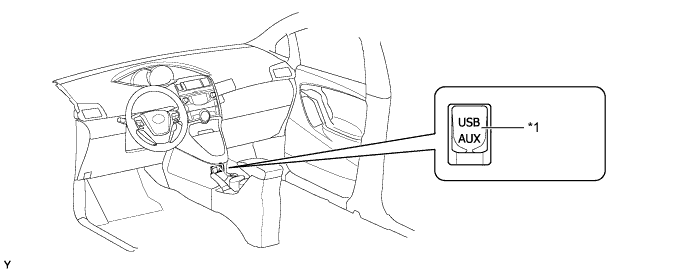
Text in Illustration *1 No. 1 Stereo Jack Adapter Assembly - -
-
-
Steering Pad Switch Assembly
-
Frequently used switches are located on the steering pad for easy use.
-
The steering pad switches provided on the steering pad may vary in accordance with optional equipment, as indicated in the table below:
Item Switch Audio
-
Volume +/-
-
Seek Up/Down
-
MODE
Telephone
-
On Hook
-
Off Hook
Multi-information Display
-
DISP
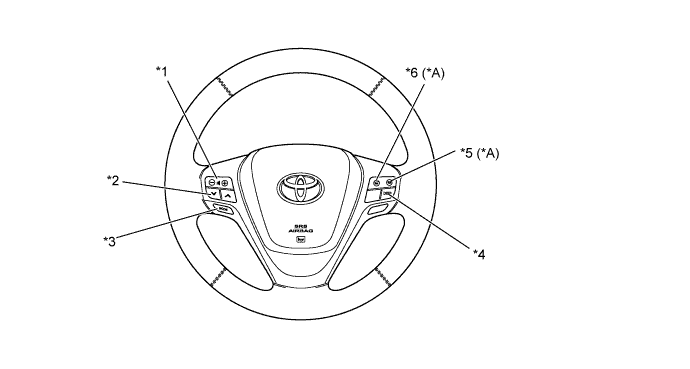
Text in Illustration *A Models with Radio and Display Receiver Assembly - - *1 Volume +/- Switch *2 Seek Up/Down Switch *3 MODE Switch *4 DISP Switch *5 On Hook Switch *6 Off Hook Switch -
-
-