METER / GAUGE SYSTEM GENERAL
-
OUTLINE
-
Combination Meter Assembly
-
An Optitron type combination meter assembly is used. This type realizes excellent visibility through the use of a smoked acrylic protective panel, and bright Light Emitting Diodes (LEDs) that use high contrast to illuminate the indicators and dials.
-
All the meters, gauges, indicator lights and warning lights use LEDs to reduce the consumption of electrical energy.
-
The combination meter assembly has a built-in meter ECU and buzzer.
-
A hybrid system indicator is provided. The indicator makes it possible to confirm the system output and regenerative condition of the hybrid system.
-
A Liquid Crystal Display (LCD) combined shift display, odometer and trip meter are used.
-
A white Organic Light Emitting Diode (OLED) display is used for the multi-information display in the combination meter assembly. This display uses a high contrast ratio to provide readability even when viewed from a wide angle, ensuring the visibility of each warning message.
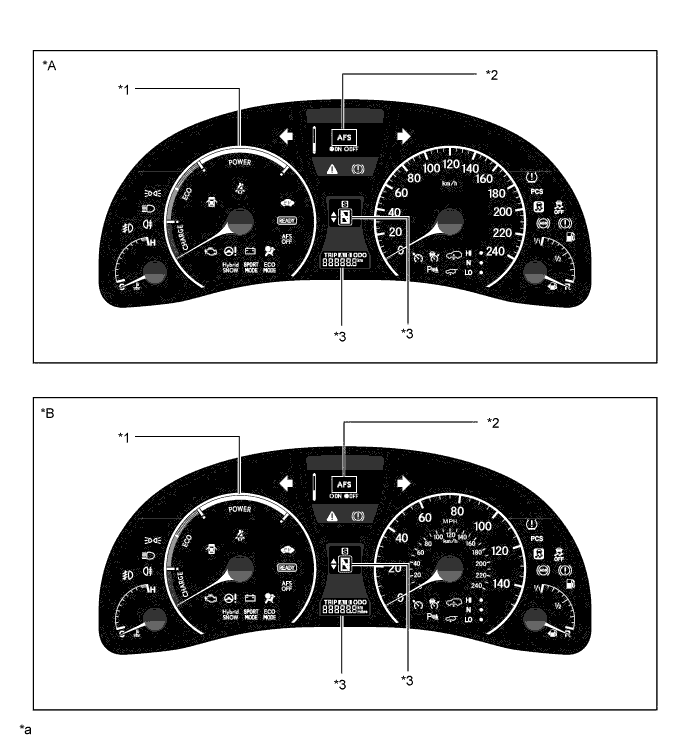
Text in Illustration *A LHD Models for Europe *B RHD Models for Europe *1 Hybrid System Indicator *2 White OLED Display *3 LCD - - *a The illustrations are examples that show the locations of the indicators. - - 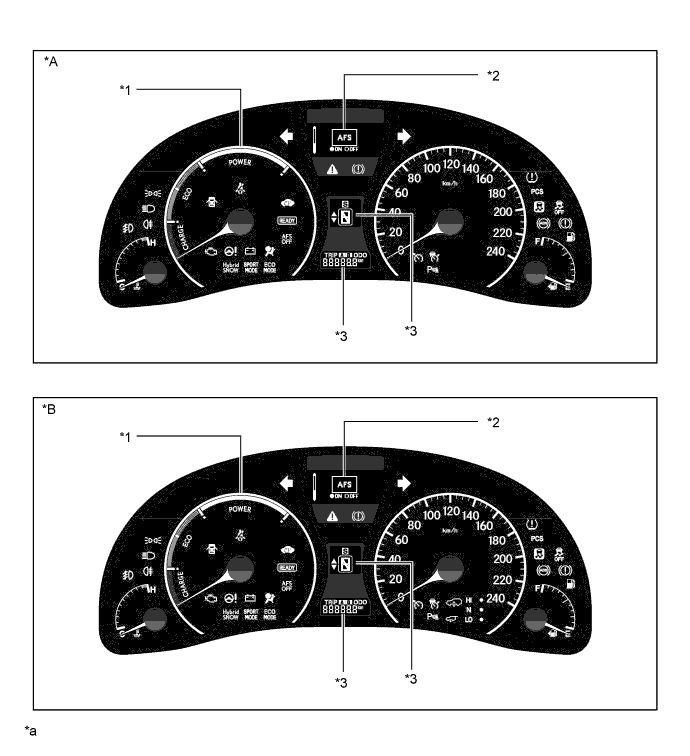
Text in Illustration *A Destination Package for Australia and China *B Destination Package for Other Countries *1 Hybrid System Indicator *2 White OLED Display *3 LCD - - *a The illustrations are examples that show the locations of the indicators. - -
-
-
Headup Display
-
The headup display projects the image from the dot Liquid Crystal Display (LCD), built into the headup display unit (combination meter mirror ECU), in a position approximately 2 m (6.6 ft) forward of the driver using a concave mirror and the windshield in order to support the driver with various information.
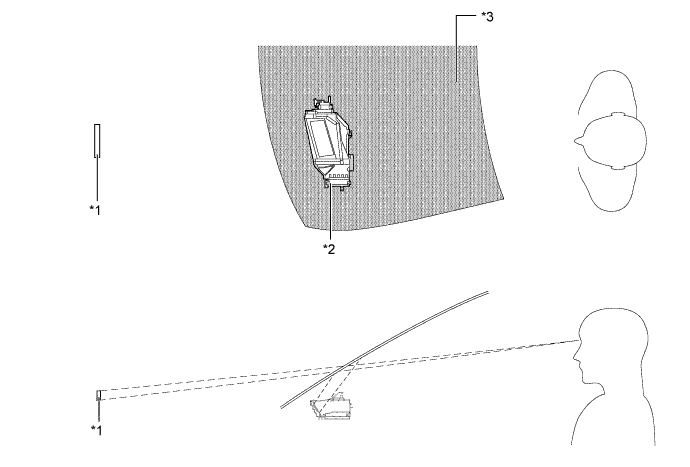
Text in Illustration *1 Display Area *2 Headup Display Unit (Combination Meter Mirror ECU) *3 Windshield Glass - -
-
-
Accessory Meter (Models without Navigation System)
-
The accessory meter displays the audio, air conditioning and clock.
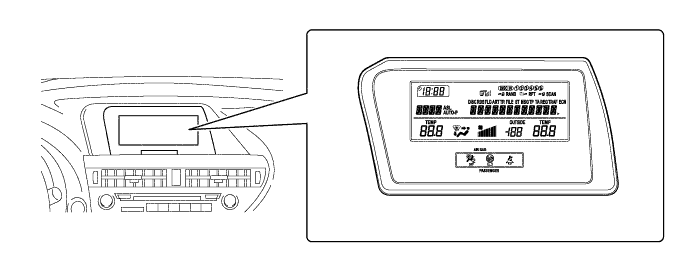
-
-
-
MAJOR DIFFERENCE
-
The new models have been modified from the previous models as shown below:
-
A tire pressure indicator has been added (models with tire pressure warning system).
-
The tire inflation pressure information and warning message in the multi-information display have been added (models with tire pressure warning system).
-
The rear seat belt warning function has been discontinued.
-
-
-
MAIN FEATURES
-
Combination Meter Assembly
-
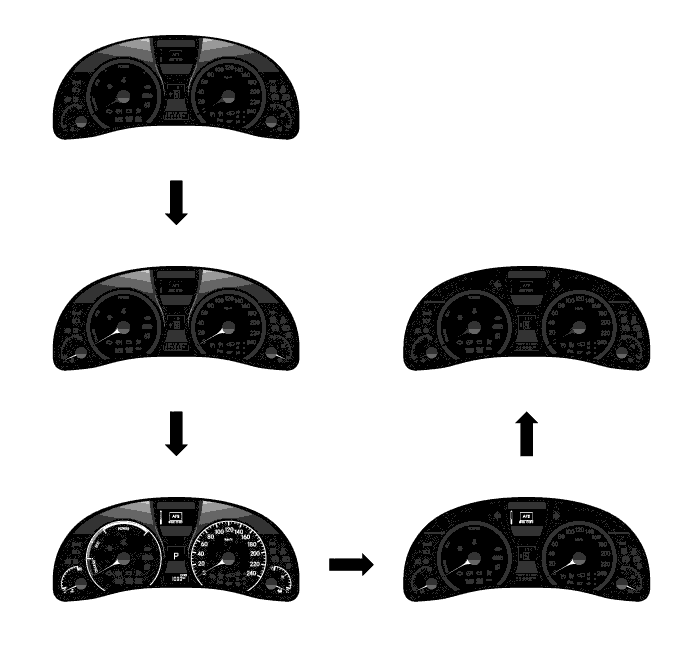
An illumination control which allows for anticipation of a pleasant drive is used. If the power switch is turned on (IG), the illumination control operates as follows:
-
When the driver door is opened, the meter panel illumination fades in.
-
When the hybrid system is started, the speedometer, hybrid system indicator, coolant temperature gauge and fuel gauge needles illuminate.
-
Next, the coolant temperature gauge dial, fuel gauge dial, LCDs, speedometer dial, hybrid system indicator dial and multi-information display fade in to welcome the driver with hospitality.
-
When the power switch is turned off, the meter panel illumination, speedometer dial, hybrid system indicator dial, coolant temperature gauge dial, fuel gauge dial and LCD fade out.
-
The multi-information display, speedometer, hybrid system indicator, coolant temperature gauge and fuel gauge needles fade out consecutively, offering ample hospitality when the driver exits the vehicle.
-
-
By setting the customize function, the panel illumination of the combination meter assembly changes its color in accordance with the hybrid system indicator. When the hybrid system indicator is in the Eco area, the panel illumination is blue.
-
By setting the customize function, the meter panel illumination color changes in accordance with the selected mode.
-
Normal Mode or Eco Mode: Blue
-
Sport Mode: Red
-
-
-
Hybrid System Indicator
-
The hybrid system indicator displays the total of the HV battery and engine output as the hybrid system output.
-
The scale for hybrid system indicator is divided into 3 areas (Charge, Eco, Power). The role of each area is as follows.
Area Function Charge Charge area indicates when energy is being regenerated. Eco
-
Eco area indicates when the vehicle is driven in Eco-friendly.
-
Hybrid Eco area indicates that the vehicle is driven in a manner that promotes frequent motor only operation. (Based on various conditions, the power management ECU controls if the engine should be stopped to fuel efficiency.)
Power Power area indicates that an Eco-friendly driving range is being exceeded. (during full power driving etc.) 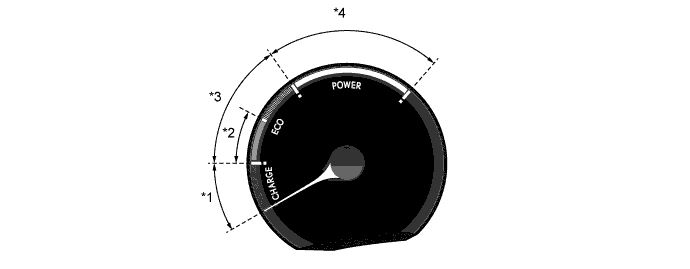
Text in Illustration *1 Charge Area *2 Eco Area (Hybrid Eco Area) *3 Eco Area *4 Power Area -
-
-
Multi-information Display
-
The following items can be displayed on the multi-information display.
Mode Outline Outside Temperature
-
The outside temperature is always displayed.
-
When the outside temperature drops below 3°C (37°F), the warning sign is displayed on the outside temperature display area to warn the driver to drive with caution due to icy road conditions. When the temperature rises above 5°C (41°F), the warning sign goes off.
Dynamic Radar Cruise Control*1 The multi-information display displays the set vehicle speed and vehicle ahead mark. Cruise Information
-
The item shown can be changed by using pushing the up/down switch in the multi-information switch (steering pad switch assembly).
-
In cruise information mode, the following 8 types of information can be displayed:
-
Energy Monitor
-
Current Fuel Consumption
-
Average Fuel Consumption After Refueling
-
Average Fuel Consumption
-
Average Vehicle Speed
-
Driving Range
-
Tire Inflation Pressure*2
-
Blank Screen
Electronic Features Control
-
The item shown can be switched by using the multi-information switch (steering pad switch assembly).
-
In electronic features control mode, a maximum of 5 items (LEXUS Parking Assist-sensor ON/OFF, Sport Mode ON/OFF, Eco Mode ON/OFF, Hybrid SNOW Mode ON/OFF, AFS ON/OFF) can be displayed.
Warning The warning display will interrupt the multi-information display immediately when a warning occurs. Customization
-
The item shown can be switched by using the multi-information switch (steering pad switch assembly).
-
In customization mode, 6 items (Door Lock, Lighting, Seat, Display, Suggest, Entry and Start System) can be customized.
*1: Models with dynamic radar cruise control system
*2: Models with tire pressure warning system
-
-
-
Headup Display
-
The following items can be displayed on the headup display:
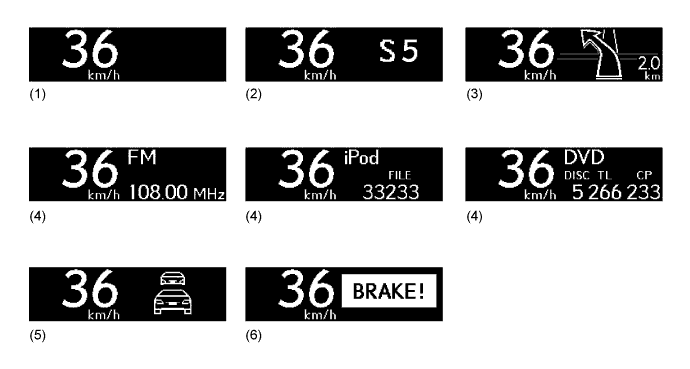
No. Information Outline (1) Vehicle Speed The vehicle speed is always displayed. (2) Shift Position The current shift position is displayed. (3) Turn-by-turn Navigation Turn-by-turn navigation information is displayed based on the signal from the multi-media module receiver assembly. (4) Audio
-
The audio information display will interrupt the headup display immediately when the audio system is operated.
-
The audio mode can be turned on or off by using a customize function.
-
Press and hold the HUD switch (headup display main switch) for more than 3 seconds while the vehicle speed is 8 km/h (5 mph) or less.
-
Display is changed to audio display on/off mode.
-
Press the HUD switch (headup display main switch) to turn the audio display on/off.
(5) Dynamic Radar Cruise Warning Dynamic radar cruise warning information indicates when the vehicle is nearing the vehicle ahead during vehicle-to-vehicle control. (6) Pre-crash Safety Warning The pre-crash safety warning display will interrupt the multi-information display immediately when a warning occurs. -
-
Headup display luminance can be adjusted with the display luminance adjustment switch.
-
Headup display position can be adjusted with the display position adjustment switch.
-
-
-
PRECAUTION
-
Headup Display
-
The headup display may seem dark and hard to see when viewed through sun glasses, especially polarized sun glasses.
-
-