NAVIGATION SYSTEM / MULTI INFORMATION SYSTEM GENERAL
-
OUTLINE
-
Light Emitting Diodes (LEDs) are used to provide mercury-free backlighting for the multi-display. This reduces the burden on the environment and ensures brightness.
-
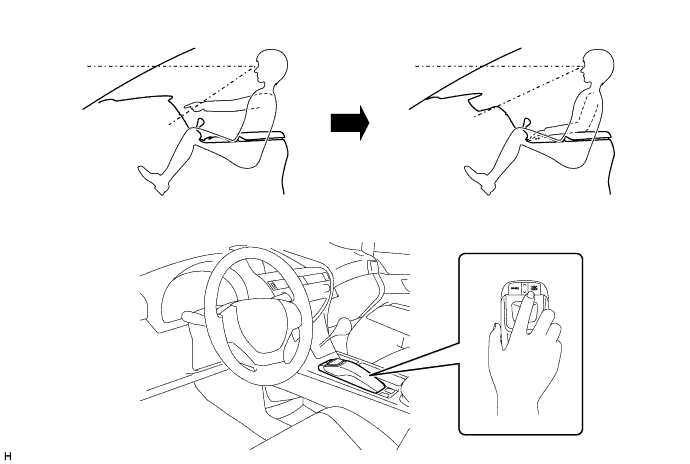
The multi-display is provided at the same height as the combination meter assembly to minimize changes in the driver's line of sight and ensure visibility while driving.
-
Due to the change in the multi-display location, the remote touch is used to ensure operability.
-
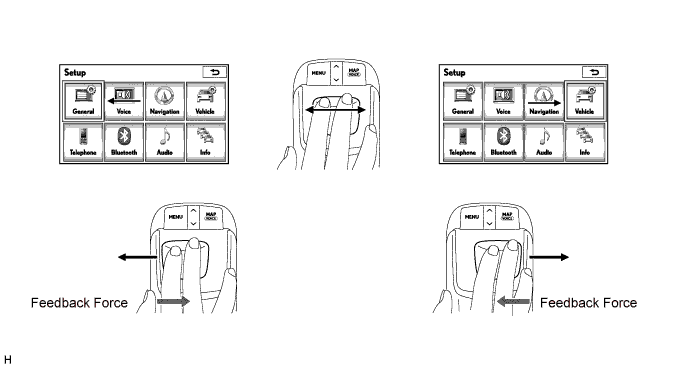
A 2-axis mechanism is adopted for the remote touch. Motors in the remote operation board portion of the device provide feedback (feedback force) which is similar to a click. This feedback is transmitted to the users hand according to the operation of the cursor on the screen to facilitate selecting buttons or icons and ensure operability while driving.
-
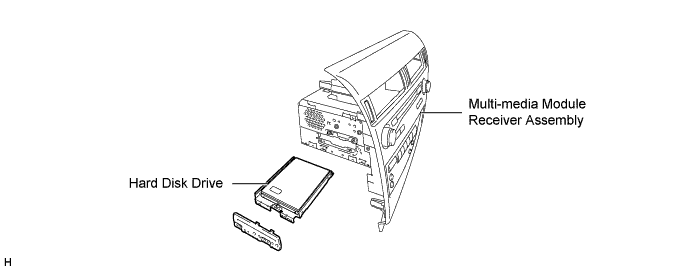
A Hard Disk Drive (HDD) is used for the multi-media module receiver assembly. The HDD is available separately, enhancing serviceability. For details, refer to the Repair Manual.
-
A multiple display function is provided. Due to this function, a map screen and air conditioning operation screen, and an audio screen or vehicle information screen can be displayed on the single screen simultaneously. (Models for Europe)
-
A split display function is provided. Due to this function, the map screen and the audio screen or vehicle information screen can be displayed on the single screen simultaneously. (Destination package for China)
-
During route guidance, turn by turn navigation notification of upcoming intersections can be displayed on the headup display.
-
Transport Protocol Experts Group (TPEG) service that shows Traffic Flow and Traffic Prediction (TFP) information on the map screen is available. This service makes it possible to show a route with consideration of TFP information and display a location, fee and status (occupied or vacant) of the parking lots. (Models for Europe)
-
This navigation system supports the connected services that enable a Point of Interest (POI) searched on the internet to be set as a destination or registered as a memory point. (Models for Europe)
-
The G-BOOK system that links the vehicle and G-BOOK communication center can be used. (Models with G-BOOK system)
-
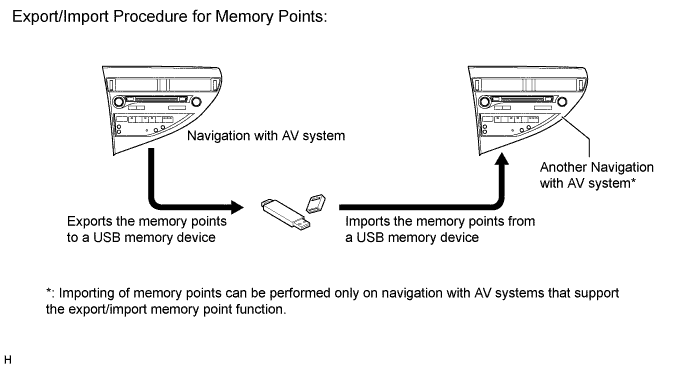
The navigation system supports a function used for the export/import of memory points. This function enables memory point data stored on the multi-media module receiver assembly to be transferred to another navigation system (such as another multi-media module receiver assembly) via a USB memory device. (Except destination package for Thailand)
-
-
MAJOR DIFFERENCE
-
The new models have been modified from the previous models as shown below:
-
The DVD type navigation system has been discontinued.
-
A new model HDD navigation system is available.
-
The display and navigation module display has been discontinued. Instead, the multi-media module receiver assembly, which integrates the navigation ECU and radio receiver assembly, is provided.
-
-
-
SPECIFICATION
Component Destination HDD Navigation System Destination Europe Australia South Africa China Taiwan G.C.C. Countries Thailand Multi-display 8.0-inch Wide LCD Navigation Computer Pioneer Hard Disk Drive Aisin AW DENSO Aisin AW DENSO DENSO Aisin AW Aisin AW Gyro Sensor Piezoelectric Ceramic Element Map Data Media HDD (Capacity 80 GB) Language Supported Voice Guidance English, German, French, Italian, Spanish, Dutch, Norwegian, Swedish, Portuguese, Danish, Finnish, Polish, Greek, Russian, Czech, Romanian, Hungarian, Slovak, Turkish and Ukrainian English English Chinese (Mandarin) Taiwanese English, Arabic English, Thai Voice Recognition English, German, French, Italian, Spanish, Dutch and Russian -
MAIN FEATURES
-
Multi-display
-
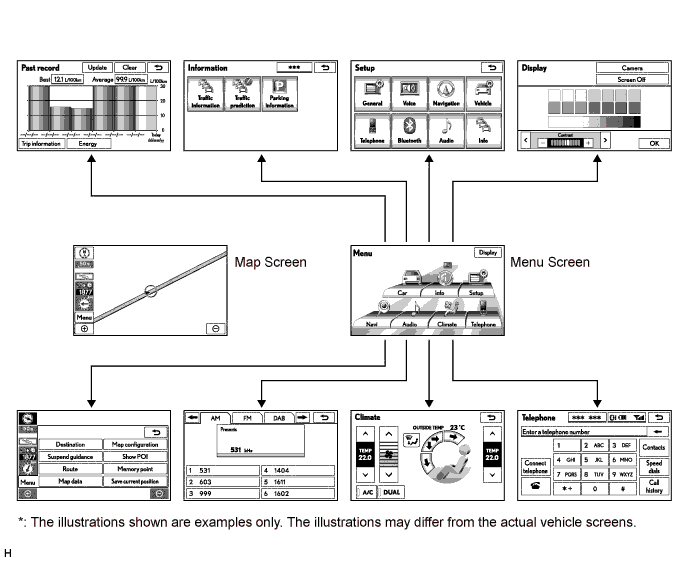
An exclusive hierarchical structure is used for each screen displayed on the multi-display in consideration of the remote touch.
-
All panel buttons that were previously provided on the touch panel are brought together on the remote touch. In addition, a seesaw switch is provided to make it easier to change the map scale and scroll the screen.
-
To operate the remote touch, the MENU button is pressed to display the menu screen, and Car, Info, Setup, Navi, Audio, Climate or Telephone, can be selected to operate each function.
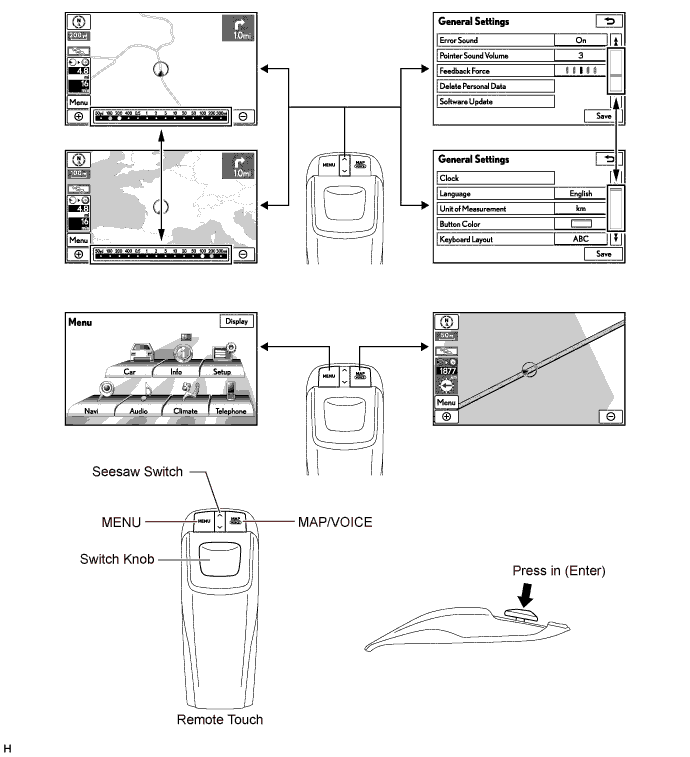
Switch Function MENU Displays the menu screen. Seesaw Switch Changes the map scale and scrolls the screen. MAP/VOICE
-
Displays the present location screen.
-
Outputs voice guidance.
Switch Knob Moves the pointer displayed on the screen. ENTER Selects the icon in the cursor highlighted by the pointer. -
-
-
Connected Services
-
The following services are available by connecting the navigation system to the Lexus portal site via the internet using a cellular phone.
-
To use these connected services, Bluetooth settings and a portal account are required.
-
To get a portal account, access the Lexus portal site (URL:www.my.lexus.eu).
Contents Outline Online search New establishments, such as restaurants and bars, that are not registered in the navigation system can be set as a destination. Importing memory points Downloading via a cellular phone Establishments that were searched for using a personal computer can be set as a destination and can be registered as memory points. Downloading from a USB memory device 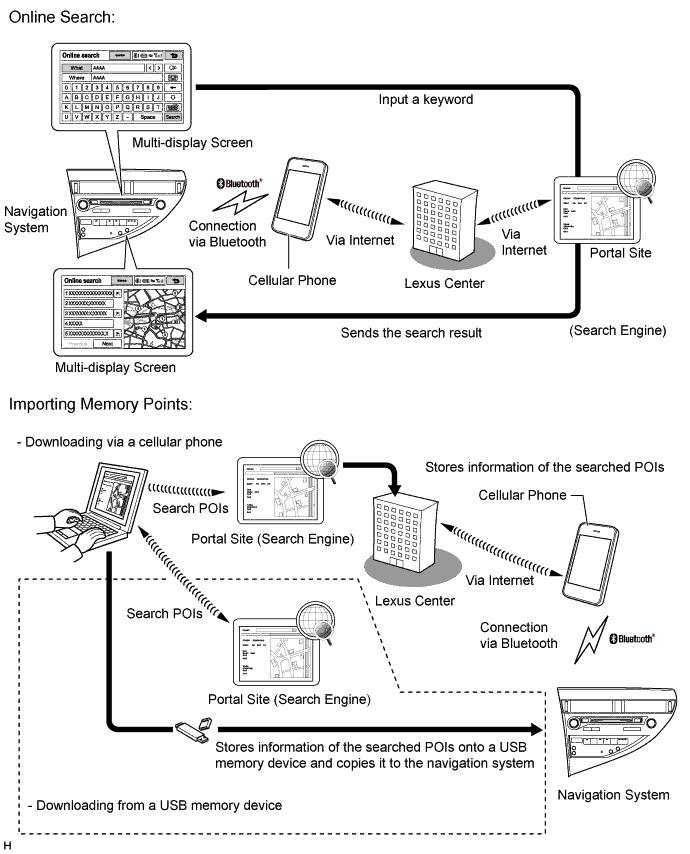
-
-
Export/Import Memory Point Function
-
Memory point data stored in the multi-media module receiver assembly can be transferred to another navigation with AV system, enabling information sharing.
-
-
The main functions of the multi-display are listed below.
Function Outline Navigation System Through the use of the Global Positioning System (GPS) and map data which is stored on a HDD, the navigation system analyzes the position of the vehicle and indicates the position on the map that is displayed on the screen.
In addition, it is possible to use the system to register memory points and navigate to a destination.
Audio/Video System Serves as the display and controls for the following:
-
Radio operation
-
CD / DVD player operation
-
Sound Library operation (Destination Package for China)
-
Bluetooth-compatible portable player operation (Models for Europe)
-
iPod / iPhone operation
-
USB memory device operation (USB type)
-
Portable audio player operation (AUX type)
Air Conditioning System The operation and control of the air conditioning system can be performed through the use of the automatic air conditioning switches displayed on the multi-display. Hands-free System When a Bluetooth-compatible cellular telephone is registered to the multi-display, the driver can make and receive calls or talk hands-free on the cellular telephone by operating the switches on the screen/steering pad. Speech Command System
(Models for Europe and Destination Package for Australia, South Africa and China)
Operates the navigation, audio, and air conditioning systems based on voice commands. Parking Assist Monitor System
(Models with parking assist monitor system)
Displays parking guide lines to assist the driver in parking the vehicle and the rear view of the vehicle that is captured by the television camera mounted on the back door when the shift lever is moved to R. Side Parking Assist Monitor System
(Models with side parking assist monitor system)
When the side monitor main switch on the steering pad switch assembly is pressed, a view of the vehicle side area captured by the television camera mounted on the front passenger side outer rear view mirror is displayed together with the guide lines. This function supports the driver in a situation such as when parking the vehicle alongside a curb. LEXUS Parking Assist-sensor System
(Models with LEXUS parking assist-sensor system)
Detects obstacles and displays information on the multi-display to inform the driver. Others Fuel Consumption Screen Fuel consumption information such as average fuel consumption per minute, current fuel consumption per minute, past fuel consumption record and energy monitor is displayed. Remote Touch Setting The following settings of each function on the remote touch can be changed:
-
Changing the pointer sound
-
Changing the pointer sound volume
-
Changing the feedback force
Maintenance Information The maintenance information can be used to inform the driver of the inspection or replacement timing for the following items based on the calendar function and distance driven.
-
ENGINE OIL: Replace engine oil
-
OIL FILTER: Replace engine oil filter
-
ROTATION: Rotate tires
-
TYRES / Tyres: Replace tires
-
BATTERY: Replace battery
-
BRAKE PAD: Replace brake pads
-
WIPERS: Replace wiper blades
-
LLC: Replace engine coolant
-
BRAKE OIL: Replace brake fluid
-
AT FLUID / Trans. Fluid: Replace ATF
-
SERVICE: Scheduled maintenance
-
AIR FILTER: Replace air filter
-
PERSONAL: New information items can be created separately from the provided items
Language Select (Models for Europe and G.C.C. Countries and Destination Package for Thailand) The language of the screen buttons, pop-up messages and the voice guidance can be changed. Button Color Setting The button color can be changed. Screen Setting
-
This enables the opening or screen off images to be changed to one copied from a USB memory device.
-
This enables automatic return to the navigation screen from the audio screen.
Keyboard Layout The keyboard layout can be changed. Delete Personal Data The following personal data can be deleted or returned to their default settings:
-
Maintenance conditions
-
Maintenance information "off" setting
-
Memory point
-
Password settings for backing up and copying memory points (Models for Europe and G.C.C. Countries and destination package for Australia and South Africa)
-
Areas to avoid
-
Previous points
-
Route guidance
-
Route trace (Models for Europe and G.C.C. Countries and destination package for Australia, South Africa, Taiwan and Thailand)
-
Phonebook data
-
Voice tag (Models for G.C.C. Countries and Destination package for Taiwan and Thailand)
-
Call history data
-
Speed dial data
-
Bluetooth phone data
-
Telephone sound settings (Models for Europe and destination package for Australia)
-
Telephone display settings (Models for Europe and destination package for Australia)
-
Phone sound settings (Models for G.C.C. Countries and Destination package for South Africa, Taiwan, China and Thailand)
-
Phone display settings (Models for G.C.C. Countries and Destination package for South Africa, Taiwan, China and Thailand)
-
Message settings (Models for Europe)
-
Audio/video setting
-
Bluetooth audio setting
-
Search engine settings (Models for Europe)
-
Opening image data
-
Screen off image data
-
G-BOOK data (Destination package for China)
-
G-BOOK setting (Destination package for China)
Screen Adjustment The brightness or contrast of the screen can be adjusted to suit the brightness of the surroundings. Diagnosis This menu contains the following items:
-
Failure Diagnosis
-
System Check
-
HDD Check
-
DCM Check (Models with telematics transceiver connection type G-BOOK system)
-
Diagnosis Recorder
-
Function Check / Setting
-
Panel & Steering Switch
-
Remote Touch Switch
-
Mic & Voice Recognition
-
Color Bar
-
GPS & Vehicle Sensors
-
Vehicle Signal
-
Sound Library Settings (Models for Europe and destination package for China)
-
HF Voice Quality Setting
-
Camera Settings (Models with parking assist monitor system)
-
DAB Reception Check (Models for Europe and destination package for Australia)
-
Service Information
-
G-BOOK Info for Contact (Models with telematics transceiver connection type G-BOOK system)
-
Emergency Call History (Models with telematics transceiver connection type G-BOOK system)
-
Security History (Models with telematics transceiver connection type G-BOOK system)
-
Program Update
-
Version Information
-
Memory point backup
-
-