G-BOOK SYSTEM GENERAL
-
OUTLINE
-
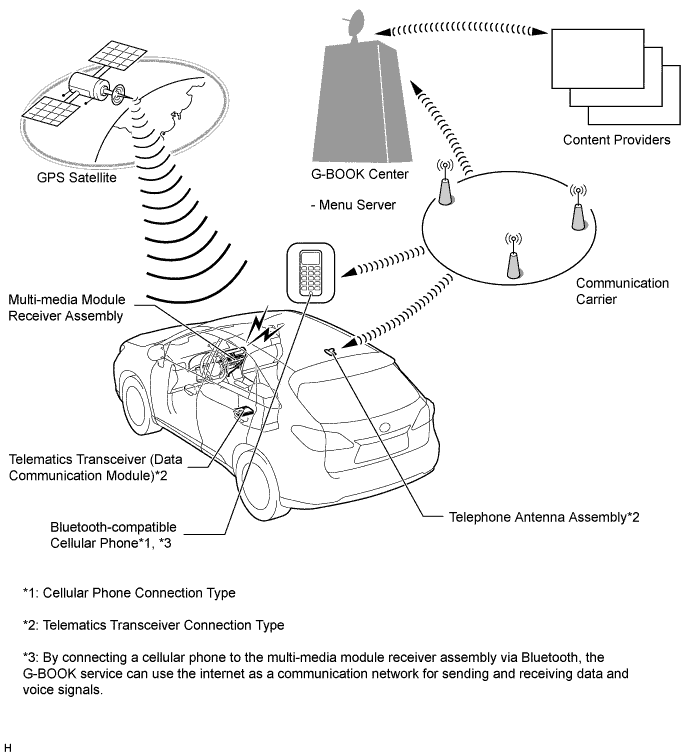
The G-BOOK is a telematics service that links the vehicle and G-BOOK network (provides information from the G-BOOK center or content providers).
-
When using the G-BOOK system, the multi-media module receiver assembly is connected via the communication devices indicated below:
Type Communication Device Cellular Phone Connection Type (Models without Telematics Transceiver (Data Communication Module)) Bluetooth-compatible Cellular Phone Telematics Transceiver Connection Type (Models with Telematics Transceiver (Data Communication Module)) Telematics Transceiver (Data Communication Module) -
The user needs to follow the instructions displayed on the multi-display of the multi-media module receiver assembly to start using the G-BOOK system service after applying for the service at a dealership.
-
-
MAJOR DIFFERENCE
-
The new models have been modified from the previous models as shown below:
-
A connection method using a cellular phone has been added to the G-BOOK (cellular phone connection type). This enables the user to connect to the G-BOOK network using the multi-media module receiver assembly and a Bluetooth-connected cellular phone.
-
The display and navigation module display has been discontinued. Instead, the multi-media module receiver assembly, which integrates the navigation ECU and radio receiver assembly, is provided for the conventional telematics transceiver connection type G-BOOK system.
-
The searching for POIs on the WEB function has been added. This function enables the latest information found on the Mapbar site, using a PC or cellular phone, to be transferred to the navigation system.
-
-
-
MAIN FEATURES
-
The G-BOOK main features are as follows:
Contents Outline Type Cellular Phone Connection Telematics Transceiver Connection Emergency Call Service Calls the emergency call center.
If it is necessary, the call is redirected to emergency facilities, dealerships or road service companies.
- X Theft Tracking Automatic Alarm Notification Notifies users with telephone or Short Message Service (SMS) after the G-BOOK center confirms that the theft detection system has been activated. - X Vehicle Tracking Service In case the vehicle is stolen, this service searches the location information of the vehicle to track it if requested by the user. - X Authorities Contact Service If requested by the user, a G-BOOK operator asks the authorities to find the stolen vehicle and take the case under their control. - X Remote Maintenance Service Inspection Notification Sends an e-mail message to the vehicle to notify the user of necessary inspections based on vehicle use conditions. - X Inspection and Maintenance Reservation Offers quick access for the user to easily make a reservation for periodic maintenance or service using the navigation system. - X Warning Notification When a system malfunction causes a warning light to illuminate or warning to be displayed in the combination meter assembly, the warning notification function transmits information about the warning to the G-BOOK center. Following this, if possible, a method of coping with the warning is sent from the G-BOOK center. This information can be displayed in the multi-media module receiver assembly. - X Operator Service Destination Setting If requested by the user, a G-BOOK operator searches for information to set the destination. X X POI Guidance Provides POI information for facilities in the area around the present location or facilities around the destination. X X News and Weather Forecasts Delivers news and weather forecast information as requested by the user. X X Navigation System Link Function G Route Search Predicts the occurrence of or changes in traffic congestion on the route to the destination and provides the most suitable route based on the latest traffic information, probe information* and past statistical data. X X Facility Information When icons obtained from the web site or POIs searched for on the web are displayed on the map, information about the facility can be viewed. X X The Nearest POI POIs near the vehicle's current position can be searched for by connecting to the G-BOOK center. X X Searching for POIs on the WEB POI information, which is was searched for on the Mapbar site, can be transferred to the navigation system. X X Tech Tips
-
X: Available
-
-: Not available
-
*: Probe information is gathered by using probe communication to aggregate driving data such as speed and position from vehicles equipped with G-BOOK.
-
-