MONITOR SYSTEM DETAILS
-
FUNCTION OF MAIN COMPONENTS
Component Function Inner Rear View Mirror Assembly*1 Display Displays the images of the area to the rear of the vehicle from the rear television camera assembly. AUTO Switch and LED
-
Pushing the AUTO switch while the rear monitor system is active will cause the display to disappear and illuminate an amber LED.
-
Pushing the AUTO switch again will cause the display to appear and illuminate a green LED.
Radio Receiver Assembly*2
-
Receives signals from the power management control ECU and turns the rear television camera assembly on and off.
-
Displays the image transmitted by the rear television camera assembly on the screen.
Rear Television Camera Assembly Captures images of the area to the rear of the vehicle and outputs visual signals to the inner rear view mirror assembly.*1 Captures images of the area to the rear of the vehicle and outputs visual signals to the radio receiver assembly.*2 Park/Neutral Position Switch Assembly Transmits the shift position signal to the inner rear view mirror assembly.*1 Sends an R shift position signal to the ECM.*2 ECM Sends an R shift position signal to the radio receiver assembly.
-
*1: Models without multi-display
-
*2: Models with Lexus display audio system
-
-
OPERATING CONDITION
-
This system operates when both the following conditions have been met:
-
Engine switch is on (IG).
-
Shift lever is in R.
-
-
-
FUNCTION
-
Area Displayed on Screen
-
On the display, objects on the right of the vehicle appear on the right side of the display panel, and objects on the left of the vehicle appear on the left side of the display panel.
-
The rear television camera assembly uses a wide-angle lens. The perceived distance from images that appear on the screen differs from the actual distance.
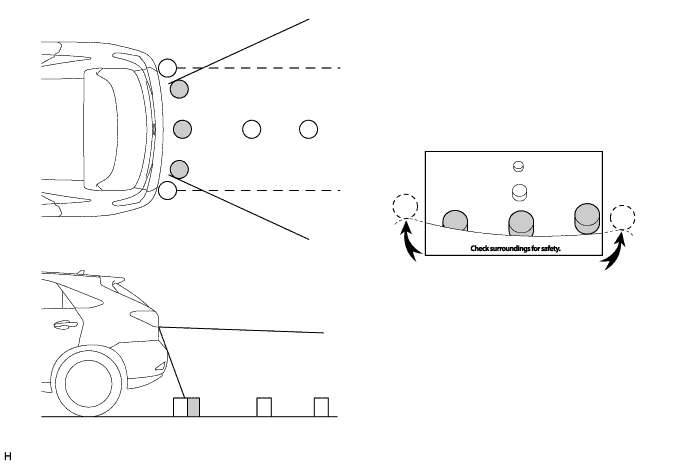
Note
The area displayed on the screen may vary according to vehicle status or road conditions. The area covered by the rear television camera assembly is limited. The rear television camera assembly does not show objects close to either corner of the bumper or show the area under the bumper.
-
-
Warning Message
-
A warning message appears at the bottom of the screen under the following conditions. The warning message appears in the same language that has been selected by the language selector of the multi-display.
Message Appearing at Bottom of Screen Warning Message Condition Check surroundings for safety. This message always appears during system operation.
-
-
-
CONSTRUCTION
-
Rear Television Camera Assembly
-
The rear television camera assembly consists of the wide-angle lens and the Charge Coupled Device (CCD).
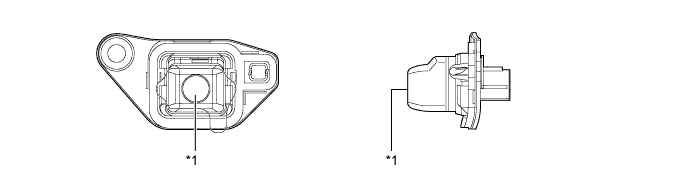
Text in Illustration *1 Wide-angle Lens - -
-
-
Inner Rear View Mirror Assembly (Rear View Monitor Display)
-
A 3.3 inch display is built in the inner rear view mirror assembly.
-
When reverse is selected, the display shows the image from the rear television camera assembly. The AUTO switch is used to turn the display on or off.
-
When the video is being displayed on the inner rear view mirror assembly, the guide lines for park assist are also displayed.
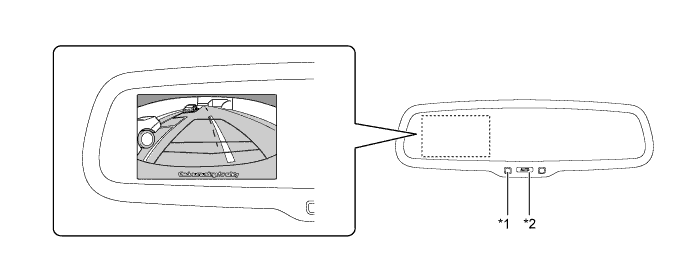
Text in Illustration *1 LED *2 AUTO (Display On/Off) Switch -
A description of the parking guide line mode display is provided in the following diagram.
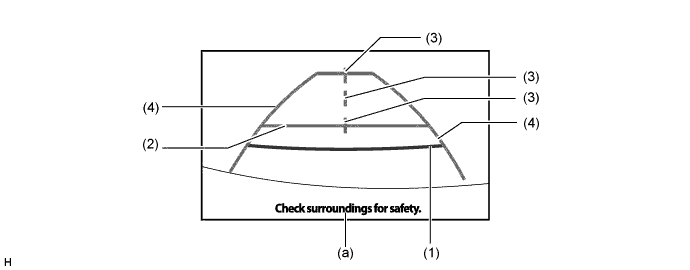
Item Description (1) Distance Guide Line (Red) Indicates a position on the ground approximately 0.5 m (1.6 ft.) behind the rear bumper. (2) Distance Guide Line (Blue) Indicates a position on the ground approximately 1.0 m (3.3 ft.) behind the rear bumper. (3) Vehicle Center Guide Lines (Blue) These lines indicate the estimated position on the ground of the center of the vehicle. (4) Vehicle Width Extension Guide Lines (Blue) Indicate the estimated vehicle width. (a) Warning Message Display Area Area where warning message is displayed.
-
-
-
FAIL-SAFE
-
The table below indicates fail-safe operation when a malfunction is detected:
Malfunctioning Part Detection Item Function Rear Television Camera Assembly Rear television camera assembly malfunction signal is detected. System stops signal reception and displays a dark screen.
-