MONITOR SYSTEM GENERAL
-
OUTLINE
-
Rear Monitor System
-
To assist the driver in parking the vehicle by monitoring the area behind it, the rear view monitor system has a rear television camera assembly mounted on the back door.
-
A view of the area behind the vehicle will be displayed on the inner rear view mirror assembly*1 or radio receiver assembly*2.
-
When reverse (R) is selected and the engine switch is on (IG), the rear view monitor system displays an image of the area behind the vehicle on the inner rear view mirror assembly*1 or multi-display assembly*2, via rear television camera assembly.
-
The rear view monitor display is canceled when the shift lever is moved to a position other than R.
-
*1: Models without multi-display
-
*2: Models with Lexus display audio system
-
-
-
-
MAJOR DIFFERENCE
-
The new models have been modified from the previous models as shown below:
-
A monitor system has been adopted on the Lexus display audio system.
-
-
-
PRECAUTION
-
General Precautions
-
Do not rely entirely on the rear view monitor system. When backing up, drive the vehicle as carefully as you would drive one that is not equipped with the rear view monitor system.
-
Never attempt to back up the vehicle only by observing the screen. If you do so, you could unexpectedly crash the vehicle or cause an accident because the image on the screen could differ from the actual situation. While backing up, also make sure to use the inside and outside rear view mirrors in order to directly verify the safety of the rear and surrounding areas.
-
-
Television Camera Precautions
-
The area covered by the rear television camera assembly is limited. The rear television camera assembly does not show objects close to either corner of the bumper or show items under the bumper. The clearance distance that appears on the screen is different from the actual distance because the rear television camera assembly uses a wide-angle lens.
-
The camera is unable to capture a clear image if the glass in front of the lens is dirty. Therefore, clean the glass if it has water drops, snow, or dirt on it.
-
In the following cases, it may become difficult to see the images on the screen, but this is not a malfunction:
-
In the dark (for example, at night).
-
When the temperature near the lens is very high or low.
-
When water droplets are adhering to the camera, or when humidity is high (for example, when it rains).
-
When the camera has scratches or dirt on it.
-
When foreign matter (for example, mud) is adhering to the camera lens.
-
When the sun or the beam of headlights is shining directly into the camera lens.
-
-
When the camera is used under fluorescent lights, sodium lights, or mercury lights etc., the lights and the illuminated area may appear to flicker.
-
When washing the vehicle with a high-pressure washer, do not spray water on the rear television camera assembly or surrounding area. High-pressure water can damage the camera.
-
If a bright light (for example, sunlight reflected off the vehicle body) is picked up by the rear television camera assembly, the smear effect*, particular to the CCD camera, may occur.
Tech Tips
*: Smear effect: A phenomenon that occurs when a bright light is received by the rear television camera assembly. When the image is transmitted to the screen, the light source will appear to have a vertical streak above and below it.
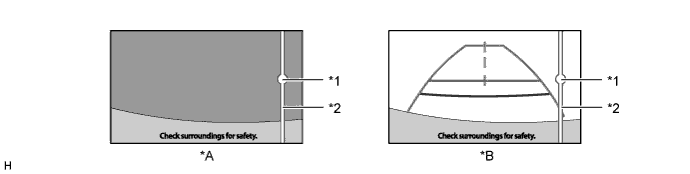
Text in Illustration *A Models with Lexus Display Audio System *B Models without Multi-display *1 Bright Light *2 Vertical Streak
-
-
Road Condition Precautions
-
Depending on the number of occupants, the load conditions, the slope of the road, and bumps in the road, a disparity may occur between the display indication and the actual distance on the road surface. Operate the vehicle carefully.
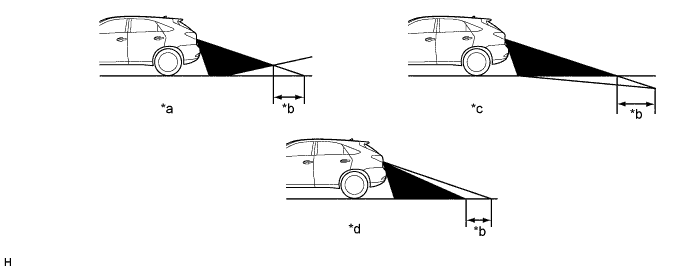
Text in Illustration *a Steep Uphill Incline behind Vehicle *b Disparity *c Steep Downhill Incline behind Vehicle *d Vehicle Posture Changed by Passengers and Load -
If a steep uphill incline is behind the vehicle, an obstacle will appear to be further away than it actually is, as shown in the illustration below.
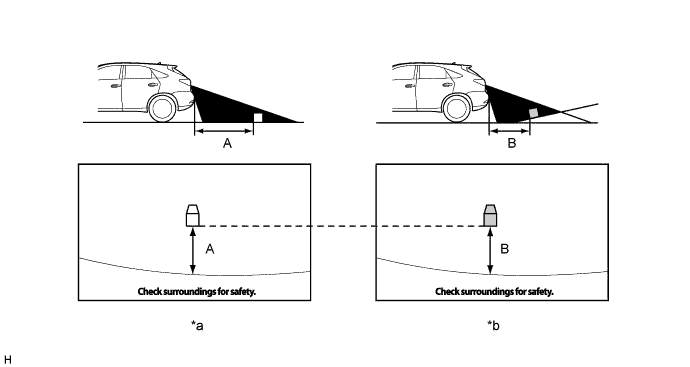
Text in Illustration *a Screen Image in Case A *b Screen Image in Case B -
Drive carefully when any 3-dimensional objects such as walls or vehicles are behind the vehicle as the distance and estimated guide lines are provided based on the road surface.
Tech Tips
The distance indication as shown on the screen varies between 3-dimensional objects, such as a vehicle and a flat plane such as the road surface. As shown in the following illustrations, points A and B are actually vertically in the same position and point C is a bit away from them, however, the points are displayed in order of distance from the vehicle, B, C and A. Therefore, the vehicle will come into contact with the 3-dimensional object if it is backed to point B on the screen.
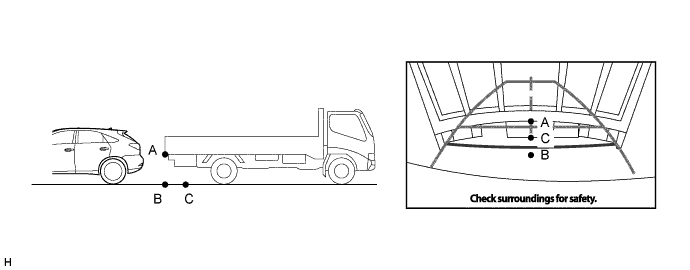
-
-