METER / GAUGE SYSTEM DETAILS
-
OPERATING CONDITION
-
Eco Driving Indicator Light Operation
-
Eco Driving Indicator Light can operate when all of the following conditions are met:
-
The ignition switch is ON and the engine is running.
-
The vehicle is being driven with the shift lever in D.
-
Temporary S mode is not selected.
-
The vehicle is at a speed of 130 km/h (81 mph) or below.
-
-
-
-
FUNCTION
-
Combination Meter Assembly
-
Buzzer Function
-
The table below shows the warning and reminder functions of the buzzer in the combination meter assembly.
1 Shift Position R Indication*1 2 Driver Seat Belt Warning (Maximum 5 Times) 3 Front Seat Belt Warning (Once) 4 Front Seat Belt Warning (Level 2) 5 Front Seat Belt Warning (Level 1) 6 EPS Warning 7 Lane Departure Alert Warning*2 8 Smart Key System Warning (Continuous)*3 9 Smart Key System Warning 1 (Intermittent)*3 10 Key Reminder*4 11 Smart Key System Warning 2 (Intermittent)*3 12 Smart Key System Warning (Once)*3 13 Multi-information Display Warning*5 14 Dynamic Radar Cruise Control Cancellation due to Low Speed Warning*6 15 Immobiliser Certification Reminder 16 Parking Brake Engaged Warning 17 Door Open while Driving Warning 18 Sport Shift Reject Warning 19 Light Reminder 20 Slide Roof Warning*1, *7 21 Turn Signal/Hazard Warning Operation - -
-
*1: Models without multi-information display
-
*2: Models with lane departure alert system
-
*3: Models with smart key system
-
*4: Models without smart key system
-
*5: Models with multi-information display
-
*6: Models with dynamic radar cruise control system
-
*7: Models with sliding roof system
-
-
Maintenance Required Reminder Function (Models for U.S.A.)
-
The engine oil maintenance required reminder will appear to inform the driver of maintenance requirements. On models without the multi-information display, the reminder function is performed using a warning light. On models with the multi-information display, a message is displayed on the multi-information display.
-
The combination meter assembly calculates the vehicle driving distance based on signals from the skid control ECU (brake actuator assembly).
-
There are 2 types of warnings: one is displayed when the accumulated vehicle driving distance is 4500 miles or more since the last time the system was reset, and the other is displayed when the accumulated vehicle driving distance is 5000 miles or more.
-
The maintenance required reminder functions as follows:
Multi-information Display Reminder Method 4500 miles or more 5000 miles or more Without Oil Maintenance Reminder Light Flashes for approximately 15 seconds Remains on while the ignition switch is ON With Oil Maintenance Reminder Message on the multi-information display MAINTENANCE REQUIRED SOON warning appears for approximately 15 seconds MAINTENANCE REQUIRED warning remains on -
After the required maintenance has been performed, the accumulated vehicle driving distance memorized in the combination meter assembly should be reset to zero using the ODO/TRIP switch knob.
Tech Tips
The accumulated vehicle driving distance memorized in the combination meter assembly can be reset using the following procedure.
-
Turn the ignition switch to ON, and make sure that trip meter A is displayed on the LCD*1 or the multi-information display*2.
-
Turn the ignition switch off. While pushing the ODO/TRIP switch knob, turn the ignition switch to ON.
-
With the ignition switch ON, continue holding the ODO/TRIP switch knob (for at least 5 seconds) with the LCD*1 or the multi-information display*2 counting down. Release the ODO/TRIP switch knob when the resetting procedure has completed.
-
When resetting is complete, the trip meter A will display "000000" for 1 second*1 or the multi-information display will show "RESETTING MAINTENANCE DATA" for 1 second*2.
*1: Models without multi-information display
*2: Models with multi-information display
-
-
-
LCD (Models without Multi-information Display)
-
Display Function Flow
-
The fuel gauge side LCD display changes in the following order due to ODO/TRIP switch operation.
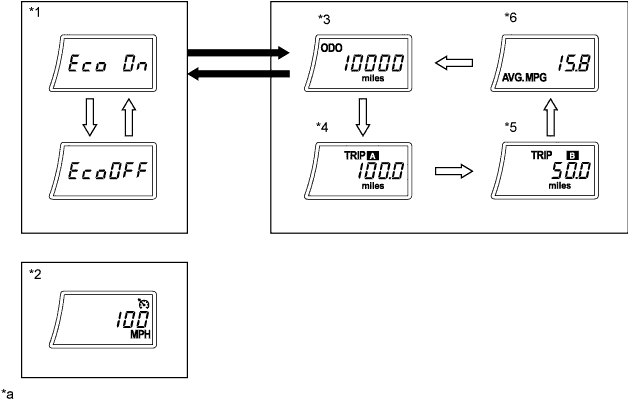
Text in Illustration *1 Eco Driving Indicator Light ON/OFF Mode *2 Cruise Control Set Speed *3 Odometer *4 Trip Meter A *5 Trip Meter B *6 Average Fuel Consumption 
ODO/TRIP switch pressed briefly. 
ODO/TRIP switch pressed and held. *a The illustrations shown are examples only. - - -
-
-
Multi-information Display (Models with Multi-information Display)
-
Display Function Flow
-
The multi-information display can be switched as shown in the flow chart below:
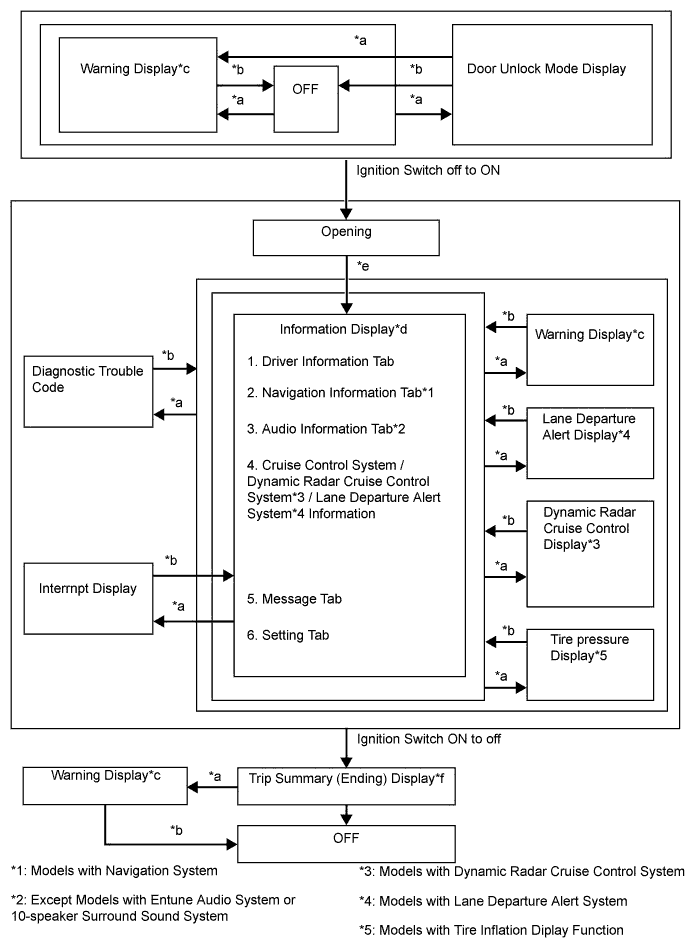
No. Display Change Condition *a Conditions are met. *b Conditions are not met. *c If there are multiple display requests, items will be displayed in sequence. *d An item or display is selected by operating the steering pad switch. *e After ignition switch ON. *f The Trip Summary (ending) display is displayed for a certain period of time after the ignition switch is turned off.
-
-
Information Display Tab Operation
-
The information currently displayed can be switched using the RIGHT switch of the steering pad switch assembly.
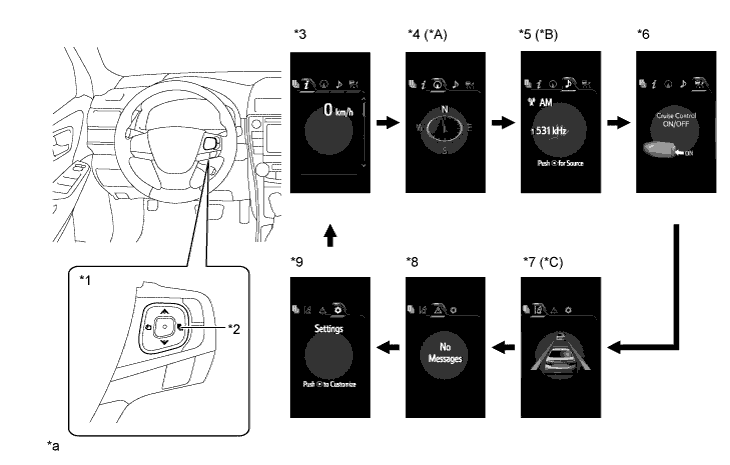
Text in Illustration *A Models with Navigation System *B Except Models with Entune Audio System or 10-speaker Surround Sound System *C Models with Lane Departure Alert System - - *1 Steering Pad Switch Assembly *2 RIGHT Switch *3 Drive Information *4 Navigation Information *5 Audio Information *6 Cruise Control System/Dynamic Radar Cruise Control System Information *7 Lane Departure Alert System Information *8 Warning Message *9 Settings - - *a The illustrations shown are examples only. - - RIGHT switch operation - - -
-
Drive Information Mode Function
-
The drive information tab shows vehicle information such as drivable range and fuel consumption.
-
The drive information display can be changed by using the UP/DOWN switch of the steering pad switch assembly.
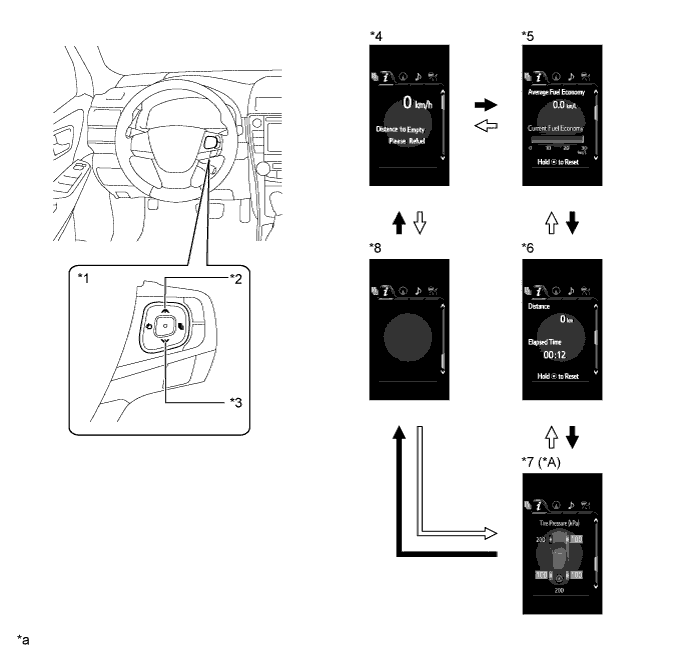
Text in Illustration *A Models with Tire Inflation Pressure Display Function - - *1 Steering Pad Switch Assembly *2 UP Switch *3 DOWN Switch *4 Drive Information 1 *5 Drive Information 2 *6 Drive Information 3 *7 Tire Pressure Indication *8 Blank *a The illustrations shown are examples only. - - DOWN switch operation UP switch operation
-
-
Setting Function
-
The items displayed on the multi-information display can be customized.
-
The following items can be selected on the information setting screen.
Item Available Setting Language The language used on the multi-information display can be selected:
-
English (Default)
-
French
-
Spanish
Unit The unit displayed on the multi-information display can be selected:
-
miles (MPG (US)) (Default*1)
-
miles (MPG (Imperial))
-
km (L/100 km) (Default*2)
-
km (km/L) (Default*3)
-
°F (Default*1)
-
°C (Default*2, *3)
Drive Information 1 2 items can be selected among the following:
-
Current Fuel Consumption (Bar Display)
-
Total Average Fuel Consumption between Reset Operations
-
Average Fuel Consumption after Engine Start-up
-
Average Fuel Consumption after Refueling
-
Total Average Vehicle Speed between Reset Operations
-
Average Vehicle Speed after Engine Start-up
-
Total Elapsed Time between Reset Operations
-
Elapsed Time after Engine Start-up
-
Cruising Range (Default of lower area)
-
Cruising Range after Engine Start-up
-
Total Cruising Range between Reset Operations
-
Vehicle Speed (Digital Display) (Default of upper area)
-
Blank
Drive Information 2 2 items can be selected among the following:
-
Current Fuel Consumption (Bar Display) (Default of lower area)
-
Total Average Fuel Consumption between Reset Operations (Default of upper area)
-
Average Fuel Consumption after Engine Start-up
-
Average Fuel Consumption after Refueling
-
Total Average Vehicle Speed between Reset Operations
-
Average Vehicle Speed after Engine Start-up
-
Total Elapsed Time between Reset Operations
-
Elapsed Time after Engine Start-up
-
Cruising Range
-
Cruising Range after Engine Start-up
-
Total Cruising Range between Reset Operations
-
Vehicle Speed (Digital Display)
-
Blank
Drive Information 3 2 items can be selected among the following:
-
Current Fuel Consumption (Bar Display)
-
Total Average Fuel Consumption between Reset Operations
-
Average Fuel Consumption after Engine Start-up
-
Average Fuel Consumption after Refueling
-
Total Average Vehicle Speed between Reset Operations
-
Average Vehicle Speed after Engine Start-up
-
Total Elapsed Time between Reset Operations (Default of lower area)
-
Elapsed Time after Engine Start-up
-
Cruising Range
-
Cruising Range after Engine Start-up
-
Total Cruising Range between Reset Operations (Default of upper area)
-
Vehicle Speed (Digital Display)
-
Blank
Eco Driving Indicator Light The Eco Driving Indicator Light can be switched:
-
ON
-
OFF (Default)
Interruption Display The following displays that appear as soon as the set conditions are met can be switched to ON (default) or OFF:
-
Turn-by-turn Navigation Display*4
-
Incoming Telephone Display
-
Cruise Control Switch Operation Guide
-
Rheostat
-
Shift Position Indicator
Accent Color The accent color can be changed:
-
Clear Blue (Default)
-
Clear Turquoise
-
Deep Orange
-
Radiant Orange
Speed Limit*1, *4 The display of speed limit information stored in the navigation system can be set:
-
With Caution (Default)
-
Only Display
-
OFF
Tech Tips
If "With Caution" is selected, the speed limit caution indicator (yellow frame) will come on when the vehicle speed exceeds the displayed speed limit.
Maintenance Required Reminder The accumulated vehicle driving distance memorized in the combination meter assembly can be reset. Initialization The set items can be initialized. *1: Models for U.S.A.
*2: Destination packages for Canada and Mexico
*3: Destination package for South Korea
*4: Models with navigation system
-
-
Warning Mode Function
-
When a warning is necessary, the warning display interrupts the current display on the multi-information display.
-
The master warning light may illuminate or blink and the buzzer in the combination meter assembly may sound depending on the item displayed on the multi-information display.
Priority Display Master Warning Light Buzzer 1 Adjusting LDA Camera*1 - - Adjusting Front Radar Beam*2 - - Checking Cruise Control C/D*2 - - Checking Cruise Control Brake*2 - - BRAKE!*3 - - 2 Dynamic radar cruise control warning reminder indicator (image display)*2 - - Lane departure alert warning reminder indicator (image display)*1 - - 3 Door open (while driving) (image display)*4 Blinks Sounds Door open (image display) - - Clearance sonar detection (image display)*5 - - Check Park Sonar System*5 Illuminates - Clean Park Sonar*5 Illuminates - 4 Shift to P position*6 Blinks Sounds 5 Check Electronic Power Steering System Illuminates Sounds Release Parking Brake Blinks Sounds Key Not Detected*6 Blinks Sounds 6 Check Anti-lock Brake System - Sounds Check Vehicle Stability Control System - - Check Tire Pressure Monitoring System*7 - - Check Brake System - - Engine Coolant Temp is High Illuminates Sounds Check Charging System - - Dynamic Radar Cruise Sensor Needs Cleaning*2 Illuminates Sounds Dynamic Radar Cruise Control Not Available*2 Illuminates Sounds LDA not available*1 Illuminates Sounds Smart Entry & Start System Check*6 Blinks Sounds Blind Spot Monitor Not Available*8 Illuminates Sounds Check Cruise Control System*2 Illuminates Sounds Check LDA System*1 Illuminates Sounds Check Pre-Collision System*3 Illuminates Sounds Check Blind Spot Monitor System*8 Illuminates Sounds Low Oil Pressure Illuminates Sounds LDA System is Unavailable Below Approx. 50 km/h*1 - - LDA System is Unavailable Below Approx. 32 MPH*1 - - LDA System is Unavailable at this Speed*1 - - 7 Dynamic radar cruise control indicator (image display)*2 - - Lane departure alert indicator (image display)*1 - - Pre-Collision System Alert*3 - - Pre-Collision System Turned Off*3 - - Turn Power OFF*6 Blinks Sounds Key Detected in Vehicle*6 Blinks Sounds Turn Headlights OFF Blinks Sounds Moon Roof Open*9 Blinks Sounds Key Battery Low
Engine Start:
Press Brake Pedal, Push Engine Switch with Key*6
Blinks Sounds Key Battery Low
Accessory Mode:
Push Engine Switch with Key*6
Blinks Sounds Engine Start:
Press Brake Pedal and Push Engine Switch*6
Blinks Sounds Accessory Mode:
Push Engine Switch*6
Blinks Sounds Shift to P Position to Start Blinks Sounds 8 Steering Lock ON Blinks Sounds Key Battery Low*6 Illuminates Sounds 9 Check Headlight Leveling System*10 Illuminates Sounds Check Headlight System*11 Blinks Sounds Check Auto High Beam System*12 Illuminates Sounds Tire pressure indicator (image display)*7 - - 10 Low Washer Fluid - - Low Fuel - - Traction Control OFF - - Maintenance Required Soon*14 Illuminates - Maintenance Required*14 Illuminates - Resetting Maintenance Data*14 - - Resetting of Maintenance Data Incomplete*14 - Sounds Power ON*6 - - Smart key symbol*6 - - Pre-Collision Brake is Disabled
Due to VSC OFF
- - Pre-Collision System Temporarily Not Available*3 - - Tire Pressure Monitoring System Reset Complete*7 - -
-
*1: Models with lane departure alert system
-
*2: Models with dynamic radar cruise control system
-
*3: Models with pre-collision system
-
*4: If the vehicle has reached a speed of 5 km/h (3 mph)
-
*5: Models with intuitive parking assist system
-
*6: Models with smart key system
-
*7: Models with tire inflation pressure display function
-
*8: Models with blind spot monitor system
-
*9: Models with sliding roof system
-
*10: Models with automatic headlight beam level control system
-
*11: Models with LED headlight system
-
*12: Models with automatic high beam system
-
*13: Except destination package for South Korea
-
*14: Models for U.S.A.
-
-
-