SAFETY CONNECT SYSTEM DETAILS
-
FUNCTION OF MAIN COMPONENTS
-
The main components in the safety connect system have the following functions:
Component Function Roof Console Box Assembly Manual (SOS) Switch Pressing the manual (SOS) switch allows the driver to connect to and communicate with the call center as an emergency assistance button (SOS) service or roadside assistance service. Telephone Microphone Assembly The user's voice is received by the microphone module. Manual (SOS) Switch Indicator Green The manual (SOS) switch indicator illuminates, blinks or turns off depending on the conditions when the Safety Connect Service is activated, operating, malfunctioning, during a call with the call center or the modes it is in. Red DCM (Telematics Transceiver)
-
Connects to the call center and allows the driver to speak with the call center advisor when the Automatic Collision Notification (ACN) service or the emergency assistance button (SOS) service is active.
-
Sends the exact location of the stolen vehicle to the call center based on the current vehicle location and speed obtained by the GPS when the Stolen Vehicle Location service is active.
-
The cellular phone module makes or receives calls.
-
The DCM (telematics transceiver) receives signals from the GPS antenna, calculates the position of the vehicle and transmits it to the call center.
-
Controls the on/off and blinking actions of the manual (SOS) switch indicator.
-
Dims the manual (SOS) switch indicator when the taillight relay on signal is received.
-
Sends the call center advisor's voice and voice prompts to the front No. 1 speaker assembly RH and front No. 2 speaker assembly RH.
BUB
-
Supplies power to the DCM (Telematics Transceiver) when the Automatic Collision Notification (ACN) service is activated.
-
The BUB is a non-rechargeable battery so it cannot be charged.
-
Determines that the safety connect system is malfunctioning if the battery is severely depleted, and illuminates the manual (SOS) switch red indicator.
Telephone and GPS Antenna Telephone Antenna This antenna is for a cellular phone. It is compatible with the transmission and reception of frequency bands of cellular phones. It transmits signals from the DCM (Telematics Transceiver) and receives signals from the call center. GPS Antenna Receives the signals from the GPS satellites and transmits these signals to the DCM (Telematics Transceiver). Stereo Component Amplifier Assembly Receives the mute signal from the DCM (Telematics Transceiver) to mute any audio sound. Front No. 1 Speaker Assembly RH Outputs the call center advisor's voice. Navigation Receiver Assembly Receives microphone voice signals from DCM (Telematics Transceiver). Airbag Sensor Assembly Sends an airbag deployment or collision detection signal to the DCM (Telematics Transceiver). Combination Meter Assembly Sends the vehicle speed signal to the DCM (telematics transceiver), the navigation receiver assembly and stereo component amplifier assembly. -
-
-
FUNCTION
-
Automatic Collision Notification Service
-
In the event of an accident in which any of the airbags are deployed or when a severe collision occurs, upon receiving a deployment signal from the airbag ECU assembly, the DCM (Telematics Transceiver) automatically makes an emergency call and transmits the vehicle position and user information to the call center. Then, the line will be automatically connected to the call center and the driver can speak with the call center advisor. If the driver is unable to communicate, the call center advisor will alert the PSAP nearest to the vehicle, explain the situation, and request dispatch of emergency services.
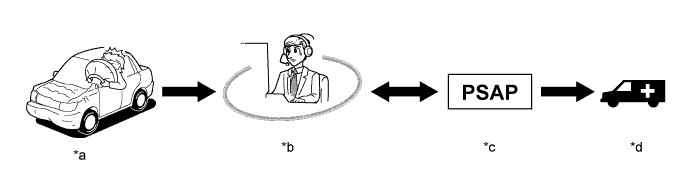
Text in Illustration *a Airbag Deployment or Collision Detection *b Call Center *c Public Safety Answering Point
(911 Emergency Services)
*d Ambulance
-
-
Emergency Assistance Button (SOS) Service
-
When the manual (SOS) switch is used in an on-road emergency, a call center advisor will locate the vehicle, judge the level of the emergency, and then offer emergency services by contacting a PSAP if it is appropriate to the situation.
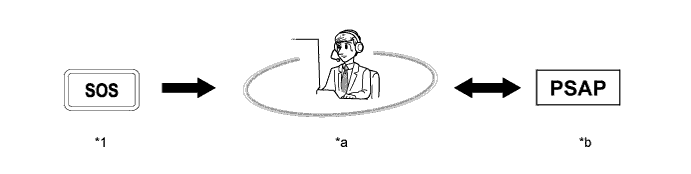
Text in Illustration *1 Manual (SOS) Switch - - *a Call Center *b Public Safety Answering Point
(911 Emergency Services)
-
-
Stolen Vehicle Location Service
-
In the event of vehicle theft, the user needs to alert the police and then call the call center. A call center advisor will connect to the stolen vehicle and track the vehicle based on the current vehicle location and speed obtained by the GPS. The call center advisor will also alert the police where required.
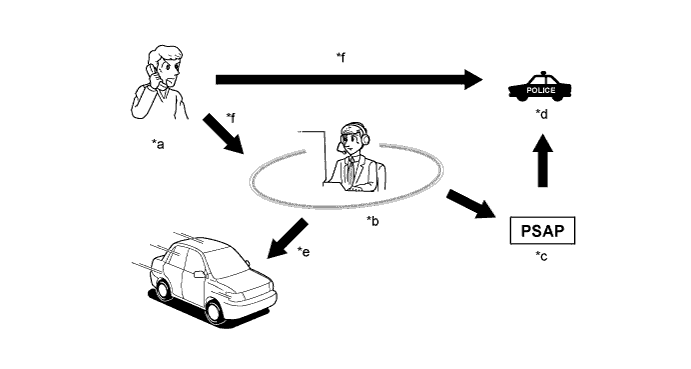
Text in Illustration *a Vehicle Stolen *b Call Center *c Public Safety Answering Point
(911 Emergency Services)
*d Police *e Track the Stolen Vehicle *f Alert
-
-
Roadside Assistance Service
-
Pressing the manual (SOS) switch will contact the call center, and a wide range of help, such as towing, flat tire, fuel delivery, etc.
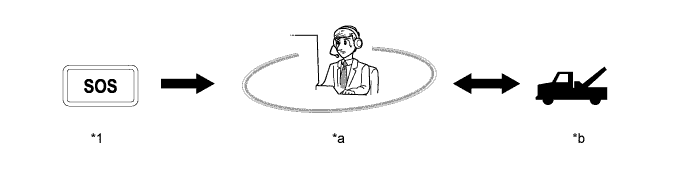
Text in Illustration *1 Manual (SOS) Switch - - *a Call Center *b Roadside Assistance Service
-
-
Safety Connect Mode
-
There are 3 modes depending on the subscription status. The available services vary depending on the mode.
Subscription Status Mode Type Available Services Before Subscription Shipping Mode*1 Automatic Collision Notification (ACN) Service Stolen Vehicle Location Service After Subscription*2 Active Mode Automatic Collision Notification (ACN) Service Stolen Vehicle Location Service Emergency Assistance Button (SOS) Service Roadside Assistance Service After Subscription Cancellation*3 Deactive Mode - Tech Tips
*1: This mode is only available at plants and ports to prevent vehicles from being stolen before delivery to dealers.
*2: The service becomes available after turning the ignition switch to ON while within a cellular phone coverage area in the United States. Even after cancellation of the service, the service will be made available again after pressing the manual (SOS) switch or setting-up the service using the Techstream. For details on setting-up the service using the Techstream, refer to the Repair Manual.
*3: To cancel the subscription, please contact the call center.
-
-
Voice Guidance Function
-
The following voice messages are played depending on the situation.
Voice Prompt Usage Condition "Safety Connect failure detected, please contact your dealer". The system detects a malfunction of the manual (SOS) switch red indicator.
The system repeats this warning once each time the ignition switch is turned to ON until the problem is fixed.
"Connecting to the Call Center". Active mode "Safety Connect Activation Failed". Deactive mode "Safety Connect Activation Complete". The DCM (Telematics Transceiver) activation completes normally. "Please make sure you are in an area with good cellular coverage and try again. If you continue to receive this message, contact your dealer". Follows the port activation sequence. "Unable to Connect to the Call Center". The DCM (Telematics Transceiver) cannot connect to the call center, such as the number of retries exceeded the limit, or center is unavailable. "Impact Detected". When the DCM (Telematics Transceiver) receives an collision detection signal. "Connecting to the Emergency Call Center". Call initiated to call center. "Unable to Connect to the Emergency Call Center". The DCM (Telematics Transceiver) cannot connect to emergency call center for some reason. "To cancel, please press the button again". When the emergency call is canceled. "Emergency call cancelled". When the emergency call can be canceled. "The system will try again". The DCM (Telematics Transceiver) cannot connect to emergency call center for some reason. "Welcome to Safety Connect". This voice prompt is a short version for activation. "To activate, please press the button again within 5 seconds". This voice prompt is an instruction for activation. "Safety Connect is not initialized". Reserved for activation. "Safety Connect is not active". When the DCM (Telematics Transceiver) is in deactive mode. "For information on setting up a new subscription or to initialize a subscription you've already set up, please press the button again within 5 seconds". When the DCM (Telematics Transceiver) is in deactive mode.
-
-
-
CONSTRUCTION
-
Manual (SOS) Switch Indicator
-
When the ignition switch is turned to ON, the manual (SOS) switch red indicator illuminates for 2 seconds and then turns off. Then, the manual (SOS) switch green indicator will illuminate for 2 seconds. The manual (SOS) switch indicator illuminates, blinks or turns off depending on the mode type.
-
When the ignition switch is turned off, the manual (SOS) switch red indicator and manual (SOS) switch green indicator turn off. If a call is in progress when the ignition switch is turned off, the call and indicators will continue to function.
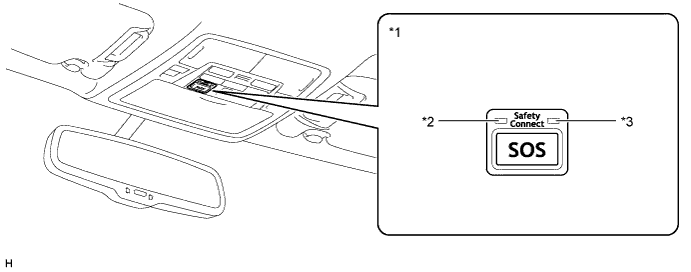
Text in Illustration *1 Manual (SOS) Switch *2 Manual (SOS) Switch Green Indicator *3 Manual (SOS) Switch Red Indicator - - -
Indicators shown in each mode are as follows:
Mode Type Manual (SOS) Switch Indicator Green Red Shipping Mode Blinks together with the manual (SOS) switch red indicator for approximately 20 seconds at 1 second intervals.
-
Blinks together with the manual (SOS) switch green indicator for approximately 20 seconds at 1 second intervals.
-
Then, illuminates when the DCM (Telematics Transceiver) has stored Diagnostic Trouble Codes (DTCs) in its memory.
Active Mode
-
Illuminates normally.
-
Blinks only during a call with the call center.
Illuminates when the DCM (Telematics Transceiver) has stored a Diagnostic Trouble Code (DTC). Deactive Mode Remains turned off. Illuminates when the DCM (Telematics Transceiver) has stored a Diagnostic Trouble Code (DTC). -
-
-
-
DIAGNOSIS
-
If there is a malfunction in the system, the DCM (Telematics Transceiver) stores Diagnostic Trouble Codes (DTCs) in its memory. For details, refer to the Repair Manual.
-