PARKING ASSIST MONITOR SYSTEM
-
DESCRIPTION OF DISPLAY
-
General
-
The parking assist monitor system displays in the manual assist and the parallel parking assist:
-
The manual assist used for parking the vehicle in a garage or parking space.
-
The parallel parking assist should be used for parallel parking the vehicle.
-
-
These assists can be changed by pressing the touch switch. The initial (default) setting is set toparallel parking assist.
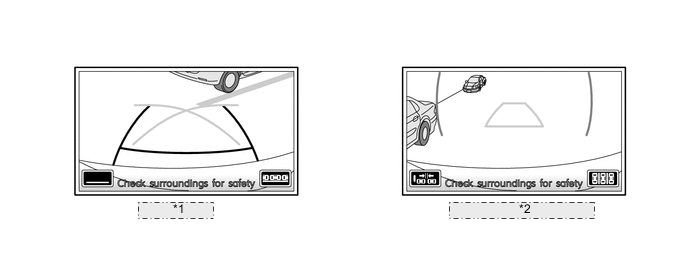
*1 Manual Assist *2 Parallel Parking Assist
-
-
Manual Assist
-
Three different manual assist modes can be selected from, A: parking guide line mode, B: guide deletion mode, and C: estimated guide line mode. The initial (default) setting for manual assist is the parking guide line mode.
-
The mode can be changed by touching the button located at the lower-left corner of the screen.
-
When the manual assist mode is operating, fixed guide lines appear superimposed on a view of the area behind the vehicle. These guide lines can be used to assist the driver while backing the vehicle.
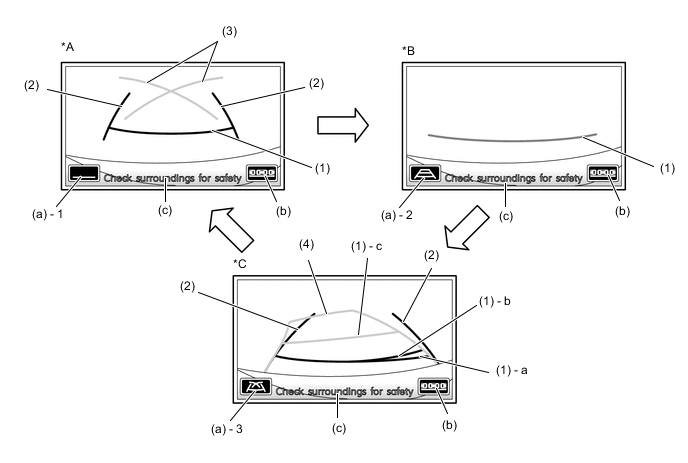
*A Parking Guide Line Mode *B Guide Line Deletion Mode *C Estimated Guide Line Mode - - Item Mode Outline A B C (1) or (1) - b Distance Guide Line (Red) ○ ○ ○ The guide line indicates a position on the ground about 0.5 m (1.5 ft) behind the rear bumper. (1) - a Distance Guide Line (Green) - - ○ The guide line moves, together with estimated guide lines, in sync with the steering wheel. The center of the line indicates a position on the ground about 0.5 m (1.5 ft) behind the rear bumper. (1) - c Distance Guide Line (Yellow) - - ○ The guide line moves, together with estimated guide lines, in sync with the steering wheel. The center of the line indicates a position on the ground about 1.0 m (3.0 ft) behind the rear bumper. (2) Vehicle Width Extension Guide Line ○ - ○ These guide lines indicate the estimated vehicle width extension. (3) Parking Assist Guide Line ○ - - These guide lines the points at which driver should turn the steering wheel fully (4) Estimated Guide Line - - ○ These guide lines indicate the estimated course in which the vehicle moves backward. The guide lines move in sync with the steering wheel. (a) - 1 Guide Line Deletion Mode Touch Button ○ - - Touching this button turns guide line deletion mode on. (a) - 2 Estimated Guide Line Mode Touch Button - ○ - Touching this button turns estimated guide line mode on. (a) - 3 Parking Guide Line Mode Touch Button - - ○ Touching this button turns parking guide line mode on. (b) Parallel Parking Assist Mode Touch Button ○ ○ ○ Touching this button turns parallel parking assist mode on. (c) Warning Message Display Area ○ ○ ○ Display a warning message.
-
-
-
Parallel Parking Assist
-
The parallel parking assist can select the following two display modes: Standard Mode and Narrow Mode*.
-
The mode can be changed by touching the button located at the lower-left corner of the screen.
-
The narrow mode is designed for situations in which the parking space is narrower than the standard mode.
-
Initial (default) parallel parking assist is standard mode.
*: Only for European and Australian models
Figure 1. Standard Mode
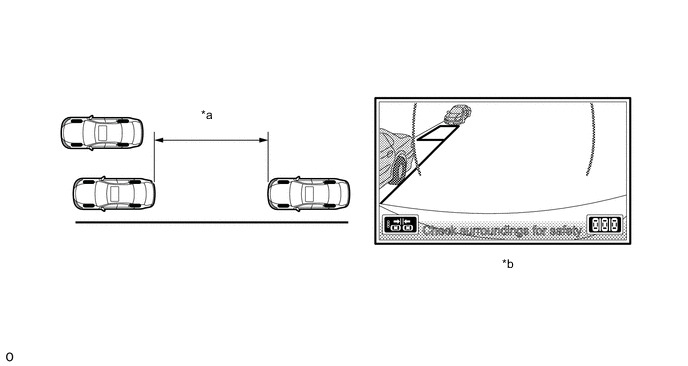
*a Space needed for parking *b Display Status Figure 2. Narrow Mode*
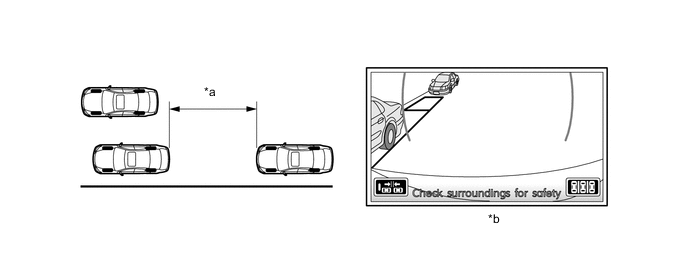
*a Space needed for parking *b Display Status
-
*: Only for European and Australian models
-
-
The guide lines displayed for the parallel parking assist mode change in accordance with the parking maneuvers of the vehicle. This provides the driver with an appropriate steering angle and timing during parallel parking.
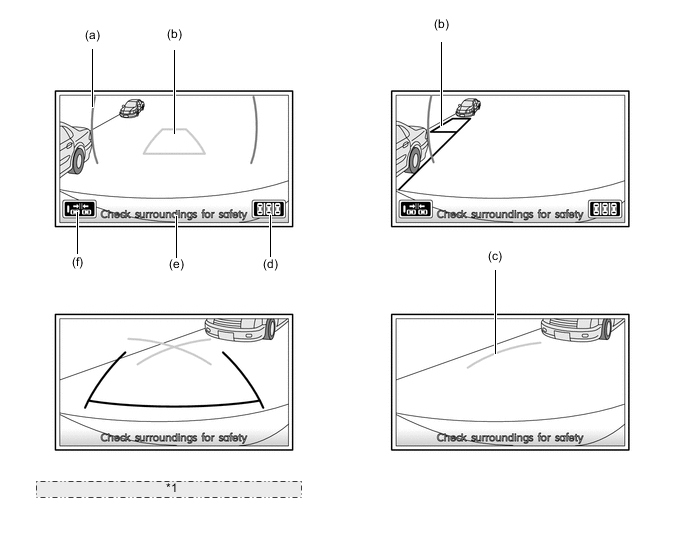
*1 Same guide lines are shown as in manual assist Item Outline (a) Green Vertical Line A guide line that serves as a reference position for starting parallel parking. (b) Green Outline A guide line that serves as a reference position for completing the intended parking. This guide line disappears once the vehicle starts moving backward. (c) Parking Guide Line A guide line indicating part of the prospective outer path of the vehicle when the steering is turned fully to the right or left side.
This guide line appears only after the guide lines (a) and (b) disappear.
(d) Touch Switch Manual Assist Mode Switch This switch changes between parallel parking assist mode and manual assist mode. (e) Warning Message Display Displays a warning message. (f)* Mode Select Switch Changes between standard and narrow modes. *: Only for European and Australian models
-
-
Warning Message
-
A warning message appears at the bottom or the center of the screen under the conditions listed below, regardless of whether the system is in the manual or parallel parking assist mode. The warning message appears in the same language that has been selected by the language selector of the multi display (from among English, Danish, Dutch, French, German, Italian, Spanish, Swedish, Norwegian, and Portuguese).
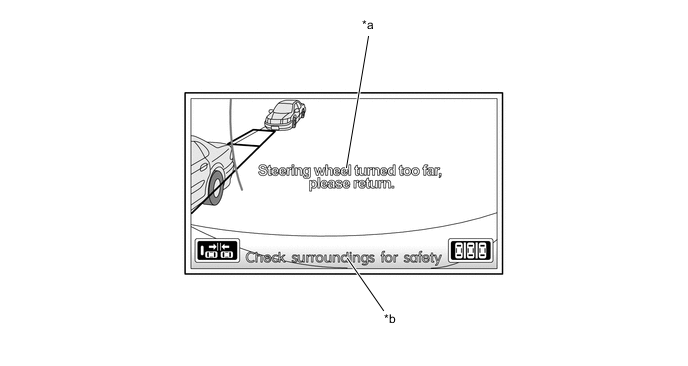
*a Center of the Screen *b Bottom of the Screen Warning Message appearing in the center of the Screen Warning Message Outline System not ready This message appears if the system is started without initializing after a part is replaced. Steering wheel turned too far, please return This message is displayed when the system cannot perform the assist operation under the following situations:
-
When the vehicle starts in the parallel parking assist mode, the distance between own vehicle and the other parked vehicles is not approximately 1 m (3.2 ft.) (too far ).
-
The steering wheel is turned too far.
Warning Message appearing at the bottom of the Screen Warning Message Outline Checks surroundings for safety This message always appears during system operation. System Initializing This message appears when the system is restarted if the parking assist ECU detects that a battery terminal has been disconnected and subsequently reconnected. Guidance Unavailable
-
This message is displayed when the vehicle is moved back furthermore, even through a message, "Steering wheel turned too far, please return", is displayed in the center of the display and also the system judges it is impossible to perform the assist operation.
-
This message is displayed when an error in the steering sensor or a gyro signal error of the navigation ECU occurs.
-
-
-