PRE-COLLISION SYSTEM
-
FUNCTION OF MAIN COMPONENTS
Component Function Pre-collision City Sensor
-
Acquires information about a preceding vehicle from a monocular camera sensor and laser sensor to perform pre-collision system control.
-
Sends the information display, PCS OFF warning light and multi buzzer signals to the combination meter assembly based on pre-collision control information.
-
Sends an operation signal to the camera heater.
Camera Heater (Pre-collision City Heater) The camera heater is heated according to signals from the pre-collision city sensor. PCS Switch
-
Turn the pre-collision system on/off.
-
Switches between the 3 warning timings (Far, Middle and Near) when pressed.
VSC OFF Switch Switches the brake system to TRC OFF mode or VSC OFF mode when operated by the user, and also turns off the pre-collision brake assist and pre-collision brake functions (the warning function can still operate). Yawrate Sensor Detects the yaw rate and longitudinal and lateral acceleration speeds of the vehicle, and sends signals to the pre-collision city sensor via CAN communication. Speed Sensors Detects the wheel speed and sends signals to the skid control ECU. Stop Light Switch Assembly Detects when the brake pedal is depressed and sends signals to the pre-collision city sensor and skid control ECU. Steering Sensor Detects the steering angle and direction and sends signals to the pre-collision city sensor via CAN communication. ECM
-
Detects the shift position signal and accelerator pedal opening angle and sends that information to the pre-collision city sensor.
-
Performs engine output control based on information from the pre-collision city sensor.
Main Body ECU (Instrument Panel Junction Block Assembly) Outputs vehicle specification information. Brake Actuator Assembly
-
Skid Control ECU
-
Receives a brake assist standby request signal from the pre-collision city sensor and switches the brake assist to standby mode. When a stop light switch signal is input, it activates the brake assist.
-
Receives a pre-collision brake request signal from the pre-collision city sensor, and then applies the brakes.
-
Transmits vehicle speed signals to the pre-collision city sensor.
Combination Meter Assembly
-
Illuminates to warn the driver in accordance with signals from the pre-collision city sensor.
-
Flashes when the pre-collision system is malfunctioning.
-
Illuminates when the pre-collision system is temporarily disabled.
-
Illuminates when the pre-collision system is not available due to certain reasons or when pre-collision brake and pre-collision brake assist operation are disabled since the VSC system has been disabled.
-
Displays a warning message to inform or warn the driver of the system condition in accordance with signals from the pre-collision city sensor.
-
Sounds the multi buzzer according to signals from the pre-collision city sensor.
-
-
FUNCTION
-
The pre-collision system uses the monocular camera sensor and laser sensor inside the pre-collision city sensor to determine if there is a risk of this vehicle colliding with the preceding vehicle.
-
When the probability of a collision is high, the pre-collision system sends a warning via the meter display and buzzer, and performs brake assist control. Additionally, when the probability of a collision is extremely high, the system performs brake control in order to reduce the impact force if a collision occurs.
-
During brake control by the pre-collision system, the skid control ECU illuminates the stop light in order to inform any following vehicles that this vehicle is braking.
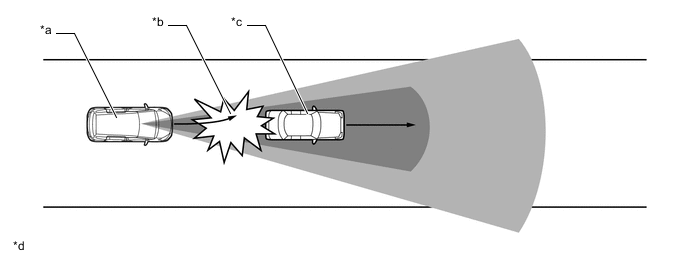
Text in Illustration *a This Vehicle *b Probability of collision extremely high *c Preceding Vehicle *d The illustrations shown are examples only. 
Laser Sensor Detection Area 
Monocular Camera Sensor Image Recognition Area
-
-
OPERATING CONDITION
-
The pre-collision system is enabled and determines that the possibility of a frontal collision with a vehicle is high.
Pre-collision System Operating Conditions Pre-collision Warning
-
Vehicle speed is approximately 15 to 140 km/h (10 to 86 mph).
-
The relative speed between your vehicle and the vehicle ahead is greater than approximately 15 km/h (10 mph).
Pre-collision Brake Assist
-
Vehicle speed is approximately 30 to 80 km/h (19 to 49 mph).
-
The relative speed between your vehicle and the vehicle ahead is greater than approximately 30 km/h (19 mph).
-
The brake pedal is being depressed.
Pre-collision Braking
-
Vehicle speed is approximately 10 to 80 km/h (7 to 49 mph).
-
The relative speed between your vehicle and the vehicle ahead is greater than approximately 10 km/h (7 mph).
Tech Tips
In case of the following, the system will not operate:
-
Steering Sensor zero point calibration has not been completed
-
If VSC is disabled (only the pre-collision warning function will be operational)
-
If the PCS OFF warning light is flashing or illuminated
-
If the shift position is in R
-
If a battery terminal has been disconnected and reconnected and then the vehicle has not been driven for a certain amount of time
-
-
If either of the following situations occur while the pre-collision brake function is operating, it will be canceled:
-
The accelerator pedal is depressed strongly
-
The steering wheel is turned sharply or abruptly
-
-
If the vehicle is stopped by the operation of the pre-collision brake function, the operation of the pre-collision brake function will be canceled after the vehicle has been stopped for approximately 2 seconds.
-
When the driver is depressing the brake pedal, the system judges that the driver is preparing to avoid a collision, so the system may delay the pre-collision brake activation timing.
-
During the following, the driver operations takes precedence and the system may not operate:
-
The accelerator pedal is depressed strongly
-
The steering wheel is turned sharply or abruptly
-
-
In some situations such as the following, the system may determine that there is a possibility of a frontal collision and operate:
-
When changing lanes while overtaking a preceding vehicle
-
When overtaking a preceding vehicle that is changing lanes
-
When overtaking a preceding vehicle that is making a left/right turn

-
When passing a vehicle in an oncoming lane that is stopped to make a left/right turn

-
When driving on a road where relative location to vehicle ahead in an adjacent lane may change, such as on a winding road

-
When rapidly closing on a vehicle ahead.
-
If the front of the vehicle is raised or lowered, such as when the road surface is uneven or undulating
-
When approaching objects on the roadside, such as guardrails, utility pales, trees, or walls
-
When there is a vehicle or object by the roadside at the entrance of a curve

-
When driving on a narrow path surrounded by a structure, such as in a tunnel or on an iron bridge
-
When there is a metal object (manhole cover, steel plate, etc.), steps, or a protrusion on the road surface or roadside
-
When passing through a place with a low structure above the road (low ceiling, traffic sign, etc.)

-
When passing under an object (billboard, etc.) at the top of an uphill road

-
When rapidly closing on an electric toll gate barrier, parking area barrier, or other barrier that opens and closes
-
When using an automatic car wash
-
When driving through or under objects that may contact the vehicles, such as thick grass, tree branches, or a banner

-
When the vehicle is hit by water, snow, dust, etc. from a vehicle ahead
-
When driving through steam or smoke
-
When there are patterns or paint on the road or a wall that may be mistaken for a vehicle
-
When driving near an object that reflects radio waves, such as a large truck or guardrail
-
When driving near a TV tower, broadcasting station, electric power plant, or other location where strong radio waves or electrical noise may be present
-
-
In some situations such as the following, a vehicle may not be detected by the pre-collision city sensor, preventing the system from operating properly:
-
If an oncoming vehicle is approaching your vehicle
-
If a vehicle ahead is a motorcycle or bicycle
-
When approaching the side or front of a vehicle
-
If a preceding vehicle has a small rear end, such as an unloaded truck
-
If a preceding vehicle has a low rear end, such as a low bed trailer

-
If a vehicle ahead is carrying a load which protrudes past its rear bumper
-
If a vehicle ahead has extremely high ground clearance

-
If a vehicle ahead is irregularly shaped, such as a tractor or side car
-
If the sun or other light is shining directly on a vehicle ahead
-
If a vehicle cuts in front of your vehicle or emerges from beside a vehicle
-
If a vehicle ahead makes an abrupt maneuver (such as sudden swerving, acceleration or deceleration)
-
When suddenly cutting behind a preceding vehicle
-
When a vehicle ahead is not directly in front of your vehicle

-
When driving in inclement weather such as heavy rain, fog, snow, or a sandstorm
-
When the vehicle is hit by water, snow, dust, etc. from a vehicle ahead
-
When driving through steam or smoke
-
When driving in a place where the surrounding brightness changes suddenly, such as at the entrance or exit of a tunnel
-
When a very bright light, such as the sun or the headlights of oncoming traffic, shines directly into the pre-collision city sensor
-
When the surrounding area is dim, such as at dawn or dusk, or while at night or in a tunnel
-
After the engine has started the vehicle has not been driven for a certain amount of time
-
While making a left/right turn and for a few seconds after making a left/right turn
-
While driving on a curve and for a few seconds after driving on a curve
-
If your vehicle is skidding
-
If the front of the vehicle is raised or lowered

-
If the wheels are misaligned
-
If a wiper blade is blocking the pre-collision city sensor
-
The vehicle is wobbling
-
The vehicle is being driven at extremely high speeds
-
When driving on a hill
-
If the pre-collision city sensor is misaligned
-
-
In some situations such as the following, sufficient braking force may not be obtained, preventing the system from performing properly:
-
If the braking functions cannot operate to their full extent, such as when the brake parts are extremely cold, extremely hot, or wet
-
If the vehicle is not properly maintained (brakes or tires are excessively worn, improper tire inflation pressure, etc.)
-
When the vehicle is being driven on a gravel road or other slippery surface
-
-
If the PCS OFF warning light Illuminates and a warning message is displayed on the multi-information display, the pre-collision system may be temporarily unavailable.
-
In the following situations, the PCS OFF warning light will turn off, the message will disappear and the system will become operational when normal operating conditions return:
-
When the area around the pre-collision city sensor is hot, such as in the sun
-
When the windshield glass is fogged up, or covered with condensation or ice
-
When the pre-collision city sensor or the area around the sensor is cold, such as in an extremely cold environment
-
If the area in front of the pre-collision city sensor is obstructed, such as when the hood is open
-
-
-
If the PCS OFF warning light flashes and a warning message is displayed on the multi-information display, the pre-collision system may be a malfunction in the system.
-
If VSC is disabled, the pre-collision brake assist and pre-collision brake functions are also disabled. However, the pre-collision warning function will still operate.
-
-
CONSTRUCTION
-
Pre-collision City Sensor
-
The pre-collision city sensor consists of a laser sensor, monocular camera sensor, etc. 2 types of sensors such as the laser sensor and camera sensor are used to ensure accurate and reliable detection.
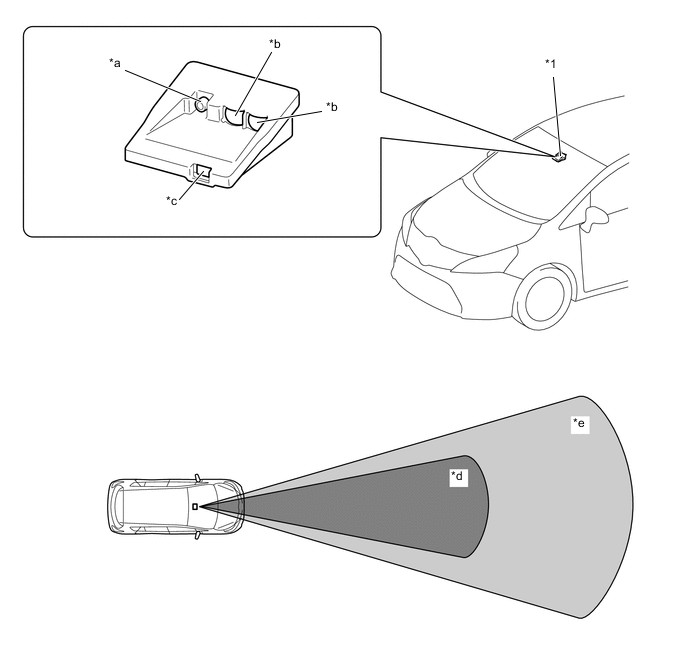
*1 Pre-collision City Sensor - - *a Monocular Camera Sensor *b Laser Sensor (Light Reception Area) *c Laser Sensor (Irradiation Area) *d Laser Sensor Recognition Range *e Monocular Camera Sensor Recognition Range - - -
Monocular Camera Sensor
-
The camera sensor detects three-dimensional objects on or near the road ahead while driving and determines whether it is necessary to avoid a collision with the object.
-
-
Laser Sensors
-
The laser sensors detect vehicles or other objects on or near the road ahead while driving and determine whether a collision is imminent based on the location, speed and heading of the vehicle or object.
-
-
-
Camera Heater (Pre-collision City Heater)
-
The camera heater installed between the pre-collision city sensor and windshield glass, is heated the heater pattern area according to signals from the pre-collision city sensor in order to prevent the windshield glass on the front of the pre-collision city sensor from fogging up, and also to remove fog buildup.
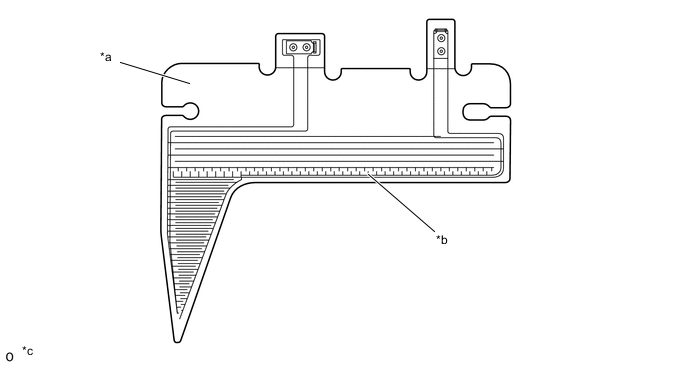
*a Camera Heater (Pre-collision City Heater) *b Heater Pattern *c The illustration is an external view. The illustration is a representative example for the structure explanation. - - -
When all of the following conditions have been met, the camera heater operates.
-
System malfunction is not detected.
-
Ignition switch is turned to ON.
-
Ambient temperature 5 °C (41 °F) or less.
-
When the ambient temperature is between 5°C (41°F) and 20°C (68°F) and the windshield glass on the front of the pre-crash safety city sensor begins to fog up while driving (fogging detected in the pre-crash safety city sensor).
-
-
After the camera heater is activated, the camera heater briefly stops operating every 30 minutes. When the above conditions are met after the camera heater stops operating, the camera heater activates again.
-
-
Combination Meter Assembly
-
The combination meter assembly uses the multi-information display, PCS OFF warning light and multi buzzer to provide the driver with pre-collision system warnings and indications.
-
If the pre-collision city sensor determines that the possibility of a collision is high, it sends a signal to the combination meter assembly. Upon receiving this signal, the combination meter assembly indicates a warning using the multi-information display and multi buzzer. Details are indicated below.
When there is a high possibility of a collision Multi-information Display Master Warning Light PCS Warning Light Multi Buzzer BRAKE! - - Sounds Intermittent -
When the system is not available, the following warning occurs to warn the driver.
When a system malfunction is detected Possible Conditions Multi-information Display Master Warning Light PCS Warning Light Multi Buzzer System Failure PRE-COLLISION SYSTEM MALFUNCTION VISIT YOUR DEALER Illuminates Flashes Sounds once Auxiliary battery voltage has decreased, etc. PRE-COLLISION SYSTEM UNAVAILABLE* - Illuminates - Operating temperature range of pre-collision city sensor exceeded FRONT CAMERA UNAVAILABLE* - - Windshield glass is dirty or fogged up FRONT CAMERA VISION BLOCKED. CLEAN AND DEMIST WINDSHIELD* - - Tech Tips
*: The message appears for 6 seconds on the multi-information display.
When the VSC OFF switch is pressed Multi-information Display Master Warning Light PCS Warning Light VSC OFF Indicator Light VSC TURNED OFF PRE-COLLISION BRAKE SYSTEM UNAVAILABLE* - Illuminates Illuminates Tech Tips
*: The message appears for 6 seconds on the multi-information display.
-
-
PCS Switch
-
A PCS switch is provided to disable the system. When pressed and held for approximately 3 seconds, the pre-collision system will be disabled. A message will be displayed for 6 seconds and the PCS OFF warning light will be illuminated. When the switch is pressed again while the system is disabled, the system will be reenabled.
-
The switch is also used to change the warning timing in 3 levels: far, middle, near. The warning timing changes in the order below each time the switch is pressed.

-
-
-
DIAGNOSIS
-
Initial Check
-
The pre-collision city sensor performs an initial check on the system for approximately 3 seconds after the ignition switch has been turned to ON.
-
-
Monitor Function
-
After completing the initial check, the pre-collision system becomes ready to operate. During this time, the pre-collision city sensor periodically monitors the system for any malfunctions.
-
-
Diagnostic Trouble Code (DTC)
-
If the pre-collision city sensor detects a malfunction in the pre-collision system, it stores a 5 digit Diagnostic Trouble Code (DTC) in memory.
-
-