PARKING ASSIST MONITOR SYSTEM
-
OUTLINE
-
The parking assist monitor system helps the driver with parking the vehicle by showing the view behind the rear of the vehicle and reference fixed parking guide lines on the screen.
-
This system consists of the rear television camera assembly and the radio and display receiver assembly.
-
-
PRECAUTION
-
Ignition Switch Expressions
-
The type of ignition switch used on this model differs depending on the specifications of the vehicle. The expressions listed in the table below are used in this section.
Expression Ignition Switch
(Position)
Engine Switch
(Condition)
Ignition Switch off LOCK Off (LOCK) Ignition Switch ACC ACC On (ACC) Ignition Switch ON ON On (IG) Engine Start START On (Start)
-
-
General Precautions
-
Do not rely entirely on the parking assist monitor system. Use caution, just as when driving any vehicle.
-
Never back up while looking only at the screen. The image on the screen may differ from actual conditions. If you back up while looking only at the screen, you may hit an object or have an accident. When backing up, be sure to check by looking behind and all around the vehicle, both directly and using the inner rear view mirror assembly and outer rear view mirror assemblies, before proceeding.
-
-
Road Condition Precautions
-
Depending on the number of occupants, the load conditions, the slope of the road, and bumps in the road, a disparity may occur between the screen indication and the actual distance on the road surface. Operate the vehicle carefully.
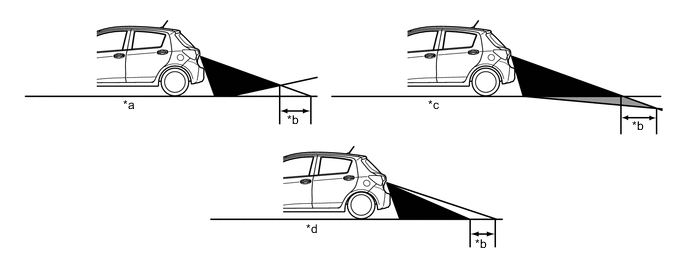
*a Steep Uphill Incline behind Vehicle *b Disparity *c Steep Downhill Incline behind Vehicle *d Vehicle Posture Changed by Passengers and Load -
If a steep uphill incline is behind the vehicle, an obstacle appears to be further away than it actually is, as shown in the illustration below.
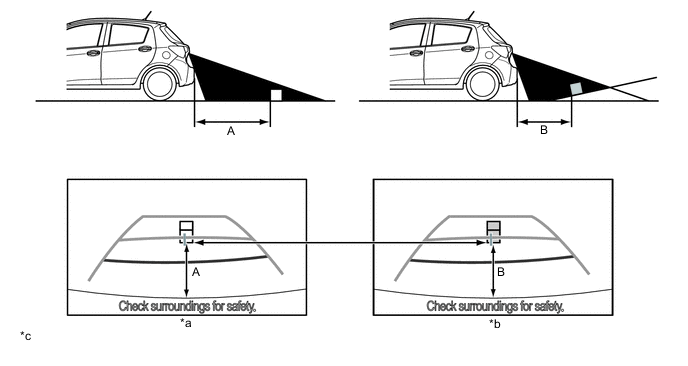
*a Screen Image in Case A *b Screen Image in Case B *c The illustrations shown are examples only. The illustrations may differ from the actual vehicle screens. - - -
Drive carefully when any 3-dimensional objects such as walls or vehicles are placed behind the vehicle as the distance and estimated guide lines are provided based on the road surface.
-
The distance indication as shown on the screen varies between 3-dimensional objects such as a vehicle and objects a flat plane such as the road surface. As shown in the following illustrations, points A and B are actually vertically in the same position and point C is a bit away from them, however, the points are displayed in order of distance from the vehicle, B, C and A. Therefore, the vehicle will come into contact with the 3-dimensional object if it is backed to point B on the screen.
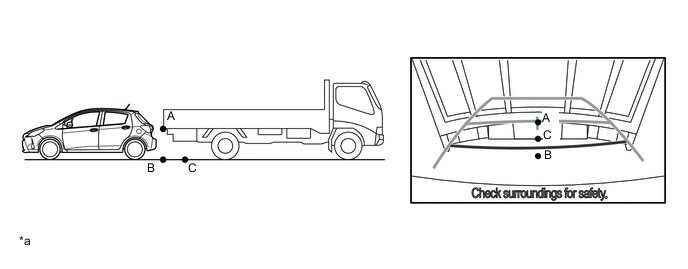
*a The illustrations shown are examples only. The illustrations may differ from the actual vehicle screens. - - -
-
-
Television Camera Precautions
-
In the following cases, it may become difficult to see the images on the screen, but this is not a malfunction:
-
In the dark (for example, at night).
-
When the temperature near the lens is very high or low.
-
When water droplets are adhering to the camera, or when humidity is high (for example, when it rains).
-
When the camera has scratches or dirt on it.
-
When foreign matter (for example, mud) is adhering to the camera lens.
-
When the sun or the beam of headlights is shining directly into the camera lens.
-
-
When the camera is used under fluorescent lights, sodium lights, or mercury lights etc., the lights and the illuminated area may appear to flicker.
-
Do not spray the camera or camera area using a high-pressure washing machine. High levels of water pressure could cause the camera to malfunction.
-
-