WIDE VIEW FRONT AND SIDE MONITOR SYSTEM
-
FUNCTION OF MAIN COMPONENTS
Component Function Multi-display Assembly Displays the image transmitted by the parking assist ECU on the screen. Monitor Switch Enables the driver to operate the wide view front and side monitor system from the steering pad switches. Parking Assist ECU
-
Turns the wide view front and side monitor system on/off in accordance with the signals input from the ECU and switches.
-
Outputs visual signals from the front television camera and the side television camera to the multi-display assembly.
Television Camera Assemblies Output the images received by television camera assemblies installed on the front grille and passenger side outer rear view mirror to the parking assist ECU. Skid Control ECU Outputs vehicle speed signals to the parking assist ECU. ECM Outputs shift position signals to the parking assist ECU. Main Body ECU (Driver Side Junction Block Assembly) Sends information such as mirror retraction signals to the parking assist ECU. Steering Angle Sensor Detects the steering angle and transmits signals to the parking assist ECU. Clearance Warning ECU Assembly* Sends clearance sonar detection information to the parking assist ECU.
-
*: Models with LEXUS parking assist-sensor system
-
-
OPERATING CONDITION
-
Manual Display Mode
-
The wide view front and side monitor system will display in manual under the following conditions:
-
Engine switch is on (IG) or on (ACC)
-
Vehicle speed is 12 km/h (7.5 mph) or less
-
Monitor switch is on
-
-
-
Auto Display Mode
-
The wide view front and side monitor system will display in automatic under the following conditions:
-
Engine switch is on (IG) or on (ACC)
-
The AUTO button in the screen display of the wide view front and side monitor system is on
-
Vehicle speed is 10 km/h (6 mph) or less
Tech Tips
After images have been displayed in manual display mode (on models without navigation system) and auto display mode, display will continue until the vehicle speed reaches 12 km/h (7.5 mph) or more.
-
-
-
-
FUNCTION
-
Area Displayed on Screen
-
The front and side television camera assemblies can capture images within the areas shown below. However, the display area may differ, depending on the conditions of the vehicle or the road.
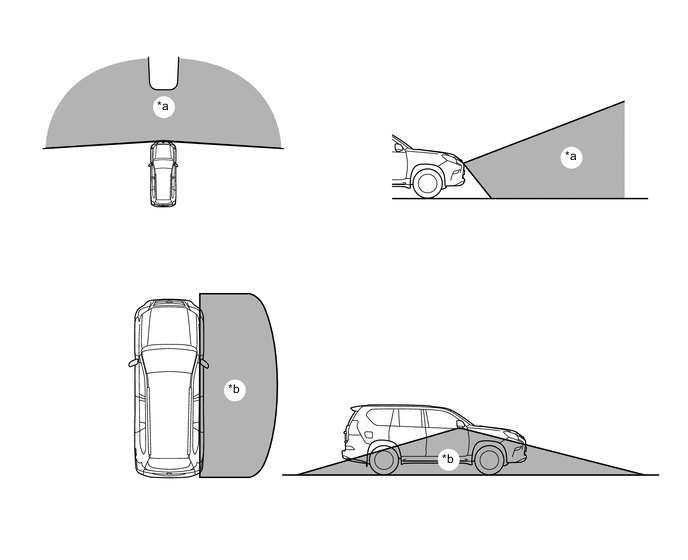
*a Front Television Camera Assembly Capture Area *b Side Television Camera Assembly Capture Area
-
-
Front and Side View Mode
-
In the front and side view mode, the screen will simultaneously display the front view and the side view. When the wide view front and side monitor system is started, it will display in the front and side view mode.
-
In the front and side view mode, the driver can operate both the AUTO mode switch and the display mode switch.
-
In the front and side view mode, the screen displays as shown in the illustration below:
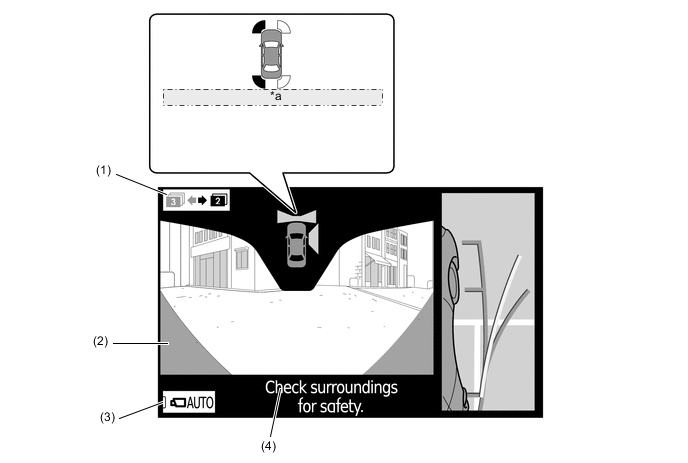
*a During simultaneous operation with LEXUS parking assist-sensor system Item Description of Display (1) Display Mode Switch Switches the display mode. (2) Parts Which Show Vehicle Shows some parts of the radiator grille and bumper. (Does not show the bumper corners.) (3) AUTO Mode Switch Turns the AUTO mode on and off. (4) Warning Message Display Area Displays a warning message.
-
-
Front View Mode
-
The front view mode, which can be displayed in the 3-display mode, shows the conditions ahead of the vehicle. Also, the AUTO mode switch can be operated in this mode.
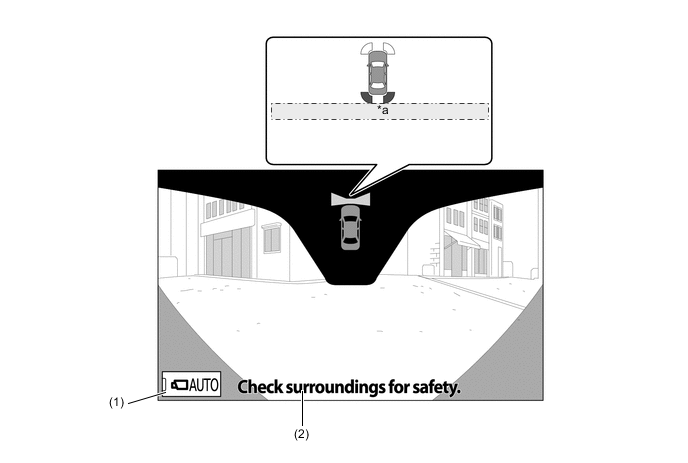
*a During simultaneous operation with LEXUS parking assist-sensor system Item Description of Display (1) AUTO Mode Switch Turns the AUTO mode on and off. (2) Warning Message Display Area Displays a warning message.
-
-
Side View Mode
-
The side view mode shows the conditions at the side of the vehicle.
-
The side view mode consists of the full view display screen and the front view enlarged display screen.
-
When the outer rear view mirror assembly is retracted, the full view display screen is shown. At this time, the display mode switch is not shown.
-
In the side view mode, the screen displays as shown in the illustration below:
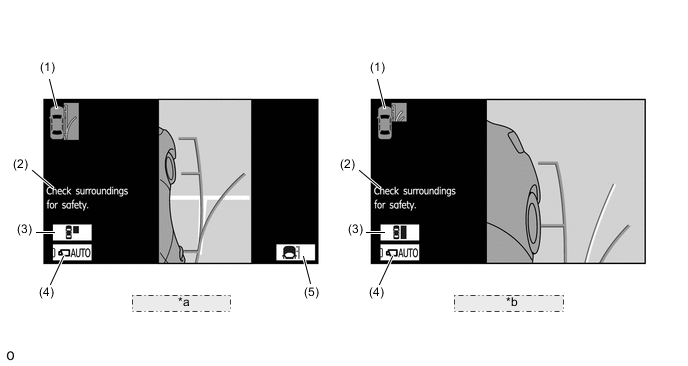
*a Full View Display *b Front View Enlarged Item Description of Display (1) Vehicle Icon Shows the display range of the side view mode. (2) Warning Message Display Area Displays a warning message. (3) Display Mode Switch Switches the screen between full view display mode and front view enlarged display mode. (4) AUTO Mode Switch Turns the AUTO mode on and off. (5) Display Mode Switch Screen Button Pressing this button changes the side view mode.
-
-
Warning Message
-
A warning message appears at the bottom, side or center of the screen under the conditions listed below.
Messages Appearing at Bottom or Side of Screen Warning Message Outline Check surroundings for safety. This message always appears during system operation. System Initialising. This message appears when the system is restarted if the parking assist ECU detects that a battery terminal has been disconnected and then reconnected. Messages Appearing at Center of Screen Warning Message Outline System not ready. This message appears if the system is not initialized.
-
-
Display Transition
-
The display of the wide view front and side monitor system for models with navigation system makes the following transitions:
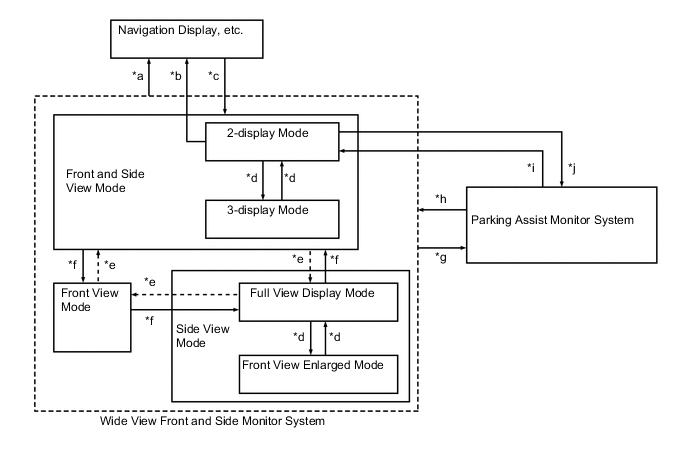
Item Transition Condition *a
-
The vehicle speed has reached approximately 12 km/h (7.5 mph) or more.
-
A switch is pressed to request the display of another screen (for example, the monitor switch is pressed on the center cluster).
*b The monitor switch is pressed. *c
-
The monitor switch is pressed when the vehicle speed is approximately 12 km/h (7.5 mph) or less.
-
The wide view front and side monitor system is on, the AUTO mode is on, and the following conditions are applicable:
-
The vehicle speed has reached approximately 10 km/h (6.0 mph) or less.
-
The switch-operated screen display has ended.
-
When the wide view front and side monitor system is started, or resumed automatically from another display, the screen will display in the front and side view mode.
*d The display mode switch is pressed. *e The monitor switch is pressed under the following conditions:
-
The 3-display mode is selected.
-
The wide view front and side monitor system ended in the front view mode in the previous operation.
(The screen will not change to another display such as the navigation display. The screen will change between the front and side view mode, side view mode, and front view mode.)
*f The monitor switch is pressed under the following conditions:
-
The 3-display mode is selected.
-
The wide view front and side monitor system ended in the side view mode in the previous operation.
(The screen will not change to another display such as the navigation display. The screen will change between the front and side view mode, side view mode, and front view mode.)
*g The shift lever is moved to R. *h The shift lever is moved from R to N, D or S when the AUTO mode is on. *i The monitor switch is pressed. (The transition conditions "*b" and "*d" are not available.) *j After the transition condition "*i" is satisfied, the monitor switch is pressed again. -
-
-
-
FAIL-SAFE
-
The table below indicates the conditions of detecting malfunctions in the components of this system:
Malfunction Parts Detection Item Function Television Camera Transmission of television camera malfunction signal Stops signal reception and displays a dark screen Parking Assist ECU Malfunction of parking assist ECU Stops system operation
-
-
DIAGNOSIS
-
The wide view front and side monitor system is equipped with a diagnosis function which can display the service menus. For details, refer to the Repair Manual.
-