WIDE VIEW FRONT AND SIDE MONITOR SYSTEM
-
OUTLINE
-
The wide view front and side monitor system uses television camera assemblies located on the front grille and passenger-side outer rear view mirror and displays images on the display and navigation module display*1 or accessory meter assembly*2 to allow the driver to see blind spots in the front and passenger side areas, thus assisting the driver's vision.
-
The screen display mode can be switched between manual display mode and automatic display mode, in consideration of usability.
-
A wide view front and side monitor switch has been placed on the steering wheel for switching the screen display and switching the wide view front and side monitor system on and off.
-
The system consists of the front television camera assembly, side television camera assembly, display and navigation module display*1, accessory meter assembly*2 and parking assist ECU.
-
*1: Models with navigation system
-
*2: Models without navigation system
-
-
-
PRECAUTION
-
In the following cases, it may become difficult to see items in the image on the screen, but this does not indicate a malfunction.
-
In the dark (for example, at night)
-
When the temperature near the lens is very high or low
-
When water droplets are present on the television camera, or when humidity is high (for example, when it rains)
-
When a foreign matter (for example, mud or salt) is present on the television camera lens
-
When sunlight or headlights are shining directly into the television camera lens
-
The camera lens is damaged by flying stones
-
-
If a bright light (for example, sunlight reflected off the vehicle body, sunlight and headlight directly reflected off the camera lens) is picked up by the television camera, the smear effect*, a phenomenon experienced by a CCD camera, may occur.
Tech Tips
*: A phenomenon that occurs when a bright light is received by the television camera and transmitted to the screen. The light source will appear to have a streak of light emanating from it.
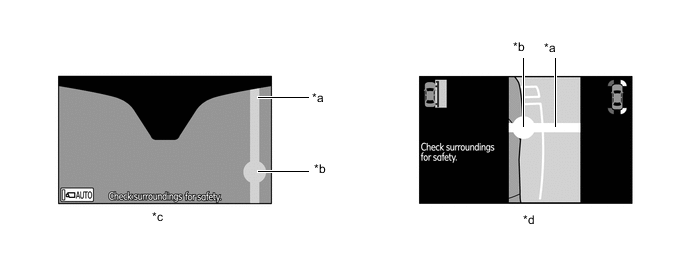
*a Streak *b Bright Light *c Front View Mode *d Side View Mode -
Flicker effect: when the camera is used under fluorescent lights, sodium lights, mercury light etc., the lights and ther illuminated areas may appear to flicker.
-
When washing the vehicle
-
Do not spray the camera or camera area using a high pressure washing machine. High levels of water pressure could cause the camera to malfunction.
-
-
Initialization Function during Part Replacement
-
The initialization function must always be performed whenever one of the conditions indicated in the table below occurs:
Parts Name Condition Initialization Item Television Camera Assembly
-
Camera position shifting
-
Removal and reassembly
-
Replacement
-
Deformation due to mount area having been struck
Camera position adjustment*
-
Roll angle, pan angle, tilt angle
Parking Assist Computer Assembly Replacement
-
Neutral steering point in memory*
-
Maximum side-to-side steering angle in memory*
-
Camera position adjustment*
-
Roll angle, pan angle, tilt angle
Steering Angle Sensor Assembly
-
Replacement
-
Removal and reassembly
-
Neutral steering point in memory*
-
Maximum side-to-side steering angle in memory*
-
*: Models with navigation system
-
-
The initialization function described above is performed on the service menu screen.
-
The method for displaying the service menu screen is the same as that of the display and navigation module display. For details, refer to the Repair Manual.
-
-