G-BOOK SYSTEM
-
FUNCTION OF MAIN COMPONENTS
Component Function Type Cellular Phone Connection Telematics Transceiver Connection Bluetooth-compatible Cellular Phone Sends and receives the data and voice signals used for the telematics system through a communication network using Bluetooth communication. ○ - Tethering-compatible Cellular Phone or Mobile Wi-Fi Router Sends and receives the data used for the telematics system through a communication network using Wi-Fi communication. ○ - Telephone Microphone Assembly Sends the microphone voice signal to the multi-media module receiver assembly. ○ ○
-
When the operator service is used: Sends the microphone voice signal to the multi-media module receiver assembly.
-
When an emergency call is made: Sends the microphone voice signal to the DCM (telematics transceiver).
- ○ Navigation Antenna Assembly Receives GPS radio waves and sends them to the multi-media module receiver assembly. ○ ○ Transmits the vehicle location together with an emergency call. - ○ Telephone Antenna Assembly Sends and receives the data and voice signals used for the telematics system through a communication network. - ○ Emergency Call Switch LED Indicator Light*1 Green
-
Turns on when the system is under a service contract and operating normally within the service area.
-
Blinks during a call or a maintenance check and turns off when the system is malfunctioning.
- ○ Red
-
Turns on when the vehicle is not within the service area.
-
Blinks when an emergency call or maintenance check has been aborted.
-
Turns off when the system is operating normally.
-
Blinks when in diagnostic mode to indicate a DTC.
- ○ DCM (Telematics Transceiver)
-
Uses the telephone antenna assembly to send and receive the data and voice signals used for the telematics system through a communication network.
-
When the operator service is used: Sends a "received voice signal" to the multi-media module receiver assembly.
-
When the operator service is used: Sends a "sent voice signal" from the multi-media module receiver assembly to the telephone antenna assembly.
-
When an emergency call is made: Sends a "received voice signal" to the vehicle speakers.
-
When an emergency call is made: Receives a "sent voice signal" from the telephone microphone.
-
When an emergency call is made: Sends a mute signal to the stereo component amplifier assembly. Mute function becomes active during the call.
-
When an emergency call is made: Sends location information to the G-BOOK center.
-
When a warning comes on, the DCM (telematics transceiver) receives a signal indicating the failure or malfunction of a system and sends the signal to the G-BOOK center.
-
When the theft deterrent system is activated, the DCM (telematics transceiver) sends a signal to the G-BOOK center indicating that the security horn has sounded.
- ○ Multi-media Module Receiver Assembly
-
Uses a Bluetooth-compatible cellular phone to send and receive the data and voice signals used for the telematics system through a communication network.
-
Sends and receives telematics data used for the telematics system to and from the Bluetooth-compatible cellular phone using Bluetooth communication.
-
When the operator service is used: Sends the "sent voice signal" from the telephone microphone assembly to the Bluetooth-compatible cellular phone.
-
When the operator service is used: Sends the "received voice signal" from the Bluetooth-compatible cellular phone to the vehicle speakers.
-
Sends and receives telematics data used for the telematics system to and from the tethering-compatible cellular phone or mobile Wi-Fi router using Wi-Fi communication.*2
○ -
-
Sends and receives the data used for the telematics system to and from the DCM (telematics transceiver) using a telematics data signal.
-
When the operator service is used: Sends the "sent voice signal" from the telephone microphone to the DCM (telematics transceiver).
-
When the operator service is used: Sends the "received voice signal" from the DCM (telematics transceiver) to the stereo component amplifier assembly.
-
Periodically sends vehicle location information to the DCM (telematics transceiver).
- ○ Multi-display Assembly Displays signals received from the multi-media module receiver assembly and transmits the signals from various switches to the multi-media module receiver assembly. ○ ○ Steering Pad Switch Assembly Sends operation signals to the multi-media module receiver assembly. ○ ○ Spiral Cable with Sensor Sub-assembly Sends operation signals from the steering pad switch assembly to the multi-media module receiver assembly. ○ ○ Main Body ECU (Multiplex Network Body ECU) Sends a security related signal to the DCM (telematics transceiver) when the theft deterrent system is activated. - ○ Airbag ECU Assembly Sends an activation signal to the DCM (telematics transceiver) when airbags deploy. (An automatic emergency call is made.) - ○ Stereo Component Amplifier Assembly Receives the "received voice signal" sent from the multi-media module receiver assembly as outputs it as sound from the vehicle speakers (when the operator service is used). ○ ○ Tech Tips
○: Used
-: Not used
*1: The green and red indicator lights turn on for 5 seconds immediately after the engine switch is turned on (ACC).
*2: While Wi-Fi communication is used
-
-
FUNCTION
-
Emergency Call Service
-
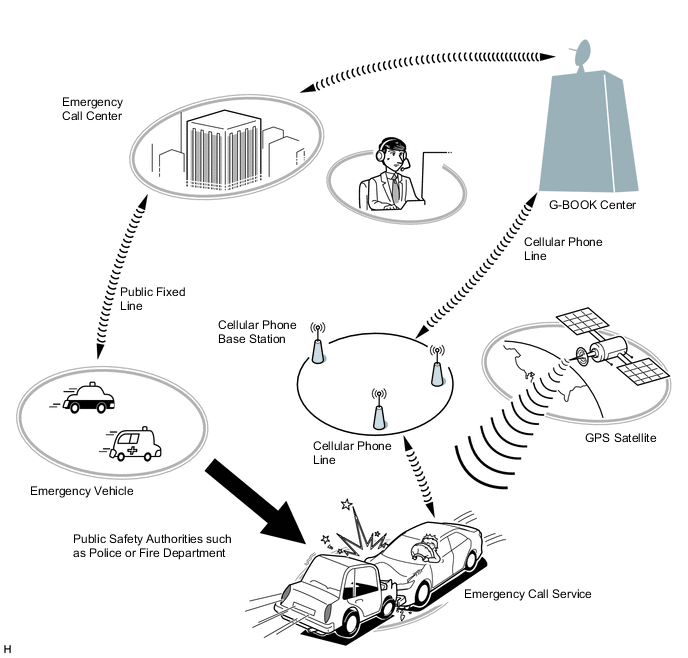
The emergency call service automatically makes a call to a G-BOOK center operator in the event of an accident, such as one that makes airbags deploy, in order to support prompt attendance by emergency personnel.
-
In the event of trouble such as an accident or sudden illness, the DCM (telematics transceiver) can be used to call the emergency call center and send location information and the registered user information.
-
The emergency call service can be activated either manually or automatically to contact the G-BOOK center.
Call Method Operation Condition Automatic Call An automatic call is made in the event of an accident, such as one that makes the airbags deploy. The call occurs regardless of the condition of the occupants. Manual Call In the event of sudden illness or an accident that does not cause the airbags to deploy, a manual call can be made by pressing the emergency call switch in the overhead console. (To press the emergency call switch, the emergency call switch cover needs to be removed.) -
The emergency call service operation and contract conditions can be confirmed by accessing the G-BOOK center and performing the following maintenance checks.
Maintenance Check Outline Automatic Maintenance Check The telematics transceiver (data communication module) automatically and periodically accesses the emergency call center to confirm if the user is still registered. Manual Maintenance Check The user can press the emergency call switch for 10 seconds or more while the green and red indicator lights are on immediately after the engine switch is turned on (IG) to access the G-BOOK center and confirm that they are still registered. Tech Tips
In the following cases, the emergency call service may not be available or the service quality may suffer.
-
The G-BOOK online service has not been established or the first manual maintenance check has not been completed.
-
Communication is interrupted due to a malfunction of the DCM (telematics transceiver) or any other related device.
-
The location cannot be determined.
-
Communication is interrupted due to a service provider system malfunction.
-
Communication problems occur in the communication network used for the emergency call system.
-
The emergency call provider suspends or halts the emergency call service.
-
Although a manual call is made, the situation cannot be confirmed because the user cannot respond to questions from the G-BOOK center.
-
-
-
G-Security Service
-
G-Security service offers the following services:
Seurity Automatic Alarm Notification Theft Tracking Service Authorities Contact Service Engine Start Notification Remote Check Operation Reminder Notification
-
Automatic Alarm Notification
-
When the automatic alarm operates, the vehicle notifies the G-BOOK center through the DCM (telematics transceiver) that the automatic alarm has operated.
-
The G-BOOK center notifies the user via telephone or Short Message Service (SMS) that the alarm has operated.
-
Based upon user request, the location of the vehicle can be tracked and security personnel can be dispatched.
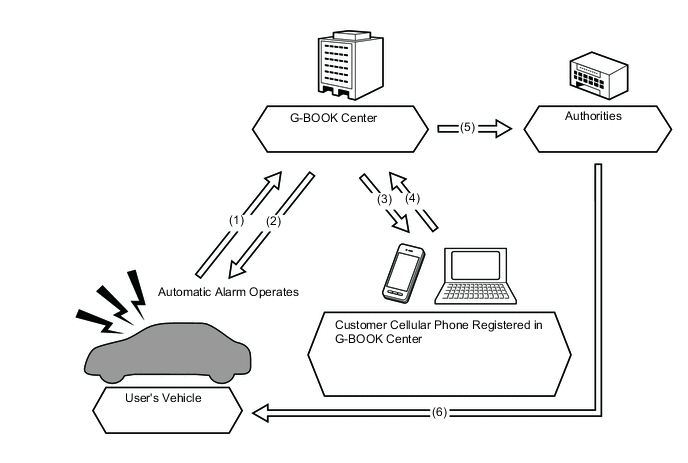
(1) Abnormality Occurs/Automatic Alarm Operates (2) Determines Vehicle Location (3) Detects Abnormality via Telephone and Short Message Service (SMS) (4) Requests Response (5) Calls Dispatch (6) Contacted Security Personnel Proceed to Location without Delay
-
-
Theft Tracking Service
-
Based upon user request, the Lexus Care Communicator searches for and tracks the location of the vehicle.
-
-
Authorities Contact Service
-
In response to user request, security company personnel are dispatched to check the vehicle.
-
-
Engine Start Notification
-
A notification is sent to the G-Book center through the DCM (telematics transceiver) when the DCM (telematics transceiver) detects that the engine has started.
-
The G-BOOK center notifies the user via Short Message Service (SMS) that the engine has started.
-
-
Remote Check
-
The vehicle status is sent to the G-BOOK center when the engine switch is turned from on (ACC) to off. Afterward, the user can check vehicle information on the dedicated site by using a cellular telephone.
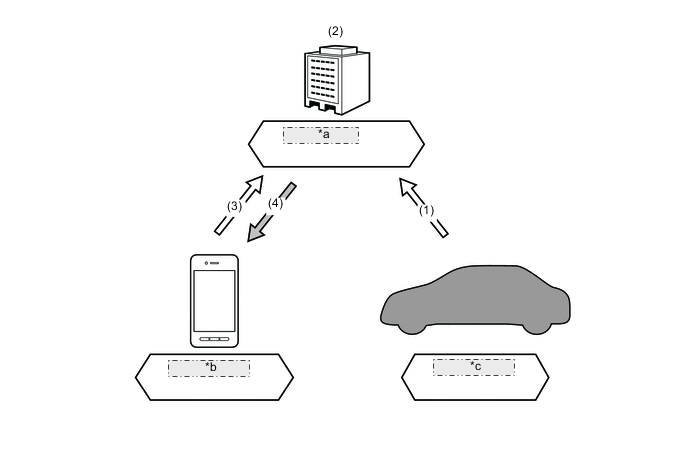
*a G-BOOK Center *b Cellular Phone *c User's Vehicle (1) Vehicle Status Notification (2) Vehicle Information is Saved (3) Dedicated Site is Accessed (4) Vehicle Information is Displayed Chart of Checkable Information Check Content Detection Target Detection Content Cruise-information ODO Value TRIP (A, B) Value Average Fuel Consumption After Refueling Value Cruising Range Value Total Average Fuel Consumption Value Remaining Amount of Fuel Value Door Door All Doors Closed / Any Door Open Engine Hood Closed / Open Lock Door All Doors Locked / Any Door Unlocked Window Window All Windows Closed / Any Window Open / Other Sliding Roof Closed / Open / Other Electrical Transmitter Electrical Transmitter Inside Cabin*1/Outside Cabin*2 Theft Deterrent Theft Deterrent System ON/OFF Lighting (Exterior) Headlight Illuminated / Turned Off Clearance Light Illuminated / Turned Off *1: Even when the electrical key transmitter sub-assembly is inside the vehicle, it is determined to be outside the vehicle if the key is not detected when it is inside a metallic bag, the battery is depleted, etc.
*2: The electrical key transmitter sub-assembly is determined to be inside the vehicle when the entry and start system is canceled.
Note
-
In the following cases, the electrical key transmitter sub-assembly may be determined to be inside the vehicle even if it is outside the vehicle:
-
The electrical key transmitter sub-assembly is placed near the windshield glass or door window glass, or above the sliding roof glass.
-
The electrical key transmitter sub-assembly is put outside the vehicle from a door window or sliding roof opening.
-
In the following cases, the electrical key transmitter sub-assembly may be determined to be outside the vehicle even if it is inside the vehicle:
-
The electrical key transmitter sub-assembly is put inside the vehicle from a door window or sliding roof opening while all of the doors and the engine hood are closed.
-
The entry and start system does not operate normally due to the condition of surrounding electrical waves, or based upon the placement (on the instrument panel, etc.) and condition (battery depleted, etc.) of the electrical key transmitter sub-assembly.
-
-
-
Operation Reminder Notification
-
When vehicle operations are complete (engine switch turned from on (ACC) to off, door lock, etc.), vehicle information is sent to the G-BOOK center after a fixed period of time elapses.*1
-
At that time, with the user away from the vehicle*2, a Short Message Service (SMS) is delivered if any or all of the conditions below (Chart of Vehicle Information to be Notified) are met.
Tech Tips
*1: Information after vehicle operations are complete may not be sent due to the vehicle status (DCM (telematics transceiver) is out of electrical wave range, etc.).
*2: When the key is determined not to be inside the vehicle, and all doors and the engine hood are closed.
CAUTION:
-
Information may not be delivered, or may arrive late, when the vehicle or the user's cellular telephone is in an area with poor signal strength.
-
Operation reminder notifications may not be delivered if the electrical key transmitter sub-assembly is placed near the windshield glass or door window glass, or on the sliding roof glass, even if the electrical key transmitter sub-assembly is outside the vehicle.
-
Operation reminder notifications may not be delivered if the electrical key transmitter sub-assembly is put outside the vehicle from a door window or sliding roof opening.
-
Operation reminder notifications are not delivered when the smart entry and start system is canceled.
-
In the following cases, operation reminder notifications may be delivered even if the electrical key transmitter sub-assembly is within the detection area:
-
The electrical key transmitter sub-assembly is put inside the vehicle from a door window or sliding roof opening while all of the doors and the engine hood are closed.
-
The entry and start system does not operate normally due to the condition of surrounding electrical waves, or based upon the placement (on the instrument panel, etc.) and condition (battery depleted, etc.) of the electrical key transmitter sub-assembly.
-
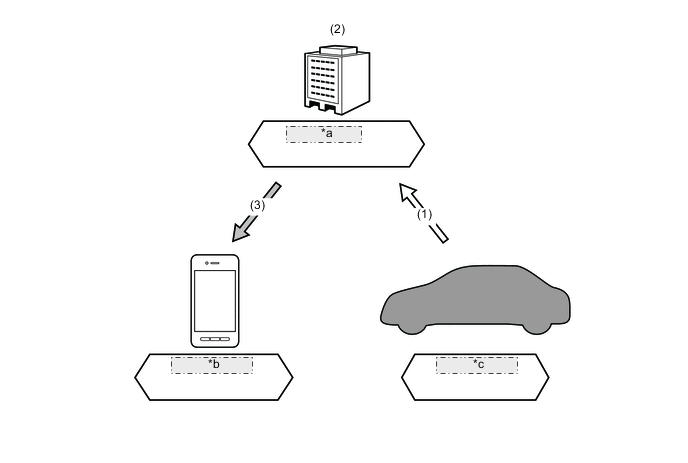
*a G-BOOK Center *b Cellular Phone *c User's Vehicle (1) Vehicle Status Notification (2) Determines Operation Reminder Notification Delivery Conditions (3) Sends Short Message Service (SMS) Notifying of Forgotten Operation Chart of Vehicle Information to be Notified Notification Content Detection Target Detection Content Security-related Lock Door Any Door Unlocked Window Window Any Door Open Sliding Roof Open Battery-related Lighting (Exterior) Headlight Illuminated Clearance Light Illuminated -
-
-
Remote Maintenance Service
The remote maintenance service offers the following services: Remote Maintenance Service Inspection Notification Inspection and Maintenance Reservation Warning Notification Driving Advice Diagnostic Support Health Check Report G-Customize
-
Inspection Notification
-
The G-BOOK center gathers user vehicle information, and according to the vehicle status, can display information on events conducted by the dealer, maintenance/periodic checkup/vehicle inspection guidance, etc. By having the system read text aloud, checks can be performed while driving the vehicle, and a reservation for bringing the vehicle into a workshop can also be made.
-
A message is delivered via Short Message Service (SMS) regarding the maintenance period of the user's vehicle, based upon the driven distance of the vehicle, number of days elapsed, etc. stored in the data gathered by the G-BOOK center.
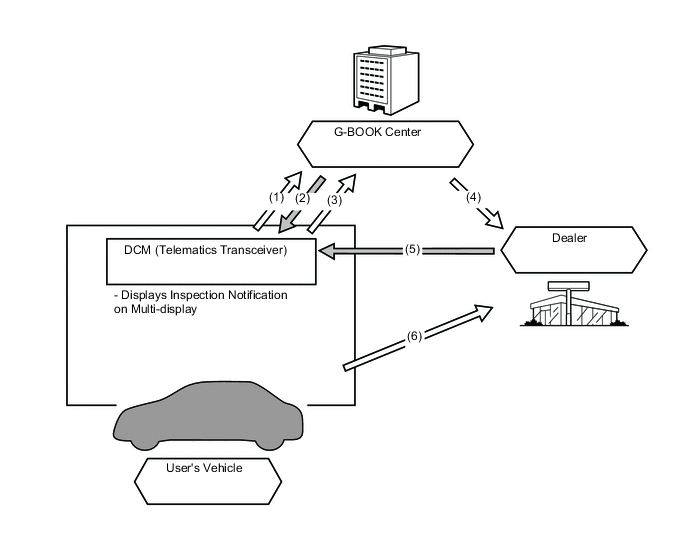
(1) Transmits Information of Driven Distance, etc. (2) Delivers Checkup Guidance Short Message Service (SMS) (3) Sends Workshop Reservation Short Message Service (SMS) (4) Delivers User Vehicle Information (5) Sends Workshop Reservation Procedures Complete Short Message Service (SMS) (6) User Brings Vehicle into Workshop
-
-
Inspection and Maintenance Reservation
-
Maintenance and service reservations can be made through the navigation system.
-
-
Warning Notification
-
Warning display signals sent from the combination meter assembly are sent to the G-BOOK center through the DCM (telematics transceiver). At the same time, the system checks if the Diagnostic Trouble Codes (DTCs) are stored in each ECU within the vehicle, and if they are stored, that information is also sent to the G-BOOK center.
-
The G-BOOK center sends a warning notification* to the vehicle that lists malfunction status and response methods based upon information acquired by the G-BOOK center. The vehicle displays the received warning notification on the multi-display, after which the user can follow the guidance of the warning notification to make an online reservation, request arrangements for an assistance vehicle, etc., by using the dedicated site or calling a dealer.
Tech Tips
*: Warning notifications may not be delivered depending on the status or condition of the vehicle, etc.
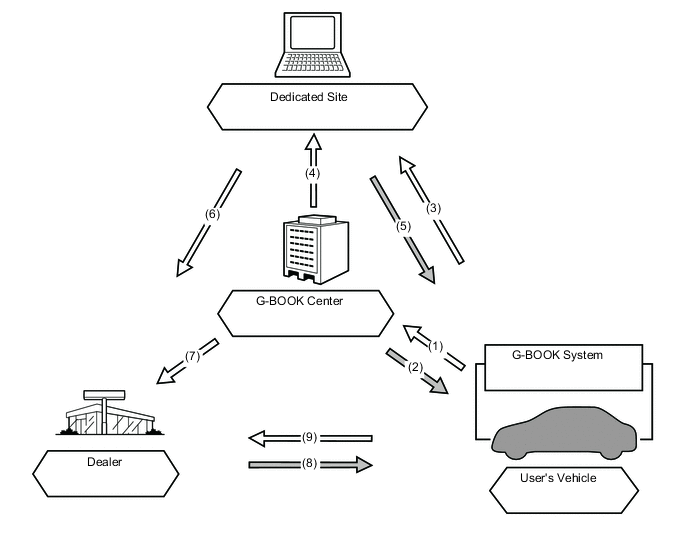
(1) Sends Vehicle Information (Malfunctions, Abnormalities, etc.) (2) Notifies of Malfunction Status and Response Method (3) Requests Assistance or Workshop Arrangements (4) Acquires Vehicle Location, Membership Information, etc. (5) Suggests Quick-fix (6) Makes Workshop Reservation (7) Acquires Vehicle Information (Malfunctions, Abnormalities, etc.) (8) Sends Workshop Reservation Procedures Complete Short Message Service (SMS) (9) User Brings Vehicle into Workshop
-
-
Driving Advice
-
The server is used to diagnose the effects of a malfunction based on vehicle information acquired by the G-BOOK center, and driving-related advice contents are provided to the user according to responses to diagnostic questions about the vehicle status, etc.
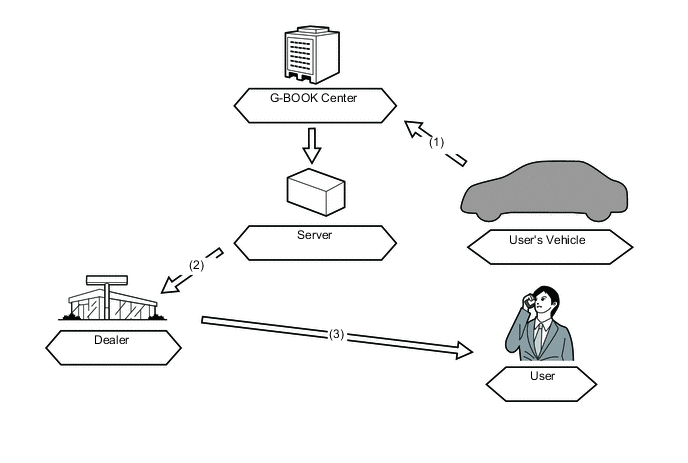
(1) Sends Vehicle Information (Abnormalities or Malfunctions, etc.) (2) Acquires and Displays Vehicle Condition and Advice Contents (3) Carries Out Advice regarding Diagnostic Questions and Driving
-
-
Diagnostic Support
-
In addition to vehicle information acquired from the G-BOOK center, DTCs, freeze frame data and ECU data monitor values of the user's vehicle can be acquired through the G-BOOK center from the dealer as needed.
-
Based on the acquired information, a diagnosis of the cause of a malfunction can be performed prior to the user's vehicle being brought into the workshop to shorten repair times, etc.
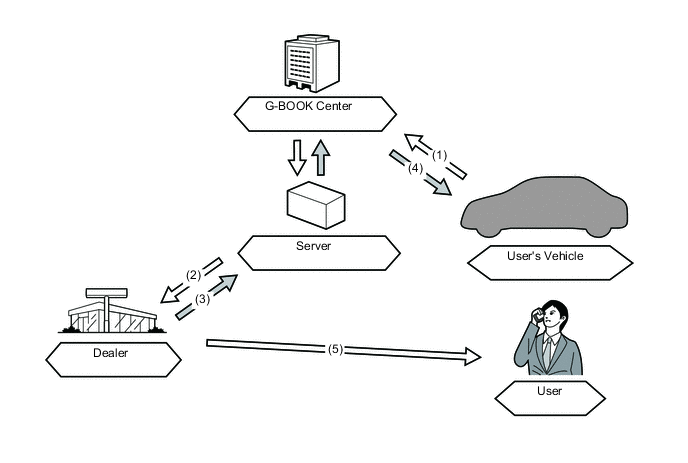
(1) Sends Vehicle Information (Abnormalities or Malfunctions, etc.) (2) Acquires and Displays Vehicle Information (3) Requests Acquisition of Information (DTCs, Freeze Frame Data, ECU Data Monitor Values) Missing in (1) and (2) (4) Sends Request for Acquisition of Vehicle Information Based on Acquisition Request of (3) (Afterwards Proceeds as (1) and (2)) (5) Responds to User
-
-
Health Check Report
-
The G-BOOK center gathers user vehicle status information via the G-BOOK center and provides advice and maintenance-related information (battery deterioration, insufficient engine oil, etc.) to a dealer or dedicated site, etc.
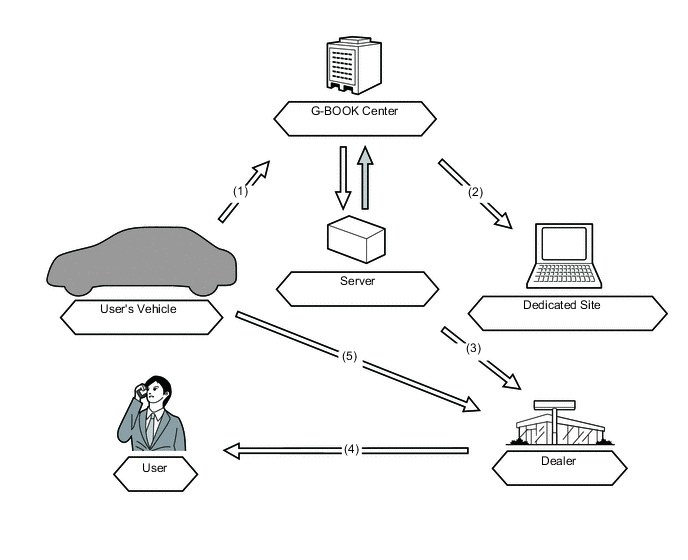
(1) Sends Maintenance-related Vehicle Information (2) Displays Advice and Maintenance Information (3) Delivers Advice and Maintenance Information (Information Updated Simultaneously as (2)) (4) Approaches User about Bringing Vehicle to Workshop (5) User Brings Vehicle into Workshop
-
-
G-Customize
-
Some vehicle customization can be changed via remote operation from a dealer or dedicated site.
-
Setting changes conducted through the dedicated site are sent to the user's vehicle through the G-BOOK center. After a setting change reservation is made by the user or dealer, the changes will be implemented the next time the engine is started.
-
The vehicle sends the new setting values to the G-BOOK center after setting changes are complete. The G-BOOK center delivers a notification via Short Message Service (SMS) to the vehicle that setting changes are complete.
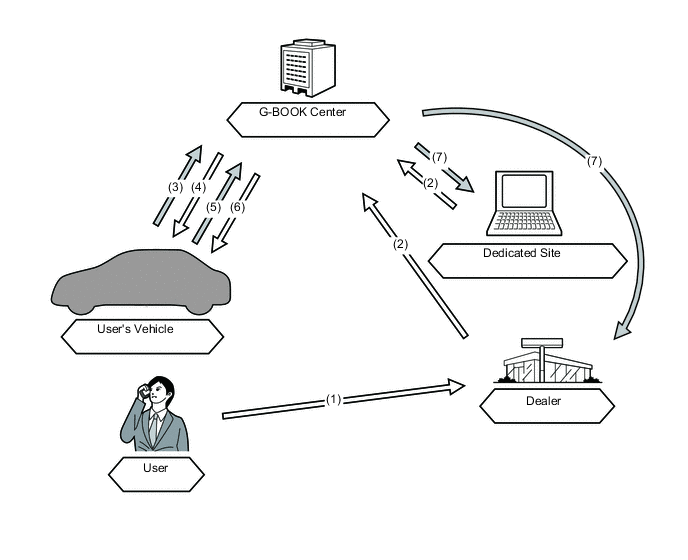
(1) Requests Setting Change of Customization Item (2) Makes Reservation for Setting Change (3) Checks Change Information at Next Engine Start after Setting Change Reservation is Made (4) Acquires Setting Value Change Information and Changes ECU Setting Values (5) Notifies of New Setting Values (6) Displays Notification that Setting Changes are Complete on Multi-display (7) Updates Dedicated Site Information to Newest Setting Values
-
-
-
Operator Service
-
The operator service allows the user to directly call a G-BOOK center operator. The user can ask the operator to set a destination or send a POI facility search result or news and weather forecast information to the navigation system.
-
The operator service uses the multi-media module receiver assembly to make calls via the following devices.
-
Cellular phone connection type navigation system: Cellular phone
It is necessary to register the phone using the Bluetooth hands-free function.
-
Telematics transceiver connection type navigation system: DCM (telematics transceiver)
It is not necessary to register a phone using the Bluetooth hands-free function.
Function Outline Destination Setting Displays the specified destination location on the navigation system screen. Weather Forecast* Displays and reads out weather forecast information for the vehicle's location, destination or a specified area. News* Displays and reads out news updates, society, sports and entertainment news. Tech Tips
*: Using the browser content display function built into the navigation system, the following contents can be displayed. If news content is displayed, headlines are read out to assist the user in checking the content easily even while driving.
-
-
-
Navigation System Link Function
-
The navigation system link function provides the navigation system with real-time information obtained from the G-BOOK center, offering more effective use of the navigation system for the user.
-
The navigation system link function has the following functions:
Function Outline G Route Search Searches for the most suitable route to the destination based on information about wide-area traffic congestion prediction. Partial Update of Map Database Partially updates map data in the navigation system by obtaining new road data or main POI data surrounding the current position or destinations from the G-BOOK center. Searching for POIs on the WEB Transfers POI information, which was searched for on the Mapbar site, to the navigation system. A found POI can be set as a destination or registered as a G-memory point. G-memory Point
-
When a POI is searched for using the contents of G-BOOK.com or a website, it can be registered as G-memory point of the memory points in the navigation system.
-
By registering POIs as a G-memory points, a list of G-memory points can be displayed without connecting to the G-BOOK center.
-
-
-
Other Function
-
The telematics system provides another function in consideration of improving usability.
-
The other function is as follows:
Function Outline MY Request Content which is frequently searched for, such as news or weather forecast information, can be registered. After registration, information can be obtained through a simple operation.
-
-
-
DIAGNOSIS
-
For details on the procedure required to enter the service menu screen, refer to the Repair Manual.
-