INTELLIGENT PARKING ASSIST SYSTEM DETAILS
-
FUNCTION OF MAIN COMPONENTS
-
The main components in the intuitive parking assist system have the following function:
Component Function Ultrasonic Sensor LH, Ultrasonic Sensor RH Detects the distance between the driven vehicle and the parked vehicle, and outputs it to the parking assist ECU. Parking Assist ECU
-
Transmits visual signals, which contain a composite view of the rear view of the vehicle taken with the rear television camera assembly and the parking frame, to the navigation receiver assembly. Furthermore, it effects overall control of the system by receiving the signal from the ECUs.
-
Determines if enough parking space is available based on the signals from the ultrasonic sensors.
-
Sets a language display of the parking assist using the language setup information from the navigation receiver assembly.
-
Transmits power signals to the rear height control sensor. *1
Rear Television Camera Assembly Mounted on the back door to transmit the rear view of the vehicle to the parking assist ECU. Navigation Receiver Assembly Receives image signals from the parking assist ECU and displays the rear view image on screen. Pre-Support Switch Turns the pre-support function on/off and switches between perpendicular parking assist mode and parallel parking assist mode. Steering Angle Sensor Detects the angle of the steering wheel, and outputs the signal to the parking assist ECU. Power Management Control ECU Outputs the vehicle status signals such as the accelerator pedal angle signal, shift position signal to the parking assist ECU. Main Body ECU Outputs the parking brake signal and back door courtesy switch signal to the parking assist ECU. Skid Control ECU Outputs the wheel speed signal to the parking assist ECU. Power Steering ECU
-
Effects the steering control upon receiving the vehicle status signals such as the steering control signal from the parking assist ECU.
-
Outputs the vehicle status signals such as the EPS fail-safe signal and steering control status signal to the parking assist ECU.
Rear Height Control Sensor Outputs changes in vehicle height received from the rear height control sensor to the parking assist ECU. Headlight Leveling ECU*2 Transmits power signals to the rear height control sensor via parking assist ECU. Air Conditioning Amplifier Assembly Outputs outside temperatures received from the outside temp. sensor to the parking assist ECU. Front Woofer LH, Front Squawker LH Outputs voice guidance for the respective mode, in accordance with the voice signals received from the parking assist ECU.
-
*1: Models without Headlight Leveling ECU
-
*2: Models with Headlight Leveling ECU
-
-
-
OPERATING CONDITION
-
The operating condition of each intelligent parking assist system differs according to its installed position as shown in the table below:
Function Operating Condition Pre-Support Function
-
Power source is on (IG).
-
Shift position is N, D and B.
-
Back door is closed.
-
Vehicle speed is approximately 15km/ h (9 mph) or less.
-
Pre-support switch is ON.
Perpendicular Parking Assist Mode or Paralle Parking Assist Mode
-
Power source is on (IG).
-
Shift position is R.
-
Back door is closed.
-
IPA/parking assist monitor select switch is ON.
-
-
-
FUNCTION
-
Display Function (Four Modes Display)
Mode Outline Path Display Mode The predicted path line in conjunction with the steering maneuver while backing up. Parking Guide Line Display Mode The point (parking guide line) at which to change the direction of the steering while backing up. Perpendicular Parking Assist Mode The path of travel and the guide lines as well as assisting the driver's steering maneuver along with the display on the screen. Parallel Parking Assist Mode -
Path Display Mode
-
When the system operates in the path display mode, it assists the driver's steering maneuver by providing a composite view consisting of a rear view of the vehicle and the guide lines in conjunction with the steering maneuver.
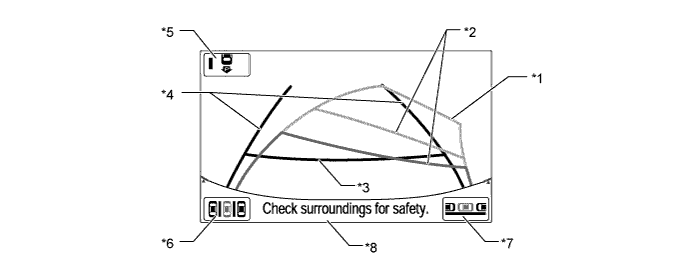
Item Description of Display *1 Predicted Path Line (Yellow) Displays the approximate path of the rearward travel of the vehicle, in conjunction with the steering maneuver. *2 Vehicle Width Extension Guide Line (Green) Displays the vehicle width extension lines, which indicate the approximate path of the rearward travel of the vehicle while backing up straight. *3 Distance Guide Line (Green) Displays a value that allows the driver to assess the approximate distance to the rear end of the vehicle. Approximately 0.5 m (19.7 in.) from rear end of bumper *4 Distance Guide Line (Red and Yellow) Displays a value that allows the driver to assess the approximate distance to the rear end of the vehicle in conjunction with the steering maneuver.
Red: Approximately 0.5 m (19.7 in.) from rear end of bumper
Yellow: Approximately 1 m (39.4 ft.) from rear end of bumper
*5 IPA/Parking Assist Monitor Select Switch Selects the intelligent parking assist system or the parking assist monitor system by one push operation. *6 Parking Assist Mode Switch These switches appear on the screen when the intelligent parking assist main switch is ON. The system transfers to the perpendicular parking assist mode or the parallel parking assist mode when the driver touches the respective switch. *7 Parallel Parking Assist Mode Switch *8 Warning Message Display Area Displays a warning message.
-
-
Parking Guide Line Display Mode
-
When the system operates in the parking guide line display mode, it assists the driver's steering maneuver by providing a composite view consisting of a rear view of the vehicle and the guide lines.
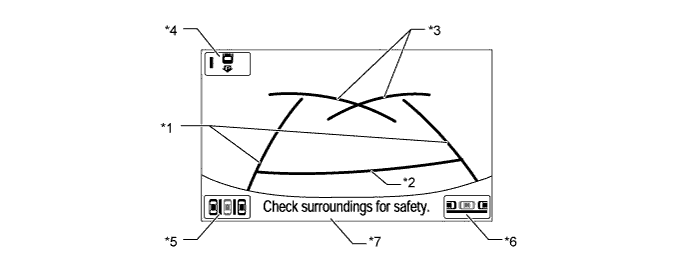
Item Description of Display *1 Vehicle Width Extension Guide Line (Green) Displays the vehicle width extension lines, which indicate the approximate path of the rearward travel of the vehicle while backing up straight. *2 Distance Guide Line (Red) Displays a value that allows the driver to assess the approximate distance to the rear end of the vehicle. Approximately 0.5 m (19.7 in.) from rear end of bumper *3 Parking Guide Line (Green) Displays the approximate path of the rearward travel of the vehicle while the driver fully turns the steering wheel. *4 IPA/Parking Assist Monitor Select Switch Selects the intelligent parking assist system or the parking assist monitor system by one push operation. *5 Parking Assist Mode Switch These switches appear on the screen when the intelligent parking assist main switch is ON. The system transfers to the perpendicular parking assist mode or the parallel parking assist mode when the driver touches the respective switch. *6 Parallel Parking Assist Mode Switch *7 Warning Message Display Area Displays a warning message.
-
-
Perpendicular Parking Assist Mode
-
When the system operates in the Perpendicular Parking Assist Mode, it displays a composite view of the rear view of the vehicle and the target parking frame that are necessary for perpendicular or parallel parking. In addition, it provides assists the driver's steering maneuver.
-
A direct touch function is used. This function allows the driver to set a target parking position by touching the front most corner of the target parking frame.
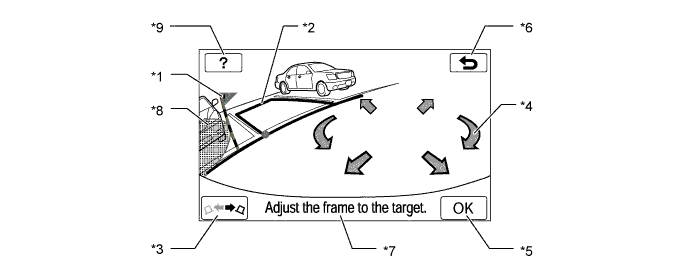
Item Description of Display *1 Warning Flag Displays the approximate position at which the vehicle will come in contact with an obstacle, while a target parking position is being set. Thus, a target parking position should be set at a position that does not overlap with an obstacle. *2 Target Parking Frame (Green or Red) Displays the present target parking position.
Green: The target parking position is OK
Red: The target parking position is not OK
*3 Switch Orientation Switch Switches the right-left orientation of the target parking position. *4 Arrows Switch Moves the target parking position in the direction of the arrow that is touched. *5 OK Switch Confirms the target parking position. If it cannot be confirmed, this switch turns into the help switch, and transfers to the help display. *6 Return Switch Returns the screen to the rear display mode. *7 Warning Message Display Area Displays a warning message. *8 Inaccessible Area Displays area inaccessible for parking. *9 Help Switch Opens the help screen, which shows how to park the vehicle and align the vehicle with parking space lines.
-
-
Parallel Parking Assist Mode
-
When the system operates in the parallel parking assist mode, it displays a composite view of the rear view of the vehicle and the target parking frame that are necessary for perpendicular or parallel parking. In addition, it provides assists the driver's steering maneuver.
-
A direct touch function is used. This function allows the driver to set a target parking position by touching the front most corner of the target parking frame.
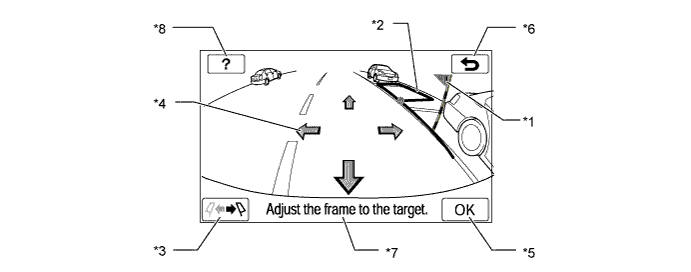
Item Description of Display *1 Warning Flag Displays the approximate position at which the vehicle will come in contact with an obstacle, while a target parking position is being set. Thus, a target parking position should be set at a position that does not overlap with an obstacle. *2 Target Parking Frame (Green or Red) Displays the present target parking position.
Green: The target parking position is OK
Red: The target parking position is not OK
*3 Switch Orientation Switch Switches the right-left orientation of the target parking position. *4 Arrows Switch Moves the target parking position in the direction of the arrow that is touched. *5 OK Switch Confirms the target parking position. If it cannot be confirmed, this switch turns into the help switch, and transfers to the help display. *6 Return Switch Returns the screen to the rear display mode. *7 Warning Message Display Area Displays a warning message. *8 Help Switch Opens the help screen, which shows how to park the vehicle and align the vehicle with parking space lines.
-
-
Pre-Support Function
-
When the ultrasonic sensor detects a space where the vehicle can be parked and the driver operates the pre-support switch, the screen display and voice guidance direct the driver to the back-up start position (parking assist start position) in both modes; perpendicular parking assist mode and parallel parking assist mode. In perpendicular parking assist mode the guidance gives the timing for turning the steering wheel, and in parallel parking assist mode the guidance notifies of the stop position.
-
-
Visual Servo Function
-
When perpendicular parking assist mode is operating, the lines of the parking space are continuously recognized in the image to ensure that the vehicle follows the lines of the parking space. if the vehicle approaches the lines of the parking space, the target parking position is corrected.
-
-
Help Function
-
When perpendicular parking assist mode or parallel parking assist mode is operating, touching the help switch opens the help mode and displays explanation screens of the applicable mode.
-
-
Warning Message Function
-
A warning message appears at the bottom or center of the screen under the conditions listed below. The warning message appears in the same language that has been selected by the language selector of the navigation screen display (from among English, French, and Spanish).
Messages Appearing at the Bottom of the Screen Warning Message Outline Check surroundings for safety This message always appears during system operation. Stop vehicle by using foot brake This message and the "Check surroundings for safety" message appear alternately when the driver is backing up the vehicle and attempting to park it in the target parking position. System initializing This message appears if the battery has been removed and reinstalled, the battery capacity has declined. Parking position cannot be set This message appears as a result of the driver starting to back up without touching the OK button after the target parking position has turned red. System not ready This message appears if the system is not initialized. Check APGS System. Have your vehicle checked by a dealer. This message appears if there is a malfunction in a system component. Guidance canceled by user operation. This message appears as a result of the operation of the steering wheel or accelerator pedal while the system is operating in the parking assist mode. Speed is too fast. This message appears if the backing speed is too fast while the system is operating in the parking assist mode. Parking position has not been set. This message appears as a result of the driver starting to back up without touching the OK button after the target parking position has turned green. Release parking brake. This message appears as a result of the driver attempting to operate the system without releasing the parking brake. Depress the brake pedal. This message appears as a result of the driver touching the OK button while the brake hold system is operating. Steer to left (or right) until the frame becomes green. This message appears the vehicle cannot begin to parking until the steering wheel is turned in the indicated direction. Accelerator pedal has been engaged. This message appears if the accelerator pedal is depressed while the system is operating in the parking assist mode. Guidance unavailable. This message appears if there is a malfunction in this system. Check Park Sonar This message appears if there is a malfunction in the ultrasonic sensor. Clean Park Sonar This message appears if the ultrasonic sensor is frozen or dirty. Use on flat surface. This message appears if the vehicle starts to roll downhill or if the vehicle fails to move uphill when the brake pedal is released. System cannot assist under current conditions. This message appears if the system is operating in the parking assist mode and a tire is worn or the tire pressure is lower than the specified value. APGS not available now. This message appears when the system is temporarily unavailable. Too much force applied to the steering wheel. This message appears if the steering wheel is held too tightly when the system is operated in the parking assist mode. Steering position is not neutral. Turn the steering wheel to left (or right). This message appears if the steering wheel is not centered.
-
-
Initialize Function
-
The initialize function can be performed on the diagnosis menu screen. The method for starting the diagnosis menu screen is the same as in the navigation receiver assembly. Refer to the Repair Manual for detailed instructions for operating the diagnosis menu screen and the initialize function.
-
-
-
OPERATION
-
Pre-Support Function Operation (Perpendicular Parking Assist Mode)
-
Press the pre-support switch once with the vehicle in a position before the parking space.
-
When the pre-support function screen is displayed drive forward slowly.
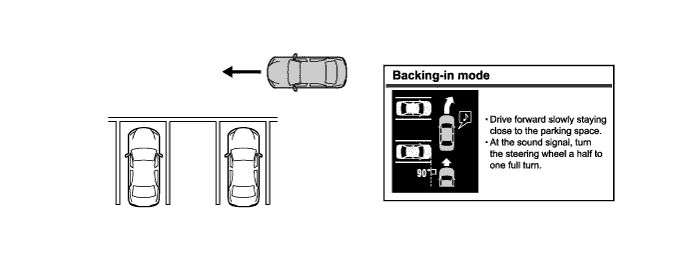
-
When the sound signal is heard once, turn the steering wheel.
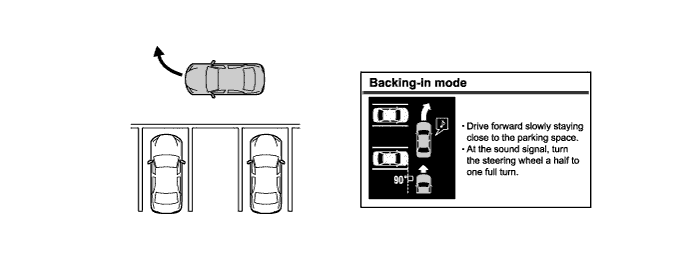
-
When the sound signal is heard twice, stop the vehicle.
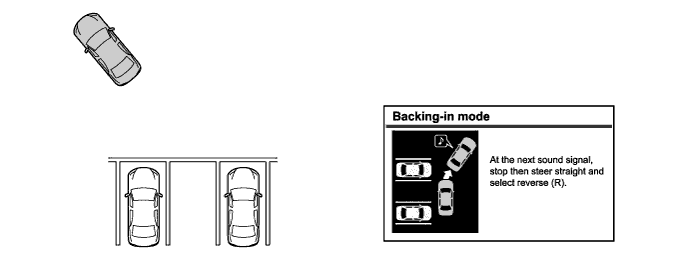
-
Return the steering wheel and move the shift lever to R to change to the parking space display.
-
-
Pre-Support Function Operation (Parallel Parking Assist Mode)
-
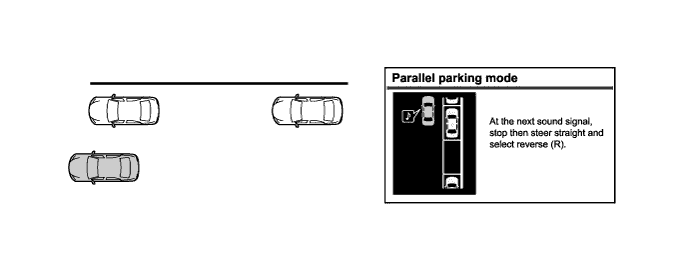
Press the pre-support switch twice with the vehicle in a position before the parking space.
-
When the pre-support function screen is displayed drive forward slowly.
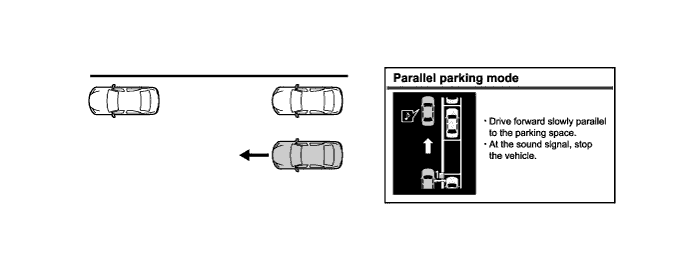
-
When the sound signal is heard once, stop the vehicle.
-
Move the shift lever to R to change to the parking space display.
-
-
Perpendicular Parking Assist Mode Operation
-
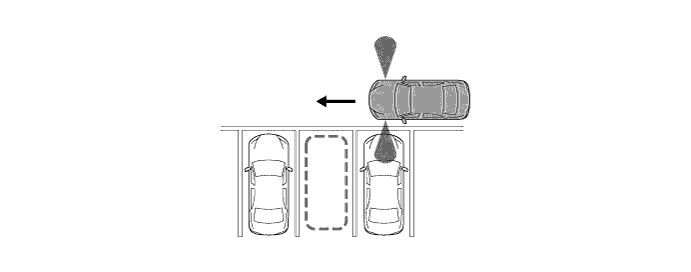
Move the vehicle to a position perpendicular to the parking space, and as close as possible to the parked vehicle.
-
At this time, the ultrasonic sensors mounted on both sides of the front bumper start detecting the distance between the driven vehicle and the parked vehicle to calculate the parking space.
-
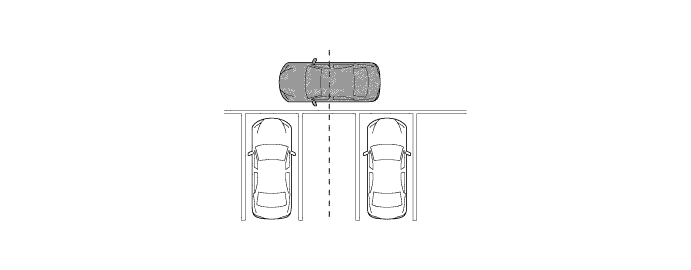
Move the vehicle to a position where you can see the center of the parking space just beside your vehicle, and start turning the steering wheel.
-
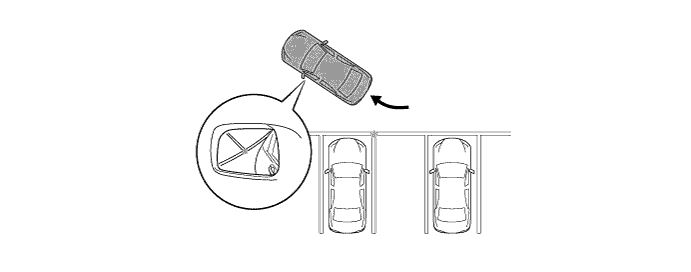
Position the vehicle so that you can enter the parking space, then stop the vehicle with the steering wheel straight.
-
At this time, when you position the vehicle where a corner of the parking space is reflected in the center of the outside rear view mirror, you can easily adjust the target parking space.
-
Shift position is in R.
-
Touch the parking assist mode switch on the screen displayed.

-
Touch the arrows to align the green frame with the target parking position, and then touch the "OK" switch.

-
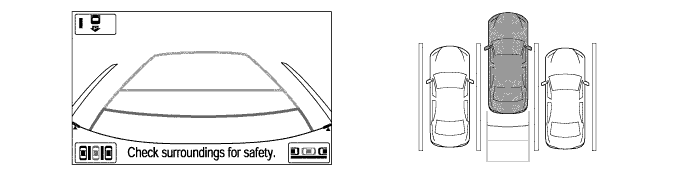
Position yourself as you would when backing up normally, and rest your hands on the steering wheel without applying any pressure. Check your surroundings and behind the vehicle for safety, and slowly back up, using the brake pedal to control the vehicle's speed.
-
At this time, the messages, "Check surroundings for safety." and "Stop vehicle by using foot brake." are alternately displayed on the warning message display area on the screen.

-
Once the vehicle is mostly within the target parking position, voice guidance will give the message "The guidance is finished," and parking assist mode will finish.
-
-
Parallel Parking Assist Mode Operation
-
Move the vehicle to a position parallel to the road (or shoulder) and approximately 1 m (39.4 ft.) away from parked vehicles.
-
At this time, the ultrasonic sensors mounted on both sides of the front bumper start detecting the distance between the driven vehicle and the parked vehicle to calculate the parking space.

Text in Illustration *a Approximately 1 m (39.4 ft.) - - -
Slowly move the vehicle forward parallel to the parking space with the steering wheel straight. Stop the vehicle where you can see the front end of the parked vehicle right beside your vehicle.

-
Shift position is in R.
-
Touch the parallel parking assist switch on the screen.

-
Use the arrows to align the green frame with your target parking position, and touch the OK switch.

-
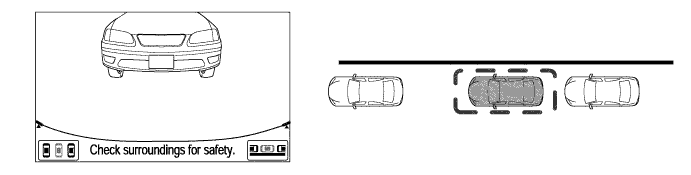
Position yourself as you would when backing up normally, and rest your hands on the steering wheel without applying any pressure. Check your surroundings and behind the vehicle for safety, and slowly back up, using the brake pedal to control the vehicle's speed.
-
At this time, the messages, "Check surroundings for safety." and "Stop vehicle by using foot brake." are alternately displayed on the warning message display area on the screen.

-
Once the vehicle is mostly within the target parking position, voice guidance will give the message "The guidance is finished", and parallel parking assist mode will finish.
-
-
-
CONSTRUCTION
-
Rear Television Camera Assembly
-
The rear television camera assembly consists of the wide-angle lens and the Charge Coupled Device (CCD).
-
An image captured by the rear television camera lens is converted into electrical signals according to the light intensity by using the CCD image element, and the signals are then output to the parking assist ECU.
-
The image output from the rear television camera assembly is reversed to match the rear view seen from the inside rear view mirror. Therefore, the rear view actually seen is displayed on the screen in the horizontal reverse.

Text in Illustration *1 Wide-angle Lens - -
-
-
Ultrasonic Sensor
-
The ultrasonic sensor consists of the microphone that transmits and receives ultrasonic wave and circuit portion.
-
The circuit portion is filled with urethane form to prevent water from entering.
-
The retainer for holding the sensor is securely affixed to the back side of the bumper with double-sided adhesive, and thus the installation surface of the ultrasonic sensor is flattened in order to improve the appearance.
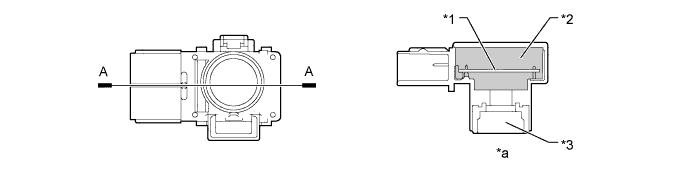
Text in Illustration *1 Circuit Portion *2 Urethane Form *3 Microphone *a A-A Cross Section
-
-
-
FAIL-SAFE
-
The table below indicates the conditions of detecting malfunctions in the sensors and ECUs in this system.
Malfunction Part Detection Item Function Path Display Mode Perpendicular Parking Assist Mode / Parallel Parking Assist Mode Steering Angle Sensor
-
Transmission of sensor malfunction signal
-
Communication malfunction between the steering angle sensor and parking assist ECU
Displays "Guidance unavailable" The mode automatically switches to the path display mode and the following messages will appear on the screen: "Check IPA System Have your vehicle checked by a dealer" and "Guidance unavailable" /"Check IPA System Have your vehicle checked by a dealer" and "Check surroundings for safety" Transmission of signal of incompletion of neutral steering point correction Displays "System Initializing" The mode automatically switches to the path display mode and the following messages will appear on the screen: "System initializing" Rear Television Camera Assembly Transmission of rear television camera assembly malfunction signal Stops signal reception and displays a dark screen Parking Assist ECU Malfunction of parking assist ECU Stops system operation Power Steering ECU Malfunction of power steering ECU - The mode automatically switches to the path display mode and the following messages will appear on the screen:" Check IPA System Have your vehicle checked by a dealer" -
-
-
DIAGNOSIS
-
The intelligent parking assist system is equipped with a diagnosis function which can display the diagnosis menus. The method for entering the diagnosis menu screen is the same as the method used for the navigation receiver assembly. For details, refer to the Repair Manual.
-