NAVIGATION SYSTEM / MULTI INFORMATION SYSTEM GENERAL
-
OUTLINE
-
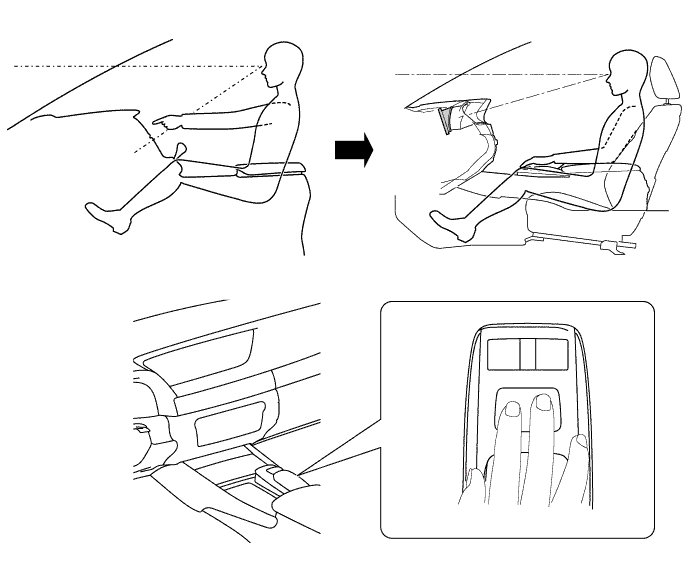
The multi-display is located in the upper part of the instrument panel to reduce movement of the eyes from the driver seat. The display consists of a wide 8-inch Thin Film Transistor (TFT) or a wide 12.3-inch Thin Film Transistor (TFT).
-
Light Emitting Diodes (LEDs), are used to provide mercury-free backlighting for the multi-display. This reduces the burden on the environment and ensures brightness.
-
Due to the change in the multi-display location, the remote touch is used to ensure operability.
-
During route guidance, turn by turn navigation notification of upcoming intersections can be displayed on the headup display.
-
A 2-axis mechanism is used for the remote touch. Motors in the remote operation board portion of the device provide feedback (feedback force) which is similar to a click. This feedback is transmitted to the user's hand in accordance with the operation of the cursor on the screen to facilitate selecting buttons or icons and ensure operability while driving.
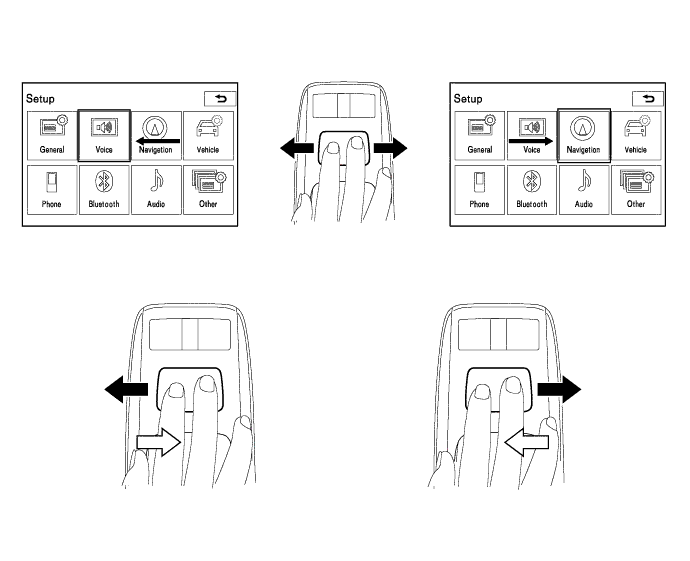
Text in Illustration 
Operation Direction 
Feedback Force -
The Hard Disk Drive (HDD) for the multi-media module receiver assembly can be supplied separately, enhancing serviceability. For details, refer to the Repair Manual.
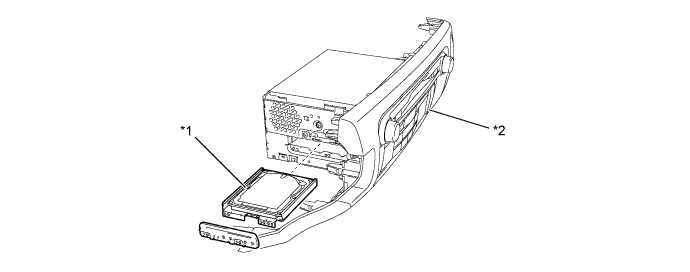
Text in Illustration *1 HDD *2 Multi-media Module Receiver Assembly -
A fuel consumption screen is provided in consideration of the environment.
-
-
SPECIFICATION
Display 8-inch TFT*1
12.3-inch TFT*2
Navigation ECU Manufacturer PIONEER Gyro Sensor Piezoelectric Piece Map Data Media HDD Voice Guidance Support Languages English, French*3, German*3, Spanish*3, Dutch*3, Italian*3, Swedish*3, Norwegian*3, Danish*3, Russian*3, Finnish*3, Greek*3, Polish*3, Ukrainian*3, Turkish*3, Hungarian*3, Czech Republic Word*3, Slovak*3 Romania*3, Arabia*4, Korean*5, Chinese*6 Voice Recognition Support Languages English, German*3, French*3, Italian*3, Spanish*3, Dutch*3, Chinese*6
-
*1: Models with 8-inch display
-
*2: Models with 12.3-inch display
-
*3: Models for Europe
-
*4: Models for G.C.C. countries
-
*5: Destination packages for Korea
-
*6: Destination packages for China
-
-
MAIN FEATURES
-
12.3-inch Multi-display
-
The 12.3-inch multi-display can show 2 types of display: a full-screen display which is shown using the whole screen, and a split-screen display which allows operation of audio etc. from the side screen while the map etc. is being displayed on the main screen.
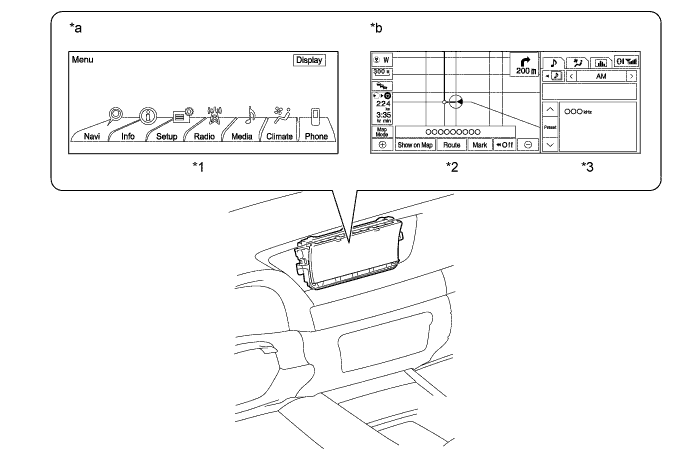
Text in Illustration *1 Full Screen *2 Main Screen *3 Side Screen - - *a Full-screen Display *b Split-screen Display -
Basic screens and interrupt screens are shown on the side screen. There are 3 basic screens: the audio screen, the air conditioning screen and the vehicle information screen: and 3 interrupt screens: the LEXUS parking assist-sensor system screen, the phone screen and the driving mode selection screen.
-
A 1280 x 480-size image can be shown on the full-screen display. The following screens are displayed on the full-screen display:
Screen Mode Display Function Opening Screen* 
Displayed for 5 seconds by turning the engine switch on (IG). Menu Screen 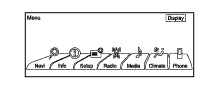
Displayed by pressing the remote touch menu switch.
-
*: The startup image can be selected from 3 preregistered movies.
Tech Tips
The screens are shown as an example.
-
-
When showing a split-screen display, the main screen will display an 800 x 480-size image. The following screens are displayed on the main screen:
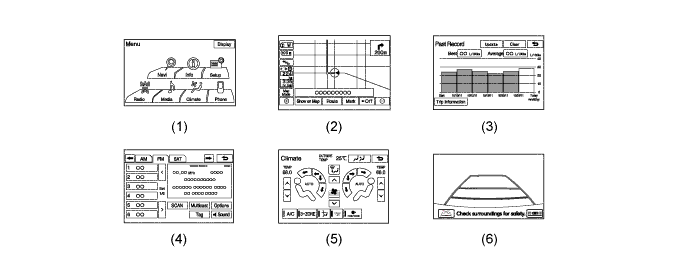
No. Screen Mode Function (1) Menu Screen
-
Displayed by pressing the remote touch menu switch while an interrupt screen is being displayed on the side screen.
-
Displayed if an interrupt screen is displayed on the side screen during full-screen display.
(2) Map Screen Displayed by pressing the remote touch map switch. (3) Fuel Consumption Screen Displays vehicle information such as fuel consumption. (4) Audio Screen Displays the information and the operating screen of the audio system. (5) Air Conditioning Screen Displays the information and the operating screen of the air conditioning system. (6) Parking Assist Monitor Screen Displayed when the shift lever is moved to R. Tech Tips
The screens are shown as an example.
-
Menu Screen
-
When an interrupt screen is displayed on the side screen while the full-screen menu screen is being displayed, the full-screen menu screen changes to be shown on the main screen.
-
When the remote touch menu switch is pressed while an interrupt screen is being displayed on the side screen, the menu screen will be displayed on the main screen.
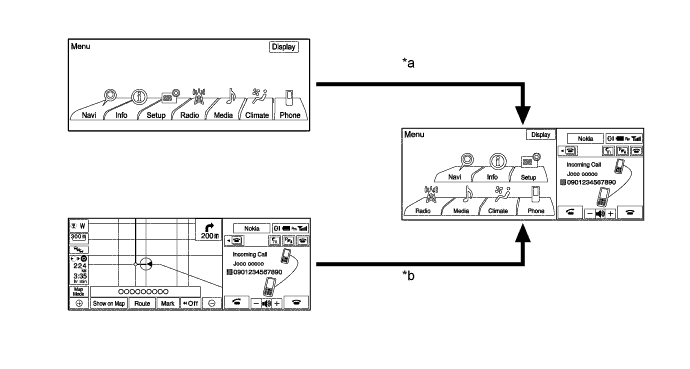
Text in Illustration *a Interrupts (Incoming Call) *b Press Menu Switch
-
-
Split-screen displays shown on the side screen will be 480 x 480-size. The following screens are displayed on the side screen:
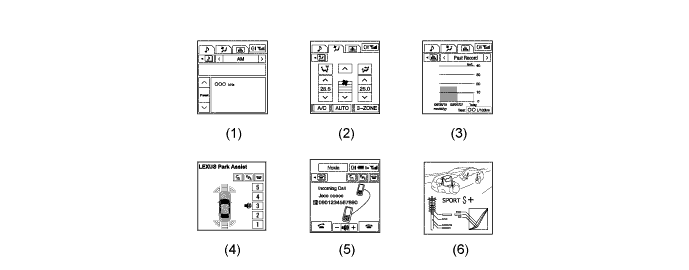
No. Screen Mode Function (1) Audio Screen*1 Displays the information and the operating screen of the audio system. (2) Air Conditioning Screen*1 Displays the information and the operating screen of the air conditioning system. (3) Fuel Consumption Screen*1 Displays vehicle information such as fuel consumption. (4) LEXUS Parking Assist-sensor Screen*2, *3 Displayed when the LEXUS parking assist-sensor system is operated. (5) Phone Screen*2 Displayed when the Bluetooth-hands free system is used. (6) Driving Mode Selection Screen*2 Displayed for a certain amount of time when ECO, SPORT, SPORT S or SPORT S+ modes is switched to. Tech Tips
*1: Basic screen
*2: Interrupt screen
*3: Models with LEXUS parking assist-sensor system
-
Display and operation of basic screens (such as the audio screen) can be performed while the main screen is being shown. In addition, interrupt screens are displayed on the side screen. Therefore, the main screen does not have to be hidden when an interrupt screen such as the phone screen has appeared while the basic screen is being shown in order for the interrupt screen to be shown.
-
The screens are shown as an example.
-
-
-
Remote Touch
-
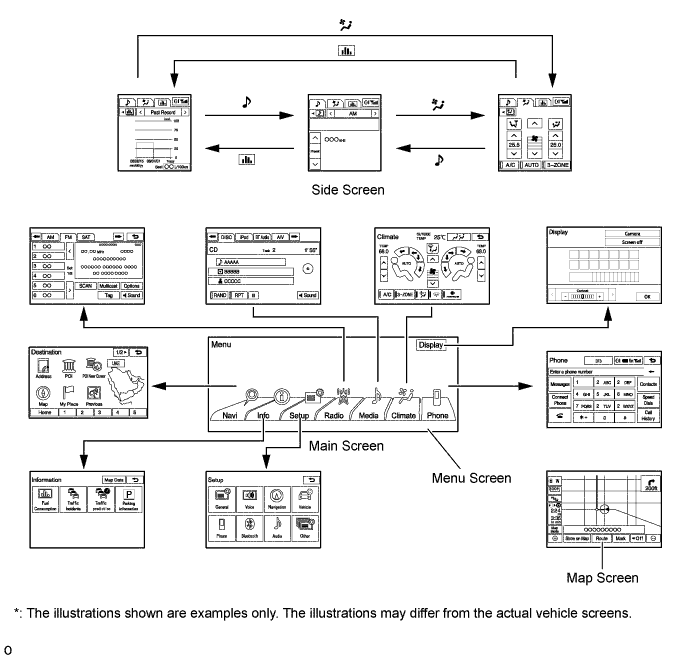
An exclusive hierarchical structure is used for each screen displayed on the multi-display in consideration of the remote touch.
-
To operate the remote touch, the MENU button is pressed to display the start screen, and Navi, Info, Setup, Radio, Media, Climate or Phone can be selected to operate each function.
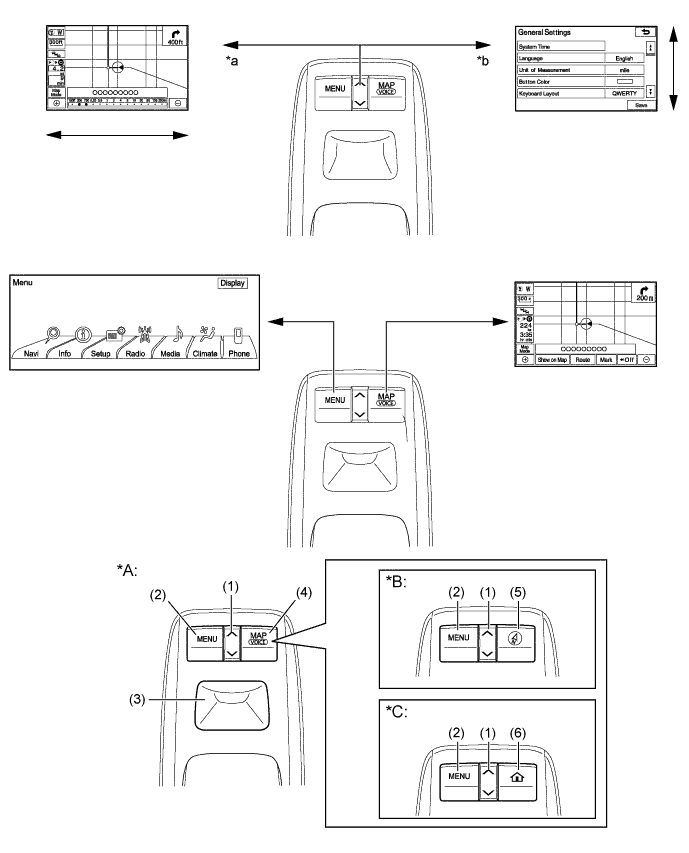
Text in Illustration *A Models with Navigation System *B Except Models for Europe without Navigation System *C Models for Europe without Navigation System - - *a Change Scale *b Scroll the List Function of Switches No. Switch Function (1) Seesaw Switch Changes the map scale and scrolls the screen. (2) Menu Switch Displays the menu screen. (3) Switch Knob
-
Moves the cursor displayed on the screen.
-
Can firms selection when the switch knob is pressed.
(4) Map Switch
-
Displays the present location screen.
-
Outputs voice guidance.
(5) Compass Switch Displays the present compass screen. (6) Home Switch Displays the present home screen. Tech Tips
The illustrations shown are examples only. The illustrations may differ from the actual vehicle screens.
-
-
-
Voice Recognition System
-
When the voice recognition system starts operating, the commands that the system is able to recognize are displayed on the multi-display.
-
A shortcut menu is provided on the voice recognition command screen, enabling the user to operate the system with fewer voice commands.
-
-