AUDIO AND VISUAL SYSTEM DETAILS
-
FUNCTION OF MAIN COMPONENTS
Component Function Multi-media Module Receiver Assembly Receives each type of signal, and outputs them to each component. Multi-display*1 Displays signals from the multi-media module receiver assembly on the screen. Accessory Meter Assembly*2 Remote Touch Sends operating signals to the multi-media module receiver assembly. Telephone Microphone Assembly Transmits the voice input signal to the multi-media module receiver assembly. Steering Pad Switch Assembly Transmits the operation signals from the switches to the multi-media module receiver assembly. Stereo Jack Adapter Assembly
-
Sends audio and/or video signals to the multi-media module receiver assembly when an auxiliary device is connected.
-
Communicates with the multi-media module receiver assembly via a USB communication line when a USB memory device, portable audio player (USB type) or Apple product is connected.
Cooler Control Switch Panel (Audio Switch)*3 Allows operation of the audio system from the rear seats.
-
*1: Models with 8-inch display
-
*2: Models with 12.3-inch display
-
*3: Models with cooler control switch panel
-
-
FUNCTION
-
Bluetooth Audio System
-
The functions of the Bluetooth audio system that can be used vary with the version of the Audio/Video Remote Control Profile (AVRCP) supported by the Bluetooth audio player that is being used. The functions of the Bluetooth audio system that can be used vary with the version of the Audio/Video Remote Control Profile (AVRCP) supported by the Bluetooth audio player that is being used.
-
The available Bluetooth audio system functions differ in accordance with each Audio/Video Remote Control Profile (AVRCP) as follows:
Function Outline Audio/Video Remote Control Profile (AVRCP) Version 1.0 Version 1.3 Version 1.4 or higher Play Starts playing the music. ○ ○ ○ Stop Stops playing the music. ○ ○ ○ Pause Pauses the music. ○ ○ ○ Track Up/Down Changes the track. ○ ○ ○ Fast Up/Down Fast-forwards or reverses. ○ ○ ○ Album Up/Down Changes the album. - ○ ○ Repeat (Single Repeat) Repeats the selected music. - ○ ○ Random (All Track Random) Plays all the music in the portable audio device at random. - ○ ○ Scan (All Track Scan) Scans all the music in the portable audio device. - ○ ○ Music Information Shows the track number, playtime, track name artist name and album name. - ○ ○ Remaining Battery Level Shows the remaining battery level of the Bluetooth audio player. - ○ ○ Music List Shows the music list. - - ○ Tech Tips
○: Available
- : Not available
-
The functions of the Bluetooth audio system are shown in the following table:
Function Outline Set Bluetooth Audio Player Registering a Bluetooth Audio Player In order to use the Bluetooth audio system with a Bluetooth audio player, it is necessary to register it to the audio head unit. Once a Bluetooth audio player is registered, the Bluetooth audio system connects automatically. The user can register up to 5* Bluetooth audio players. Deleting a Bluetooth Audio Player The user can delete a Bluetooth audio player. Connecting a Bluetooth Audio Player Enables the user to select whether to connect to a Bluetooth audio player automatically or manually. If a Bluetooth audio player has been registered and automatic connection is enabled, the Bluetooth audio player will be connected automatically. Change Settings of Bluetooth Audio Selecting a Bluetooth Audio Player If the user has registered a second Bluetooth audio player, either one can be selected for connection. Displaying a Bluetooth Audio Player The user can view the information of the Bluetooth audio player on the system. Changing the Connection Method Enables the user to select the connection method. With this function, the user determines whether to make a connection from the audio head unit to the Bluetooth audio player or from the Bluetooth audio player to the audio head unit. Displaying the Bluetooth Audio Setting The user can see the Bluetooth audio information settings on the system. Changing the Device Name or Passcode The user can change a device name or a passcode. Initializing the Bluetooth Audio Settings The user can initialize the settings. Tech Tips
*: The maximum number of Bluetooth devices that can be registered (including Bluetooth phones and Bluetooth audio players).
-
-
Bluetooth Hands-free System
-
Bluetooth is a short-distance, high-speed wireless data communication system that uses the 2.4 GHz frequency band prescribed by the Bluetooth SIG (Special Interest Group).
-
This system enables drivers to place or receive phone calls without operating a cellular phone.
-
The Bluetooth hands-free system is included in the multi-media module receiver assembly.
-
The major hands-free functions are shown in the following table:
Function Audio System Calling with a Bluetooth Phone By Dial Pad ○ By Contacts ○*1 (2500 Items) By Call History*2 ○*3 (30 Items) By Call History*2 Dialed Number ○*6 (15 Items*4/10 Items*5) Received Call ○*6 (15 Items*4/10 Items*5) Missed Call ○*6 (15 Items*4/10 Items*5) All Call History ○ By Favorites*2 ○ (15 Items) By Voice Recognition*2 Dialing by Name ○*8 Dialing by Phone Number ○*8 Dialing by Voice Tag ○*10 112 Emergency Call*2 ○*4 By Point Of Interest (POI) Call ○*11 By Short Message Service (SMS)/Multimedia Messaging Service (MMS)/e-mail Reception Screen*2 ○*4, *7 Mail Screen*2 ○*4, *7 Text Messages ○*4, *7 Receive with Bluetooth Phone/Talk on Bluetooth Phone Receiving Call*2 Received Manually ○ Refused ○ Interrupt Call*2 ○ Tone Sending By Dial ○*12 By Registered Number*2 ○*12 Receive and Reply Message with Bluetooth Phone Registering Bluetooth Phone ○ (5 Bluetooth Phones) Recognition/ Connection Connecting Bluetooth Phone Connected Automatically*2 ○ Connected Manually*2 ○ Setting Setting Automatic Connection ○ Tech Tips
○: Can be performed
-: Not equipped
*1: It is possible to have up to 2500 items per telephone (Bluetooth phone).
*2: Can be performed while driving.
*3: Models for Australia and destination package for China, Hong Kong, Macau and New Zealand
*4: Models for Europe
*5: Except models for Europe
*6: Except models for Australia and destination package for China, Hong Kong, Macau and New Zealand
*7: Models for Australia and destination package for New Zealand
*8: Models for Europe, Australia and destination package for China, South Africa and New Zealand
*9: Except models for Australia and destination package for New Zealand
*10: Except models for Europe, Australia and China and destination package for South Africa, New Zealand, Hong Kong and Macau
*11: Models with navigation system
*12: Models for Europe, Australia and destination package for South Africa and New Zealand
-
The hands-free functions are shown in the following table. However, for safety, some functions may not be selectable when the vehicle is being driven.
Function Outline Calling with a Bluetooth Phone By Dial Pad The user can make a call by inputting a telephone number. By Contacts The user can make a call by using the contact data that has been transferred from the user's cellular phone. The user can register up to 2500 items in the contact list. By Call History*1 The user can make a call by selecting a telephone number from all call history. However, the number of telephone numbers in the call history that the user can use is limited while driving. By Call History*1, *2 Dialed Number The user can make a call by selecting a previously dialed number. The system will remember up to 15*3/10*4 dialed numbers. If more than 15*3/10*4 calls have been made, the oldest number will be overwritten by the new number. Received Call The user can make a call by selecting a received call number. The system will remember up to 15*3/10*4 received call numbers. If more than 15*3/10*4 calls have been received, the oldest number will be overwritten by the new number. Missed Call The user can make a call by selecting a missed call number. The system will remember up to 15*3/10*4 missed call numbers. If more than 15*3/10*4 calls have been missed, the oldest number will be overwritten by the new number. All Call History The user can make a call by selecting a telephone number from all call history. However, the number of telephone numbers in the call history that the user can use is limited while driving. By Favorites*1 The user can make a call by using a registered contact selected from the contact list, dialed numbers or received calls. By Voice Recognition (Dialing by Name)*1, *5 The user can make a call by saying a name registered in the contact list. By Voice Recognition (Dialing by Phone Number)*1, *5 The user can make a call by saying a desired number. By Voice Recognition (Dialing by Voice Tag)*1, *6 The user can make a call by saying a registered voice tag. 112 Emergency Call Support*1, *3 The user can make a call the 112 emergency call service by operating a switch displayed on the dial pad screen. By Point of Interest (POI)*7 The user can make a call by operating a switch when "Call" is displayed on the navigation screen. By Short Message Service (SMS)/Multimedia Messaging Service (MMS)/e-mail (reception screen)*1, *8 The user can make a call by operating a switch when "Call" or the off hook icon is displayed on the incoming message screen. By Short Message Service (SMS)/Multimedia Messaging Service (MMS)/e-mail (mail screen)*1, *8 The user can make a call by operating a switch when the off hook icon is displayed on the mail screen. By Short Message Service (SMS)/Multimedia Messaging Service (MMS)/e-mail (text messages)*8 The user can make a call by operating a switch when a telephone number is displayed in blue in a text message. Receiving a Call using a Bluetooth Phone*1 When a call is received, the incoming call screen is displayed with a sound. Talking on a Bluetooth Phone*1 While the user is talking on the phone, the talking screen is displayed. Changing Bluetooth Phone Settings Favorites Registration The user can register contacts, dialed numbers or received calls. Up to 15 favorite contacts can be registered. Volume Settings The user can set the volume. Contact List Settings Transferring a telephone number: The user can transfer telephone numbers from the Bluetooth phone to the system. Up to 2500 items (up to 4 numbers and 4 e-mail addresses per entry) can be registered in the contact list. Automatically transferring a telephone number: When a PBAP compatible phone is connected, the phonebook data of the phone can be automatically transferred. Registering phone numbers: The user can register phone numbers in the contact list.*9 Adding data to the contact list: The user can add data to the contact list.*9 Editing data: The user can edit the registered data.*9 Deleting data: The user can delete the data.*9 Screen Settings Receiving call display: The user can change the receiving call display setting. Contact data and call history data transfer condition: The user can select whether a message is displayed or not after contact data and call history data are transferred. The Bluetooth connection status at startup: When the engine switch is turned on (ACC) or on (IG) and a Bluetooth phone is automatically connected, the connection check will be displayed. Initializing the settings: The user can initialize the settings. Registering and selecting a Bluetooth phone Bluetooth Phone Registration In order to use the hands-free function of a Bluetooth phone, it is necessary to register it in the multi-media module receiver assembly. Once a phone is registered, the hands-free function connects automatically. The user can register up to 5 Bluetooth phones.*10 Bluetooth Phone Selection*1 When 2 or more registered Bluetooth phones are in the cabin, it is necessary to select which phone to use. Only the selected phone is available for use as a hands-free phone. The phone registered last is automatically selected. Bluetooth Information Confirmation and Editing The user can set, change and initialize the information of the Bluetooth phone displayed on the screen. Deleting a Bluetooth Phone The user can delete a registered Bluetooth phone from the audio head unit. Bluetooth Phone Message*7 Checking Message Transmits the messages (Short Message Service (SMS)/ Multimedia Messaging Service (MMS)/e-mail) received on the Bluetooth phone to the audio head unit.
The following functions are available for the transmitted messages.
-
Display of the message text.
-
Reading out of a message.*1
-
Calling a Short Message Service (SMS)/Multimedia Messaging Service (MMS)/e-mail message sender's phone number.*1
Reply Message*1 Replies to a message (Short Message Service (SMS)/ Multimedia Messaging Service (MMS)/e-mail) received on the Bluetooth phone.. Editing Reply Message Edits the reply. Displaying Mail List*1 Displays the list of received messages (Short Message Service (SMS)/Multimedia Messaging Service (MMS)/e-mail). However, the number of the received messages in the list that the user can view is limited while driving. Tech Tips
*1: Can be performed while driving.
*2: Except models for Australia and destination package for China, Hong Kong and Macau
*3: Models for Europe
*4: Except models for Europe
*5: Models for Europe, Australia and destination package for China, South Africa and New Zealand
*6: Except models for Europe, Australia and except destination package for China, South Africa and New Zealand
*7: Models with navigation system
*8 Models for Europe and Australia and destination package for South Africa and New Zealand
*9 PBAP non-compatible phone, or PBAP compatible phone with the automatic telephone number transfer function set to off
*10The maximum number of Bluetooth devices that can be registered (including Bluetooth phones and Bluetooth audio players).
-
-
-
-
CONSTRUCTION
-
Audio Control Switch (Models with Cooler Control Switch Panel)
-
The audio control switch allows a rear seat occupant to operate the audio system.
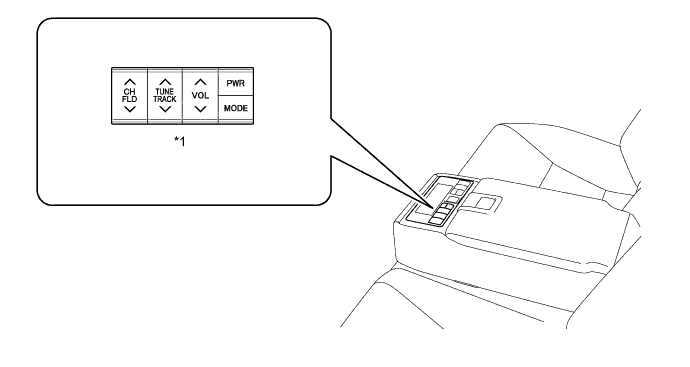
Text in Illustration *1 Audio Control Switch - -
-
-
Stereo Jack Adapter Assembly
-
A stereo jack adapter assembly has been located inside the console box.
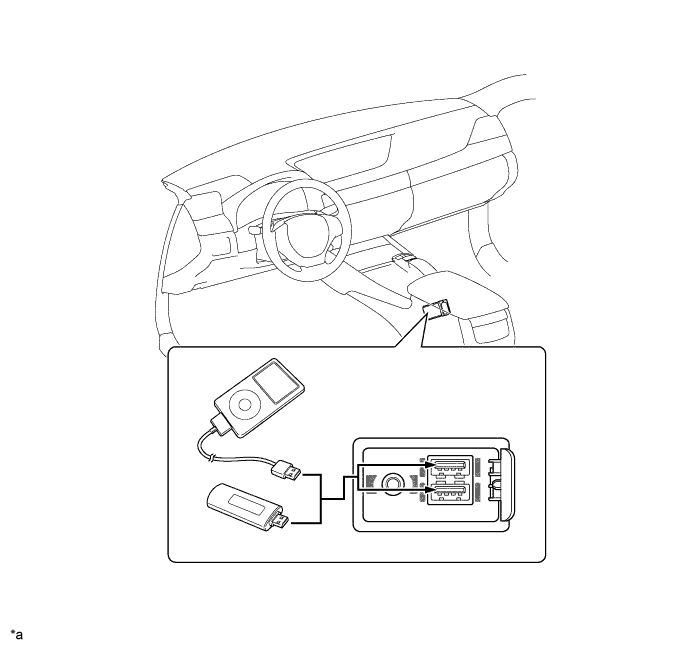
Text in Illustration *1 Stereo Jack Adapter Assembly - - *a When the cover is closed. *b When the cover is opened.
-
-
Steering Pad Switch Assembly
-
Frequently used switches are located on the steering pad for easy use.
-
The steering pad switches provided on the steering pad may vary in accordance with optional equipment, as indicated in the table below:
Item Switch Audio
-
Volume +/-
-
Seek Up/Down
-
Mode
Telephone
-
On-hook
-
Off-hook
Voice Recognition
-
Voice
-
Voice Back
Multi-information Display Multi-information 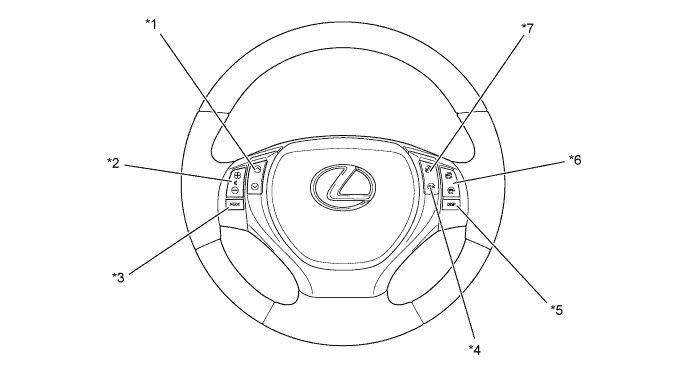
Text in Illustration *1 Seek Up/Down Switch *2 Volume +/- Switch *3 Mode Switch *4 Voice Back Switch *5 Multi-information Switch *6 On/Off-hook Switch *7 Voice Switch - - -
-
-
-
DIAGNOSIS
-
For details on the procedure required to enter the Service Menu screen, refer to the Repair Manual.
-