AIR CONDITIONING SYSTEM (for Automatic Air Conditioning System), Diagnostic DTC:B14A2

| DTC Code | DTC Name |
|---|---|
| B14A2 | Driver Side Solar Sensor Short Circuit |
DESCRIPTION
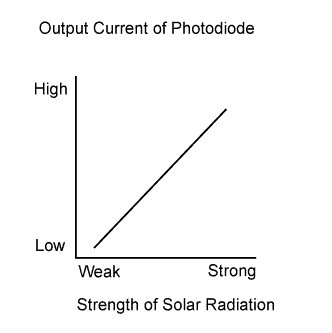
The cooler thermistor (solar sensor), which is installed on the upper side of the instrument panel, detects sunlight and controls the air conditioning in auto mode. The output current from the solar sensor varies according to the amount of sunlight. When the amount of sunlight increases, the output current increases. As the amount of sunlight decreases, the output current decreases. The air conditioning amplifier assembly detects the output current from the solar sensor.
| DTC Code | DTC Detection Condition | Trouble Area |
|---|---|---|
| B14A2 | An open or short in the driver side solar sensor circuit. |
|
Tech Tips
If the check is performed in a dark place, DTC B14A2 or B14A3 (solar sensor circuit abnormal) may be stored even though the system is normal.
WIRING DIAGRAM
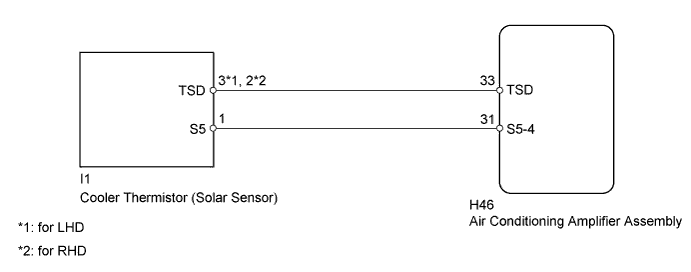
INSPECTION PROCEDURE
PROCEDURE
-
READ VALUE USING INTELLIGENT TESTER
-
Use the Data List to check if the solar sensor is functioning properly.
Air Conditioner Tester Display Measurement Item/Range Normal Condition Diagnostic Note Solar Sensor (D Side) Solar sensor / Min.: 0, Max.: 255 Driver side solar sensor voltage increases as brightness increases Open in the circuit: 0.
Short in the circuit: 255.
OK The display is as specified in the normal condition column. Result Result Proceed to OK (When troubleshooting according to Problem Symptoms Table) A OK (When troubleshooting according to the DTC) B NG C
B 
REPLACE AIR CONDITIONING AMPLIFIER ASSEMBLY Click here
C 
CHECK HARNESS AND CONNECTOR (SOLAR SENSOR - AIR CONDITIONING AMPLIFIER) Click here
A 
PROCEED TO NEXT SUSPECTED AREA SHOWN IN PROBLEM SYMPTOMS TABLE Click here
-
-
CHECK HARNESS AND CONNECTOR (SOLAR SENSOR - AIR CONDITIONING AMPLIFIER)
-
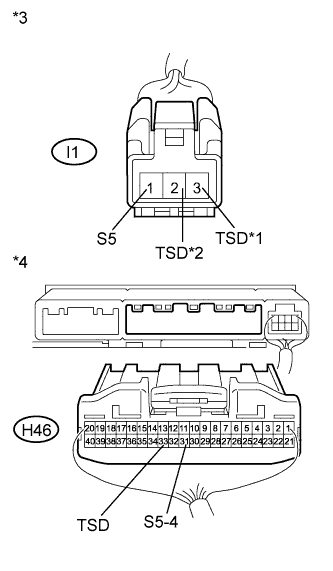
Text in Illustration *1 for LHD *2 for RHD *3 Front view of wire harness connector
(to Solar Sensor)
*4 Rear view of wire harness connector
(to Air Conditioning Amplifier Assembly)
Disconnect the I1 sensor connector.
-
Disconnect the H46 amplifier connector.
-
Measure the resistance according to the value(s) in the table below.
Standard Resistance for LHD Tester Connection Condition Specified Condition H46-33 (TSD) - I1-3 (TSD) Always Below 1 Ω H46-31 (S5-4) - I1-1 (S5) Always Below 1 Ω H46-33 (TSD) - Body ground Always 10 kΩ or higher H46-31 (S5-4) - Body ground Always 10 kΩ or higher for RHD Tester Connection Condition Specified Condition H46-33 (TSD) - I1-2 (TSD) Always Below 1 Ω H46-31 (S5-4) - I1-1 (S5) Always Below 1 Ω H46-33 (TSD) - Body ground Always 10 kΩ or higher H46-31 (S5-4) - Body ground Always 10 kΩ or higher
NG
REPAIR OR REPLACE HARNESS OR CONNECTOR
OK 
-
-
INSPECT COOLER THERMISTOR (SOLAR SENSOR)
-
*1: for LHD
-
*2: for RHD
-
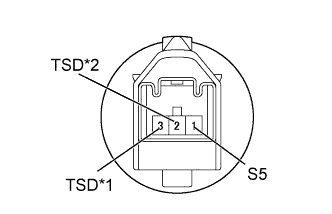
Text in Illustration *1 for LHD *2 for RHD Remove the solar sensor Click here.
-
Measure the resistance of the sensor.
-
Connect the positive (+) lead of the ohmmeter to terminal 1 and the negative (-) lead to terminal 2*2 or 3*1 of the solar sensor.
Standard Resistance for LHD Tester Connection Condition Specified Condition 1 (S5) - 3 (TSD)
-
Vehicle indoors
-
Sensor exposed to electric light
Below 1 Ω 1 (S5) - 3 (TSD)
-
Vehicle indoors
-
Sensor covered with cloth
10 kΩ or higher for RHD Tester Connection Condition Specified Condition 1 (S5) - 2 (TSD)
-
Vehicle indoors
-
Sensor exposed to electric light
Below 1 Ω 1 (S5) - 2 (TSD)
-
Vehicle indoors
-
Sensor covered with cloth
10 kΩ or higher Note
The connection procedure for using a digital tester is shown above. When using an analog tester, connect the positive (+) lead to terminal 3*1 or 2*2 and the negative (-) lead to terminal 1 of the solar sensor.
Tech Tips
-
As the inspection light is moved away from the sensor, the voltage decreases.
-
Use an incandescent light for the inspection. Position it about 30 cm (11.8 in.) from the solar sensor.
-
-
NG
REPLACE COOLER THERMISTOR (SOLAR SENSOR) Click here
OK
REPLACE AIR CONDITIONING AMPLIFIER ASSEMBLY Click here
-