SIDE AIRBAG SENSOR INSTALLATION

Tech Tips
-
Use the same procedure for the RH and LH sides.
-
The procedure listed below is for the LH side.
-
INSTALL SIDE AIRBAG SENSOR ASSEMBLY LH
-
Turn the ignition switch off.
-
Disconnect the cable from the negative (-) battery terminal.
CAUTION:
Wait at least 90 seconds after disconnecting the cable from the negative (-) battery terminal to disable the SRS system.
Note
-
w/ Navigation System (for HDD):
After the ignition switch is turned off, the HDD navigation system requires approximately a minute to record various types of memory and settings. As a result, after turning the ignition switch off, wait a minute or more before disconnecting the cable from the negative (-) battery terminal.
-
When disconnecting the cable, some systems need to be initialized after the cable is reconnected Click here.
-
-
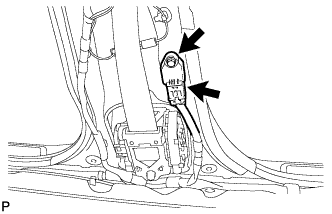
Install the side airbag sensor with the bolt.
- Torque:
- 9.0 N*m { 92 kgf*cm, 80 in.*lbf }
Note
-
If the side airbag sensor has been dropped, or there are any cracks, dents or other defects in the case, bracket or connector, replace it with a new one.
-
When installing the side airbag sensor, be careful that the SRS wiring does not interfere with other parts and that it is not pinched between other parts.
-
Check that the side airbag sensor is not loose.
-
Connect the connector.
-
-
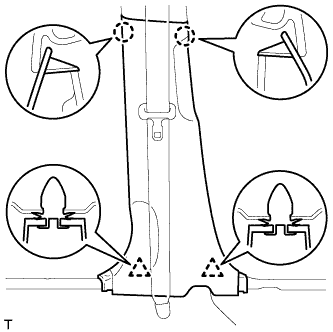
INSTALL LOWER CENTER PILLAR GARNISH LH
-
Attach the 2 claws and 2 clips to install the lower center pillar garnish.
-
-
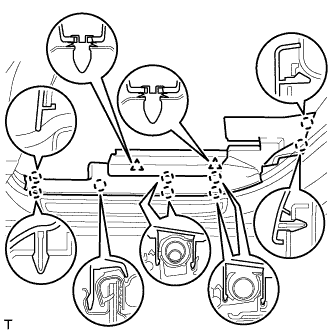
INSTALL REAR DOOR SCUFF PLATE LH
-
Attach the 9 claws and 2 clips to install the rear door scuff plate.
-
-
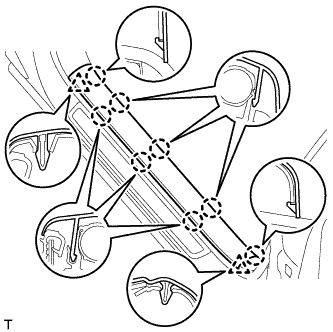
INSTALL FRONT DOOR SCUFF PLATE LH
-
Attach the 8 claws and 2 clips to install the front door scuff plate.
-
-
CONNECT CABLE TO NEGATIVE BATTERY TERMINAL
Note
When disconnecting the cable, some systems need to be initialized after the cable is reconnected Click here.
-
INSTALL BATTERY SERVICE HOLE COVER
-
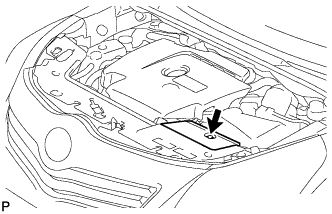
Install the battery service hole cover with the clip.
-
-
CHECK SRS WARNING LIGHT
-
Check the SRS warning light Click here.
-