METER / GAUGE SYSTEM CUSTOMIZE PARAMETERS

-
CUSTOMIZING FUNCTION WITH INTELLIGENT TESTER
Note
-
When the customer requests a change in a function, first make sure that the function can be customized.
-
Record the current settings before customizing.
-
Connect the intelligent tester to the DLC3.
-
Turn the ignition switch to ON.
-
Turn the intelligent tester on.
-
Enter the following menus: Customize Setting.
-
Select the setting by referring to the table below.
Warning Display Default Contents Setting Key Remind Volume LARGE To change the volume of the key reminder buzzer. LARGE/MEDIUM/SMALL Key Remind Sound SLOW To change the frequency of the key reminder buzzer. NORMAL/FAST/SLOW Driver Side Seatbelt Warning Buzzer ON To enable or disable the seat belt warning buzzer. ON/OFF Front Passenger Side Seatbelt Warning Buzzer ON To enable or disable the seat belt warning buzzer. ON/OFF Rear Seatbelt Warning Buzzer*1, *2 ON To enable or disable the seat belt warning buzzer. ON/OFF
-
*1: w/ Rear No. 1 Seat
-
*2: w/ Rear No. 2 Seat
Display Display Default Contents Setting ECO Drive Indicator* ON To active or deactive the Eco Driving Indicator Zone Display. ON/OFF
-
*: except Manual Transaxle
-
-
-
CUSTOMIZING ECO DRIVING INDICATOR LIGHT
Tech Tips
The driver can stay off.
When the eco driving indicator light is deactivated, the system check for the indicator is disabled.
-
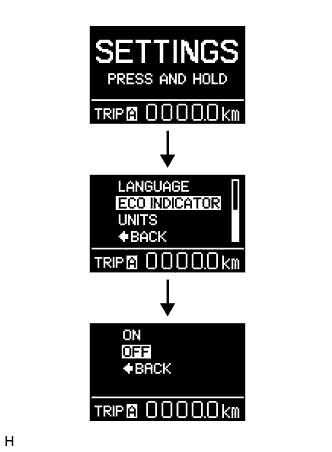
Select "SETTING" of Multi-information display while the vehicle is recognized as stopped (vehicle speed is below 8 km/h).
-
Keep the DISP switch pressed for a while.
-
Select "ECO INDICATOR" from the displayed items.
-
Keep the DISP switch pressed for a while.
-
Select "OFF" from the displayed items. Then keep the switch pressed for a while. the eco drive indicator light is deactivated.
Tech Tips
To activate the eco driving indicator light, select "ON".
-